The network for creativity
Join 1.25M professional creatives like you
Connect with clients, get discovered, and run your business 100% commission-free
Creatives on Contra have earned over $150M and we are just getting started
Back to feedPost

🔐 Securing Azure Logic Apps (Standard) with IP Restrictions
When deploying Azure Logic Apps (Standard), it’s important to ensure that only trusted sources can access your workflows. One effective way to strengthen security is by configuring IP restrictions through the Networking settings in the Azure Portal.
Here’s how you can do it:
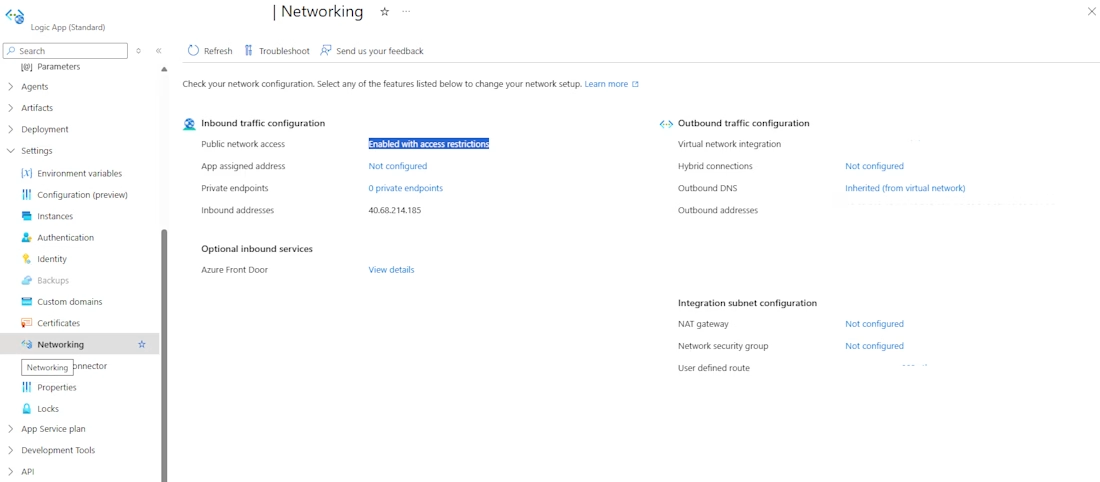
1️⃣ Navigate to your Logic App (Standard) in the Azure Portal.
2️⃣ Go to the Networking tab.
3️⃣ Under Inbound Traffic Configuration, locate Public Network Access.
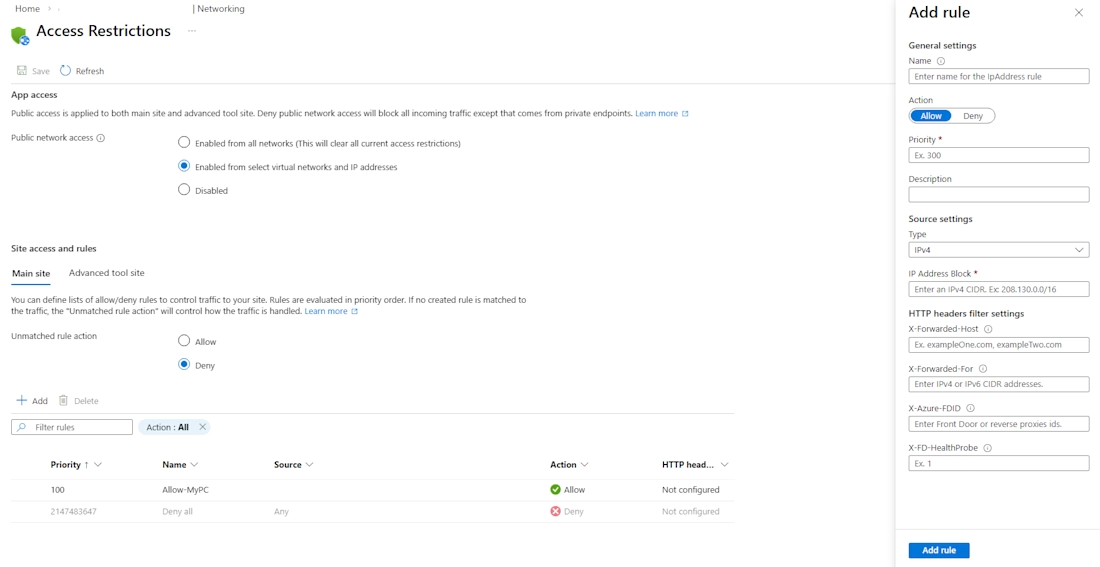
4️⃣ Set it to “Enabled from selected virtual networks and IP addresses.”
5️⃣ Add an IP rule by specifying:
A Name
A Priority (lower number = higher priority)
The IP address or CIDR range you want to allow
The Action (Allow/Deny)
6️⃣ Save your configuration.
Once configured, only the specified IP addresses or virtual networks will be able to access the Logic App endpoint, helping reduce exposure to unwanted traffic.
💡 A few additional best practices to consider:
✔ Use CIDR ranges where appropriate – If multiple systems need access, defining a range can simplify rule management.
✔ Combine IP restrictions with Virtual Network integration – For internal workloads, allowing only trusted VNets provides an additional layer of isolation.
✔ Assign clear rule priorities – Azure processes rules in priority order, so make sure allow/deny rules are organized logically.
✔ Consider disabling public access entirely – If your Logic App is only consumed internally, you may be able to restrict access to private networking only.
✔ Review access regularly – Periodically audit allowed IP addresses to ensure only required sources remain permitted.
🔎 Why this matters
Implementing IP restrictions helps:
• Reduce the attack surface of publicly exposed endpoints
• Protect sensitive workflows and integrations
• Support a zero-trust security model
• Improve overall cloud security posture
Security in cloud integrations is not just about building powerful workflows — it’s also about ensuring they are accessible only to the right sources.
Have you implemented network restrictions or private access patterns for your Azure Logic Apps? I’d be interested to hear how others are securing their integration endpoints.
#Azure #LogicApps #MicrosoftAzure #CloudSecurity #Integration #DevOps #CyberSecurity
The network for creativity
Join 1.25M professional creatives like you
Connect with clients, get discovered, and run your business 100% commission-free
Creatives on Contra have earned over $150M and we are just getting started
Related posts

FinSecure: A High-Performance API with Role-Based Access Control (RBAC)
Security is the backbone of any fintech application. For FinSecure, I architected a robust backend infrastructure using FastAPI and PostgreSQL that prioritizes both data integrity and system speed.
I implemented a strictly enforced Role-Based Access Control (RBAC) system and JWT authentication to ensure that sensitive financial data is only accessible to authorized users. Beyond security, I focused on performance engineering—optimizing database schemas to reduce query latency by 15%. This project demonstrates my ability to deliver 'production-ready' code that balances high-level security protocols with the speed required for a modern user experience.
Secure Authentication: Integrated OAuth2 and JWT for industry-standard user sessions.
Granular Permissions: Developed a scalable RBAC system to manage complex user hierarchies.
Performance Tuning: Refactored SQL queries to handle high-concurrency requests without lag.
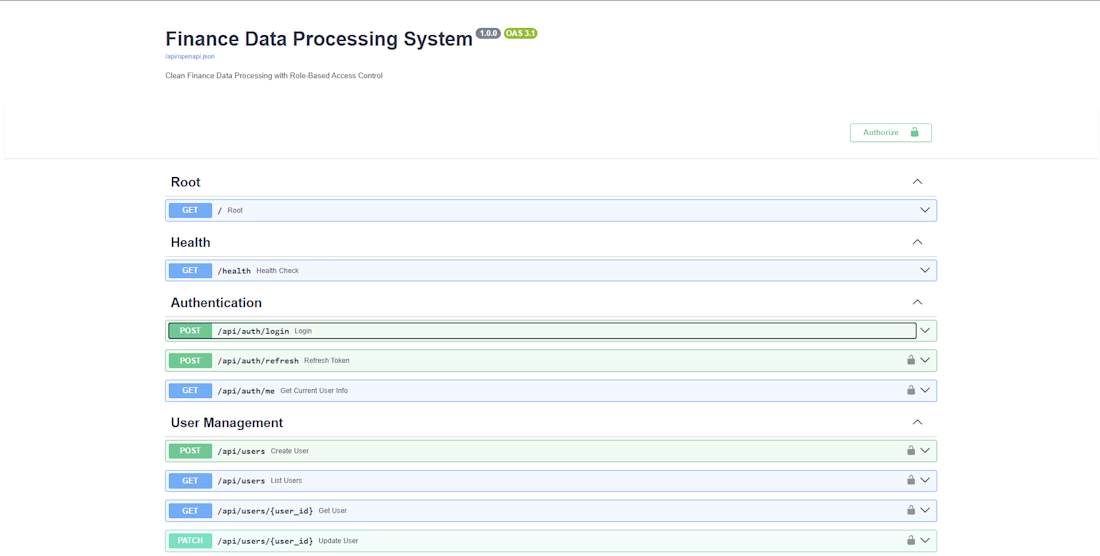
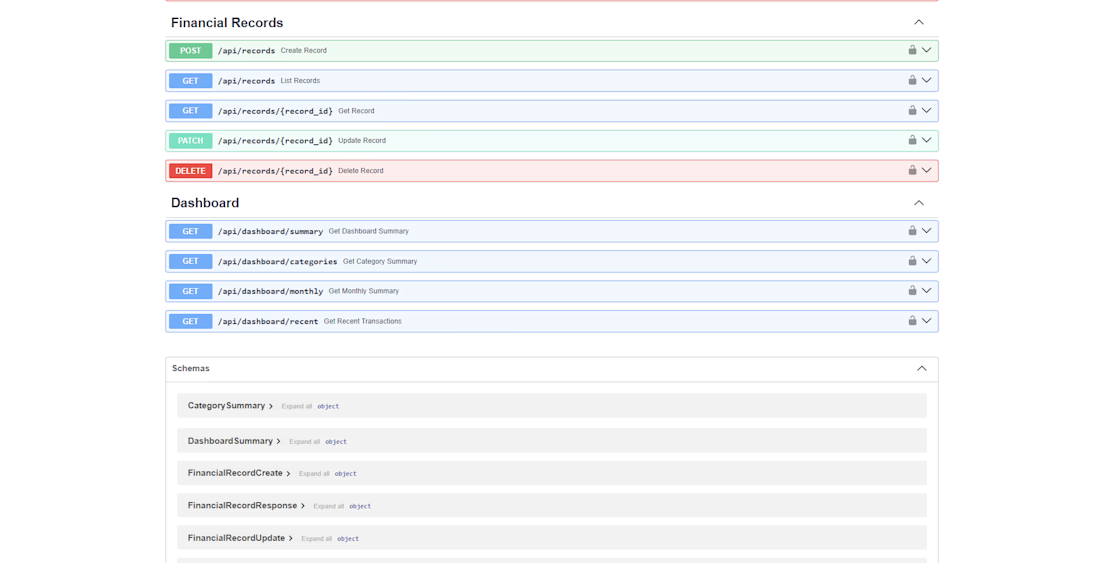
Clean Documentation: Fully documented API endpoints using Swagger/OpenAPI for easy frontend integration.
#FastAPI #Python #BackendEngineer #PostgreSQL #API
#FinTech #CyberSecurity #RBAC #SystemDesign #ScalableSystems
#Independent #RemoteWork #SoftwareEngineering #CommissionFree #BhubaneswarTech




I'm a ai web developer I can build you anything I make you open the ai website and you sign in and then I will invent you in my workspace then I will make you the owner then you will make me no longer owner your web will have a ai badge but if you subscribe to pro you can hide it I don't give domain or host name


Transforming the Real Estate Landscape in Kuwait with Dallal 🇰🇼🏢
The real estate hustle is real! Between untrusted agents and the chaos of fragmented communication on WhatsApp and social media, high-value leads often get buried.
Enter Dallal—the ultimate platform designed to give verified, professional agents a real competitive advantage.
Why Dallal is a Game Changer:
🛡️ Verified Professionals: Building trust through rigorous verification.
📊 Unified Dashboard: One place to manage your entire workflow, from listings to leads.
📈 Massive Reach: Instantly jump from your personal network to thousands of active users across Kuwait.
🤖 AI-Powered: Transform voice notes into structured data with cutting-edge AI features.
Whether it’s residential, commercial, or industrial, Dallal ensures your visibility is never limited. It’s more than an app; it’s your peace of mind in a fast-paced market.


















Trending

Runway
AI video generation is exploding. What are you dreaming up in Runway?

Contra University
Learn from expert creatives how to earn more using next-gen AI tools.
creativeaiflow
Creative AI workflows are evolving. What tools do you use, and what are their strengths and weaknesses?
portfolioreview
The best portfolios tell a story, not just show a grid. Share yours for feedback.
freelancerlife
Freelancer life is wins, pivots, and everything in between. What’s yours right now?