The network for creativity
Join 1.25M professional creatives like you
Connect with clients, get discovered, and run your business 100% commission-free
Creatives on Contra have earned over $150M and we are just getting started
Back to feedPost

Your Inventory System Knows Which Products Are Expiring. But Does Your Team Find Out in Time? 📦
A food distributor has hundreds of product batches across multiple warehouses.
Some batches are approaching expiry. Others are running low. Purchasing teams rely on spreadsheets, and warehouse managers manually communicate stock problems.
The data exists. The automated action is missing.
Common operational problems:
Expiry dates are tracked manually.
Near-expiry stock goes unnoticed.
Reorder requests are delayed.
Warehouse inventory data becomes inconsistent.
Batch-level traceability requires manual investigation.
Purchasing and warehouse teams work with different information.
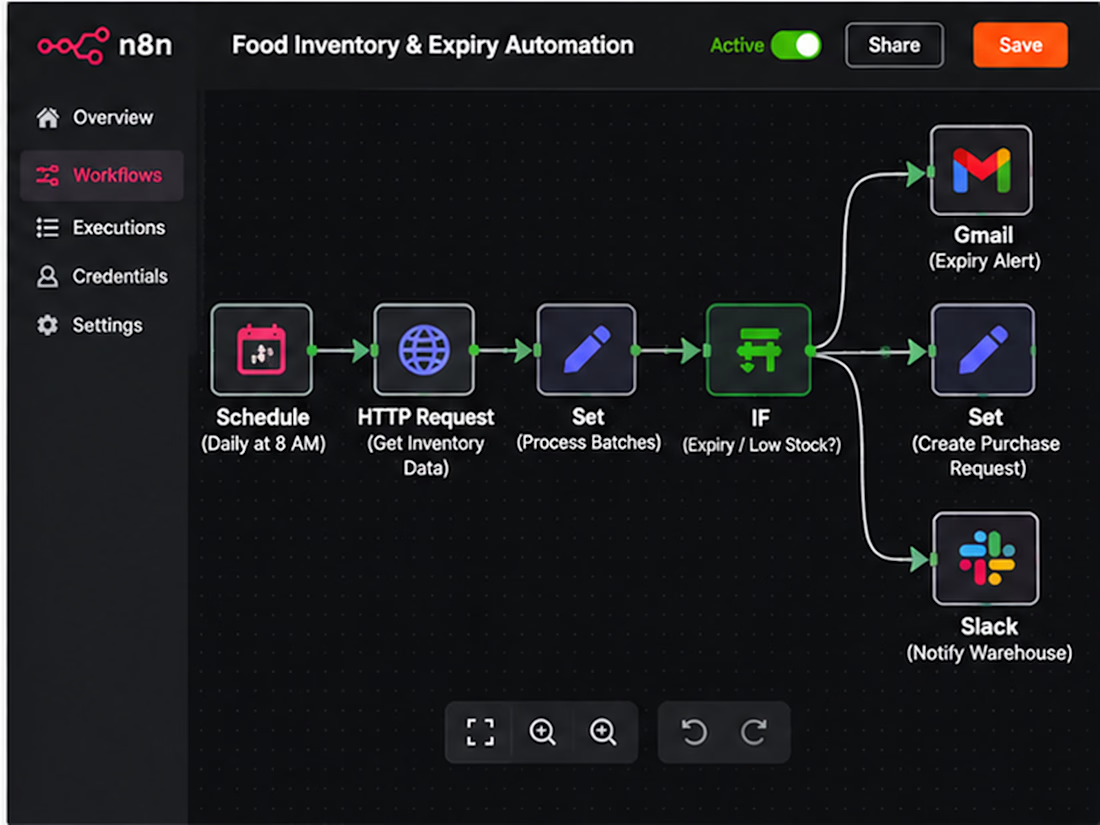
The solution: n8n-powered inventory monitoring and replenishment automation.
I can connect your inventory database, ERP, and purchasing workflows to help teams identify stock risks earlier.
What the automation can handle:
📦 Batch-Level Monitoring — Track quantities, expiry dates, and warehouse locations.
⏰ Expiry Alerts — Flag batches approaching configurable expiry thresholds.
📉 Low-Stock Detection — Compare available inventory against approved reorder points.
🧾 Purchase Request Drafts — Prepare replenishment requests for purchasing approval.
🏭 Warehouse Notifications — Notify relevant teams about stock exceptions.
📊 Inventory Reporting — Produce scheduled summaries of at-risk stock and replenishment activity.
🔍 Traceability Support — Maintain references to batches, suppliers, and inventory movements.
Why does this matter?
Because inventory automation isn't just about counting products.
It's about helping your business make timely decisions with reliable operational data.
Two ways to start:
Option 1: Already using an ERP, WMS, or inventory database? Share your system and integration requirements.
Option 2: Not sure where inventory automation should begin? We can review your stock monitoring, expiry management, and purchasing process.
Build a more connected inventory operation without replacing every system your team already uses.
Workflow
Schedule Trigger → ERP Inventory API → Normalize SKU and Batch Data → Check Expiry Thresholds → Check Reorder Points → Branch by Exception → Notify Warehouse / Draft Purchase Request → Manager Approval → Update ERP → Log Results.
Implementation: Use read-only inventory checks initially, enforce batch-level traceability, distinguish physical from available stock, avoid duplicate purchase requests, and require purchasing approval. Regulatory recall decisions and product safety determinations remain under qualified human control.
Benefits: Earlier inventory risk awareness, more consistent purchasing, reduced manual checking, and clearer batch-level visibility.
Result: A structured inventory monitoring system that helps warehouse and purchasing teams respond to expiry and replenishment risks.
SEO Keywords
n8n inventory automation • food distribution automation • food manufacturing software • inventory expiry alerts • batch tracking automation • warehouse automation • food inventory management • ERP inventory integration • inventory API automation • low stock alerts • reorder point automation • purchase request automation • batch expiry monitoring • food warehouse software • wholesale distribution automation • food supply chain technology • inventory synchronization • stock monitoring automation • n8n warehouse workflow • food batch traceability • warehouse inventory integration • automated stock reporting • replenishment workflow • purchasing automation • inventory exception management • expiry date tracking • stock threshold alerts • food wholesale ERP • food distribution software • supplier management workflow • warehouse stock alerts • AI inventory automation • batch inventory database • automated purchase requests • inventory audit trail • warehouse management integration • inventory data validation • stock availability automation • multi-warehouse inventory • food distributor technology • manufacturing inventory automation • n8n ERP integration • food operations automation • inventory workflow developer • food manufacturing API • procurement workflow automation • stock movement tracking • wholesale inventory management • inventory risk monitoring • food supply chain automation • custom inventory automation • warehouse reporting workflow
Hashtags
#n8n #InventoryAutomation #FoodManufacturing #FoodDistribution #WarehouseAutomation #SupplyChainAutomation #BatchTracking #InventoryManagement #ERPIntegration #WorkflowAutomation #StockManagement #ExpiryTracking #FoodSupplyChain #WholesaleDistribution #PurchasingAutomation #ProcurementAutomation #WarehouseManagement #ManufacturingTech #B2BAutomation #APIAutomation #InventorySoftware #StockAlerts #BusinessAutomation #DistributionTechnology #SupplyChainTech #InventoryVisibility #AutomationEngineer #CustomAutomation #ReplenishmentAutomation #OperationsAutomation #BatchTraceability #n8nDeveloper


The network for creativity
Join 1.25M professional creatives like you
Connect with clients, get discovered, and run your business 100% commission-free
Creatives on Contra have earned over $150M and we are just getting started
Related posts

Most inbound bottlenecks aren't caused by low lead volume—they happen during triage.
When inquiries roll into a Google Sheet or CRM, operations teams often waste 10–15 minutes per submission reading through messy paragraphs, deciphering budget mismatch, and manually deciding who gets an immediate call vs. a standard rate sheet.
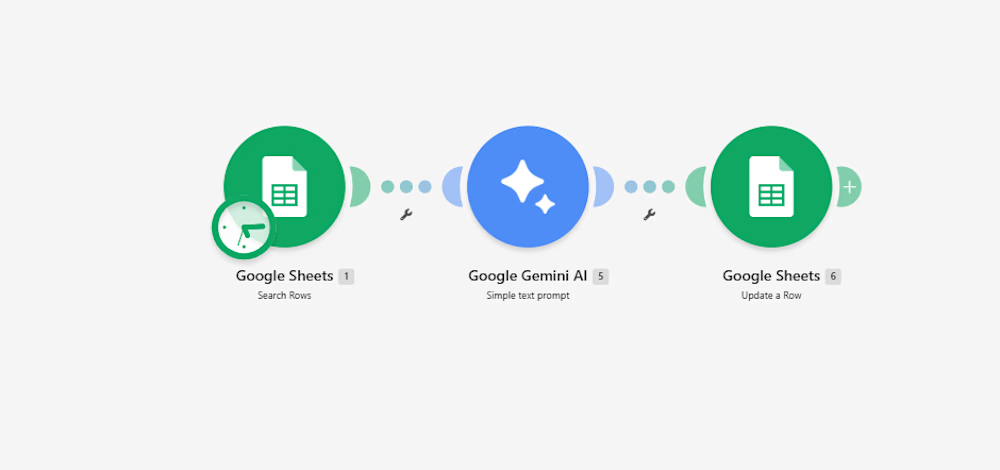
Instead of adding a bulky CRM add-on, I documented a lightweight 3-step automation pipeline built inside Make:
Intake & Extraction: An active listener triggers immediately upon a new submission, extracting core variables: client scope, target deliverables, timeline, and stated budget.
Context-Aware Evaluation (Gemini 2.5 Flash): The payload passes through an AI evaluation node with strict guardrails:
Evaluates budget against minimum agency criteria.
Assigns a triage score: Hot (immediate priority), Warm (nurture), or Cold (disqualified/template reply).
Generates a strict 15-word operational summary—no long paragraphs.
Determines an automated next step (e.g., routing to an account lead or flagging for asynchronous follow-up).
Data Return & Clean Pipeline: Appends the structured classification directly back to the master operational tracker, keeping the sheet filterable and clean.
The outcome: The sales and operations team can filter the entire board by priority status in two clicks, cutting first-touch response time to minutes without manually reading every single submission.
I’ve documented the full scenario map, execution logic, and data schemas below.
Curious how other agency operators and automation leads here handle their lead enrichment layer—are you doing AI scoring at the form level, or later in the CRM pipeline?:


For the budget gate, I'd keep an unstated budget separate from one explicitly below your minimum. Does the Make route ask for clarification when the amount or currency is missing, so a potentially suitable lead doesn't fall into Cold by default?

Vibe coding looks easy… until your app breaks. 😅
“Just tell AI what you want and it will build it.”
Sounds great.
Until you spend credits asking it to fix the same bug 10 different ways.
Then another feature breaks.
You fix that one.
Something else stops working.
Then you're staring at the same error for hours thinking:
“Why is this still happening?”
That's the part people don't show you about vibe coding.
AI can write code incredibly fast, but fast code doesn't automatically mean good code.
You still need to understand:
→ How the application is structured
→ Where the bug is actually coming from
→ How different features affect each other
→ When an AI-generated solution is making things worse
→ How to debug instead of blindly regenerating code
And sometimes the biggest time killer isn't building a feature.
It's getting stuck on one tiny bug that refuses to die.
That's why I don't see vibe coding as:
“Tell AI what to build.”
I see it as:
Human problem-solving + AI development.
The AI can help you move faster.
But you still need someone who knows where to go when things stop working.
That's where the real skill comes in.
What has been your biggest headache with vibe coding? 👇
— Optimum Studio


the same bug fixed 10 different ways is painfully accurate lol

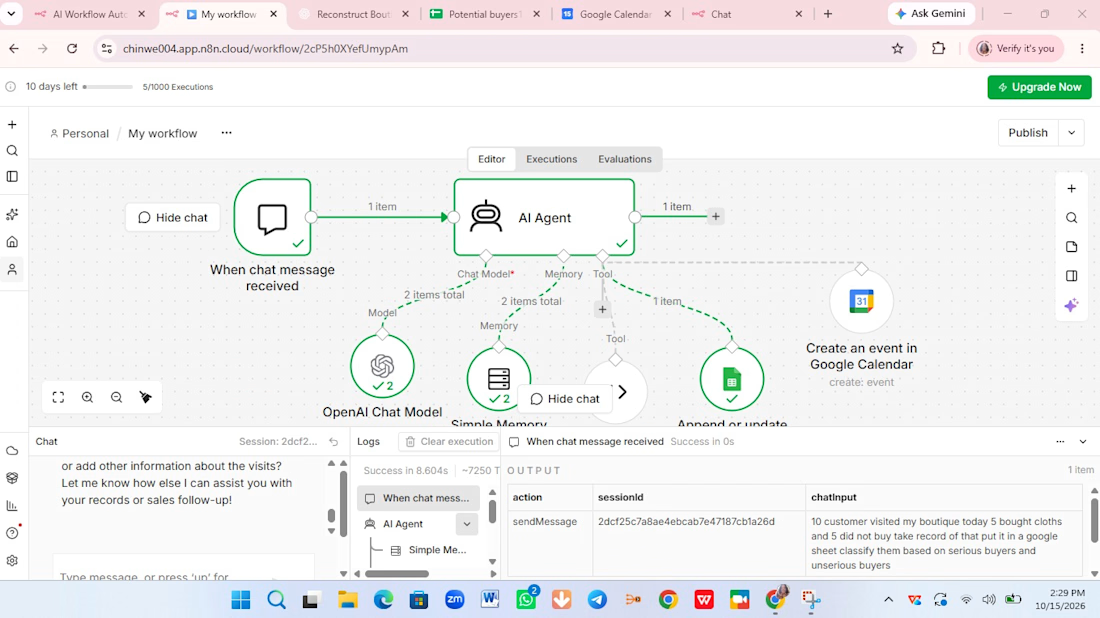
This is a customer support chatbot that help users to sell their products online.
User will chat with on your website.
It collect leads on your behalf gather detail in a google sheet.
It will even create meeting add to your Google calendar. It is useful for you as an individual, an entrepreneur, as somebody delivery services or product.
I use my niece boutique as a reference.
Tools:
Ai Agent, Ai chat model, memory, code tools, Google sheet and Google calendar.
Ai Agent: as Ai agent you it a task, it will use several tools at it's disposal to respond and act based on the system prompt.
Ai chat model: respond to all the chats.
Memory: you give your agent memory so that it can remember everything read understand and interpret it.
Code tool: It return the days of the week.It gather information about people that are chatting even see them as potential buyers or not.
Google sheet: It record every sales.
Google calendar: You use Google calendar to book an appointment with your customers