The network for creativity
Join 1.25M professional creatives like you
Connect with clients, get discovered, and run your business 100% commission-free
Creatives on Contra have earned over $150M and we are just getting started
Back to feedPost


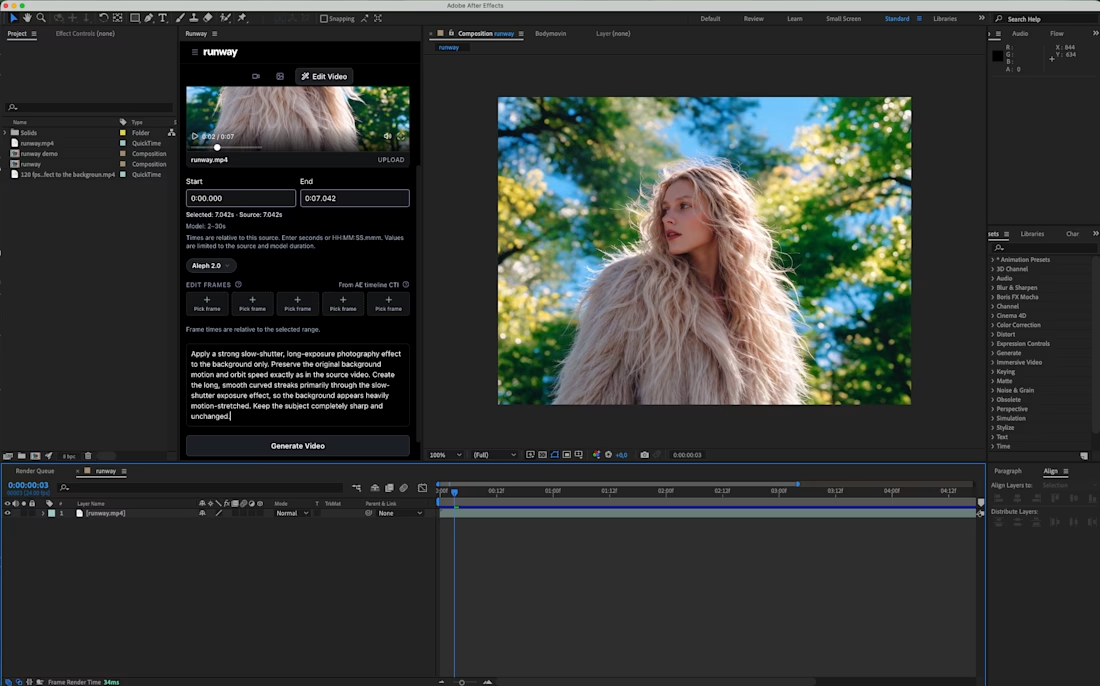
Sharing a simple trick for transforming a video background:
Add a slow-shutter effect.
By turning the surroundings into long, curved motion streaks, you can transform an ordinary environment into a more abstract composition that adds another layer to the shot.
I applied the effect to my own footage using Runway’s Aleph 2.0, editing only the background while keeping the original subject and movement intact.
There are also Runway plugins for After Effects and Premiere Pro if you want to use this directly inside your editing workflow.
Prompt is in the comments.
What do you think of this effect?

good one.


cooooool !

Very cool!

just amazing!

Nice

Awesome

Beautiful

Slow-shutter motion streaks background ko bohot clean depth dete hain! Simple yet effective AI video trick, Karina.


Amazing tip!


Thanks for sharing

Helpful tip for a person whose main focus is on numbers and farrrr from the video creativity 😊

The sharp face against the streaked background makes the blur feel intentional.

pretty cool effect. thanks for sharing!


Tough 🔥

uhhh this is SO nice!!

This is so cool

nice

This is beautiful!

Love how the slow-shutter effect transforms the background into abstract motion while keeping the subject sharp and natural. Such a creative way to add depth, energy, and a cinematic feel to an ordinary shot!
The network for creativity
Join 1.25M professional creatives like you
Connect with clients, get discovered, and run your business 100% commission-free
Creatives on Contra have earned over $150M and we are just getting started











Related posts

15 seconds of smooth UI, editorial layouts, and micro-interactions.
Kept the micro-interactions snappy, typography expressive, and transitions buttery smooth.
Rate this UI animation from 1 to 10 in the comments, or tell me what you’d improve! 😉


Solid 10/10 bro! 🔥 Micro-interactions are super snappy and transitions are buttery smooth indeed. Editorial layout game is strong. Keep it up!

The brief was simple. Show a new personalized news feature.
The obvious solution was to show a few clicks in the UI as you choose your topics. Clear, but not very interesting.
So I pulled that moment out of the interface first and turned it into a cloud of topics. You get the idea before you even see the product, then the video drops you back into the real UI and shows where it lives.
I really like these tiny decisions. The feature stays the same, but it feels easier to get and a lot more fun to watch.


Pulling the topic cloud outside the UI makes the feature instantly clearer.

SaaS Video Editing Project Completed for Lexi 🚀
Another successful SaaS project delivered! I had the opportunity to work with Lexi to bring their software product to life through clean, engaging, and professional video editing.
As a video editor, I focus on helping SaaS companies and software brands turn complex ideas into clear, engaging visual stories that connect with their target audience. From smooth transitions and polished visuals to thoughtful pacing and a professional finish, every detail matters when creating videos that showcase a product and its value.
I help SaaS startups, tech companies, and growing businesses create product demos, explainer videos, software walkthroughs, promotional videos, and marketing content that support their brand and business goals.
Looking for a reliable video editor for your next SaaS or software project? I would love to help bring your vision to life.
Services: SaaS Video Editing, Software Demo Videos, Product Explainer Videos, Tech Video Editing, Promotional Videos, and Marketing Content.
Let’s create something great together!
#SaaS #SaaSVideoEditing #VideoEditing #SoftwareMarketing #ProductDemo #TechVideo #Contra

