The network for creativity
Join 1.25M professional creatives like you
Connect with clients, get discovered, and run your business 100% commission-free
Creatives on Contra have earned over $150M and we are just getting started
Back to feedPost

Snap — Interactive 3D Patch Studio
The problem
Customizing clothes online creates a gap between what the customer imagines and what ends up on the sewing table. People want creative freedom; production needs exact instructions. The result is endless back-and-forth and “where do I put this patch?” messages.
The build
I’m a designer, so everything started in Figma — every screen, hover and sticker. Then I rebuilt it in Base44, one prompt at a time: layout first, then motion, then the 3D studio.
In the studio, you drop patches anywhere on a real 3D shirt, then rotate, resize, duplicate or undo. On mobile, it’s built for one thumb: separate modes for viewing, placing and editing, and quick zones like Chest or Sleeve. Small details carry the brand: hover a patch in the catalog to see it sewn on a shirt, or hover the headline letters to watch them turn into 3D type.
Three things fought back:
Patches on a real 3D shirt — solved with surface decals that follow the fabric.
Saving exactly what people design — solved with automatic front/back snapshots.
One-thumb mobile editing — solved by splitting the studio into clear modes instead of shrinking the desktop layout.
Automation
Snapshot → production (saves time, removes errors). The moment you add to bag, snap captures your design front and back. The snapshots go to production with the order, and the admin can download a ready-to-print production sheet as a PDF. What you see is exactly what we sew.
Status emails (customer experience). Change an order’s status in the admin, and the customer is notified automatically: in production, shipped with tracking, delivered.
Owner alerts (operations). New orders and contact messages land in my inbox right away, with a link to the order.
Waitlist (leads). Unreleased items like the hoodie collect sign-ups instead of being a dead end. The moment I switch it live, everyone waiting gets an email.
Vibe code. Vibe design. Real thread.
Life project:
https://figma-snap-416e61aa.base44.app
Figma file (for personal use)
Full screencasts are in the comments: the customer flow (from the catalog to checkout, on desktop and mobile) and the admin flow (the order with its snapshots → the production PDF → a status change → the automatic email).

screencast all website and admin panel

Ohhhh wowww this is nice
Thank you 🙏
The network for creativity
Join 1.25M professional creatives like you
Connect with clients, get discovered, and run your business 100% commission-free
Creatives on Contra have earned over $150M and we are just getting started


Related posts

🎬 DEBUT
A launch-day ad that rolls out the red carpet for your product.
Friday, October 20. Premiere night.
A limo glides up to the carpet.
A perfume takes the spotlight.
"Who are you wearing?"
It was wearing the night.
Saturday, a skateboard walked the same carpet.
"Can you do it again?"
It landed it.
Sunday, a soda can cracked open in front of the press.
"What's the flavour?"
Nobody would say.
None of them were real.
All of them got a premiere.
🎟️ Every launch deserves a red carpet.
Most of them get a story post.
So I built the whole premiere.
The marquee. The press pen. The fans. The limo.
A rooftop across the street to watch it all from.
I had way too much fun with this one.
Built the street in Blender, then rolled the cameras in SVGator with the MCP.
Six premieres.
One template.
Zero redraws.
Swap the logo and the product.
Every marquee, wall and shot follows.
Retype the headline, the date and what the press shouts.
Every word is live text. Every layer has a name.
The cameras never change.
So who's walking the carpet next?
The flashes never stop. ✨
🛠️ Built in SVGator with the MCP, staged in Blender. 1,429 named layers, 3,917 keyframes.
Use the template 👇
DEBUT · Red-carpet launch ad


the motion looks so fine-

I’m Rokas - a Framer Developer & Official Framer Expert.
I turn Figma designs into production-ready Framer websites, customize templates, and fix/troubleshoot existing Framer sites.
Have a Framer project, need a template customized, or something fixed? DM me.
Portfolio: https://contra.com/rokas_griskonis1

contra.com
Rokas Griškonis - Framer Designer | Contra
I fix & develop Framer websites. Official Framer Expert. . View Rokas Griškonis’s Profile on Contra. The Independent-first, commission-free freelance marketplace shaping the future of work.

Official Framer Expert status plus the production-ready angle is a strong combo. Positioning around fixing and troubleshooting existing sites is smart, that is usually where the urgent, paid work lives.

⚡ Vault — Rethinking Mobile Banking & Neobank UX
A modern Fintech app redesign focused on speed, clarity, and seamless money transfers.
🔑 Highlights:
15+ Custom Mobile Screens & End-to-End User Flows
Scalable Design System built in Figma (8-pt grid)
Minimal, High-Contrast UI for Effortless Navigation
🎨 Role: Lead UI/UX Designer
🛠️ Tools: Figma, Design System, Prototyping
#Fintech #MobileApp #UIUX #Figma #DesignSystem #WebDesign #ProductDesign

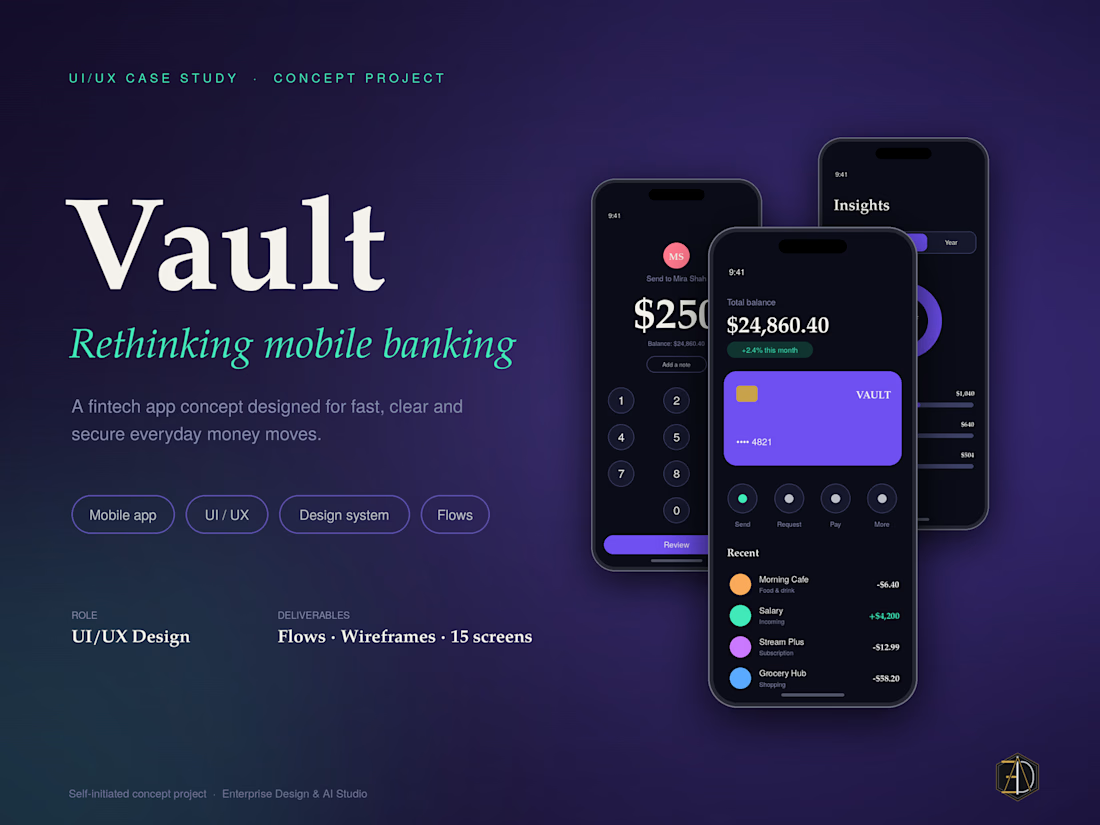
The Vault case study banner with the Rethinking mobile banking script headline is classy. Building the whole system on an 8-pt grid and shipping 15+ screens with full flows shows real systems thinking.









