The network for creativity
Join 1.25M professional creatives like you
Connect with clients, get discovered, and run your business 100% commission-free
Creatives on Contra have earned over $150M and we are just getting started
Back to feedPost

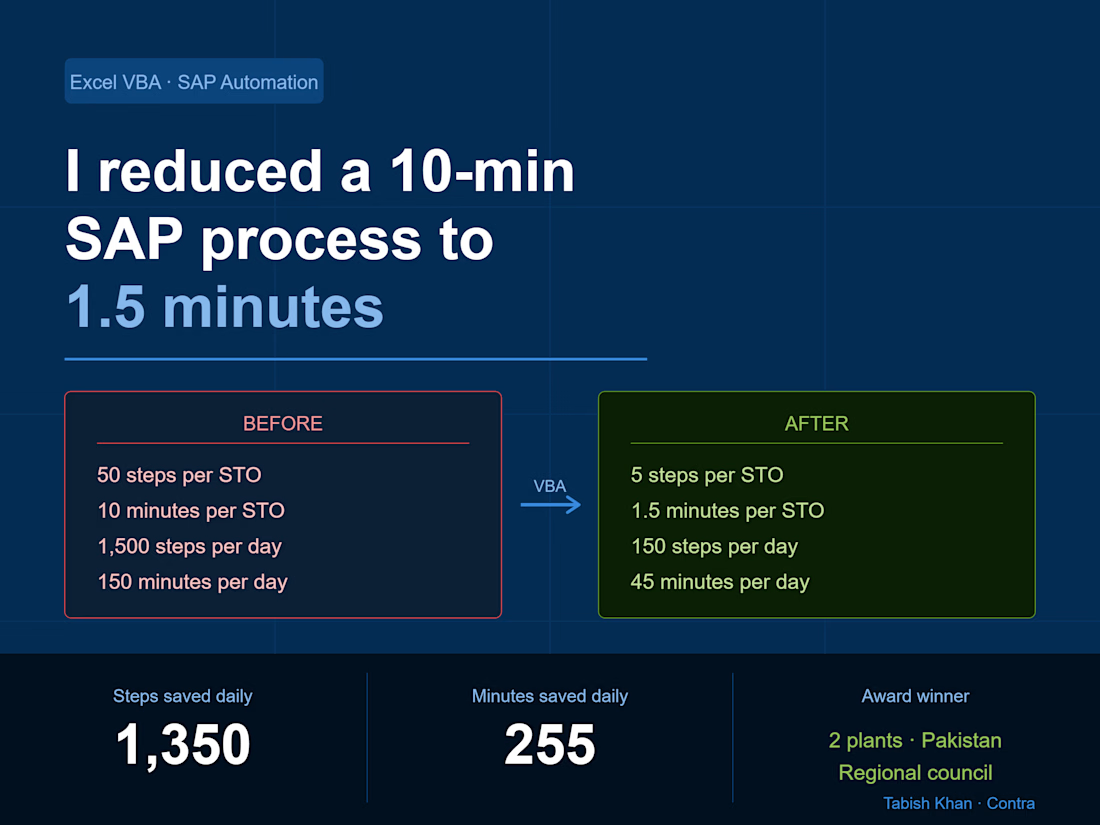
How I reduced a 10-minute SAP process to 1.5 minutes using Excel VBA — and saved 255 minutes every day
This isn't a theory post. This is something I built, tested, and deployed across 2 manufacturing plants in Pakistan.
If your team is running repetitive SAP transactions manually every day, this will show you exactly what's possible — and how I did it with nothing but Excel VBA.
The problem
In my last FMCG role we ran STOs (Stock Transfer Orders) daily. An STO is a stock movement between two plants or warehouses in SAP — and it requires 3 separate transactions to complete:
→ PO Creation — run NME21N, select PO type, enter shipping code, item codes, quantities, receiving plant, SLOC for each SKU
→ Delivery Creation — run NVL10B, go to purchase order, paste PO number, execute, click line item, save
→ Shipment Creation — run NVT01N, enter FK02, Z004, select P&G Interplant, click delivery tab, paste delivery number, execute, set shipping point, select date, click planning, check in, select date, click shipment start, save
50 manual steps per STO.
10 STOs per shift.
3 shifts per day.
That's 1,500 manual steps every 24 hours — and 2.5 hours of pure manual work daily across all shifts.
The errors
The process wasn't just slow — it was a trap.
The most common error: copying an 8-digit PO number and missing one digit. You wouldn't catch it until the next transaction failed — then you'd go back, find the correct PO, and restart.
SAP also disconnected occasionally mid-process. When it did, you started from scratch.
30 STOs a day meant 30 chances to make a mistake. And mistakes had real consequences — wrong stock movements, delayed shipments, production line stoppages.
The solution
I mapped every single step across all 3 transactions. Every click, every field, every copy-paste, every keyboard shortcut.
Then I built an Excel VBA tool that automated the entire flow.
The tool:
→ Opens SAP automatically
→ Copies all item codes across 6 SKUs in one action
→ Pastes all quantities across 6 SKUs in one action
→ Clicks create STO — completing all 3 transactions automatically
The new process:
Open tool
Open SAP
Copy item codes
Paste quantities
Click create
5 steps. That's it.
The results
Before After Steps per STO 50 Time per STO 10 min 1.5 min Steps per day 1,500 150 Time per day 150 min 45 min Steps saved daily 1,350 Minutes saved daily 255
The impact
It took me 3 months to build. Nights, weekends, failed scripts, late fixes.
When it worked — it really worked.
The tool was rolled out across 2 plants in Pakistan. I shared it with the regional council and they couldn't believe it was built in Excel — not by an SAP consultant, not with an IT budget, not through a formal project.
I received a company award for it.
What this means for your operation
If your team is running repetitive SAP transactions manually, you almost certainly have the same opportunity.
The tool doesn't require SAP customization. It doesn't require an IT team. It works alongside your existing SAP setup — not instead of it.
Every warehouse or production operation running SAP has at least one process like this. A task done 20, 30, 50 times a day that nobody has ever stopped to question.
That's where the biggest wins are hiding.
Want this built for your operation?
I offer SAP & Excel process consulting for warehouse and production teams. If you're running repetitive SAP transactions manually and want to explore what automation could look like for your specific setup, book a free discovery call below.
👉 [View my SAP Consulting Service]https://contra.com/s/7lbgEqRc-sap-and-erp-process-consulting-for-warehouse-operations
👉 [Schedule a Call]https://appointment.briskcloudware.com/book.html?r=lLixzwVO


The network for creativity
Join 1.25M professional creatives like you
Connect with clients, get discovered, and run your business 100% commission-free
Creatives on Contra have earned over $150M and we are just getting started

Related posts


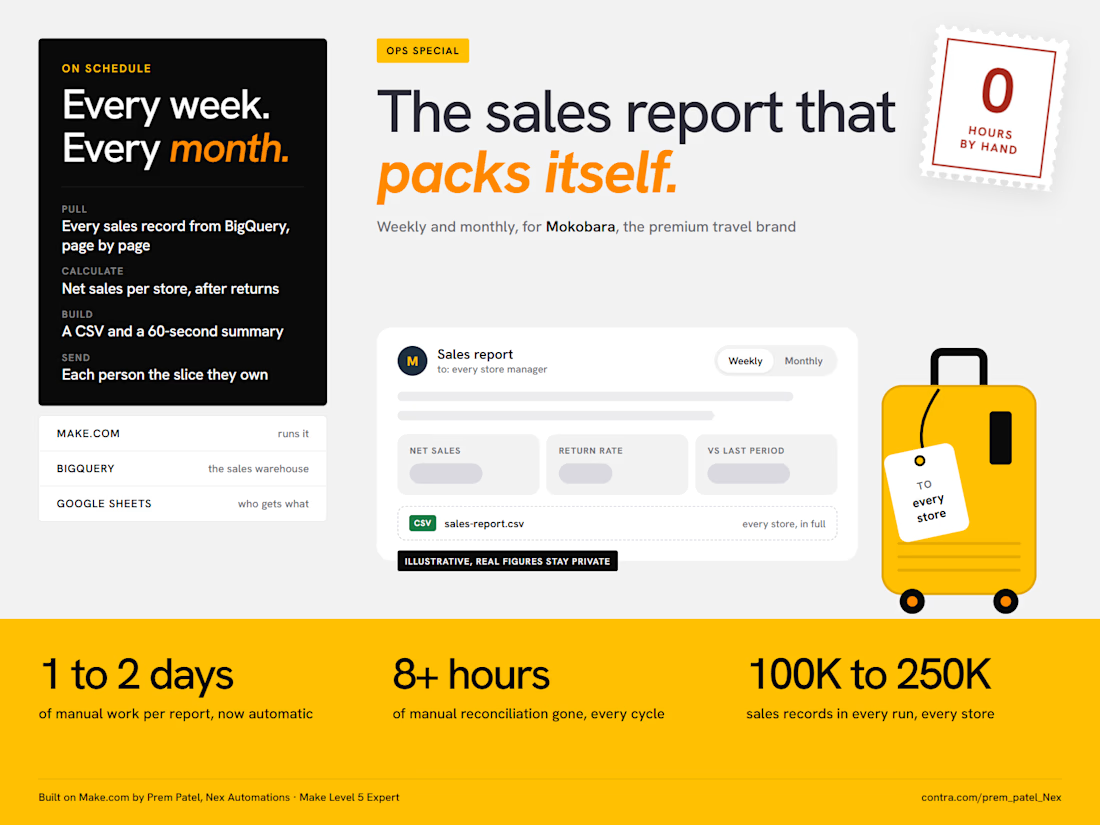
Does someone on your team lose a day or two building the sales report every week or month?
That was the starting point at Mokobara, the premium travel brand. Pulling sales across all their stores, checking returns, reconciling the numbers and emailing each manager took 1 to 2 days every cycle, with 8+ hours of that spent just reconciling.
I built them an automation on Make.com a few months ago. It has run on its own ever since, weekly and monthly:
Make pulls every sales record from BigQuery, 100K to 250K per cycle. That is too many for one request, so it reads them page by page and stitches them back together.
It calculates the numbers the team actually uses: net sales per store after returns and discounts, return rates and the change against the last period.
It builds a CSV with the full breakdown and a short email summary you can read in 60 seconds.
It reads a Google Sheet of store representatives and emails every one of them the report for their own store.
The result: the reporting problem is gone. The report went from 1 to 2 days of manual work to fully automatic, and the 8+ hours of reconciliation dropped to zero.
Two things I would do the same way again:
Calculate "net sales" in the automation, not in the warehouse. The business rule for what counts as a net sale is not what the raw data stores.
Send people their slice, not the whole report. One report for everyone gets skimmed by everyone.
The figures in the image are placeholders, the real ones stay with the client.
What report is your team still building by hand? Tell me where the data lives and I will tell you how I would automate it.



🚨 𝗦𝘁𝗶𝗹𝗹 𝘄𝗮𝗶𝘁𝗶𝗻𝗴 𝗱𝗮𝘆𝘀 𝗳𝗼𝗿 𝘆𝗼𝘂𝗿 𝗳𝗶𝗻𝗮𝗻𝗰𝗲 𝘁𝗲𝗮𝗺 𝘁𝗼 𝗰𝗼𝗻𝘀𝗼𝗹𝗶𝗱𝗮𝘁𝗲 𝘀𝗽𝗿𝗲𝗮𝗱𝘀𝗵𝗲𝗲𝘁𝘀?
If you are making strategic decisions on delayed P&L reports, you are operating with blind spots.
When managing 𝟴-𝗳𝗶𝗴𝘂𝗿𝗲 𝗿𝗲𝘃𝗲𝗻𝘂𝗲 (€𝟭𝟳.𝟳𝟳𝗠+), static spreadsheets fail to provide the real-time cost visibility needed to protect profit margins.
Here is an executive-grade 𝗣𝗼𝘄𝗲𝗿 𝗕𝗜 𝗙𝗶𝗻𝗮𝗻𝗰𝗶𝗮𝗹 & 𝗣&𝗟 𝗦𝘁𝗮𝘁𝗲𝗺𝗲𝗻𝘁 𝗗𝗮𝘀𝗵𝗯𝗼𝗮𝗿𝗱 designed for leadership to monitor profitability, control operating expenses, and optimize cash flow in seconds.
📊 𝗞𝗘𝗬 𝗙𝗜𝗡𝗔𝗡𝗖𝗜𝗔𝗟 𝗜𝗡𝗦𝗜𝗚𝗛𝗧𝗦 & 𝗜𝗠𝗣𝗔𝗖𝗧
🔹 𝗥𝗲𝘃𝗲𝗻𝘂𝗲 𝗦𝘁𝗿𝗲𝗮𝗺 𝗩𝗶𝘀𝗶𝗯𝗶𝗹𝗶𝘁𝘆: Analyzed €𝟭𝟳.𝟳𝟳𝗠 in total top-line revenue, isolating core product sales (€𝟭𝟭.𝟳𝟳𝗠) vs. consulting services (€𝟲.𝟬𝟬𝗠).
🔹 𝗠𝗮𝗿𝗴𝗶𝗻 𝗢𝗽𝘁𝗶𝗺𝗶𝘇𝗮𝘁𝗶𝗼𝗻: Automated tracking for €𝟭𝟬.𝟱𝟵𝗠 𝗚𝗿𝗼𝘀𝘀 𝗣𝗿𝗼𝗳𝗶𝘁 (𝟱𝟵.𝟲% 𝗠𝗮𝗿𝗴𝗶𝗻) and €𝟱.𝟱𝟬𝗠 𝗡𝗲𝘁 𝗣𝗿𝗼𝗳𝗶𝘁 (𝟯𝟬.𝟵% 𝗡𝗲𝘁 𝗠𝗮𝗿𝗴𝗶𝗻).
🔹 𝗖𝗼𝘀𝘁 𝗖𝗲𝗻𝘁𝗲𝗿 𝗖𝗼𝗻𝘁𝗿𝗼𝗹: Uncovered Raw Materials (€𝟲.𝟰𝟱𝗠) as 𝟴𝟵.𝟵% of total COGS, unlocking direct vendor renegotiation targets.
🔹 𝗢𝗽𝗲𝗿𝗮𝘁𝗶𝗻𝗴 𝗘𝘴𝗽𝗲𝗻𝘀𝗲 𝗧𝗿𝗮𝗰𝗸𝗶𝗻𝗴: Monitored €𝟰.𝟱𝟳𝗠 in Opex, detailing consulting overhead (€𝟮.𝟲𝟮𝗠) and R&D spend (€𝟭.𝟰𝟯𝗠).
🔹 𝗗𝘆𝗻𝗮𝗺𝗶𝗰 𝗧𝗶𝗺𝗲 𝗜𝗻𝘁𝗲𝗹𝗹𝗶𝗴𝗲𝗻𝗰𝗲: Enabled instant drill-down across Quarters, Months, and Product Lines without relying on external paid visuals.
⚡ Automating P&L reporting eliminates manual errors, cuts review prep from days to seconds, and gives C-suite stakeholders total control over their bottom line.
💬 𝗟𝗼𝗼𝗸𝗶𝗻𝗴 𝘁𝗼 𝗮𝘂𝘁𝗼𝗺𝗮𝘁𝗲 𝘆𝗼𝘂𝗿 𝗳𝗶𝗻𝗮𝗻𝗰𝗶𝗮𝗹 𝗿𝗲𝗽𝗼𝗿𝘁𝗶𝗻𝗴 𝗼𝗿 𝗻𝗲𝗲𝗱 𝗮 𝗰𝘂𝘀𝘁𝗼𝗺 𝗣𝗼𝘄𝗲𝗿 𝗕𝗜 𝗱𝗮𝘀𝗵𝗯𝗼𝗮𝗿𝗱?
📩 𝗛𝗶𝗿𝗶𝗻𝗴 𝗮 𝗗𝗮𝘁𝗮 𝗔𝗻𝗮𝗹𝘆𝘀𝘁 / 𝗕𝗜 𝗗𝗲𝘃𝗲𝗹𝗼𝗽𝗲𝗿 for your team or project?
Send me a DM or let’s connect!
#PowerBI #FinancialAnalytics #BusinessIntelligence #ProfitAndLoss #ExecutiveDashboard #DataVisualization #FinancialModeling #DAX #CFOInsights #CorporateFinance
#BangladeshBusiness #CorporateBD #DhakaJobs #DataAnalystBD #TechBangladesh #BIFreelancer #DhakaStartups #BangladeshTech


Challenges
View all