The network for creativity
Join 1.25M professional creatives like you
Connect with clients, get discovered, and run your business 100% commission-free
Creatives on Contra have earned over $150M and we are just getting started
Back to feedPost

Ghostlight: only what moves, glows
Primary Effect
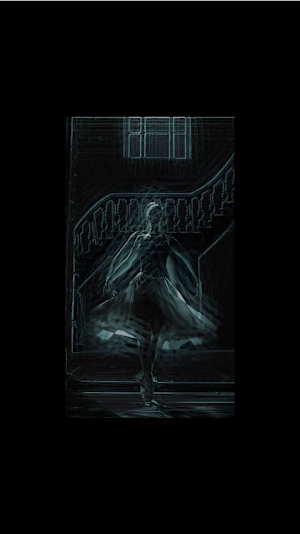
Original effect: Ghostlight — motion extraction with a cyan-to-magenta glow trail.
Project Description
What if only motion could glow? ✨
Ghostlight is an experimental motion extraction effect that transforms movement into light. Static elements fade into darkness while moving subjects emerge in glowing cyan and magenta, leaving behind a vivid trail that emphasizes every movement.
Created with the invideo Editor agent, the effect uses a layered combination of delayed footage, difference blending, glow, color treatment, and screen blending to isolate motion while keeping the subject recognizable.
Creative Process
I started with a licensed Pexels stock clip (video 4990427) featuring a ballerina twirling in a cream tutu against a dark staircase. The contrast between the dancer's movement and the stationary background made it a suitable starting point for motion extraction.
Rather than manually keyframing the effect frame by frame, I described the intended visual result in a single prompt. The invideo Editor agent built a layered effect on the timeline using a 10-frame delayed copy blended with Difference, an adjustment layer for glow and cyan-to-magenta color treatment, and the original footage mixed back in with Screen blending at 20%.
I then refined the effect using natural-language instructions:
Increased the glow intensity to 140.
Set the original footage mix to 20%.
Extended the motion trail from 4 to 10 frames.
Trimmed the clip to its strongest 8 seconds (4–12 seconds) and added 0.5-second fades.
The longer trail makes the magenta afterimage more visible during the dancer's spin, while the cyan highlights help separate the motion from the dark background.
What This Project Explores
Ghostlight explores how AI-assisted video editing can turn a simple visual idea into a stylized motion effect through natural-language direction and iterative refinement.
The final presentation includes the source footage, the finished effect, a screen recording of the agent building and refining the effect, and playback inside invideo Editor. The voiceover is my own.
invideo Editor is free to try.
Instagram: https://www.instagram.com/reel/DebFoEwyBbJ/?rpxt=dWpieDVtOWNicXdx
invideo.io
GHOSTLIGHT
invideo AI - Create Videos without limits
The network for creativity
Join 1.25M professional creatives like you
Connect with clients, get discovered, and run your business 100% commission-free
Creatives on Contra have earned over $150M and we are just getting started







Related posts

for my "3rd" submission i wanted to explore more with the 4-Stepped bar effect with @Invideo , so i made this nice edits
i had different clips i compiled in a compilation video, then placed the effect on the clips to make this edit.
how i did it? (check the comment section below, for my workflow)
Vicky, my Agent Two AI built the bar effect, then i told Vicky to place the bar effect on the first 2 seconds of every incoming clips
i prompted Vicky to build the bars in a rectangular-horizontal box,. with rounded corners.
i also told Vicky to add the SFX Sound you hear as the Bars lands/reveals, and i loved how that sounds lands alongside the bar effect.
❤️my first Contra submission - https://on.contra.com/zkgcpj
❤️my second Contra submission - https://on.contra.com/RdBPjt
N/B: Agent Two, created everything about this video,.. the only thing i did was upload the clips, trim each clips, and added the background song
👉my workflow is in the comment section, check it out to know how i made this edit

here's my workflow of how i made the above video edit in Invideo Editor

Reworked and refined the motion of an existing character animation of a company.
I spent time on the little things that are not really 'visible' but make a character feel more alive.
the pupil has a subtle pseudo curved effect using Rive path scripting. There’s a slight delay between the tilt, a bit of squish. You might not consciously notice these details, but they make a difference in how expressive the character feels.
(disney's principles are timeless)
what do you guys think : D
6 voted
60%
4 voted
40%
10 votes
Closed

Time Machine: One Morning Across Three Eras
I built a custom Time Machine effect that transforms the same morning across 1905, 2026, and 2080
I wanted to show how our surroundings and technology may change over time while the small human rituals we carry with us remain familiar
Using invideo Editor’s timeline agent, I created a custom shader with an editable Year control: aged film grain and sepia for 1905, a clean natural look for 2026, and cyan holographic scanlines for 2080
The agent also built the bar transitions between eras directly on the timeline. I refined the timing, adjusted the shader controls, and fixed the closing titles inside invideo Editor
The first video is the final result. The second shows the process, from importing the clips and directing the agent to testing the Year control
@invideo.io @invideo.creators
#invideocontrachallenge #invideoeditor