The network for creativity
Join 1.25M professional creatives like you
Connect with clients, get discovered, and run your business 100% commission-free
Creatives on Contra have earned over $150M and we are just getting started
Back to feedPost
Building a 4-role real-time SaaS taught me one uncomfortable lesson: the hard part was never the code.
I've been building RestaurantOS — one platform connecting Owner, Kitchen, Waiter, and Cashier in a single live workflow (Table → Order → Kitchen → Serve → Billing → Reports).
The tech stack was the easy part. The real challenge: keeping 4 different roles in sync in real time without any of them stepping on each other's data — a waiter updating a table while the kitchen marks an item ready while the cashier is mid-billing.
That forced decisions most tutorials never cover:
⚡ How much state should live client-side vs. source-of-truth server-side
⚡ What "real-time" actually needs to mean per role (a kitchen screen needs sub-second updates, a report dashboard doesn't)
⚡ Designing failure states — what happens when the waiter's app loses connection mid-order
Currently redesigning the UI/UX layer too (motion, better visual hierarchy) while keeping this real-time core intact.
If you've built multi-role or real-time systems — curious what broke first for you. And if you're a founder who needs something like this built, my DMs are open.


the role based flow is easy to follow. what part was hardest to keep real time?


Good question - the concurrency, not the connection, was the hard part.
A waiter updates an order, kitchen marks an item ready, and cashier starts billing - all within the same second. Sending those events fast is easy. The hard part is deciding whose update is "true" when two...

Role-based real-time flows are where the real complexity hides. When the kitchen and waiter screens both touch the same order, how are you handling conflicts: last-write-wins or order-level locking? I hit similar role sync issues on a multi-tenant CRM I built.
The network for creativity
Join 1.25M professional creatives like you
Connect with clients, get discovered, and run your business 100% commission-free
Creatives on Contra have earned over $150M and we are just getting started



Related posts


What can you add to your portfolio to make it a little more personal?
I love to write, and I've always kept a journal (often several on the go at once). I thought it'd be nice to add a work journal to my website so that my clients and colleagues can explore my processes and the messy inner-workings of my brain.
Have a look at: https://www.onyourtiptoes.com/journal and have a click through my highlights below.
It only took a couple of hours to build in Figma and Framer, but now the real challenge is keeping the entries going!
In spirit of building in public being more popular than ever, I'd love to see what you're making at the moment too. Let me know in the comments and we can share notes 💌


This is so cool @Cara Ellis. What is everyone else making?

Energy communities need to manage a lot at once: consumption, generation, members, billing, reports, alerts, and operational changes.
Wattbank explores a clearer SaaS dashboard experience for energy community operators. The interface brings key metrics, energy balancing, participant distribution, billing, reporting, and insights into one workspace that is easy to scan and act on.
The goal was to move away from heavy energy software and create something more visual, human, and operationally useful.


Building a platform that covers scheduling, customer records, communication, and appointment booking means designing across very different use cases. The risk is that each use case starts pulling in its own direction and the product ends up feeling fragmented.
We established a consistent way to use components early and applied it at two levels.
1/ At the page level, consistent text sizes and layout logic.
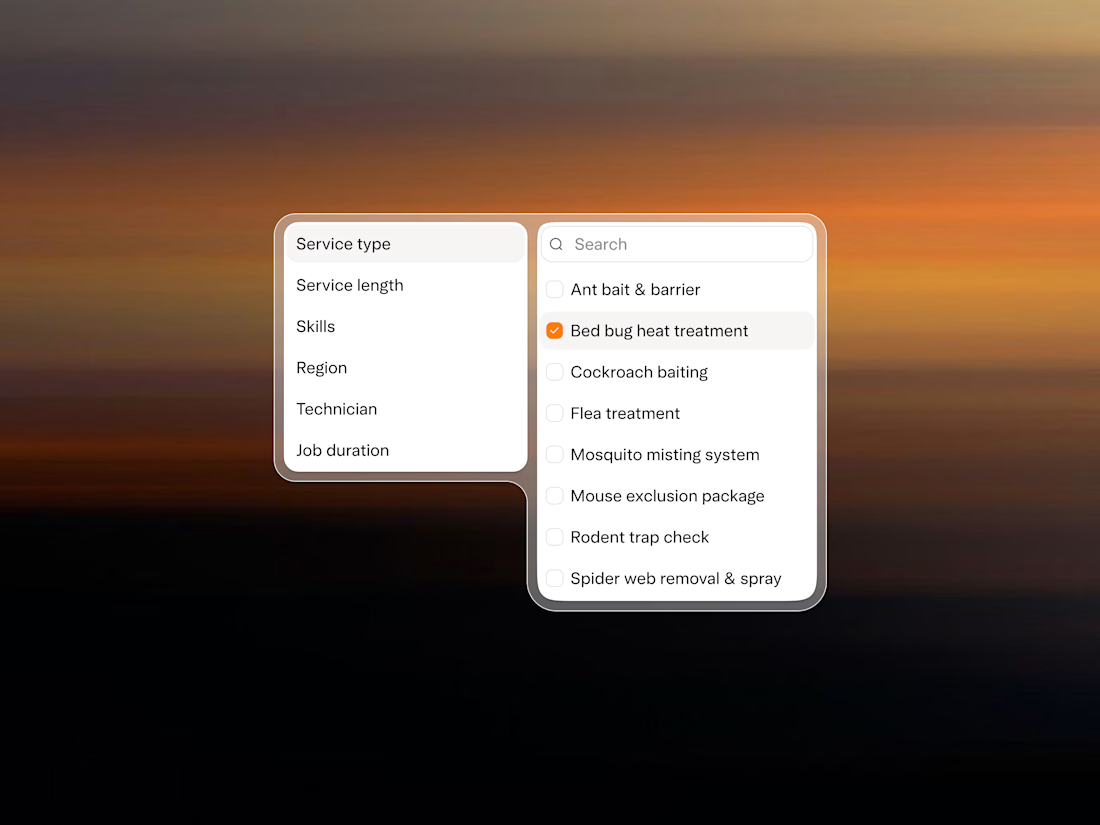
2/ At the component level, the interaction patterns show whether you are filtering technicians, service types, or job durations.
The result is a system where you don't need many text sizes, components, or colors because everything follows a coherent logic.
The filter panel is one example of that direction.