The network for creativity
Join 1.25M professional creatives like you
Connect with clients, get discovered, and run your business 100% commission-free
Creatives on Contra have earned over $150M and we are just getting started
Back to feedPost
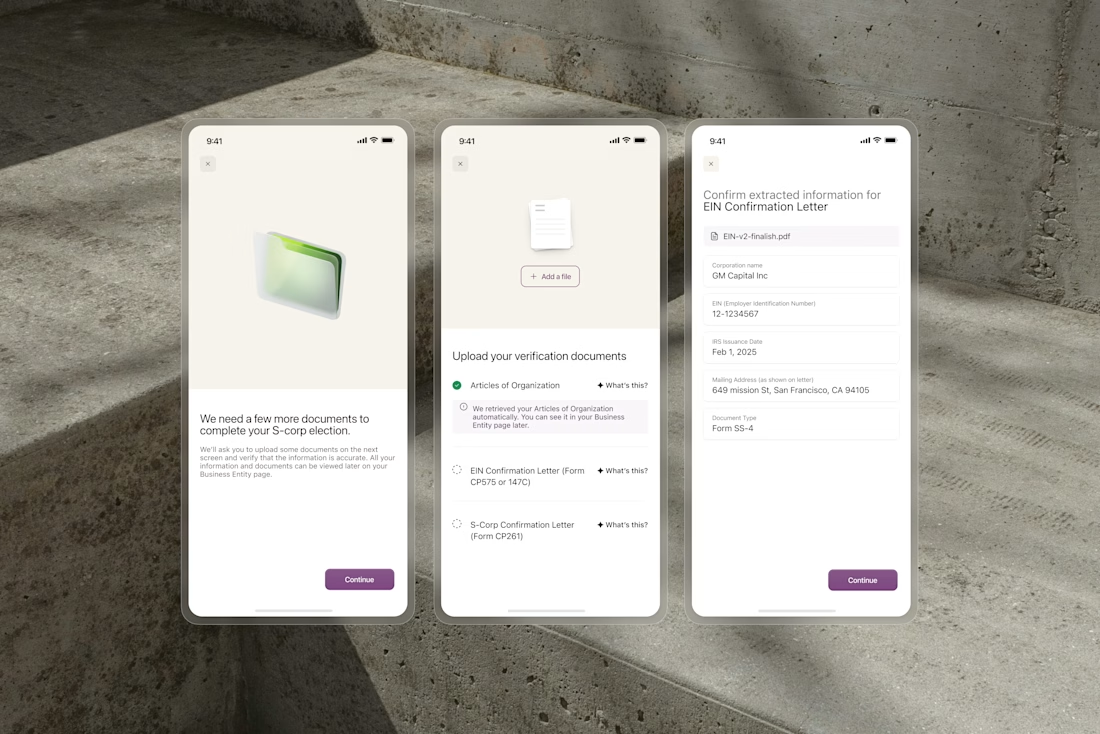
OCR extracts business names, formation dates, and addresses from uploaded documents automatically. But users still need to trust what the system found before anything gets submitted.
We designed the confirmation flow around editable fields that surface extracted data clearly. Users review what the system found and correct where needed, rather than typing everything from scratch. The design choice was to make the AI output feel transparent and controllable.
The design choice was to make the AI output feel transparent and controllable. The result is a flow that reduces data entry to the minimum while keeping users fully in control of what gets submitted.

Great work!

Editable-by-default beats a blind accept/reject toggle here — it keeps the correction cost at one field when OCR gets a formation date wrong, instead of forcing a full manual re-entry the moment trust breaks on a single value.

Confirmation flows for OCR-extracted data are so easy to get wrong, either too much friction re-verifying everything or too little and errors slip through. Did you test how far you could push toward minimal review before people stopped trusting the auto-fill entirely?

The editable-fields approach is smart, letting people verify OCR output instead of trusting it blindly probably saves you a ton of support tickets down the line.


Looks good. I like the minimalist approach. Nice and clean.

This is great tho

Making AI output editable rather than just showing a result is such a smart trust-building move. Users feel in control instead of just hoping the system got it right.

The editable confirmation step does more than correct OCR errors. It creates an audit boundary between machine extraction and user intent. I’d surface confidence selectively by flagging uncertain fields instead of asking users to distrust every value equally. Strong product thinking.

Good work

Love this approach Making AI-generated data editable and transparent is such a smart UX decision. It reduces friction while still giving users full control. Really clean work!
The UX tension you've solved here is the right one. AI does the extraction but the user has to own what gets submitted, so locked read-only fields would create exactly the wrong feeling. Editable fields that surface the extracted value flip the dynamic from rubber-stamping to...

I like the clean interface + UX decision you made.
Goated work

One detail I would want in this review step is a link from each extracted value back to the source region. A wrong date can still look perfectly plausible in an editable field. Did you include a document crop or highlight beside the field, and how did you balance that extra context against keeping the form compact?

This is a smart UX pattern letting users review and edit AI-extracted data builds trust without adding extra friction.

Editable fields are the right call. OCR is never perfect, so letting people correct the extraction keeps trust instead of forcing a restart.

Nice Design

Would you keep the user's corrections if they upload the document again? Having to fix the same date twice would make this flow feel much less helpful.


There's a lot of nuanced involved with this. When you're changing the date we need to know if it's because the AI captured it wrong or because your document is wrong given it has legal implications.
Many small challenges like this with it.
That distinction makes sense. I meant retaining a confirmed OCR correction for the same document, rather than silently applying it to a new upload. Do you show the extracted value alongside the corrected one?
Yes, the original document is highlighted with the extracted fields!

the checklist showing which document is already confirmed before you open the next one is what actually kills the anxiety here, not the editable fields

Letting people check what the OCR found before it's saved is the part most onboarding flows skip

The original-value trace is the part I’d care about most here. Editable fields are good, but for legal/business data I’d want every correction to preserve what OCR saw + what the user changed. Otherwise you fix the UX and lose the audit trail.

Your UI design looks very minimal and clean. However, I noticed a potential UX issue: users may feel confused about what happens after they upload a file, as the next step and overall goal aren't clearly communicated. I’d suggest introducing a clear, step-by-step process with...

Editable fields with the source visible is the right call. People trust extracted data a lot more when they can see where each value came from and fix it in place.

Flagging only the low-confidence fields (say, a smudged formation date) instead of making every extracted value equally editable could cut review time even further. Did you experiment with showing confidence levels, or did users trust the flow more when everything looked equally reviewable?

This is the right trust boundary for AI output. Business names, formation dates and addresses carry real consequences if they're wrong, so making the extracted data editable — rather than asking users to blindly accept it before submission — keeps the automation useful without...

Showing what the system found and letting people fix one field is the whole trust game. Nobody minds AI being wrong, they mind not being able to correct it fast.

This is the right trust boundary for AI output. I have worked on OCR flows before and blind accept is where errors ship. Keeping every extracted field editable while surfacing what the system found is the detail I would fight for too.
The network for creativity
Join 1.25M professional creatives like you
Connect with clients, get discovered, and run your business 100% commission-free
Creatives on Contra have earned over $150M and we are just getting started











Related posts

The only glow on the Kestra page is the reflective strip on the jacket. It comes from the image itself, so the Framer layers on top stay flat: grey, white and mono text, no glow effects on buttons or headings. That keeps the page easy to edit, because nothing in the UI depends on one lighting setup. If you swap the photo, the glow goes with it. Would you add a glow effect in Framer or keep it in the image?


wow, nothing but top notch

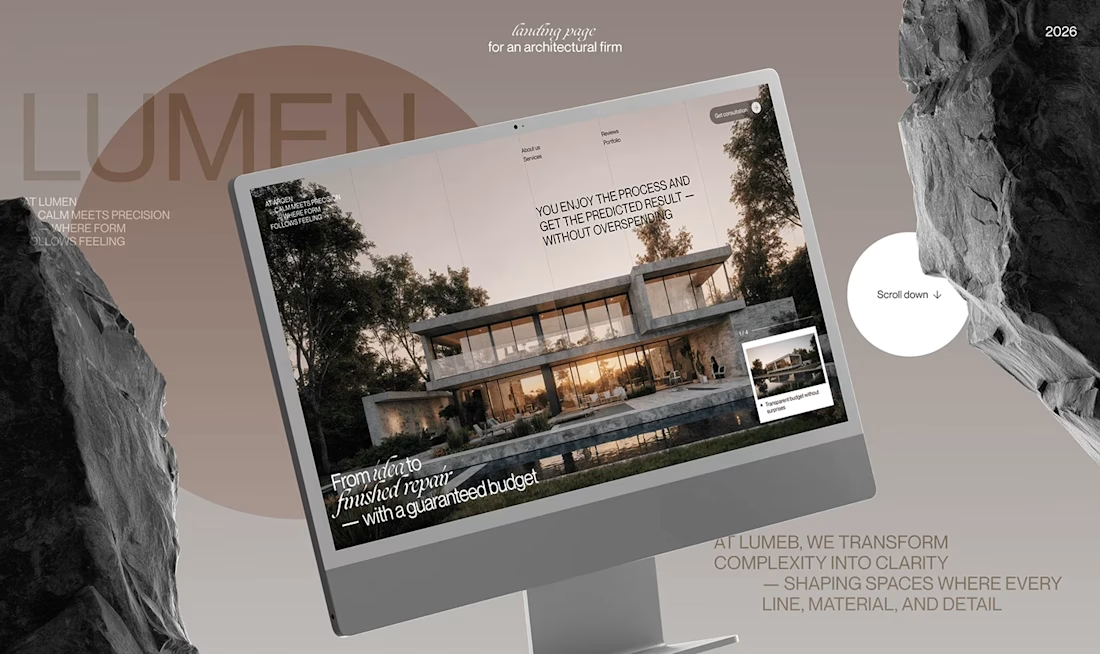
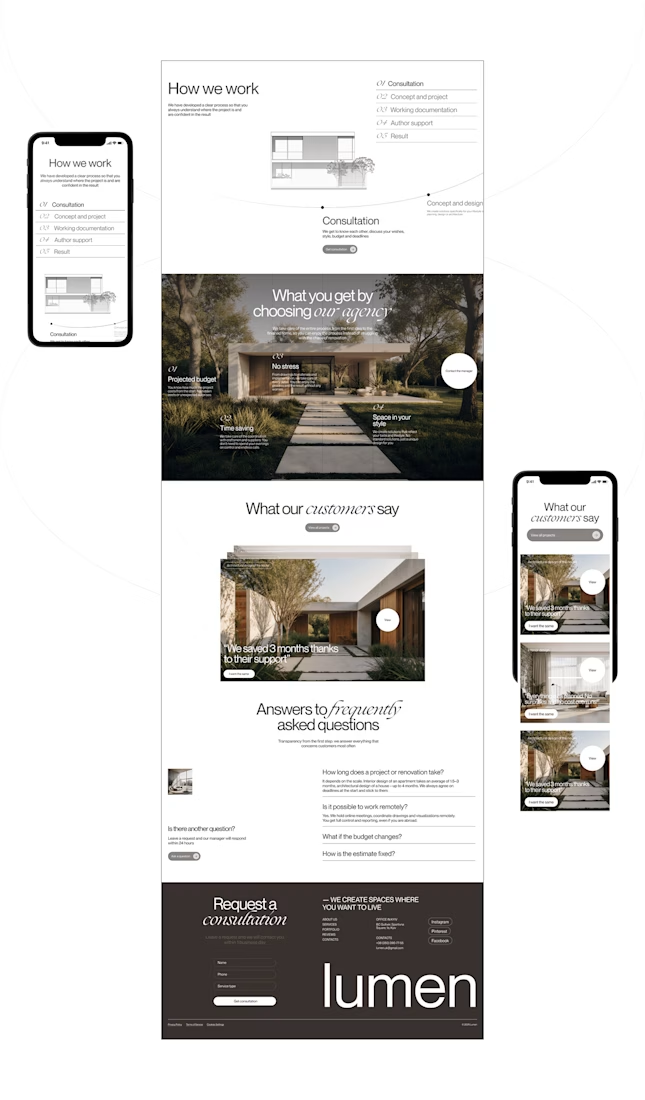
Lumen — UX/UI Design for a Premium Architecture Studio
Sometimes, the smallest details are what give a design its personality.
For Lumen, I found myself exploring how typography, architectural photography, colour, and layout could work together to tell a story before someone even starts reading.
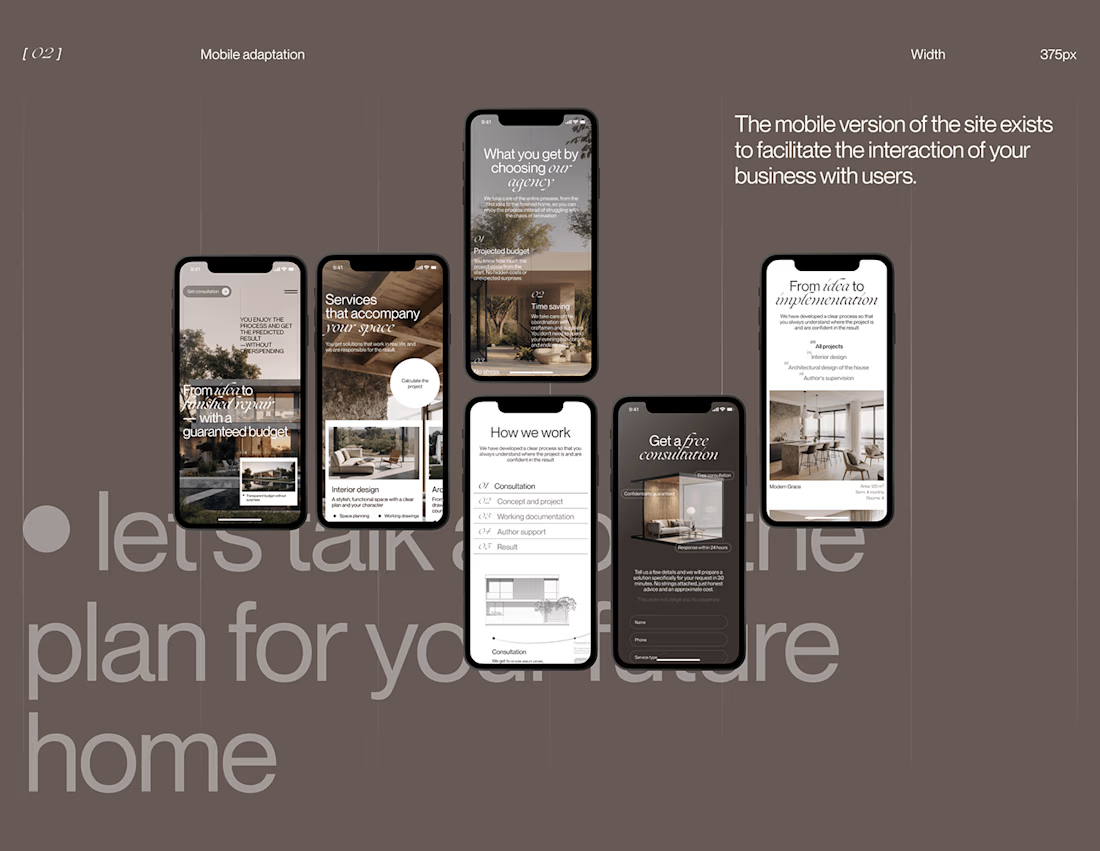
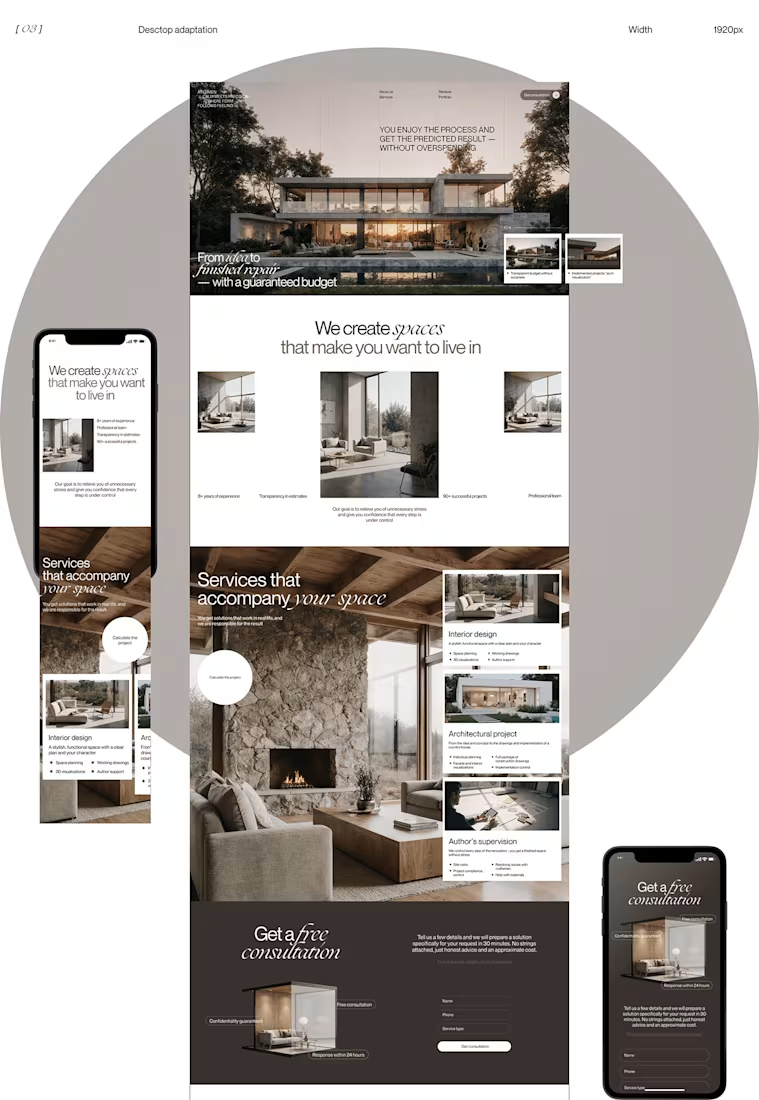
I played with oversized text, warm brown tones, editorial layouts, and a mobile experience that carries the same visual character as the desktop design.
I especially enjoyed putting the mobile screens together. Seeing the different sections come to life on a smaller screen made the whole concept feel more complete.
It's always interesting to see how different creative decisions can change the way people experience a brand.
What's one design detail that can make you appreciate a website even before you've explored everything?
#WebDesign #CreativeDesign #UIUXDesign #Architecture



i love this soooo wellllll, i just said welll with 4 l's thats how good this is

sentences
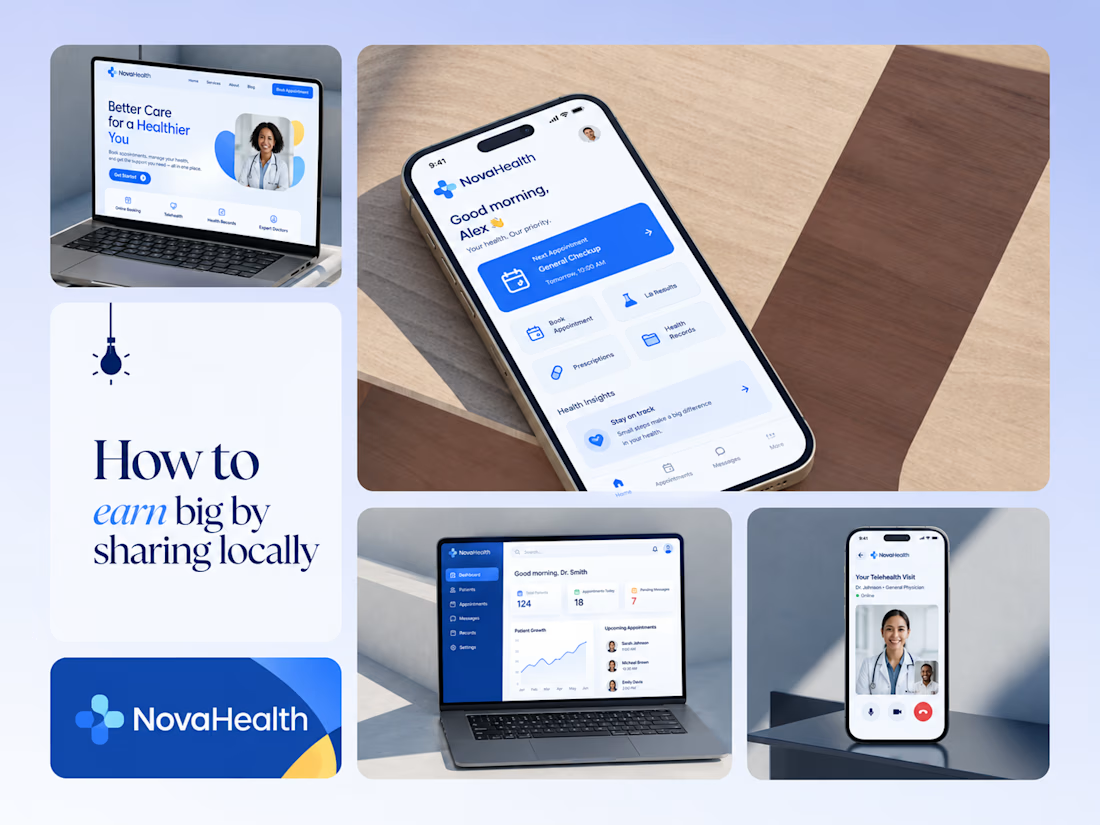
One brand, three screens: patient, doctor, and the video call between them.
NovaHealth is a healthcare brand and product system I designed from logo to apps. Healthcare software tends to feel either cold and clinical or too cluttered to open. I wanted something calm for a worried patient and quick for a doctor between appointments.
The logo breaks the classic medical cross into soft, rounded blocks in two blues, so it reads as “health” without feeling sterile.
The patient app opens with one thing: a solid blue card showing your next appointment. It’s the only fully saturated block on the screen, so nothing competes with it.
The doctor dashboard is built for a glance. Total patients, today’s appointments, and pending messages come first, in the same blue and rounded style as the patient app.
The telehealth screen has almost no UI. The doctor’s face fills the screen, with just three controls: mic, camera, and a red end-call button, the only red in the whole system.
One rule ties it together: blue means action, white space means calm, and yellow is a small spark of warmth.
Which screen should I break down next? 👇


Great medical brand design specially the phone app UI and top left laptop dashboard 🔥🔥🔥
great job Joshua ❤️🎉