The network for creativity
Join 1.25M professional creatives like you
Connect with clients, get discovered, and run your business 100% commission-free
Creatives on Contra have earned over $150M and we are just getting started
Back to feedPost

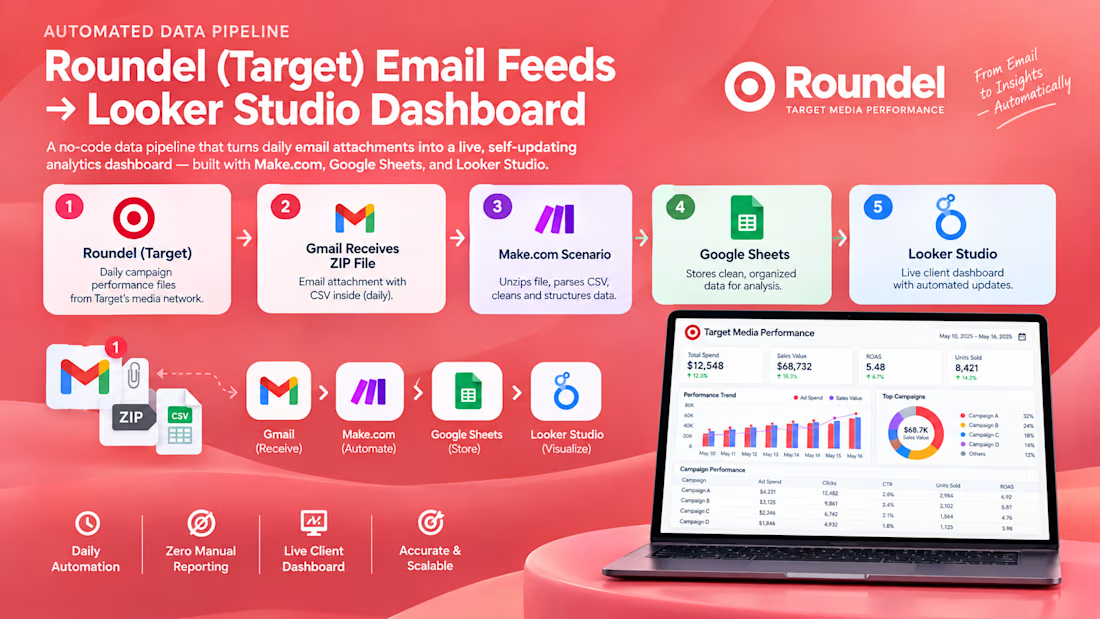
Automating Retail Media Reporting: Roundel (Target) Email Feeds → Looker Studio Dashboard
A no-code data pipeline that turns a daily email attachment into a live, self-updating analytics dashboard — built with Make.com, Google Sheets, and Looker Studio.
Overview
A retail media client running campaigns on Roundel, Target's in-house media network, needed daily performance data visible in a dashboard — without anyone manually downloading, unzipping, and uploading a CSV every morning. Roundel delivers its scheduled reports as a zipped CSV attachment via automated email, with no native API or direct BI connector available for smaller accounts. I designed and built an end-to-end automation that watches the inbox, extracts the report, appends it to a live dataset, and feeds a Looker Studio dashboard — fully hands-off, running once a day, every day.
The Problem
Roundel's reporting exports arrive as:
A daily email from a no-reply system address (roundel-kiosk-no-reply2@target.com)
Containing a .zip attachment
Inside which sits a Table 1.csv file with the actual performance metrics
There's no direct connector between this format and a BI tool. Left as-is, someone has to check the inbox every day, download the zip, extract it, open the CSV, and manually paste or upload the new rows into wherever the dashboard reads from. That's a daily manual task with real room for error — missed days, duplicate imports, or someone simply forgetting.
The brief was simple: make the data appear in the dashboard on its own, every day, with zero manual touch.
The Approach
Rather than reach for a custom script and server to host it, I used Make.com as the orchestration layer — no infrastructure to maintain, visual and auditable, and easy to hand off or modify later.
Pipeline architecture:
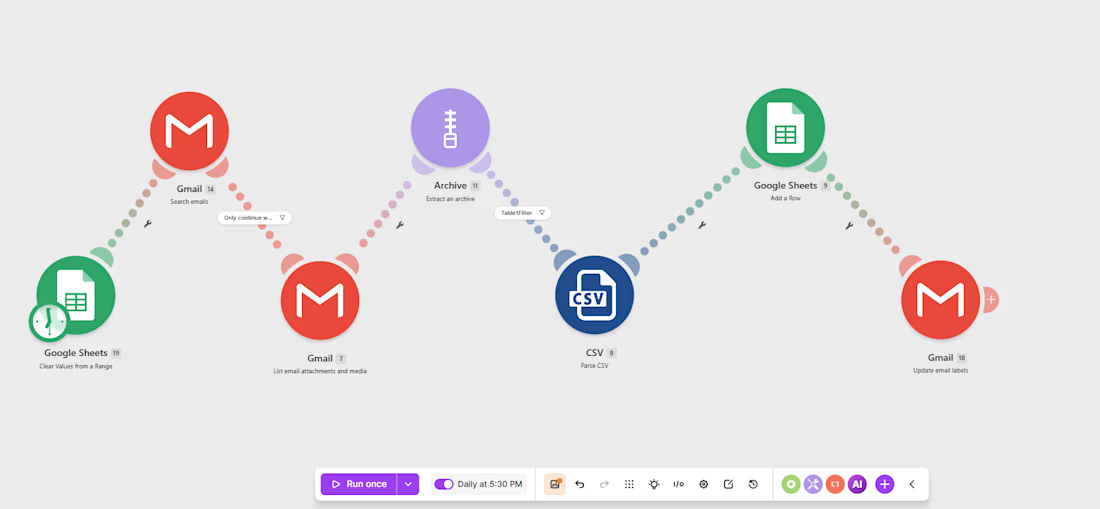
Trigger: A Gmail "Watch Emails" module filters specifically for messages from the Roundel no-reply address containing a zip attachment, so the scenario only fires on the relevant daily report — not on any other inbox activity.
Extraction: The zip attachment is unpacked in-flow using Make's Archive module, with no temporary storage or third-party unzip service involved.
File targeting: The scenario filters the unzipped contents down to the one file that matters — Table 1.csv — ignoring any other files bundled into the same archive.
Parsing: The CSV is parsed row by row directly inside the scenario.
Load: Each row is appended to a master Google Sheet, which acts as the persistent, growing dataset behind the dashboard.
Confirmation: Once every row from that day's file is successfully written, the original email is labeled/marked as imported — so there's a built-in audit trail of exactly which reports have been processed, and the scenario never double-imports a file it's already handled.
From Data to Dashboard
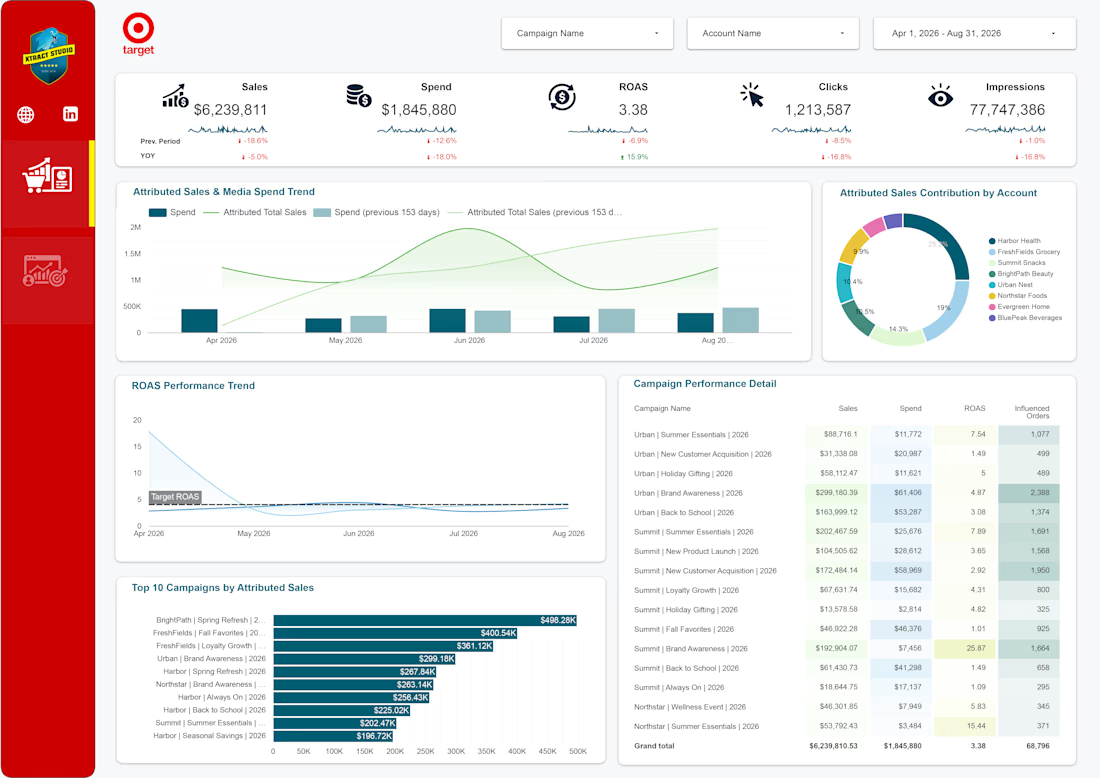
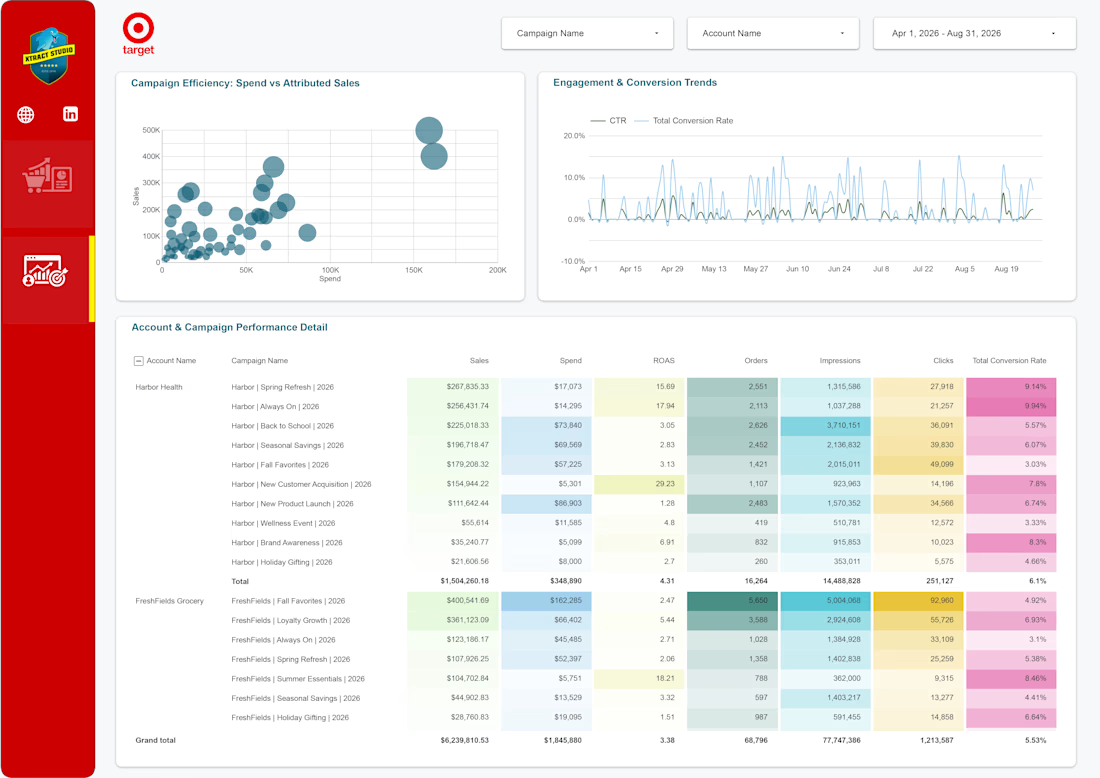
The Google Sheet isn't just a landing zone — it's the live data source for a Looker Studio dashboard built on top of it. As new rows append daily, the dashboard's charts, trend lines, and KPI cards update automatically on next load, with no manual refresh of the underlying data needed. The result is a reporting layer that behaves like a connected BI system, built entirely on tools that don't require an engineering team or ongoing hosting cost.
Why This Approach
No API dependency: Roundel doesn't expose a public reporting API for this tier of account, so this pipeline works entirely off the one channel that is available — the scheduled email.
No infrastructure to maintain: Everything runs inside Make.com's cloud — no server, no cron job, no credentials to rotate manually.
Idempotent by design: Marking the email as imported only after a successful write means a failed run never gets silently marked as done, and the scenario won't double-process the same report.
Fully auditable: Every import leaves a trace — the labeled email, the appended rows, and Make's own execution history — so troubleshooting a bad day's data takes minutes, not guesswork.
Outcome
Zero manual touch on a previously daily manual task
Same-day data freshness in the dashboard, every single day
Error-resistant, with built-in duplicate protection and a clear audit trail
A pattern that's now reusable for any client whose reporting platform only offers "scheduled email with attachment" as an export option — a surprisingly common constraint in retail media


The network for creativity
Join 1.25M professional creatives like you
Connect with clients, get discovered, and run your business 100% commission-free
Creatives on Contra have earned over $150M and we are just getting started



Related posts




Awesome dude

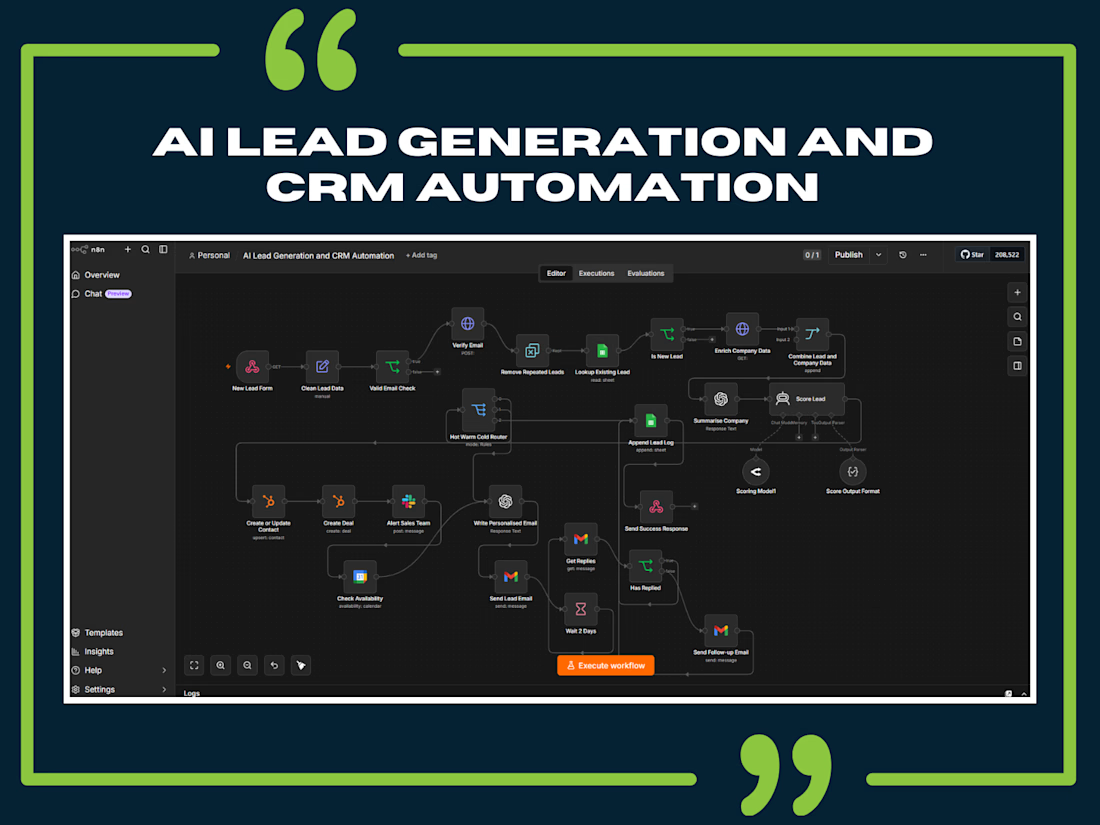
AI Lead Generation and CRM Automation | Intelligent Sales Workflow with n8n
Turn Every Lead into an Opportunity with AI-Powered Automation
Businesses lose valuable sales opportunities every day because of slow responses, scattered customer information, manual data entry, and inconsistent follow-ups.
This AI-powered Lead Generation and CRM Automation workflow is designed to solve these challenges by connecting lead capture, intelligent qualification, CRM management, sales notifications, and automated follow-ups into one streamlined system.
How the Automation Works
1. Automated Lead Capture: Collects incoming leads through a connected form or webhook and prepares their information for processing.
2. Email Validation and Duplicate Detection: Checks lead email information and identifies existing records to reduce duplicate entries.
3. Company Data Enrichment: Retrieves additional company information to provide useful context for sales qualification.
4. AI-Powered Lead Qualification: Uses AI to analyze lead and company information, summarize business needs, and support intelligent lead scoring.
5. Smart Lead Routing: Organizes leads into Hot, Warm, and Cold categories so sales teams can prioritize the most promising opportunities.
6. HubSpot CRM Integration: Creates or updates contacts and deals to keep customer information organized.
7. Instant Sales Notifications: Sends Slack alerts to notify the sales team about important leads.
8. Personalized Email Communication: Generates relevant email messages and supports automated customer outreach.
9. Follow-Up Automation: Uses Gmail, reply checks, and scheduled waiting periods to manage follow-up communication.
10. Google Sheets Lead Tracking: Maintains lead records and activity logs for improved visibility and management.
The Business Problems This Solves
Lost Leads: Prevents valuable opportunities from slipping through disconnected systems.
Manual Data Entry: Reduces repetitive administrative tasks.
Slow Lead Responses: Supports faster and more consistent customer communication.
Duplicate CRM Records: Helps identify existing contacts and maintain cleaner data.
Poor Lead Prioritization: Uses AI-assisted scoring to identify high-potential opportunities.
Missed Follow-Ups: Automates follow-up scheduling and reply monitoring.
Disconnected Sales Processes: Connects marketing, CRM, and sales communication tools.
Business Value
This intelligent automation is designed to help businesses:
Save Time by reducing repetitive manual work.
Improve Lead Management with organized customer records.
Increase Sales Efficiency through intelligent lead qualification.
Accelerate Follow-Ups with automated communication.
Improve Team Productivity with instant sales notifications.
Scale Business Operations through connected automation workflows.
Create More Sales Opportunities by improving lead handling and prioritization.
Instead of managing every lead manually, businesses can build a smarter, faster, and more scalable sales process.
Technologies & Integrations
n8n | AI Agents | OpenAI | HubSpot CRM | Google Sheets | Gmail | Slack | Google Calendar | Webhooks | API Integrations
Smarter Lead Management. Faster Follow-Ups. Better Sales Opportunities.
Let's Build Something Smart Together!
#AIAutomation #n8n #LeadGeneration #CRMAutomation #AIAgents #HubSpot #SalesAutomation #BusinessAutomation #WorkflowAutomation #ArtificialIntelligence
Lead GenerationaiautomationleadgenerationcrmautomationAutomation EngineeringBusiness Workflow AutomationGoogle SheetsHubSpotN8N



Great work



Full of visual hierarchy