The network for creativity
Join 1.25M professional creatives like you
Connect with clients, get discovered, and run your business 100% commission-free
Creatives on Contra have earned over $150M and we are just getting started
Back to feedPost
AeroOps - Intelligent Drone Operations and Mission Recovery
I built AeroOps, an intelligent drone operations platform designed to help operators monitor their fleet, manage missions, identify risks, and work through recovery options when things go wrong.
The idea started with a simple question: When a drone mission goes wrong, what happens next?
I wanted to explore what a drone operations platform could do beyond showing locations, displaying statistics, and sending alerts. When a mission runs into trouble, the operator still needs to understand the situation, consider the available options, and decide how to move forward.
That is what AeroOps is built around. It brings mission monitoring, fleet management, risk detection, and recovery planning into one place, giving operators a clearer view of their operations and the problems they may need to deal with.
- The Problem I Wanted to Solve
A drone mission does not always go according to plan. A battery might run low, a drone could become unavailable, or a mission might take longer than expected. There can also be scheduling problems when an operator is already responsible for several tasks.
These issues become more complicated when multiple drones and missions are involved. An operator might receive an alert about a low battery, but that alert does not answer the bigger questions. Can the mission still be completed on time? Is another drone available? Would changing the assignment affect another mission? What is the most practical option?
I wanted AeroOps to help bring these questions into one place instead of leaving the operator to work through everything separately.
The goal is not simply to tell someone that something has gone wrong. It is to help them understand the problem and evaluate what they can do about it.
- How AeroOps Works
AeroOps brings the main parts of drone operations together in one workspace, Operators can review their missions, check the status of their fleet, identify potential problems, and explore ways to respond.
The Overview dashboard provides a general picture of the operation, including mission activity, fleet status, alerts, and recent events. From there, operators can open individual missions, review their progress, and investigate issues that could affect completion.
The platform also has separate areas for mission planning, fleet management, risk monitoring, recovery decisions, and reporting. Each area serves a different purpose, but they are designed to work together rather than feel like unrelated pages.
For me, the important part is how these pieces connect, a risk affecting a mission should lead the operator toward the relevant information and possible responses, not leave them searching through the application to figure out what to do next.
- The Mission Recovery Engine
The Mission Recovery Engine is the main idea behind AeroOps and the feature I want people to understand when they explore the project
A dashboard can tell an operator that a mission is at risk, the harder part is working out what should happen next, and that's why we have the Recovery Lab. It is designed to help with that decision
When a mission encounters a problem, the operator can review the situation and compare possible recovery options. The options are intended to include details such as estimated completion time, potential delay, cost, and feasibility ( this gives the operator more information to consider before choosing a response )
By bringing these trade-offs together, AeroOps explores how operators could make more informed decisions instead of reacting to an alert without seeing the wider situation
- A Practical Example: When a Mission Goes Wrong
Consider a survey mission that needs to be completed before a deadline. The assigned drone develops a low-battery problem, and the operator responsible for the mission is already handling other tasks.
The mission is now at risk, and simply displaying a battery warning is not enough to resolve the situation.
In AeroOps, the operator can review the mission, identify the risks in the Risk Center, and open the Recovery Lab to examine the available options. They can compare the proposed responses, consider the expected delays and feasibility, and choose a suitable option.
After the operator confirms a recovery action in the demo environment, the application is intended to reflect the result in the relevant mission records, drone assignment or status, recovery history, and activity feed.
This is the workflow I want to highlight: a problem appears, the operator investigates it, the available responses are compared, and a decision is recorded.
It gives the project a practical purpose beyond displaying information on a dashboard.
-- Inside the AeroOps Console
- Overview Dashboard
The Overview page gives operators a central place to check the current state of their operation. It brings together mission activity, fleet information, operational metrics, alerts, and recent events so they can understand what is happening without opening every section individually.
- Live Missions
Live Missions focuses on individual missions. Operators can review routes, waypoints, progress, and drone information to get a clearer picture of how a mission is progressing.
- Mission Planner
Mission Planner is designed to help organise missions, schedules, and assignments. It provides a dedicated place to manage the planning side of drone operations.
- Fleet Management
The Fleet section provides a central view of drone records and their operational status. This helps operators review the equipment associated with their missions and understand which resources may be available.
- Risk Center
Risk Center brings attention to issues that could affect mission completion. These include scenarios such as low battery, an unavailable drone, operator workload, or a mission that is falling behind schedule.
- Recovery Lab
Recovery Lab is where the operator moves from identifying a problem to evaluating possible responses. It is the main decision-making part of AeroOps, allowing the recovery workflow to be explored in a controlled environment.
- Demo Simulator
The Demo Simulator makes it possible to explore mission activity and risk scenarios without needing a physical drone. It gives people a way to test and demonstrate the intended workflow using simulated data.
- Reports
Reports provides a place to review mission outcomes and operational performance using the records available in the application. This can help users look back at what happened during a mission and review the results.
- Settings
Settings contains application preferences and configuration options. The aim is to let users adjust the experience to suit their needs.
- Why I Built a Demo Simulator
I wanted people to be able to try AeroOps without needing to own a drone or connect physical hardware just to understand the concept.
The simulator provides a controlled environment for demonstrating mission progress, simulated telemetry, and risk scenarios. This makes it possible to reproduce a problem and walk through the recovery process during a demonstration.
It also gives me a way to test how the different parts of the application are supposed to work together.
For example, I can demonstrate a mission becoming at risk, open the recovery workflow, and show how the application is intended to reflect the selected response. That is much easier to present when the scenario can be repeated without relying on a physical flight.
The simulated environment is clearly different from actual drone operations. Its purpose is to demonstrate the product workflow, not to suggest that a real drone has received a command or completed a flight.
- Demo Mode and Live Mode
AeroOps separates simulated activity from the real-world data that could be provided by a compatible drone integration.
Demo Mode is intended for exploring the application, testing scenarios, and demonstrating the recovery workflow. Live Mode is intended for information supplied by a supported real-world connection.
If no live data source is connected, the application should make that clear rather than presenting simulated records as real telemetry.
Actual drone connectivity would require compatible hardware, a supported communication method or API, and additional integration work. Selecting Live Mode on its own does not mean a drone is connected or can be controlled.
- Who Could Use AeroOps?
I see potential uses for AeroOps in areas where teams depend on drones to carry out planned work.
Search-and-rescue teams may need to keep track of equipment and mission progress when conditions change. Surveying and agricultural operators may need to organise multiple assignments and deal with unexpected delays. Infrastructure inspection teams may need a clearer view of their missions, while commercial drone service providers may benefit from having fleet information and recovery records in one place.
These are potential applications rather than claims of existing deployments. Each real-world use would require the appropriate hardware integrations, operational procedures, and safety checks.
What connects these use cases is the need to keep track of several moving parts and respond when a mission does not go according to plan.
- What Makes AeroOps Useful?
The main value of AeroOps is the connection between monitoring a mission and deciding what to do when something goes wrong.
Operators can review mission information and fleet status, identify risks, compare recovery options, and keep a record of the response. Bringing these tasks together can make operations easier to understand and help teams make more informed decisions.
What matters most to me is that AeroOps is designed around the next step after a problem appears. It explores how an operations platform can help people move from identifying a risk to evaluating possible solutions.
Challenges and the Road Ahead
AeroOps is still a work in progress. One of the biggest challenges is making sure the different parts of the application work together reliably, especially when mission data changes or a recovery action is confirmed.
Another important step is connecting the platform to compatible real-world drone systems. That would require supported integrations, reliable data exchange, and careful testing to ensure that the information displayed reflects actual operating conditions.
I also want to improve the recovery process, expand the scenarios that can be tested in the simulator, and make the platform more useful for operators managing multiple missions.
These are areas for future development, not capabilities I want to claim before they are implemented and tested.
- Overall
Building AeroOps has given me an opportunity to explore a practical problem at the intersection of automation, decision-making, and drone operations
The project is built around a straightforward idea: monitoring a problem is only part of the job, understanding the available options and deciding what to do next matters just as much
Through its mission dashboard, risk monitoring, Recovery Lab, and demo simulator, AeroOps explores how those steps could work together in one platform.
AeroOps is about helping drone operators stay informed, respond to changing conditions, and find a way forward when a mission does not go according to plan.


Great 👍🏻

Thank you
The network for creativity
Join 1.25M professional creatives like you
Connect with clients, get discovered, and run your business 100% commission-free
Creatives on Contra have earned over $150M and we are just getting started











Related posts

Loopwise — Every Complaint Deserves a Resolution 🚀
Turning customer complaints into clearer workflows and better customer experiences.
🔗 Live Product: https://loopwise-app.base44.app
🌐 Follow the Build
LinkedIn: https://lnkd.in/p/dxHKFiw3
Built with Base44 for the #Base44Challenge.
💡 The Vision
Every business receives customer complaints. The real challenge is making sure those complaints are seen, understood, and followed up on.
That's why I built Loopwise — a customer feedback and complaint management platform designed to bring customer submissions and case management together in one organized workspace.
My goal is to make the journey from a customer's problem to a team's next steps clearer, simpler, and more manageable.
🎯 The Problem I'm Solving
Customer complaints can become difficult to manage when information is scattered, context gets lost, or teams lack a consistent process for follow-up.
Businesses need more than a place to receive feedback. They need a structured way to review issues, prepare responses, preserve important information, and work toward resolutions.
Loopwise is my attempt to make that workflow simpler.
✨ What Loopwise Offers
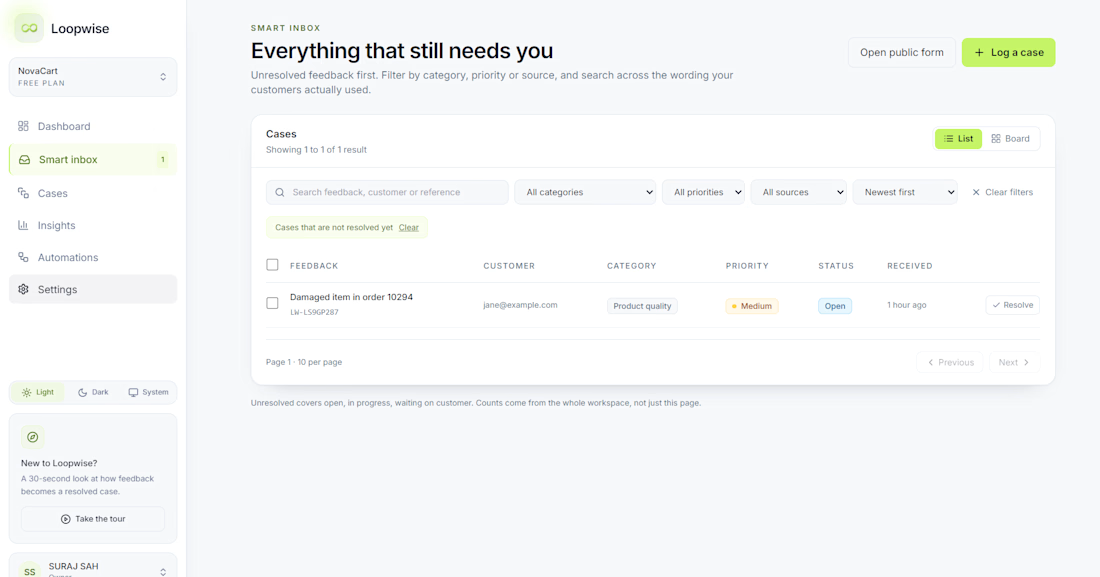
📥 Smart Inbox
A centralized place for teams to review incoming customer complaints.
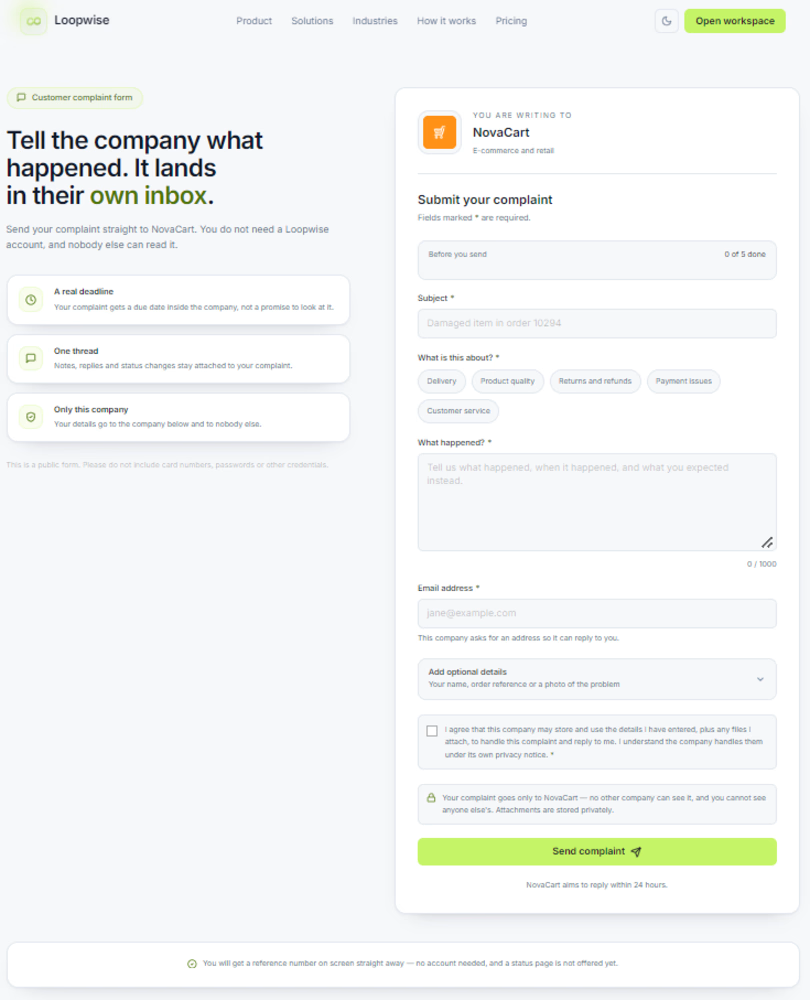
📝 Public Complaint Form
A straightforward customer-facing experience for submitting issues and feedback.
🏢 Dedicated Business Workspaces
Workspace setup with a company name, logo, and industry context.
📋 Case Management
An organized view of individual complaints and the information needed for follow-up.
💬 Response Drafts
Prepare and save customer replies directly within the case workflow.
🗒️ Internal Notes
Keep important context and follow-up instructions available to workspace members.
Each feature supports the same objective: helping teams move from receiving a complaint to managing the next steps.
🛍️ The Demo: A Realistic Customer Scenario
For my walkthrough, I created a fictional e-commerce business called NovaCart.
Imagine a customer receives a damaged product. They submit a complaint through the public support form. The NovaCart team can then locate the submission in the Smart Inbox, review the case, prepare a response draft, and document the next steps using internal notes.
The workflow is simple:
Collect → Review → Respond → Follow Up
This scenario demonstrates how Loopwise connects the customer-facing experience with the team's case-management process.
🎨 Design & Development
I built and published Loopwise using Base44, focusing on both the product's visual identity and its core workflow.
The interface combines a deep navy background, electric-lime accents, consistent branding, and a modern SaaS-inspired layout.
Rather than building only a landing page, I wanted to create a working product experience that connects customer complaint submission with the tools a team needs to review and manage cases.
🚀 What's Next?
Loopwise is a work in progress, and I see opportunities to make it even more useful.
My next priorities include:
More reliable workflow automation.
AI-assisted complaint classification and prioritization.
Further mobile usability testing.
More complete customer email integration.
These are planned improvements, and I'm continuing to develop the product toward that vision.
💚 The Takeaway
Loopwise started with one simple idea: a customer complaint shouldn't get lost in the process.
I built it to help businesses bring customer issues into focus, organize their cases, and make the next steps easier to manage.
I'm excited to share what I've built with Base44 and continue improving it.
Loopwise — Every complaint deserves a resolution.
Built with @base44

Navy and lime look sharp. Which feature are you building next?

I built FlowPilot AI ⚡ — an AI-powered operations platform that transforms customer requests into intelligent workflows.
From AI-powered request analysis and smart prioritization to conditional automation and human approval, FlowPilot helps small businesses streamline operations and reduce repetitive work.
Built with @Base44 for the #Base44Challenge

There's a lot to appreciate in this piece. Great job!

Every morning, before the sun is fully up, Nigeria's motor parks are already moving.
At Jibowu, Ojota, Utako, Mile 1 and hundreds of parks across the country, buses are loading, and tucked between the passengers' bags are parcels. A mother sending foodstuff to her son at university in Sokoto. A trader in Onitsha restocking a shop in Kano. Documents, phones, fabric, medicine, gifts. All of it riding to towns and villages that most courier companies don't even list on their website.
This is Africa's real delivery network. It is fast, it is everywhere, and it runs on trust. But it's also invisible.
You hand your parcel to a driver you just met. You collect a number scribbled on paper. Then you wait, and you call, and you call again. Is it on the road? Has it arrived? Did it get lost at the next park? There's no tracking, no receipt and no record. When something goes wrong, there's no one to turn to.
The drivers aren't the problem. They are the heroes of this story. They drive these routes every single day. What's missing is the layer that connects them to the people who need them.
So for Base44's #GiveItAGlow challenge x Contra, I gave that network a glow-up and called it Waybill.
Waybill puts your parcel on a bus that's already going. You search your route and see the drivers who are loading or about to depart, with their price, vehicle and rating. You pay safely in the app, and the driver's number unlocks. At the park, the parcel is photographed and weighed. Then you and your receiver watch it move, town by town, until it's delivered.
Then I made sure nobody has to chase anybody. Ten automations run quietly in the background:
• You book, and an animated email confirms it's waiting for the driver to accept
• Drivers on that exact route are alerted the moment a paid parcel appears
• The receiver gets a tracking link at every stage, with no app or account needed
• Unpaid bookings get a reminder, then cancel themselves
• A parcel that goes quiet for 6 hours nudges its driver. After 12, the team is alerted
• Drivers who stop updating drop out of search, so you only see who is really moving
• Every Monday, drivers get their earnings. Every morning, the team gets an ops digest
The design comes straight from the park: headlines set like painted route boards, danfo yellow and road-sign green, and a waybill slip, the same paper ticket every park hands you, that fills itself in and gets stamped CONFIRMED.
For a driver, this means extra income from seats and space that already exist. For a sender, it means peace of mind. For a small business, it means reaching customers in towns that were too far before. Multiply that across every park in Nigeria, then across Africa, and you start to see how big this can be.
The infrastructure is already on the road. It just needed a glow-up. 🇳🇬
Built end to end with @Base44: the app, database, workflows and emails. Made in Sokoto by Low Code Africa.
(Video: a walkthrough of Waybill)
Try it: https://waybill.base44.app
#GiveItAGlow #Base44Challenge #BuiltWithBase44 #Nigeria #Africa #Logistics
https://contra.com/community/topic/base44giveitaglowchallenge

This is a brilliant solution to a real African problem! 🔥👏 Turning our existing transport network into a reliable, trackable delivery system is a smart move. Waybill is more than an app; it’s a bridge between trust, technology, and everyday logistics. 🇳🇬🚀