The network for creativity
Join 1.25M professional creatives like you
Connect with clients, get discovered, and run your business 100% commission-free
Creatives on Contra have earned over $150M and we are just getting started
Back to feedPost

📄 Case Study: Enterprise Client Portal & Project Management Dashboard
Metadata
Project Title: Northgate Capital B2B Client Operations Portal
Client / Niche: Northgate Capital (B2B Financial Services & Tech Integration)
Industry: Financial Tech / Enterprise Project Management
Role: Lead UI/UX Designer & Systems Integration Architect
Tech Stack: React, Tailwind CSS, Dark Mode UI System, Custom Metric Tracking Components
Key Metric Target: Streamline milestone approvals, document sign-offs, and live project tracking for high-ticket clients
1. Executive Summary
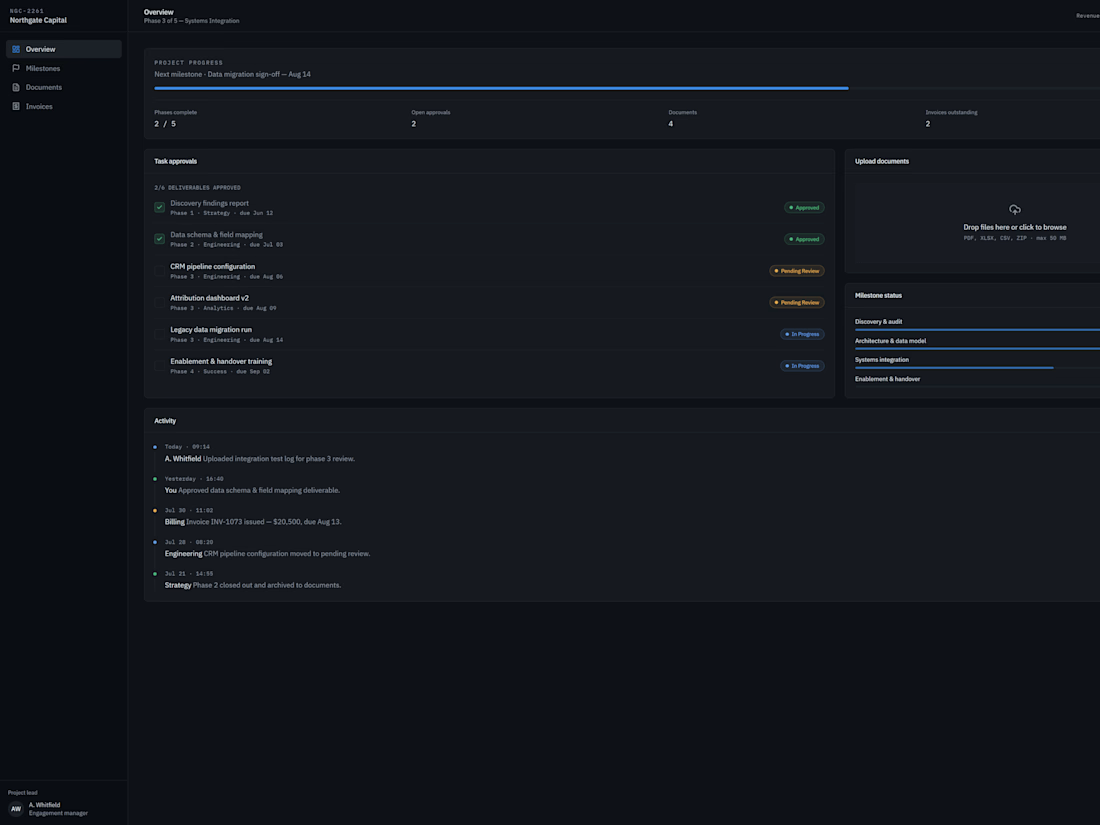
Northgate Capital required a centralized, secure B2B client dashboard to manage multi-phase systems integration and data migration projects. Enterprise clients needed full visibility into progress metrics, task approvals, pending deliverables, and billing status without relying on fragmented email threads. We designed and engineered a unified, dark-mode operations portal that gives enterprise stakeholders real-time transparency into every project milestone.
2. The Challenge
Opaque Progress Tracking: B2B technical projects (like legacy data migrations and CRM pipeline setups) often feel like a black box to non-technical client executives.
Friction in Sign-Offs: Delays in approving deliverables (such as data schemas or discovery reports) stall project momentum and create billing bottlenecks.
Fragmented Communication: Managing documents, invoices, and activity logs across separate tools increased administrative overhead and missed deadlines.
3. Key Features & Interface Design
A. High-Level Progress & Milestone Tracker
Real-Time Progress Bar: Displays overall project completion percentage (e.g., 68% complete) alongside phase breakdowns (Discovery & Audit, Architecture & Data Model, Systems Integration, Enablement & Handover).
Open Approvals & Documents Overview: Instant top-level counters displaying pending approvals, active documents, and outstanding invoices ($20,500+).
B. Interactive Task Approval Workflow
Deliverable Status Badges: Uses clear visual status tags (Approved, Pending Review, In Progress) for major deliverables like CRM pipeline configurations and attribution dashboards.
Direct Sign-Off Action: Enables client managers to review and approve technical deliverables directly inside the interface to unlock subsequent project phases.
C. Integrated Drag-and-Drop Document Intake
Multi-Format Upload Zone: A dedicated, secure container for dropping compliance files, data schema sheets, and logs (supporting PDF, XLSX, CSV, ZIP up to 50MB).
D. Audit-Ready Activity Feed
Chronological System Logs: Displays a time-stamped feed of critical actions (e.g., uploaded test logs, approved deliverables, issued invoices) to maintain complete operational transparency.
4. Design System & Tech Specs
Color Palette: Deep slate canvas (#090A0F) paired with high-contrast slate cards (#12151E), electric blue progress indicators (#2563EB), and status pills (Emerald Green for Approved, Amber for Review).
Typography & Layout: Clean hierarchy with high legibility for dense technical data, micro-interactions for button hover states, and smooth collapsible navigation.
5. Key Takeaways & Impact
"By transforming complex technical integration phases into a visual, self-serve client dashboard, Northgate Capital eliminated communication lag, accelerated milestone sign-offs, and established an enterprise-grade experience for high-ticket accounts."


The network for creativity
Join 1.25M professional creatives like you
Connect with clients, get discovered, and run your business 100% commission-free
Creatives on Contra have earned over $150M and we are just getting started
Trending

Claude
Claude has entered the design space. How are you using it?

Contra University
Learn from expert creatives how to earn more using next-gen AI tools.
Brand Design
The best brand designers are on Contra. Scroll to see what's trending in brand design. What are you building?
creativeaiflow
Creative AI workflows are evolving. What tools do you use, and what are their strengths and weaknesses?
freelancerlife
Freelancer life is wins, pivots, and everything in between. What’s yours right now?



Related posts

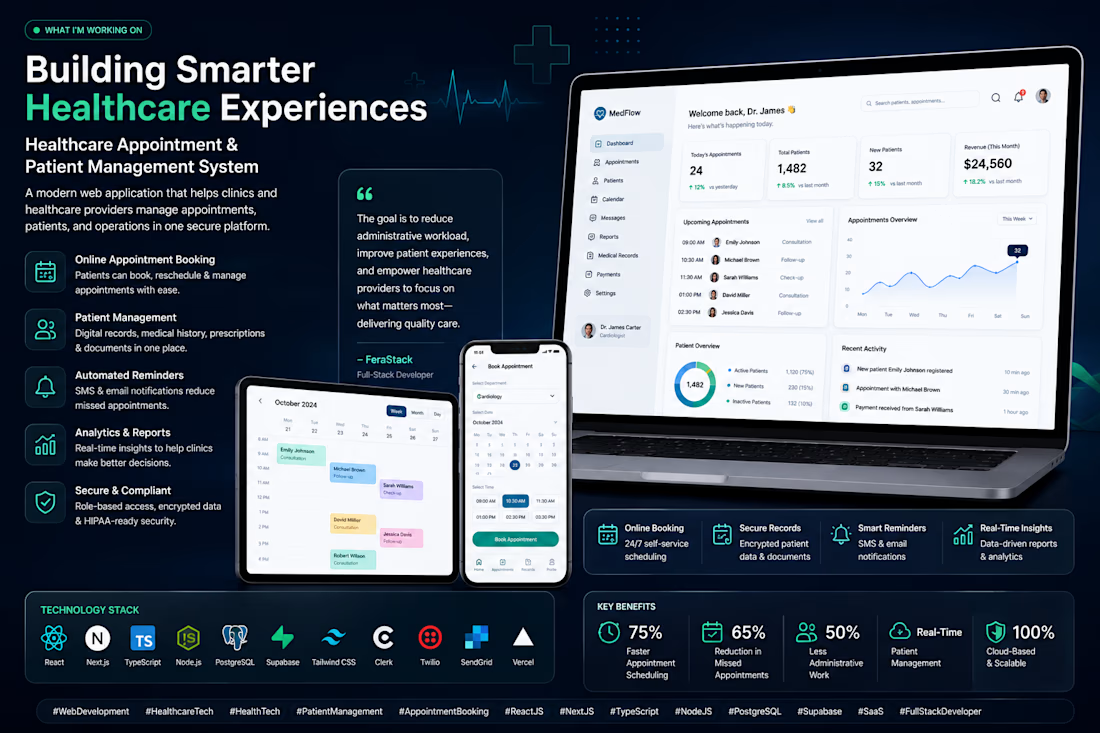
Building Smarter Healthcare Experiences with Modern Web Applications
I'm currently working on a Healthcare Appointment & Patient Management System designed to simplify how clinics and medical practices manage appointments, patient records, and daily operations.
The platform enables online appointment booking, secure electronic medical records, automated reminders, and real-time analytics all within a modern, responsive web application.
The goal is to reduce administrative workload, improve patient experiences, and help healthcare providers focus more on delivering quality care through secure and scalable technology.
Every feature is designed with performance, security, and usability in mind to support the evolving needs of modern healthcare organizations.



This is cool

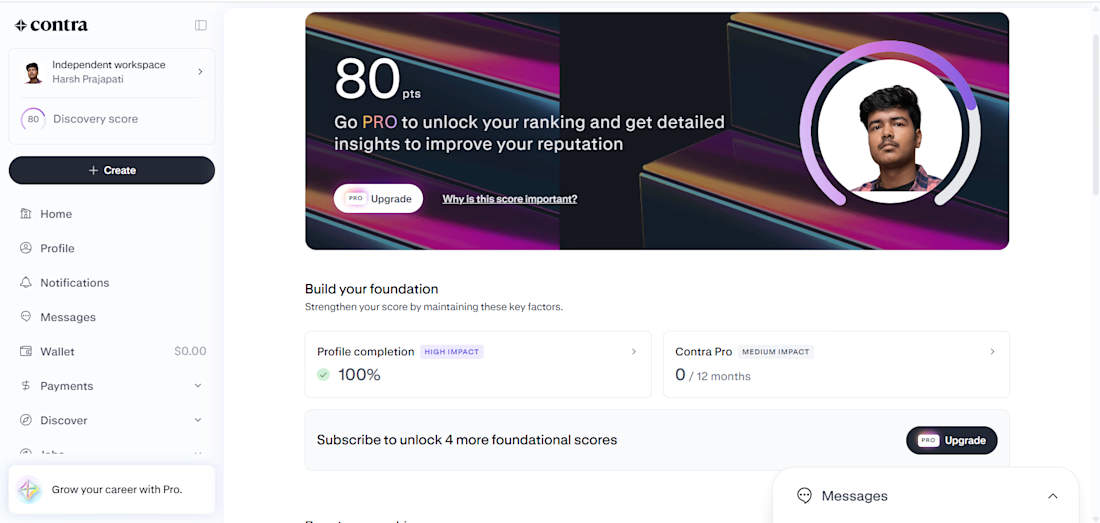
Day 6 of my contra journey until I earn 10x hired
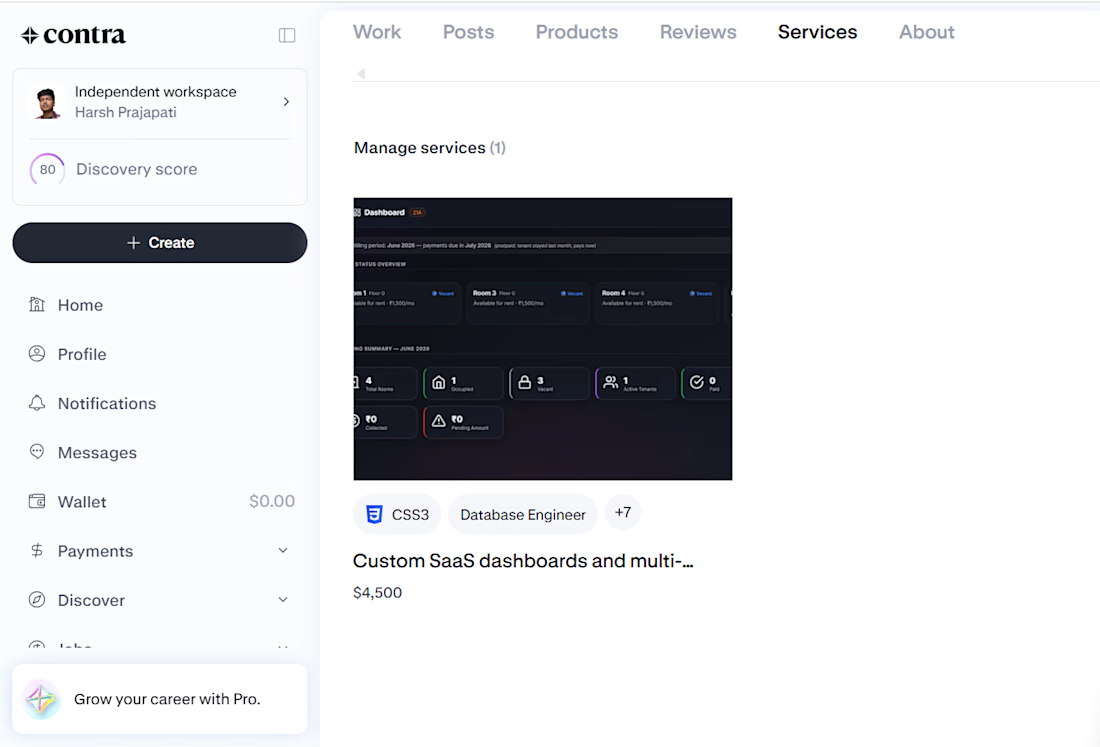
so the latest update my discovery score has increased to 80 points and this has been after posting my first fixed price service do checkout once- "Custom SaaS dashboards and Multi-tenant Web Application". this service is built around the rentflow project offering- Hero page, landing page, multi section dashboards, integration with databases, integration of web services like API calls etc. in order to get the application working in its full capacity.
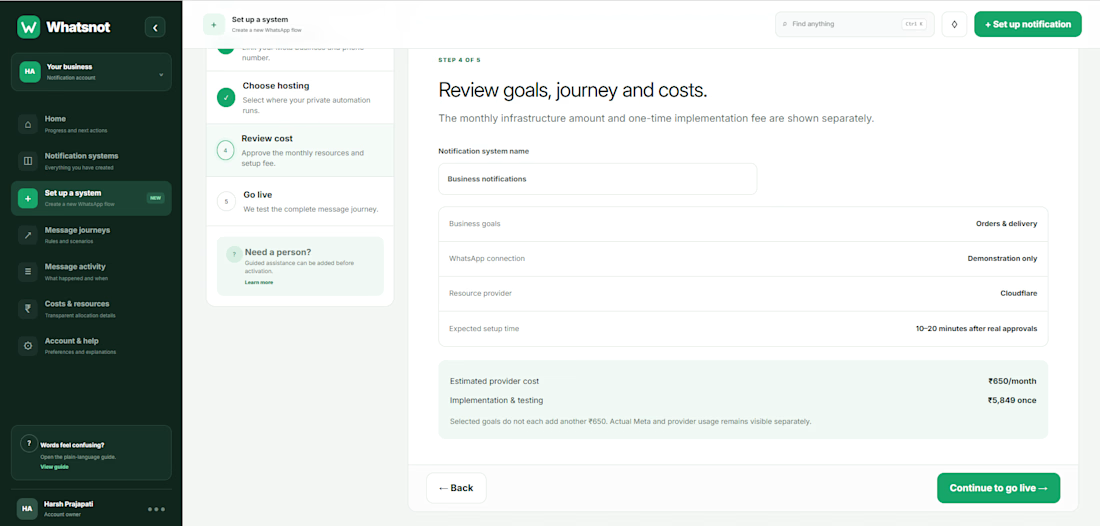
Along with that there are some updates on the 'Whatsnot' application. a video showing how to setup the notification systems. The review cost page as well has been added to the current application.
we will meet again with some more updates tomorrow.

Never give up! 🔥 🔥
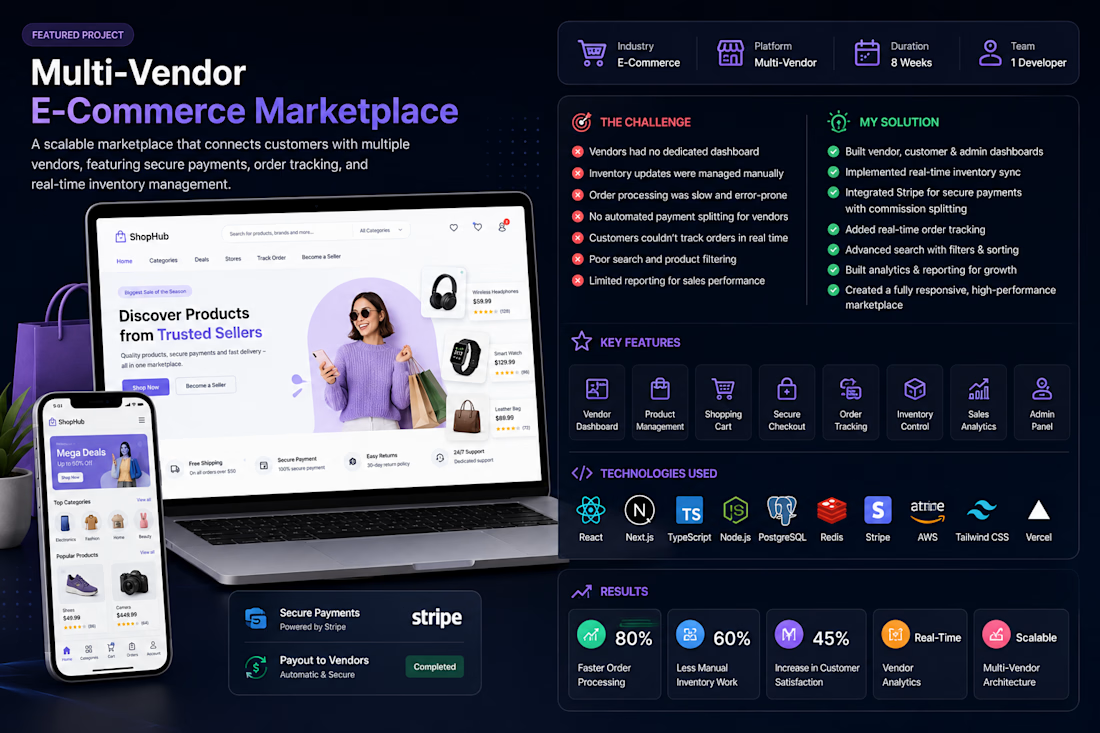
A retail startup wanted to launch a scalable multi-vendor marketplace where multiple sellers could register, manage their own stores, list products, process orders, and receive payouts through a centralized platform.
The existing system lacked vendor management, automated order processing, inventory synchronization, and secure payment integration, making it difficult to scale the business.
The Challenge
The client faced several challenges:
Vendors had no dedicated dashboard.
Inventory updates were managed manually.
Order processing was slow and error-prone.
Customers couldn't track their orders in real time.
No automated payment splitting for vendors.
Poor search and product filtering.
Limited reporting for sales performance.
The platform wasn't optimized for mobile users.
My Solution
I designed and developed a modern multi-vendor marketplace with separate dashboards for administrators, vendors, and customers.
The solution included:
Vendor Portal
Vendor registration
Store management
Product management
Order management
Revenue dashboard
Customer Experience
Smart product search
Advanced filtering
Wishlist
Shopping cart
Secure checkout
Order tracking
Admin Dashboard
Vendor approval
Product moderation
Sales analytics
Customer management
Commission management
Platform reporting
Payment System
Stripe integration
Secure checkout
Vendor commission splitting
Refund management
Inventory Management
Real-time stock updates
Low-stock notifications
Product variants
Inventory synchronization
Security
Secure authentication
Role-based access
Encrypted payments
Fraud protection
Technologies Used
Frontend
React
Next.js
TypeScript
Tailwind CSS
Backend
Node.js
NestJS
Database
PostgreSQL
Redis
Cloud
AWS S3
Vercel
Payments
Stripe
Search
Algolia
Authentication
Clerk Authentication
Key Features
✔ Multi-Vendor Marketplace
✔ Vendor Dashboard
✔ Customer Dashboard
✔ Admin Panel
✔ Inventory Management
✔ Secure Payments
✔ Order Tracking
✔ Sales Analytics
✔ Product Reviews
✔ Mobile Responsive
✔ Notifications
✔ API Integrations
Results
The completed marketplace delivered measurable business improvements:
Faster onboarding for new vendors.
Streamlined order fulfillment with automated workflows.
Improved customer satisfaction through real-time order tracking.
Increased sales with advanced product search and filtering.
Better inventory accuracy using live stock synchronization.
Reduced administrative overhead with centralized vendor and commission management.
A scalable architecture capable of supporting thousands of products and vendors.
Keywords
Multi-Vendor Marketplace
E-Commerce Development
Marketplace Website
Custom Web Application
Full-Stack Developer
React Developer
Next.js
Node.js
TypeScript
Stripe Integration
Shopping Cart
Admin Dashboard
Vendor Dashboard
Inventory Management
Order Management
Payment Gateway
API Integration
PostgreSQL
Tailwind CSS
Responsive Web Design
Why This Solution Worked
Rather than building a basic online store, the platform was designed as a complete marketplace ecosystem. Vendors could independently manage products, inventory, and orders, while administrators retained full control over the platform. Automated payments, inventory synchronization, and advanced analytics reduced manual work and created a seamless shopping experience for customers, enabling the business to scale efficiently.