The network for creativity
Join 1.25M professional creatives like you
Connect with clients, get discovered, and run your business 100% commission-free
Creatives on Contra have earned over $150M and we are just getting started
Back to feedPost

How a Single Line of Code Can Break Your Next.js App Router Build (and leak your API keys) 🛑
I recently ran into a classic TimeoutError and Missing API key crash during local development in a Next.js project using Resend for transactional emails.
The culprit? A single line placed at the root of a server action file:
❌ const resend = new Resend(process.env.RESEND_API_KEY);
🔍 What was happening under the hood?
Even if you use "use server"; at the top of your file, initializing a third-party SDK directly at the file's root level can cause major headaches:
Client-Side Import Triggers: If any component or type (like an enum or status type) from that file is accidentally imported into a Client Component, the browser tries to evaluate the entire file.
The Environment Variable Leak: Since process.env keys are protected and not exposed to the browser by default, the constructor receives undefined, causing the application to crash instantly on the client side with a Missing API key error.
Static Generation Failures: It forces static routes to bail out or timeout during compilation because it tries to evaluate dynamic server-side logic outside of an actual server lifecycle.
💡 The Fix
The solution is a fundamental best practice for Next.js App Router: Keep your SDK initialization localized inside the scope of the server function itself, rather than globally at the top of the file.
TypeScript
"use server";
import { Resend } from "resend";
export async function sendOrderConfirmationEmail(orderEmail: string) {
// ✅ Instantiate only when the server function runs
const resend = new Resend(process.env.RESEND_API_KEY);
try {
return await resend.emails.send({ ... });
} catch (error) {
console.error("Email sending failed:", error);
}
}
Takeaway: Never let your SDK constructors hang around in the global scope of your modules. Wrap them tightly inside your actions to keep your bundle clean, your API keys safe, and your Next.js build blazing fast! ⚡
#NextJS #WebDevelopment #FullStack #React #JavaScript #CodingTips #WebSecurity #Resend


The network for creativity
Join 1.25M professional creatives like you
Connect with clients, get discovered, and run your business 100% commission-free
Creatives on Contra have earned over $150M and we are just getting started
Related posts

React / Next.js dev needed for an active platform
Looking for another React / Next.js developer to join an existing project we're actively building.
We're not at the "just fixing bugs" stage. There's still a good amount of real work left — frontend features, dashboard work, dynamic pages, API integrations, responsive improvements, and overall platform improvements as things continue getting built out.
React / Next.js stack. Tailwind preferred. TypeScript helps.
We are looking for someone who can examine the existing system and get directly involved in the existing codebase without needing continuous guidance.
Timeline is around 1–2 months.
Budget is around $7k–12k depending on experience and fit.
Send something you’ve worked on that’s similar availability


Hey Benny,
I’d be a strong fit for this. I have 9+ years of frontend experience and regularly work with React, Next.js, Tailwind, TypeScript, API integrations, and responsive dashboard development.
I’m comfortable jumping into existing codebases independently and moving features...


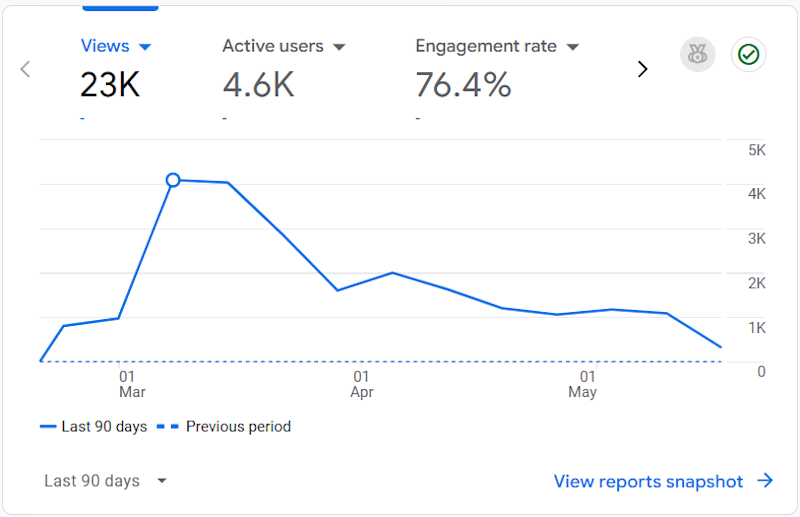
23K views. 76.4% engagement rate. In 90 days. 👀
That's not luck - that's what happens when design actually works for the product.
We built Elecctro's website from zero - strategy, design, and dev.
Interactive, fast, and built to keep people in. Not just to look good (although it does that too 😏).
The kind of project where you open the site and just... stay.
You know that feeling? 🔥
⚡ Want such a website for your product too?
Get in touch with Lynksen!
Also, check the full case study here 👉 Link



Amazing!

Nobody told me becoming a Web Developer in 2026 would feel like this...
You learn React ✅
Then you need TypeScript 😅
Then Tailwind CSS
Then Docker
Then AWS
Then GraphQL
Then CI/CD pipelines
Then Security Best Practices
Then Performance Optimization
Then Analytics & SEO
And just when you think you're done...
A NEW framework drops. 😂
But here's the truth nobody talks about 👇
💡 Every skill you learn makes you MORE valuable.
💡 Every challenge you face makes you MORE resilient.
💡 Every project you build makes you MORE confident.
Quick Question for all Developers 👇
Which era do YOU belong to?
👴 THEN Team — HTML | CSS | jQuery | Bootstrap
🧑💻 NOW Team — React | Docker | AWS | GraphQL
Comment below — THEN or NOW!
Tag a developer friend who lived BOTH eras!
Keep building. Keep learning. Keep growing. 🚀
#DeveloperLife #WebDev #CodingHumor #ReactJS #FullStackDeveloper #TechLife #JavaScript #LearnToCode #DevCommunity #Programming #ThenVsNow #WebDevelopment


I’m from the “THEN started, NOW surviving” generation 😂





Trending

Claude
Claude has entered the design space. How are you using Claude Design?

Contra University
Learn from expert creatives how to earn more using next-gen AI tools.
creativeaiflow
Creative AI workflows are evolving. What tools do you use, and what are their strengths and weaknesses?
portfolioreview
The best portfolios tell a story, not just show a grid. Share yours for feedback.
freelancerlife
Freelancer life is wins, pivots, and everything in between. What’s yours right now?