The network for creativity
Join 1.25M professional creatives like you
Connect with clients, get discovered, and run your business 100% commission-free
Creatives on Contra have earned over $150M and we are just getting started
Back to feedPost
I’m building the lab I wish my students had. 🧪✨
For years, I taught brilliant minds in empty labs. We described reactions instead of seeing them. This "STEM Interaction Gap" drove my submission for the #ConfigMakeathon.
🚀 Introducing: LabCraft AI
Turn static lesson plans into interactive web simulations in seconds. No code—just curriculum.
⚡ The Workflow (via @Figma Make):
AI Design: Generated responsive "Teacher Dashboard" & "Simulation Canvas" layouts instantly.
Logic Mapping: Used Figma Variables to link sliders to real-time flask visual states.
It’s personal. It’s EdTech. It’s the future of STEM.
👇 Explore the Lab:
🚀 Live Prototype: thus-clad-63683861.figma.site
X Post Link: https://x.com/i/status/2064876112128127280
📂 Remix the Prompt: (See the section below!)
📂 The "Secret Sauce" (Remix Prompt)
SYSTEM ROLE: Principal Product Architect. GOAL: Generate a 3-screen STEM web app "LabCraft AI" (1440px) using Clean Neobrutalism (2px borders, 8px corners, 4px hard shadows). SCREENS: 1. Prompt Input Dashboard: Sidebar navigation + center AI input bar (48px height) with hover/focus states. 2. Interactive Lab Canvas: Split view. Left: 2 Sliders (8px track, 24px thumb) in Chemical Green (#01C38D). Right: Simulation viewport with an Erlenmeyer Flask showing dynamic fluid levels. 3. Performance Analytics: Grid of 3 metric cards + line chart with interactive nodes in Science Blue (#2A697). CONSTRAINTS: Use Auto Layout for everything. Semantic layer naming. Accessible palette (#2A6F97, #01C38D, #FF6B6B).
🛠️ Quick Setup for Remixers 😊
If you're trying this prompt in Figma Make, follow these two steps for the best results:
StepAction1. Variable BindBind the generated colors to Local Variables to keep the Neobrutalist palette consistent.2. Prototype SyncLink the "Generate" button to the Lab Canvas using Smart Animate to show off the STEM interaction.




Amazing work!

Thanks really means alot😊

This is great!
Appreciate dylan

Amazing!
Thanks Sharon
The network for creativity
Join 1.25M professional creatives like you
Connect with clients, get discovered, and run your business 100% commission-free
Creatives on Contra have earned over $150M and we are just getting started
Related posts


Interactive shader in the Hero responding to cursor movement.
Made with Wonder, done in Webflow.
Should I participate in the Wonder Challenge?




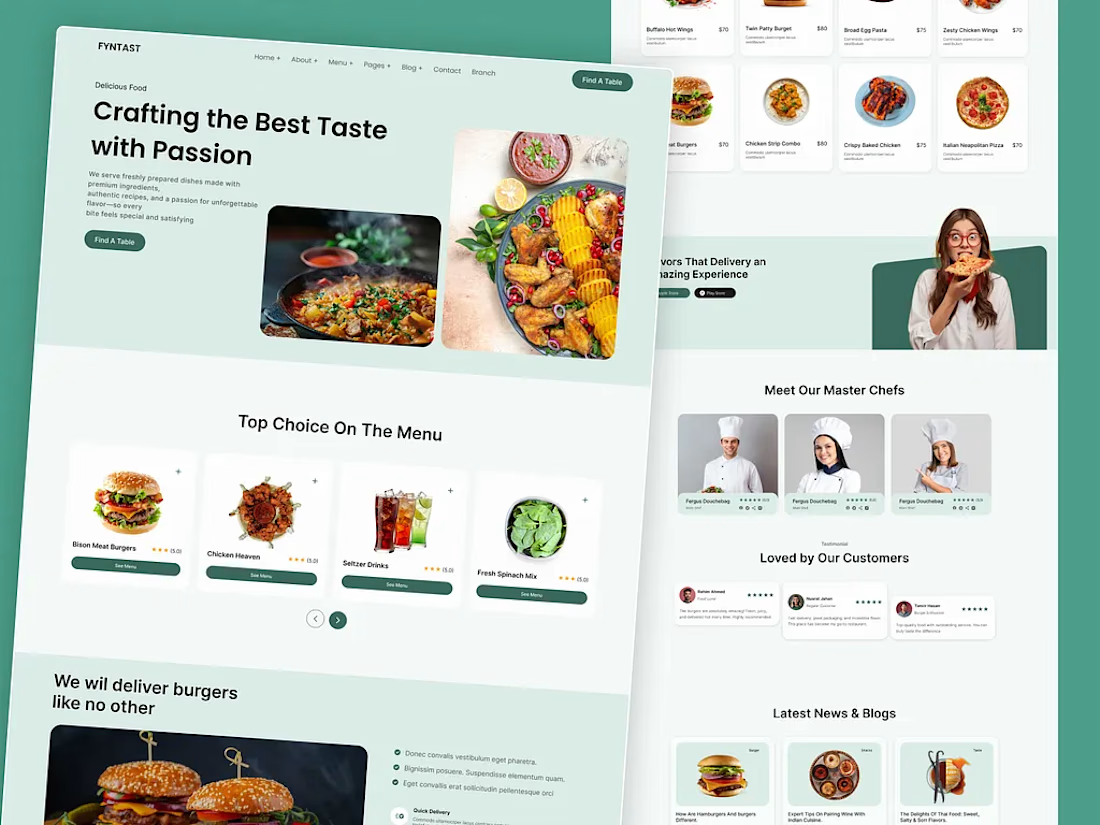
Modern Restaurant Website Design
A modern restaurant website designed to showcase menus, featured dishes, chef profiles, customer reviews, and online reservations.
The interface combines clean layouts, engaging food imagery, and intuitive navigation to create a seamless dining experience across desktop devices.


Sleek!


This is my submission or the RivexContra Character Challenge!
AI Agents are on the rise, and I always found it to be the best opportunity for interactive character experiences - So I built just that - A fully functional Avatar Builder and Selector with 5 fully designed, animated and interactive Characters embedded in a realistic AI Agent!
UI DesignAI Agent DesignerRive AnimationRivecharacterchallengecharacteranimationinteractivedesignMascot Design

Amazing!








Trending

Claude
Claude has entered the design space. How are you using Claude Design?

Contra University
Learn from expert creatives how to earn more using next-gen AI tools.
fifaworldcup2026
The World Cup is here and the whole world's watching. How are you designing for the world stage?
creativeaiflow
Creative AI workflows are evolving. What tools do you use, and what are their strengths and weaknesses?
freelancerlife
Freelancer life is wins, pivots, and everything in between. What’s yours right now?