The network for creativity
Join 1.25M professional creatives like you
Connect with clients, get discovered, and run your business 100% commission-free
Creatives on Contra have earned over $150M and we are just getting started
Back to feedPost

Hi Wonder team,
I'm participating in the Wonder Challenge and have completed my project design in Wonder, but I'm trying to connect my project to code and I'm stuck with the MCP setup.
I've already tried Cursor, Codex, VS Code manual setup, Google Cloud SDK, and the Cloud/Claude instructions, but unfortunately none of the integrations are working correctly:
Cursor doesn't keep me signed in, Codex doesn't support the MCP setup I'm seeing, and VS Code doesn't expose the required MCP configuration.
Could you please tell me the correct and supported way to connect a Wonder project to code for the current challenge? I'
d really appreciate your help because today is the submission deadline. Thank you!


I hit MCP snags too, here’s the exact path that worked for me. I used the Claude Desktop app (not Cursor/VS Code), which has a built-in “Code” tab. On Windows you first need Git installed, or the Code tab won’t run. Then connect Wonder as a custom connector: in the Code tab, go...
The network for creativity
Join 1.25M professional creatives like you
Connect with clients, get discovered, and run your business 100% commission-free
Creatives on Contra have earned over $150M and we are just getting started
Related posts

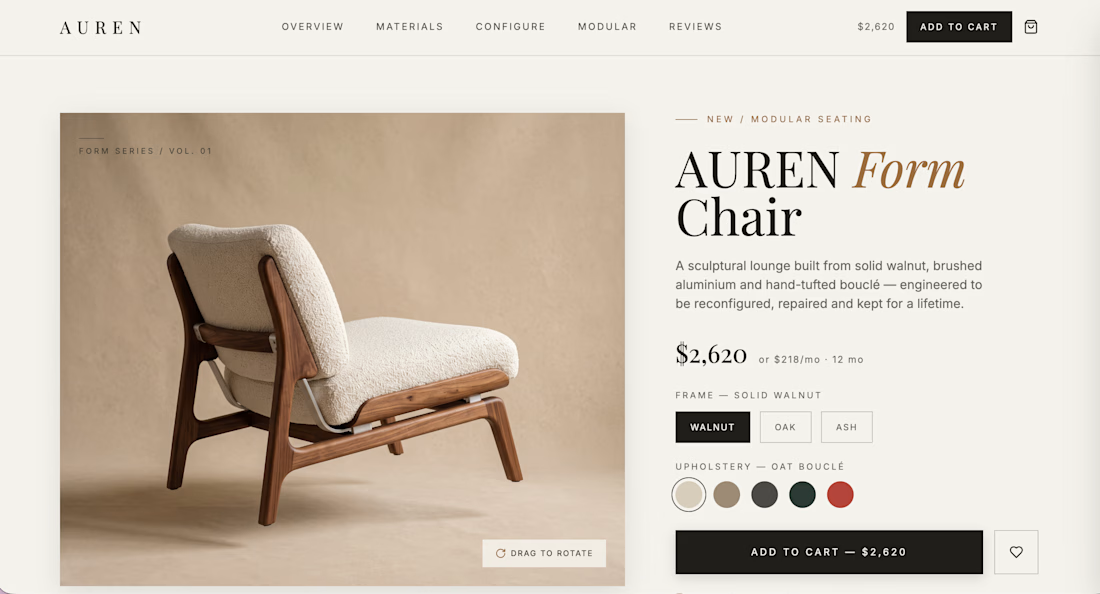
Built AUREN, a fully responsive e-commerce experience for a modular furniture brand, designed in Wonder and brought to life through Wonder MCP + Codex.
As someone who regularly designs e-commerce templates, I wanted to see how far I could take an idea inside one connected workflow. Wonder helped me move incredibly fast from visual direction and product imagery to responsive layouts, a complete design system, material assets, and then straight into a functional coded experience.
The final build includes product variants, modular configurations, cart interactions, responsive states, and a full mobile experience. What would normally require jumping between multiple tools became a much faster, more fluid process.
The video starts with the final showcase, followed by short clips showing how Wonder supported the project from first concept to live implementation.
Built with @usewonder


Built a voice-first AI app in @usewonder.
The goal was simple: create something that makes people instantly think, "Damn, this feels like a real AI product."
I started with a few foundation screens, imported them into Wonder, then used Wonder Chat to expand the experience, refine the UX, and iterate much faster than I normally would.
My favorite feature has to be Shaders. It instantly made the interface feel more alive and premium. I also experimented with MCP + Codex to push the prototype further. Still learning that workflow, but it was fun to explore.
Here's a quick walkthrough of the project and how Wonder fit into my design process.
P.S. Ignore my grammar and occasional stuttering in the video. My brain renders thoughts faster than my mouth ships them. 😭

My entry for the #WonderChallenge: Aurora Breaker 🎮
A game where every level is played on top of a living Wonder shader. Break bricks, chain combos, and watch the sky react. The shaders pulse with every hit.
It all started with Wonder's Northern Lights shader. I love that one. It felt alive, like something you'd want to touch, so I built a game where you literally play inside it. The playfield is translucent glass, so the shaders shine through everything, and 14 hand-picked scenes rotate as you climb levels, each one tuned to react subtly to gameplay.
My workflow: I designed everything in Wonder first using the AI Chat, from the layout and HUD to the components and objects. I got lucky that Claude Fable got unlocked during this challenge, because it helped a ton in bringing my vision for the game to life. From there I used "Copy as Code" a lot to paste scenes straight into Claude Code and build out the gameplay mechanics, powerups, and the live leaderboard on top.
🕹️ Play it: aurorabreaker.fun
🎨 Wonder file: https://app.wonder.so/jerold-llauderes/files/019f275f-4fbd-7503-98f4-428ca35952b9
Walkthrough video in the comments 👇
Thanks Wonder for an amazing tool. This was genuinely the most fun I've had building something.




Trending

Claude
Claude has entered the design space. How are you using Claude Design?

Contra University
Learn from expert creatives how to earn more using next-gen AI tools.
fifaworldcup2026
The World Cup is here and the whole world's watching. How are you designing for the world stage?
creativeaiflow
Creative AI workflows are evolving. What tools do you use, and what are their strengths and weaknesses?
freelancerlife
Freelancer life is wins, pivots, and everything in between. What’s yours right now?