
Camila González
Product Design | AI-Driven Workflows | UI/UX Strategy
New to Contra
Camila is ready for their next project!

Aura | UI & UX Strategy | AI vs DH | Creative Workspace
Aura is a high-fidelity interface redesign for a moodboard creation tool. The challenge was transforming a generic interface into a cohesive workspace where designers can organize images, adjust properties and build color palettes. I introduced a bold visual identity, custom controls and a modular layout that keeps the canvas and editing tools connected across desktop and mobile.
KEY HIGHLIGHTS
• Workspace Strategy: Organizing the library, properties and palette into a coherent editing experience.
• Visual Identity: Combining expressive typography, vibrant accents and a neobrutalist component system.
• Interaction Design: Defining selection, hover and input states for a precise Figma handoff.
• Responsive UX: Adapting asset browsing and editing controls to smaller screens.
1
5
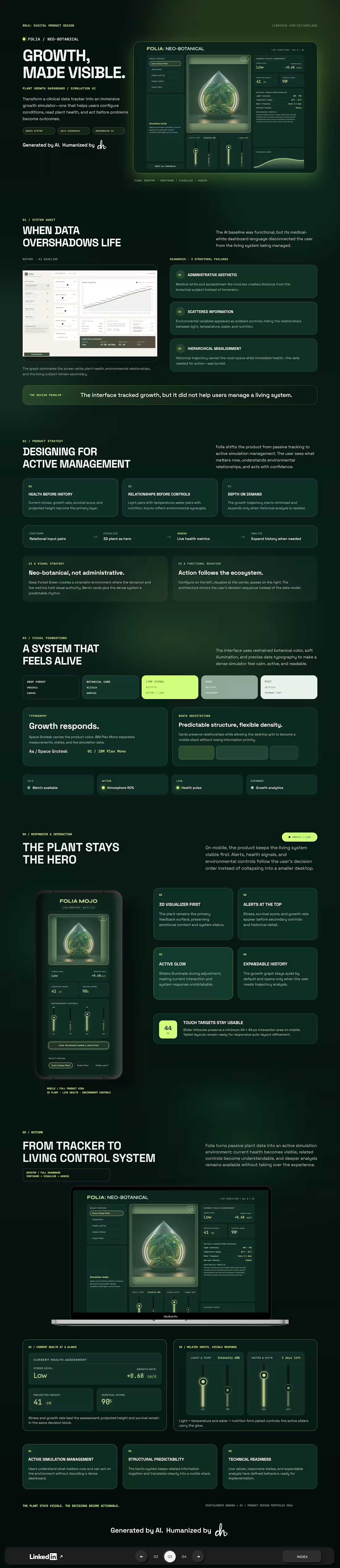
Folia | UI & UX Strategy | AI vs DH | Plant Growth Dashboard
Folia is a high-fidelity dashboard redesign for a virtual plant growth simulator. The challenge was reorganizing scattered controls and historical data into a clear experience for managing the plant’s current condition. Related environmental variables, prioritized health indicators and expandable growth history create a coherent workflow across desktop and mobile.
KEY HIGHLIGHTS
• Information Architecture: A structured grid connects controls, visualization and metrics.
• Decision Hierarchy: Current health takes priority over historical data.
• Contextual Controls: Related environmental inputs are grouped together.
• Responsive Design: Mobile layouts preserve the plant visualization and surface critical alerts.
1
20
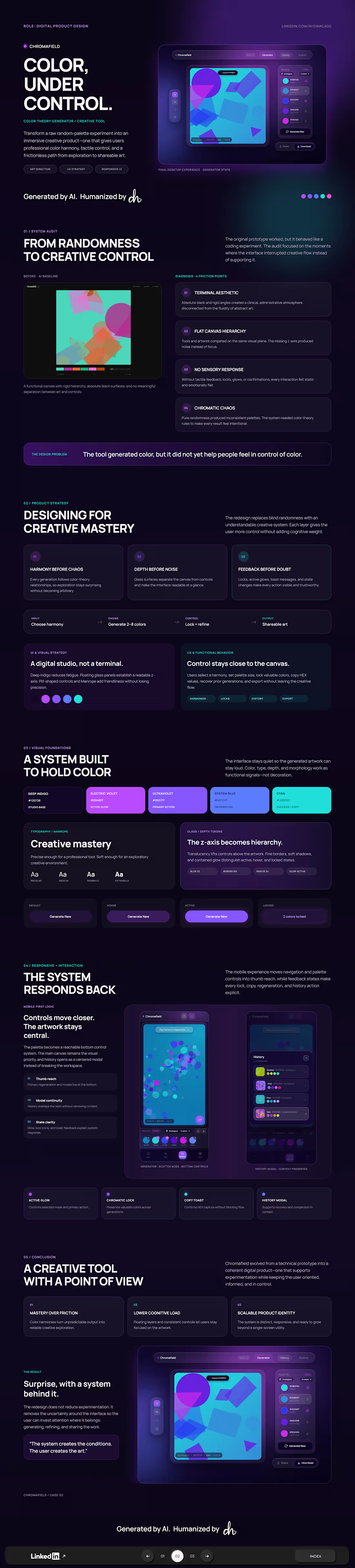
ChromaField | UI & UX Strategy | | AI vs DH | Creative Tools
ChromaField is a high-fidelity interface redesign for a generative art and color exploration tool. The challenge was transforming a visually flat prototype into a creative workspace with clear hierarchy and intentional controls. Floating panels, color harmony selection and palette locking keep the artwork central, while mobile navigation supports effortless exploration.
KEY HIGHLIGHTS
• Creative Control: Color harmonies and palette locking support intentional exploration.
• Visual Hierarchy: Floating panels separate tools from the canvas.
• Mobile UX: Key actions stay within thumb reach.
• Interaction Specs: Documented generation, copy feedback, locking and history states.
1
19

LLM Arbiter | UI & UX Strategy | Artificial Intelligence vs Digitalmente Humana (LLM Output Redesign)
LLM Arbiter is a high-fidelity dashboard designed to transform complex AI logic into clear and transparent decision-making.
The core challenge was redesigning a flat, non-hierarchical flow into a professional tool.
By implementing Staged Disclosure, the interface "grows" alongside the data retrieval, eliminating the anxiety generated by the black-box and building a bridge of trust between the system and the human user.
KEY HIGHLIGHTS
• Behavioral Strategy: Transforming technical waiting times into a logical, transparent narrative.
• Visual Hierarchy: Using a semantic color palette and hybrid typography to prioritize the winner result.
• Interaction Specs: Detailed documentation of states (Idle, Processing, Resolved) for a precise Figma handoff.
• Cognitive Focus: Reducing user friction by delivering information in digestible layers.
1
22