
Anuj Singh
Conversion Copywriter | Landing Pages, Website & Email
- 1
- Followers

SLEEP SYNC
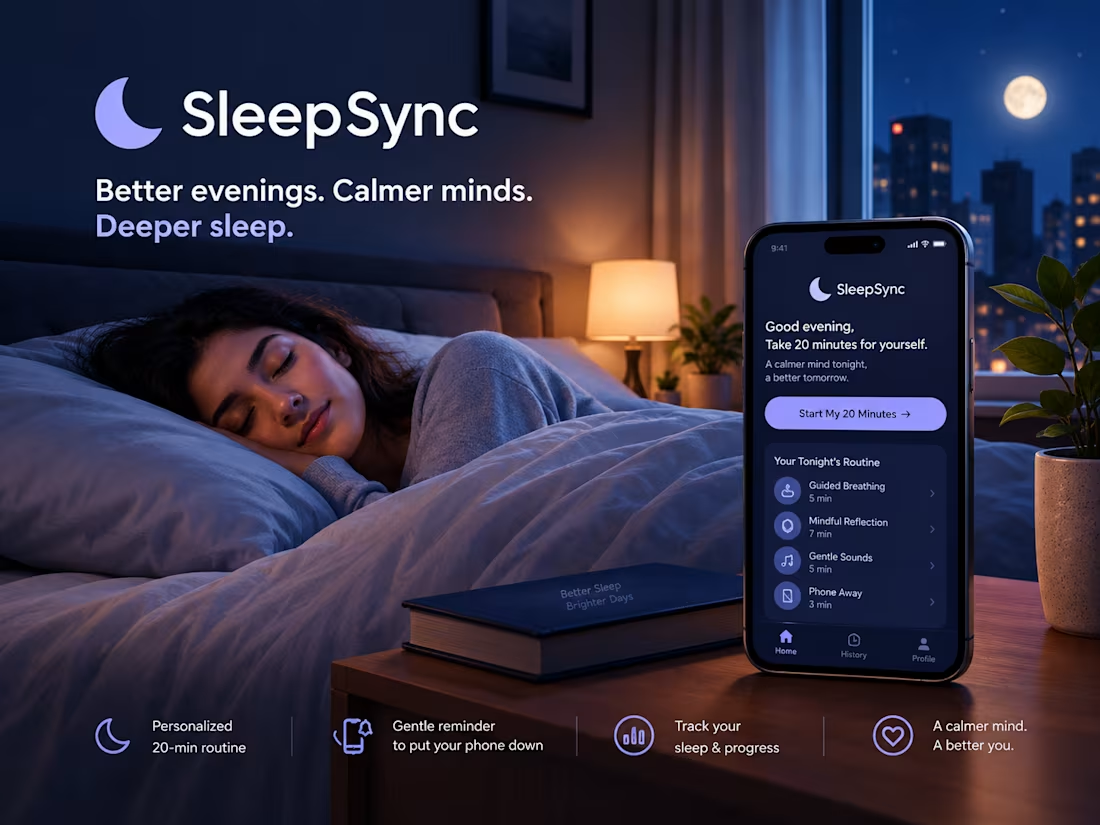
BEDTIME RITUAL APP — LANDING PAGE COPY
HERO SECTION
You Take Care of Everyone. Who's Taking Care of Your Sleep?
SleepSync gives you 20 minutes before bed that belong only to you, so your mind can start to switch off.
[Start My 20 Minutes →]
THE PROBLEM
It Isn't That You Can't Sleep. It's That Your Mind Never Got the Signal That the Day Is Over.
You finish your work. You take care of everyone else's needs. You finally get into bed.
But your mind is still running through tomorrow's tasks, today's conversations, and everything you didn't get time to do.
Your body is in bed. Your mind is still at work.
And the time that's supposed to be yours becomes another part of the day you can't switch off from.
THE SOLUTION
Don't Force Sleep. Prepare Your Mind for It.
You don't need another complicated routine or another task to complete before bed.
You need a small, consistent moment that helps you leave the day's demands behind and begin winding down.
SleepSync helps you create that moment with a simple 20-minute bedtime ritual designed around your night.
✨ Not another obligation. A little time that's just for you.
HOW IT WORKS
1. Make 20 Minutes Yours
Set aside a short window before bed to step away from the day's demands.
2. Follow a Simple Bedtime Ritual
Use short, calming activities to help create a more intentional transition from a busy day to bedtime.
3. Build a More Consistent Routine
Use reminders and a morning check-in to reflect on your routine and gradually make it part of your evenings.
BUILT FOR REAL NIGHTS
Not Every Night Has to Be Perfect.
Some nights, your mind won't quiet down immediately.
Some nights, tomorrow's responsibilities will still feel close.
You don't have to turn every night into a perfect routine.
🌙 Start with 20 minutes. Give yourself permission to slow down. Let consistency matter more than perfection.
FINAL CTA
SAME BED. DIFFERENT NIGHT.
You give everyone your 9 hours. Give yourself the last 20 minutes.
Your day asks a lot of you. Let the end of it belong to you.
[Start My 20 Minutes →]
Speculative portfolio concept.
I wrote the copy myself, while the visual design was generated using AI.
0
14
BUDGET BUDDY
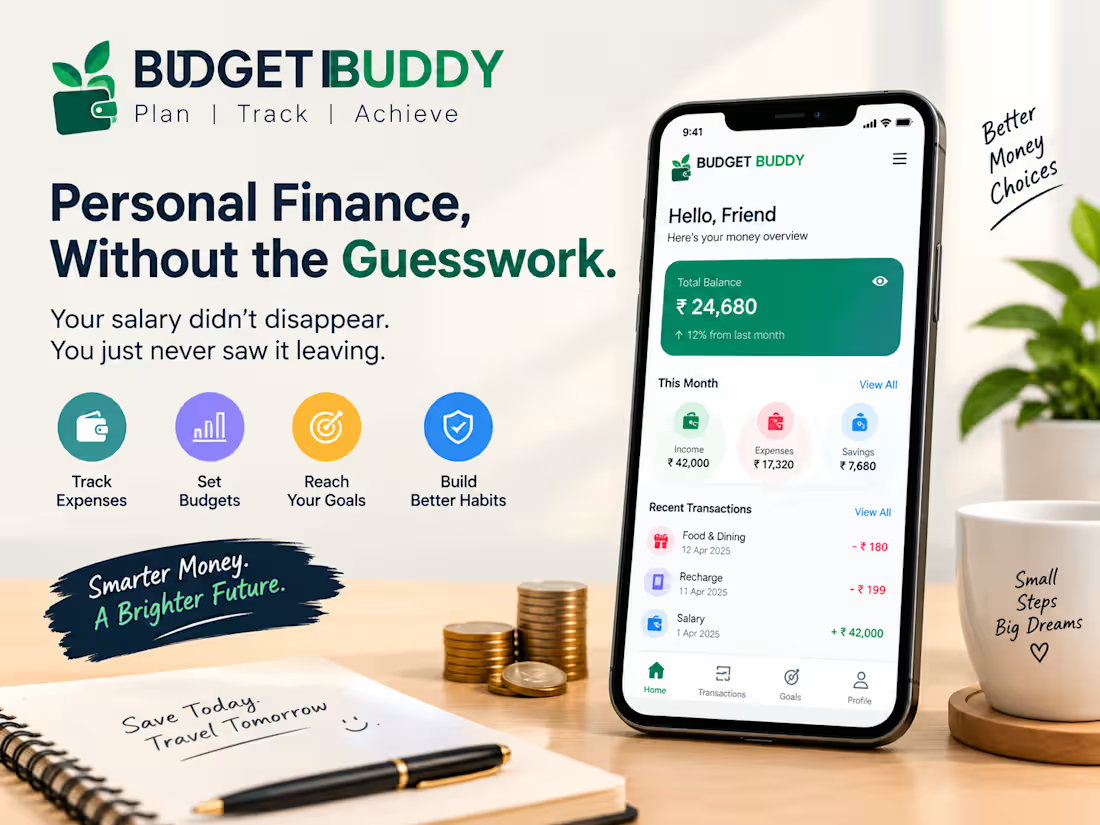
HERO — Your Salary Didn’t Disappear. You Just Never Saw It Leaving.
Payday feels good. But by the 25th, are you wondering where your money went?
Connect your account and get a clearer picture of your spending before month-end catches you off guard.
[See Where My Money Goes →]
THE PROBLEM — Small Expenses. One Big Month-End Surprise.
Payday on the 1st feels great. By the 25th, you're doing math in your head and hoping the numbers somehow work out.
A ₹180 food order.
A quick UPI payment.
A recharge you barely remember.
None of them felt expensive on its own. Together, they quietly ate into your month.
There's no big purchase to blame. Just a long list of small expenses you didn't notice adding up.
You've probably tried fixing it.
A notebook. A spreadsheet. Maybe a tracking app.
It worked for a few days. Then life got busy, and logging every payment became another chore you didn't have time for.
Now the doubts start:
Am I spending too much?
Or is my income just not enough?
And the bigger worry:
If I can't see where my money goes today, how will I save for tomorrow?
The bike you wanted.
The trip you keep postponing.
The emergency fund you haven't started.
They all get pushed to "next month."
You don't need a lecture about spending less.
You weren't careless. You just couldn't see the pattern while it was happening.
THE SOLUTION — Know Where Your Money Goes. While There's Still Time to Change Course.
Budget Buddy helps you track your spending without logging every purchase by hand.
Connect your account, review your spending by category, and see which expenses are taking the biggest share of your money.
No daily spreadsheets. No guesswork. Just a clearer picture of your spending, so you can make more informed decisions before the month ends.
WHAT YOU GET — Less Guesswork. More Control Over Your Spending.
1. Every Expense, Easier to Track
What it does: Records and categorizes supported transactions after you connect your account.
Why it matters: You spend less time logging expenses manually.
What you gain: Small purchases become easier to spot before they add up.
2. Your Week's Spending, All in One View
What it does: Shows a weekly summary of your spending in one place.
Why it matters: You can spot categories where your spending is increasing.
What you gain: More time to review your habits before the month ends.
3. Finally See Where the Money Goes
What it does: Organizes expenses into categories such as food, shopping, bills, and subscriptions.
Why it matters: You can see which categories take the biggest share of your spending.
What you gain: If you want to cut back, you have a clearer place to start.
4. A Heads-Up Before You Cross Your Limit
What it does: Notifies you when your spending approaches a limit you've set.
Why it matters: You get a chance to review your spending before crossing that limit.
What you gain: You decide whether to pause, adjust, or continue.
5. Turn Your Savings Into Something You Can See
What it does: Lets you set goals for things like a bike, a trip, or an emergency fund.
Why it matters: Saving becomes connected to something you actually want.
What you gain: You can track your progress and keep your goal in sight.
TRUST — Your Money. Your Decisions.
Connecting a financial account is a decision worth understanding.
Before connecting, check what information the app requests, what permissions it uses, and how your data is stored and handled. Read the privacy policy so you understand what you're agreeing to.
Budget Buddy is a budgeting tool, not financial advice. It helps you understand your spending; the decisions remain yours.
YOUR QUESTIONS, ANSWERED
Will Budget Buddy decide how I should spend?
No. It helps you see your spending patterns. You decide what, if anything, you want to change.
What should I check before connecting my account?
Review the information requested, the permissions required, and the privacy policy. Make sure you understand how your financial data will be accessed and handled.
Do I need to log every payment manually?
Yes. Once you connect your account, supported transactions are tracked automatically, so you don't need to log them by hand.
THE OUTCOME — Stop Wondering Where Your Money Went.
Before: "Wait… where did my money go?"
After: "Okay. Now I can see where it's going."
The goal isn't to stop spending.
It's to stop being surprised by it.
[See Where My Money Goes →]
Speculative portfolio project. Not a real product.
0
26

You learned the skill. Now prove you can use it.
You watched the lessons. You took the notes. You finished the course, and for a while it felt like real progress. Then someone asks, "So what have you built with it?" And the honest answer is that you've only ever watched.
That gap between knowing something and being able to use it is where most learners quietly get stuck. It isn't a lack of effort. You've put in the hours. The problem is that most courses end at the lesson, and nobody asks you to make anything with what you learned.
So you buy another course. You start it with the same hope. Somewhere around the third module, the energy fades, the notes pile up, and the skill stays in your notebook instead of in your hands.
Skill Leap closes that gap. Instead of stopping at the lesson, you learn by building. You pick one skill you actually want to use. You work on a real, practical project with it. And you finish with something you can show, not just a line on a certificate.
Pick one skill. Tell Skill Leap what you want to be able to do, and where you want to use it. Keep your focus on that one thing, instead of trying to learn everything you could.
Get a real project. Not a quiz, and not a made-up exercise. A small task that looks like real work. Learning design? Redesign a real app screen and explain your choices. Learning writing? Rewrite a real landing page, and show the before and after. Learning code? Build a small tool that actually runs, and fix it when it breaks.
Build it, and keep it. You will get stuck. That's the point. Every stuck moment shows you what to practise next, so your learning follows your real gaps instead of a fixed syllabus. You move at your own pace, without turning learning into another race to finish.
Finish with proof. When the project is done, you have work you can share with a client, a team, or an interviewer. Instead of saying "I studied that once," you can say, "Let me show you what I made."
Think about the last course you finished. What did you make with it? If the honest answer is "nothing yet," you don't need another course. You need one project, and a clear reason to finish it.
Start My First Project →
Free to start. No more courses to finish.
Speculative portfolio project. Copy written by me. Visual created with AI assistance.
0
79

Skincare that understands your skin.
Every product promises a glow. Brighter skin. Clearer skin. A healthier look. The reviews say it worked for them. The ingredients look impressive. The packaging looks convincing. So you buy it, and a few weeks later your skin still doesn't respond the way you hoped.
It's easy to think the product failed. But often, the product was fine. It just wasn't made for your skin. Your skin has its own type, its own sensitivity, its own daily routine, and its own environment. A serum that works wonders for one person can irritate another, or do nothing at all. You usually find out only after you've paid, and after you've wasted a few weeks waiting for a change that never came.
That's the gap GlowMind is built for.
GlowMind starts with your skin, not with what's trending. Tell it about your skin type: dry, oily, combination, or sensitive. Share your main concerns, like acne, dark spots, dullness, or ageing. Tell it about your current routine: the cleanser, moisturiser, sunscreen, or nothing at all. Then GlowMind builds a skincare plan around that picture, and suggests products that fit it.
Every recommendation comes with a short reason. You'll see why a gentle cleanser makes sense for your sensitivity, or why a lightweight moisturiser suits an oily T-zone. You know why a product is there before you spend a rupee on it.
It also works as your routine changes. Started a new cleanser? Tell GlowMind how your skin responds, and the plan adjusts. Added sunscreen for the first time? The plan shows what to pair it with. Your skincare grows with you, instead of becoming a pile of random experiments.
Here's what that looks like in practice. You sit down, answer a few questions about your skin, and get a clear plan in minutes. No endless reviews to compare. No guessing from an ingredient list. Just a routine that makes sense for the skin you actually have.
Stop guessing. Start choosing for your skin.
Get My Skincare Plan →
Free to start. No endless reviews to read.
Recommendations are for informational purposes only and are not medical advice.
Speculative portfolio project. Copy written by me. Visual created with AI assistance.
0
74