
Mobile App Design, iOS and AndroidAsim Antule
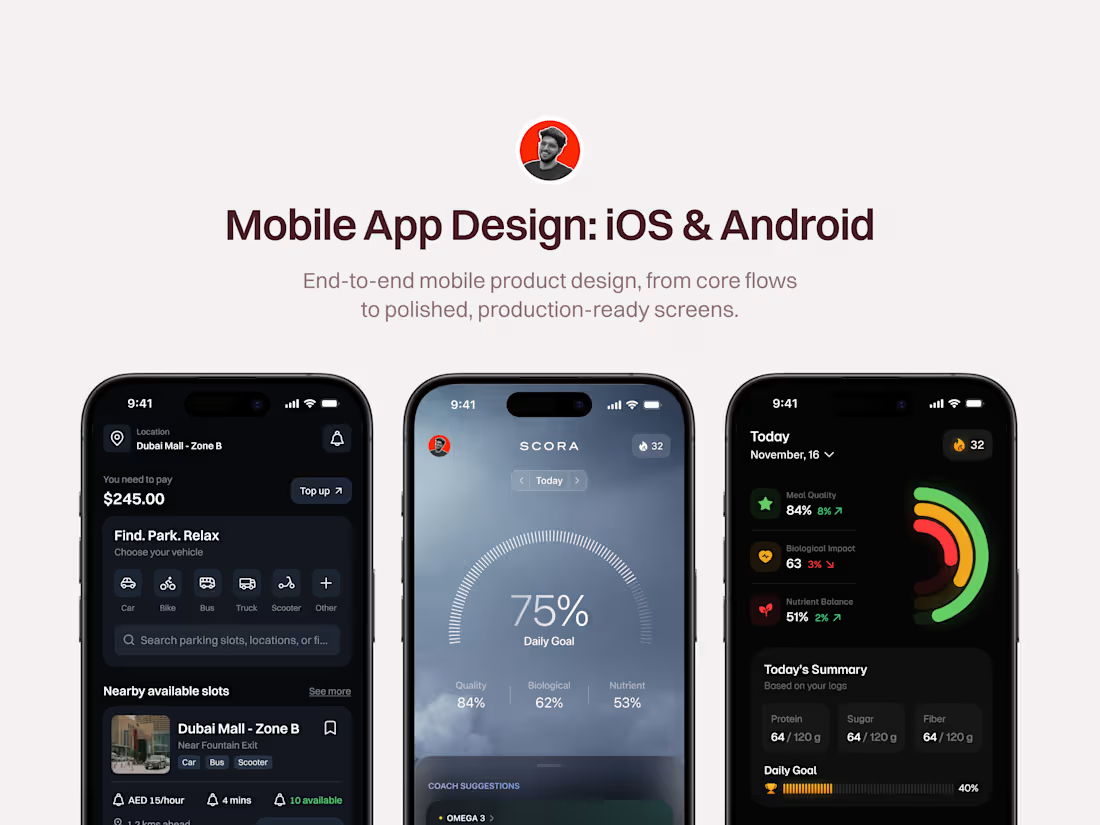
Mobile App Design is a full design engagement covering how your app works, how it looks, and how your engineers build it.
App design fails in the gaps between screens, not on the screens themselves. Anyone can make a good looking settings page. The hard part is the empty screen on day one, the error when the connection drops halfway through, and the third onboarding screen where a lot of your users quietly leave.
I design the flow first and the visuals second. What you get is a system your engineers can build from, where the awkward moments are already decided instead of guessed at 11pm.
What's included
Product Discovery: What your users are trying to do, what the competition already does, and the one number this app has to move. (Includes user goals, competitor teardown, and a defined success measure.)
Full Flow Design: Every path through the app including the ones that fail, mapped before any visual work starts. (Includes onboarding, main experience, account, and every failure path.)
Wireframes and Early Prototype: The cheap version, where disagreements get resolved before they cost design time. (Includes wireframes for the full core experience and a clickable prototype to test with.)
Full Interface Design: Screens designed to look and feel native rather than like a website squeezed onto a phone. (Includes onboarding, main loop, account, and platform specific patterns for iOS and Android.)
Every State Designed: The ones teams discover during testing because nobody designed them. (Includes empty, loading, error, success, offline, and permission denied.)
A System and a Clean Handover: Built so your engineers are not measuring pixels off a screenshot. (Includes a component library, colour type and spacing rules, icons, written specs, animation notes, exported assets, a 60 minute engineering session, and three weeks of support.)
Who this is for
Funded startups building a first version who need product thinking rather than a visual pass.
Teams whose app works but loses people inside the first session.
Founders whose app was built by developers and now needs to look like a real product ahead of a launch or a raise.
Not the right fit for: refreshing one or two screens. Also not for teams expecting 60 plus screens in six weeks, which I would rather quote honestly than miss.
Timeline
Week 1. Discovery, competitor review, flow mapping.
Week 2. Wireframes and first prototype.
Weeks 3 and 4. Interface design with feedback rounds.
Week 5. Component system, all states.
Week 6. Final prototype, handover documents, engineering session.
FAQs
Example work
Asim's other services
Contact for pricing
Duration6 weeks
Tags
Figma

Figma Make

Design Systems Specialist
Mobile Designer
Product Designer
UI Designer
UX Designer
App Design
Service provided by
Asim Antule proIndia
- $10k+
- Earned
- 3
- Paid projects
- 31
- Followers
Mobile App Design, iOS and AndroidAsim Antule
Contact for pricing
Duration6 weeks
Tags
Figma
Figma Make
Design Systems Specialist
Mobile Designer
Product Designer
UI Designer
UX Designer
App Design
Mobile App Design is a full design engagement covering how your app works, how it looks, and how your engineers build it.
App design fails in the gaps between screens, not on the screens themselves. Anyone can make a good looking settings page. The hard part is the empty screen on day one, the error when the connection drops halfway through, and the third onboarding screen where a lot of your users quietly leave.
I design the flow first and the visuals second. What you get is a system your engineers can build from, where the awkward moments are already decided instead of guessed at 11pm.
What's included
Product Discovery: What your users are trying to do, what the competition already does, and the one number this app has to move. (Includes user goals, competitor teardown, and a defined success measure.)
Full Flow Design: Every path through the app including the ones that fail, mapped before any visual work starts. (Includes onboarding, main experience, account, and every failure path.)
Wireframes and Early Prototype: The cheap version, where disagreements get resolved before they cost design time. (Includes wireframes for the full core experience and a clickable prototype to test with.)
Full Interface Design: Screens designed to look and feel native rather than like a website squeezed onto a phone. (Includes onboarding, main loop, account, and platform specific patterns for iOS and Android.)
Every State Designed: The ones teams discover during testing because nobody designed them. (Includes empty, loading, error, success, offline, and permission denied.)
A System and a Clean Handover: Built so your engineers are not measuring pixels off a screenshot. (Includes a component library, colour type and spacing rules, icons, written specs, animation notes, exported assets, a 60 minute engineering session, and three weeks of support.)
Who this is for
Funded startups building a first version who need product thinking rather than a visual pass.
Teams whose app works but loses people inside the first session.
Founders whose app was built by developers and now needs to look like a real product ahead of a launch or a raise.
Not the right fit for: refreshing one or two screens. Also not for teams expecting 60 plus screens in six weeks, which I would rather quote honestly than miss.
Timeline
Week 1. Discovery, competitor review, flow mapping.
Week 2. Wireframes and first prototype.
Weeks 3 and 4. Interface design with feedback rounds.
Week 5. Component system, all states.
Week 6. Final prototype, handover documents, engineering session.
FAQs
Example work
Asim's other services
Contact for pricing