
Complex Workflow Design: Flow Map to PrototypeMarian Cozma
Stuck on a complex workflow?
Common signs:
A feature that started simple has grown into something users struggle with.
Everyone knows what the workflow needs to do, but no one has turned it into a clear design.
Designs only show the happy path, so engineers guess the empty, error, loading and permission states.
Stakeholders keep going round in circles because there's nothing concrete to react to.
Engineering is ready to build but waiting on design.
Typical workflows: onboarding, applications and approvals, setup and configuration, dashboards, team roles and permissions.
I take one core workflow from a flow map to a clickable prototype and a handoff your engineers can build from, using your brand and design system.
What you'll have at the end
One agreed flow: what happens, in what order, and why.
Figma screens for the whole journey, including the states people forget.
A clickable prototype to put in front of users and stakeholders.
A handoff your engineers can build from without guessing.
What you get
Workflow map: steps, decisions and priorities, agreed before any screens are designed.
Figma designs: 8–12 screens for one core workflow and one user role, including empty, error, loading and permission states.
Clickable prototype: the chosen approach, ready for user testing or stakeholder review.
Reusable components: new components, or extensions to your design system, that the journey needs.
Engineering handoff: implementation notes and a live handoff session.
Two review rounds: one after the flow map and one after the first full design.
How it works
Week 1: Map. We align on the task, users and constraints. I map the flow and explore structure options. Review round 1.
Weeks 2–3: Design. I turn the chosen direction into full screens and states, using your brand and design system. Review round 2.
Weeks 4–5: Prototype and handoff. Clickable prototype, implementation notes and a handoff session with your engineers.
Why work with me
I build designs up from core patterns into each journey, so stakeholders follow the reasoning and there are fewer questions at the end.
I started as a front-end engineer, so my designs account for how they'll be built.
You work directly with me, from first map to handoff.
Selected work (client work is under NDA, so highlights only)
Global investment bank: redesigned an alert-heavy supervision workflow used by several roles, organising work by urgency and ownership. The direction was tested with users before delivery.
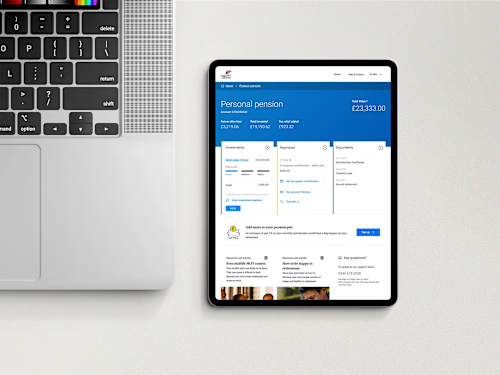
Pensions and investments provider: designed a reusable tile system for customer account dashboards, with responsive variants and placement rules. Validated with customers, approved and released.
UK mobile network: a two-week design proof that won the wider platform commission, followed by responsive templates that went into production.
"Not only was the quality of the design really good, but the way Marian structured and presented it was the most impressive part." — Senior Product Manager
"The Figma page he creates is so nuanced but so well put together that reviewing it is a breeze for all stakeholders." — Digital Product Owner
Good fit if
You understand the problem and the users, and need it designed.
You have a brand, and ideally a design system, to work within.
One person on your side can gather and combine feedback.
Not a fit if
You're not sure what's wrong yet. Start with a UX Audit.
You need production code, a full rebrand or several unrelated workflows at once.
You want ongoing support for your own designers. See Design Leadership for Scale-Ups.
To get started
A product contact, existing research and design files, engineering constraints, your brand guidelines, and one person who combines feedback.
FAQs
Example work
Contact for pricing
Duration5 weeks
Tags
FigJam

Figma
Product Designer
UI Designer
UX Designer
Complex Workflow Design
Service provided by
Marian Cozma Colchester, UK
Complex Workflow Design: Flow Map to PrototypeMarian Cozma
Contact for pricing
Duration5 weeks
Tags
FigJam
Figma
Product Designer
UI Designer
UX Designer
Complex Workflow Design
Stuck on a complex workflow?
Common signs:
A feature that started simple has grown into something users struggle with.
Everyone knows what the workflow needs to do, but no one has turned it into a clear design.
Designs only show the happy path, so engineers guess the empty, error, loading and permission states.
Stakeholders keep going round in circles because there's nothing concrete to react to.
Engineering is ready to build but waiting on design.
Typical workflows: onboarding, applications and approvals, setup and configuration, dashboards, team roles and permissions.
I take one core workflow from a flow map to a clickable prototype and a handoff your engineers can build from, using your brand and design system.
What you'll have at the end
One agreed flow: what happens, in what order, and why.
Figma screens for the whole journey, including the states people forget.
A clickable prototype to put in front of users and stakeholders.
A handoff your engineers can build from without guessing.
What you get
Workflow map: steps, decisions and priorities, agreed before any screens are designed.
Figma designs: 8–12 screens for one core workflow and one user role, including empty, error, loading and permission states.
Clickable prototype: the chosen approach, ready for user testing or stakeholder review.
Reusable components: new components, or extensions to your design system, that the journey needs.
Engineering handoff: implementation notes and a live handoff session.
Two review rounds: one after the flow map and one after the first full design.
How it works
Week 1: Map. We align on the task, users and constraints. I map the flow and explore structure options. Review round 1.
Weeks 2–3: Design. I turn the chosen direction into full screens and states, using your brand and design system. Review round 2.
Weeks 4–5: Prototype and handoff. Clickable prototype, implementation notes and a handoff session with your engineers.
Why work with me
I build designs up from core patterns into each journey, so stakeholders follow the reasoning and there are fewer questions at the end.
I started as a front-end engineer, so my designs account for how they'll be built.
You work directly with me, from first map to handoff.
Selected work (client work is under NDA, so highlights only)
Global investment bank: redesigned an alert-heavy supervision workflow used by several roles, organising work by urgency and ownership. The direction was tested with users before delivery.
Pensions and investments provider: designed a reusable tile system for customer account dashboards, with responsive variants and placement rules. Validated with customers, approved and released.
UK mobile network: a two-week design proof that won the wider platform commission, followed by responsive templates that went into production.
"Not only was the quality of the design really good, but the way Marian structured and presented it was the most impressive part." — Senior Product Manager
"The Figma page he creates is so nuanced but so well put together that reviewing it is a breeze for all stakeholders." — Digital Product Owner
Good fit if
You understand the problem and the users, and need it designed.
You have a brand, and ideally a design system, to work within.
One person on your side can gather and combine feedback.
Not a fit if
You're not sure what's wrong yet. Start with a UX Audit.
You need production code, a full rebrand or several unrelated workflows at once.
You want ongoing support for your own designers. See Design Leadership for Scale-Ups.
To get started
A product contact, existing research and design files, engineering constraints, your brand guidelines, and one person who combines feedback.
FAQs
Example work
Contact for pricing