Marketing Analytics Dashboard for Ads & Revenue by Yassin AbouzeidMarketing Analytics Dashboard for Ads & Revenue by Yassin Abouzeid
Marketing Analytics Dashboard for Ads & RevenueYassin Abouzeid
Cover image for Marketing Analytics Dashboard for Ads & Revenue
Marketing data often lives in multiple tools — Meta Ads, Google Ads, Shopify, CRM systems, and spreadsheets. This makes it difficult to understand what is actually driving growth.
I build automated marketing analytics dashboards that centralize your data and give your team clear, decision-ready insights.
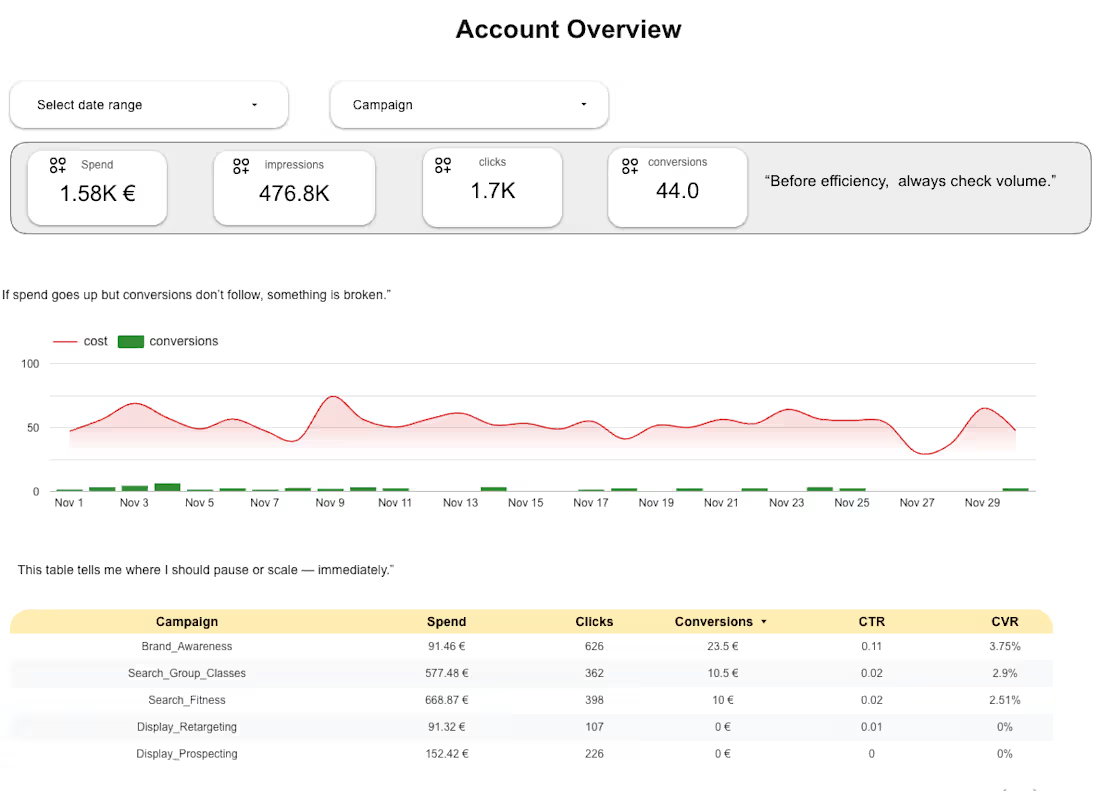
Using Looker Studio connected to BigQuery, I create dashboards that help marketing teams monitor performance, identify opportunities, and optimize campaigns faster.

What you will get

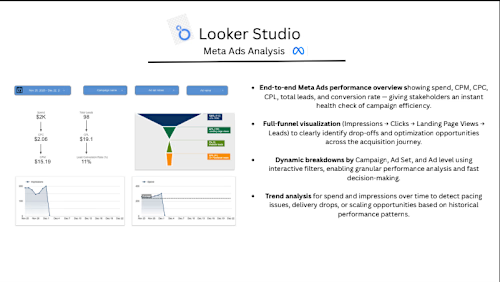
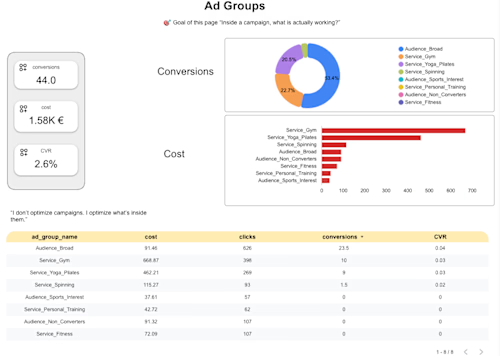
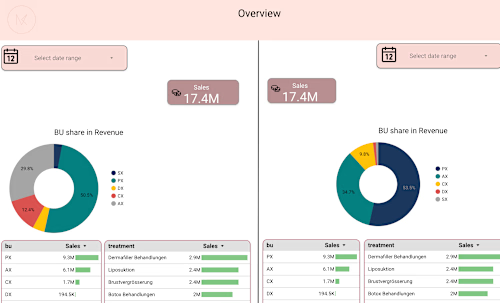
• Unified marketing performance dashboard • Real-time visibility into campaigns and revenue • Clear KPIs like ROAS, CPA, CAC, and conversion rates • Campaign and channel comparison • Funnel performance insights • Clean and structured data models

Typical data sources

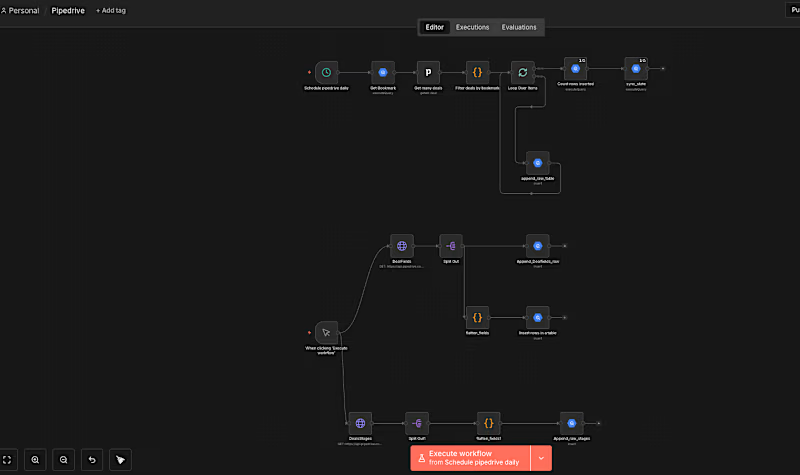
• Meta Ads • Google Ads • Shopify / Ecommerce platforms • CRM systems (Pipedrive, HubSpot, etc.) • Google Analytics

Deliverables

• Fully built Looker Studio dashboard • Data source connections configured • KPI definitions and business logic implemented • Documentation for your team

Tools used

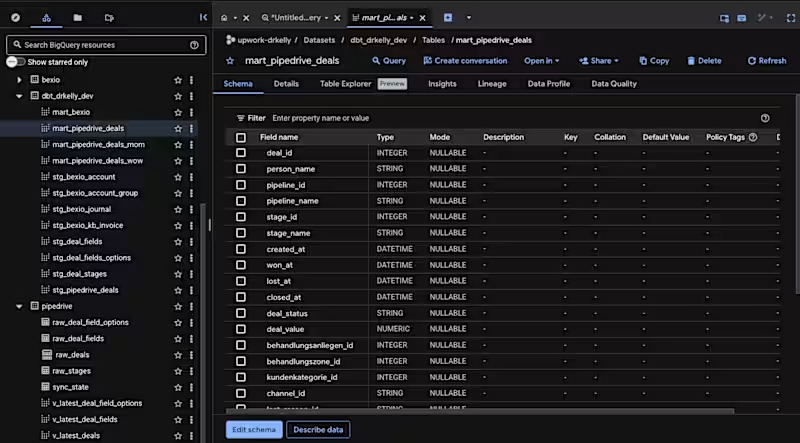
• Looker Studio • Google BigQuery • dbt • SQL
FAQs
I can connect dashboards to a wide range of marketing and business data sources, including: • Meta Ads • Google Ads • Shopify and ecommerce platforms • Google Analytics (GA4) • CRM systems such as HubSpot or Pipedrive • Custom databases through BigQuery If your data lives in multiple platforms, I can centralize it into a single analytics environment.
Not necessarily. For smaller projects, dashboards can connect directly to platforms like Google Ads or GA4. For companies with multiple data sources or large datasets, I usually recommend using BigQuery as a centralized data warehouse. This makes the dashboards faster, more reliable, and easier to scale.
Most marketing dashboards are completed within 1–2 weeks, depending on: • number of data sources • complexity of KPIs • required data transformations More advanced analytics systems involving a full data warehouse may take slightly longer.
Yes. Every dashboard is customized to your business goals. We define the metrics together, such as: • ROAS • CPA • CAC • Conversion rates • Funnel performance • campaign comparisons This ensures the dashboard reflects how your business actually measures success.
Yes. Dashboards are designed to be simple and intuitive so that marketing and leadership teams can quickly understand performance. I also provide documentation and a short walkthrough so your team knows how to navigate and use the dashboard.
Contact for pricing
Schedule a call
Duration1 week
Tags
dbt
Google BigQuery

Looker Studio

SQL

Data Analyst
Marketing Analytics Specialist
Analytics
Service provided by
Yassin Abouzeid Essen, Germany
Marketing Analytics Dashboard for Ads & RevenueYassin Abouzeid
Contact for pricing
Schedule a call
Duration1 week
Tags
dbt
Google BigQuery
Looker Studio
SQL
Data Analyst
Marketing Analytics Specialist
Analytics
Cover image for Marketing Analytics Dashboard for Ads & Revenue
Marketing data often lives in multiple tools — Meta Ads, Google Ads, Shopify, CRM systems, and spreadsheets. This makes it difficult to understand what is actually driving growth.
I build automated marketing analytics dashboards that centralize your data and give your team clear, decision-ready insights.
Using Looker Studio connected to BigQuery, I create dashboards that help marketing teams monitor performance, identify opportunities, and optimize campaigns faster.

What you will get

• Unified marketing performance dashboard • Real-time visibility into campaigns and revenue • Clear KPIs like ROAS, CPA, CAC, and conversion rates • Campaign and channel comparison • Funnel performance insights • Clean and structured data models

Typical data sources

• Meta Ads • Google Ads • Shopify / Ecommerce platforms • CRM systems (Pipedrive, HubSpot, etc.) • Google Analytics

Deliverables

• Fully built Looker Studio dashboard • Data source connections configured • KPI definitions and business logic implemented • Documentation for your team

Tools used

• Looker Studio • Google BigQuery • dbt • SQL
FAQs
I can connect dashboards to a wide range of marketing and business data sources, including: • Meta Ads • Google Ads • Shopify and ecommerce platforms • Google Analytics (GA4) • CRM systems such as HubSpot or Pipedrive • Custom databases through BigQuery If your data lives in multiple platforms, I can centralize it into a single analytics environment.
Not necessarily. For smaller projects, dashboards can connect directly to platforms like Google Ads or GA4. For companies with multiple data sources or large datasets, I usually recommend using BigQuery as a centralized data warehouse. This makes the dashboards faster, more reliable, and easier to scale.
Most marketing dashboards are completed within 1–2 weeks, depending on: • number of data sources • complexity of KPIs • required data transformations More advanced analytics systems involving a full data warehouse may take slightly longer.
Yes. Every dashboard is customized to your business goals. We define the metrics together, such as: • ROAS • CPA • CAC • Conversion rates • Funnel performance • campaign comparisons This ensures the dashboard reflects how your business actually measures success.
Yes. Dashboards are designed to be simple and intuitive so that marketing and leadership teams can quickly understand performance. I also provide documentation and a short walkthrough so your team knows how to navigate and use the dashboard.
Contact for pricing