
UX/UI DesignerAkanksha Sharma
Comprehensive creation of products, websites and apps with a keen focus on ease to use, intuitiveness and visually appealing deliverables.
Client's values and personal expression would be kept a priority throughout design process with constructive and professional feedback ongoing till fruition.
What's included
Wireframes
The low-fidelity visual representations of the user interface, outlining the structure and layout of the screens. Wireframes focus on the placement of elements and content without much attention to visual design.
Prototyping
Interactive models of the user interface that allow users to experience the design and interact with the various elements and functionalities. Prototypes help clients and stakeholders understand the flow and usability of the design before development. These help in development.
Mockups
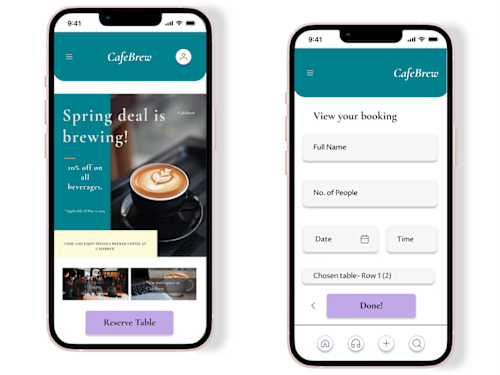
High-fidelity visual representations of the user interface that showcase the final look and feel of the design. Mockups incorporate color schemes, typography, and visual styling, providing a realistic representation of the user interface.
User Flows
Visual diagrams or charts that illustrate the pathways users take to navigate through the application or website. User flows depict the sequence of screens, interactions, and decision points, helping to identify potential usability issues or bottlenecks.
Style Guide
A comprehensive document that outlines the visual and design guidelines for the user interface. It includes details such as color palettes, typography, iconography, spacing, and other visual elements.
Design project documentation
Detailed documentation that provides insights into the design decisions, user research findings, and rationale behind the design choices. It may also include guidelines for developers on implementing the design and any specific considerations.
Example work
Akanksha's other services

Starting at$25 /hr
Tags
Canva

ChatGPT

Figma

WixVibe
Content Creator
UX Designer
UX Researcher
Service provided by
Akanksha Sharma United Kingdom
- 5.00
- Rating
- 1
- Followers
UX/UI DesignerAkanksha Sharma
Starting at$25 /hr
Tags
Canva
ChatGPT
Figma
WixVibe
Content Creator
UX Designer
UX Researcher
Comprehensive creation of products, websites and apps with a keen focus on ease to use, intuitiveness and visually appealing deliverables.
Client's values and personal expression would be kept a priority throughout design process with constructive and professional feedback ongoing till fruition.
What's included
Wireframes
The low-fidelity visual representations of the user interface, outlining the structure and layout of the screens. Wireframes focus on the placement of elements and content without much attention to visual design.
Prototyping
Interactive models of the user interface that allow users to experience the design and interact with the various elements and functionalities. Prototypes help clients and stakeholders understand the flow and usability of the design before development. These help in development.
Mockups
High-fidelity visual representations of the user interface that showcase the final look and feel of the design. Mockups incorporate color schemes, typography, and visual styling, providing a realistic representation of the user interface.
User Flows
Visual diagrams or charts that illustrate the pathways users take to navigate through the application or website. User flows depict the sequence of screens, interactions, and decision points, helping to identify potential usability issues or bottlenecks.
Style Guide
A comprehensive document that outlines the visual and design guidelines for the user interface. It includes details such as color palettes, typography, iconography, spacing, and other visual elements.
Design project documentation
Detailed documentation that provides insights into the design decisions, user research findings, and rationale behind the design choices. It may also include guidelines for developers on implementing the design and any specific considerations.
Example work
Akanksha's other services
$25 /hr