
Lead Follow-Up & CRM Automation SetupMuhammad Arslan Ishaq
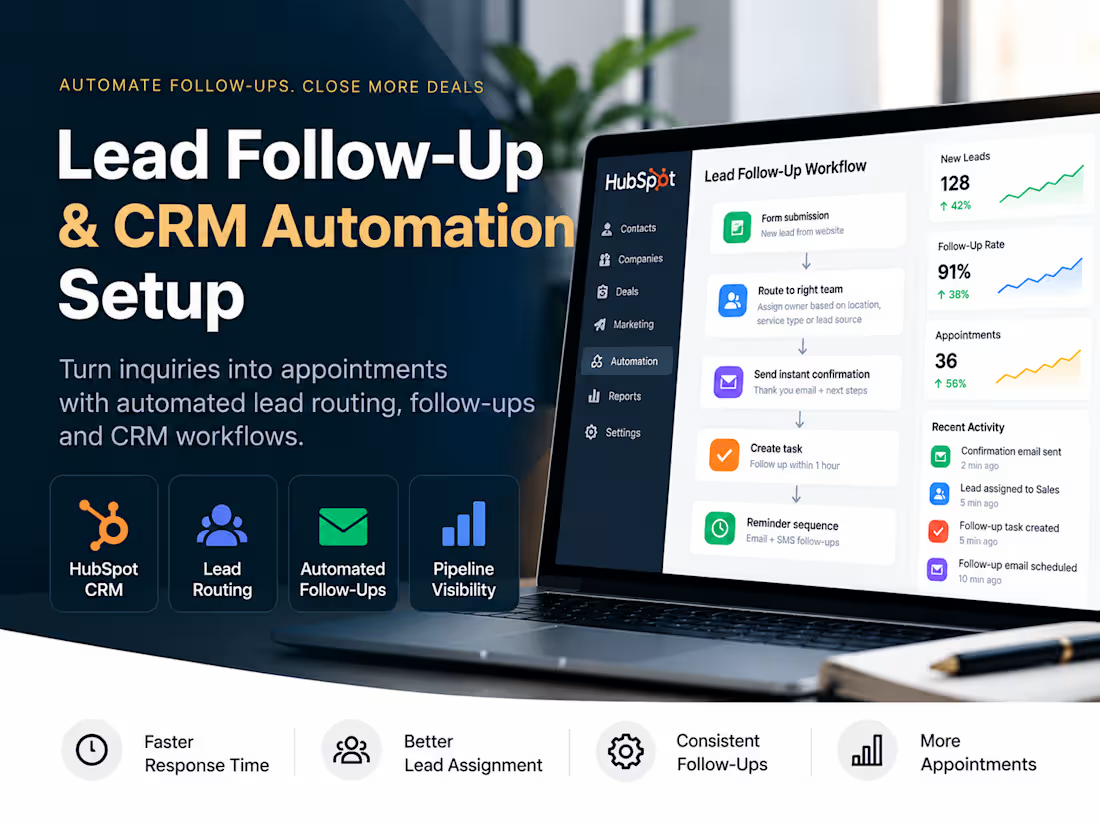
Stop losing leads because of slow responses and missed follow-ups.
Generating leads is only half the job. What happens after someone submits an inquiry determines whether that opportunity moves forward or gets forgotten.
When leads aren't assigned quickly, follow-up tasks are missed, or your CRM requires too much manual work, potential customers can slip through the cracks.
I will set up a practical CRM automation workflow that helps your team respond faster, manage leads consistently, and keep opportunities visible.
What's included
1. Lead Capture & CRM Review
Review one existing lead capture source.
Check how new leads enter your CRM.
Identify missing fields or assignment gaps.
2. Automated Lead Assignment
Configure rules to assign new leads to the appropriate owner.
Set up notifications for new inquiries.
Establish a clear follow-up responsibility.
3. Follow-Up Automation
Configure follow-up tasks or reminders.
Set up one automated acknowledgment email where supported.
Create basic follow-up triggers based on lead status.
4. CRM Workflow Setup
Build one defined automation workflow.
Configure agreed triggers, conditions, and actions.
Test the workflow using sample leads.
5. Testing & Documentation
Validate lead assignment and follow-up triggers.
Provide a workflow diagram and setup summary.
Deliver a short walkthrough of the completed automation.
What you'll receive
One functional CRM automation workflow.
Automated lead assignment and notifications.
Follow-up task or reminder automation.
One acknowledgment email template and automation, where supported.
Workflow testing and documentation.
A 30-minute handover call.
Project details
Delivery: 5 business days after access and requirements are confirmed.
Scope: One CRM, one existing lead source, and one workflow with up to five automation actions.
Supported platforms: HubSpot is preferred. Other CRMs can be considered after confirming their automation capabilities and subscription requirements.
Not included: Full CRM implementation, complex integrations, SMS provider charges, paid software subscriptions, bulk data migration, or ongoing CRM management.
Ready to stop letting leads fall through the cracks?
Let's build a follow-up process that keeps every new opportunity moving toward the next step.
FAQs
Example work

Muhammad Arslan's other services

Starting at$599
Duration1 week
Tags
HubSpot

Sales Automation
Zapier

Business Workflow Automation
CRM Automation
Lead Generator
Revenue Operations
CRM Integration
Lead Management
Service provided by
Muhammad Arslan Ishaq Islamabad, Pakistan
- 5.00
- Rating
- 3
- Followers
Lead Follow-Up & CRM Automation SetupMuhammad Arslan Ishaq
Starting at$599
Duration1 week
Tags
HubSpot
Sales Automation
Zapier
Business Workflow Automation
CRM Automation
Lead Generator
Revenue Operations
CRM Integration
Lead Management
Stop losing leads because of slow responses and missed follow-ups.
Generating leads is only half the job. What happens after someone submits an inquiry determines whether that opportunity moves forward or gets forgotten.
When leads aren't assigned quickly, follow-up tasks are missed, or your CRM requires too much manual work, potential customers can slip through the cracks.
I will set up a practical CRM automation workflow that helps your team respond faster, manage leads consistently, and keep opportunities visible.
What's included
1. Lead Capture & CRM Review
Review one existing lead capture source.
Check how new leads enter your CRM.
Identify missing fields or assignment gaps.
2. Automated Lead Assignment
Configure rules to assign new leads to the appropriate owner.
Set up notifications for new inquiries.
Establish a clear follow-up responsibility.
3. Follow-Up Automation
Configure follow-up tasks or reminders.
Set up one automated acknowledgment email where supported.
Create basic follow-up triggers based on lead status.
4. CRM Workflow Setup
Build one defined automation workflow.
Configure agreed triggers, conditions, and actions.
Test the workflow using sample leads.
5. Testing & Documentation
Validate lead assignment and follow-up triggers.
Provide a workflow diagram and setup summary.
Deliver a short walkthrough of the completed automation.
What you'll receive
One functional CRM automation workflow.
Automated lead assignment and notifications.
Follow-up task or reminder automation.
One acknowledgment email template and automation, where supported.
Workflow testing and documentation.
A 30-minute handover call.
Project details
Delivery: 5 business days after access and requirements are confirmed.
Scope: One CRM, one existing lead source, and one workflow with up to five automation actions.
Supported platforms: HubSpot is preferred. Other CRMs can be considered after confirming their automation capabilities and subscription requirements.
Not included: Full CRM implementation, complex integrations, SMS provider charges, paid software subscriptions, bulk data migration, or ongoing CRM management.
Ready to stop letting leads fall through the cracks?
Let's build a follow-up process that keeps every new opportunity moving toward the next step.
FAQs
Example work
Muhammad Arslan's other services
$599