
Materio Project Setup for Architecture and Interior DesignBriana Ellis
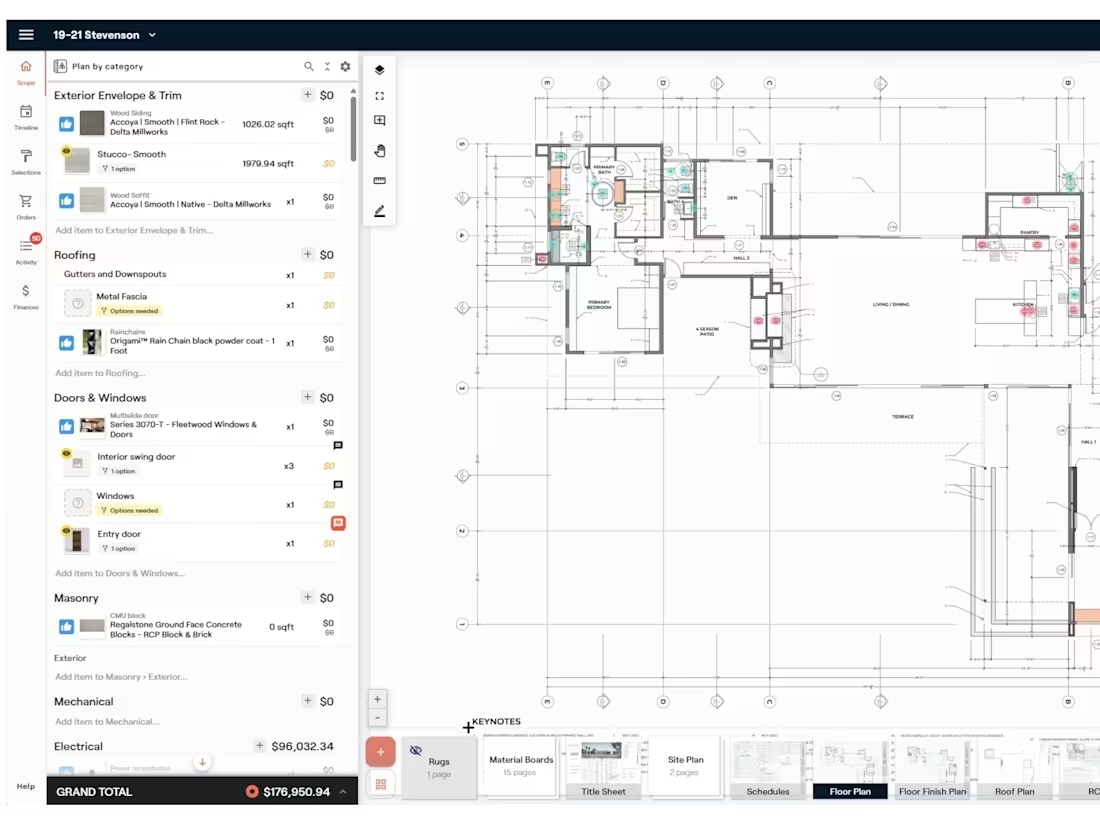
Materio is a powerful project management app for interior designers and architects. We help you setup your project and onboard your team so you can utilize it's features successfully, which allows you to spend more time designing and less time managing the procurement, resulting in a more efficient and profitable business with less hiccups and mistakes.
What's included
1. Initial project setup
Review your project drawings to understand the scope of the project. Upload the drawings to Materio and organize them per drawing type. Input any project related info.
2. Scope development
Outline and detail the scope of the project with each scope category to match the scope depicted in your drawing set. This can be as comprehensive as you'd like- including design and consultant costs, contractor fees, construction materials and labor, as well as furnishings.
3. Scope plan mapping
Reference each scope item for construction and furnishings on the uploaded plans.
Develop quantities for each scope item and reference the schedule IDs for easy cross reference.
4. Budget development
Assign values to each scope item to track the project budget. Alternatively, prices will be uploaded during selection and the project cost tracked accordingly.
5. Timeline setup
Create a project timeline framework for tracking the project phases and procurement of each item. This can reflect your team's project schedule proposed to the client and will track the purchase, shipping, delivery, and install date of each item.
6. Selections
Load preliminary selections for client approval. This includes links to product websites, selection assemblies and options like finishes and colors, as well as product unit prices, trade discounts, tax, delivery costs.
7. Team onboarding
Assign project roles to team members and clients.
Provide recorded training videos to walk you through the project and next steps.
Show you how to utilize the platform with your team members, clients, and contractors.
8. Project Support
Respond to questions as needed throughout the life of your design and construction project.
FAQs
Briana's other services

Contact for pricing
Tags
Google Apps

Architect & Interior Designer
Project Manager
Service provided by
Briana Ellis San Diego, USA
- 1
- Followers
Materio Project Setup for Architecture and Interior DesignBriana Ellis
Materio is a powerful project management app for interior designers and architects. We help you setup your project and onboard your team so you can utilize it's features successfully, which allows you to spend more time designing and less time managing the procurement, resulting in a more efficient and profitable business with less hiccups and mistakes.
What's included
1. Initial project setup
Review your project drawings to understand the scope of the project. Upload the drawings to Materio and organize them per drawing type. Input any project related info.
2. Scope development
Outline and detail the scope of the project with each scope category to match the scope depicted in your drawing set. This can be as comprehensive as you'd like- including design and consultant costs, contractor fees, construction materials and labor, as well as furnishings.
3. Scope plan mapping
Reference each scope item for construction and furnishings on the uploaded plans.
Develop quantities for each scope item and reference the schedule IDs for easy cross reference.
4. Budget development
Assign values to each scope item to track the project budget. Alternatively, prices will be uploaded during selection and the project cost tracked accordingly.
5. Timeline setup
Create a project timeline framework for tracking the project phases and procurement of each item. This can reflect your team's project schedule proposed to the client and will track the purchase, shipping, delivery, and install date of each item.
6. Selections
Load preliminary selections for client approval. This includes links to product websites, selection assemblies and options like finishes and colors, as well as product unit prices, trade discounts, tax, delivery costs.
7. Team onboarding
Assign project roles to team members and clients.
Provide recorded training videos to walk you through the project and next steps.
Show you how to utilize the platform with your team members, clients, and contractors.
8. Project Support
Respond to questions as needed throughout the life of your design and construction project.
FAQs
Briana's other services
Contact for pricing