
Client Onboarding Automation for Agencies & StartupsHayeni Samuel
From New Client Signup to Organized Team Handoff Without the Repetitive Admin
When a new client joins your business, what happens next?
Does someone manually copy their details into a CRM, send a welcome message, assign an onboarding task and remind the responsible team member?
If your team is losing time to repeated administration, dealing with missed handoffs, or struggling with inconsistent onboarding, your current process may need improvement.
I help growing agencies, consultancies and B2B startups turn disconnected onboarding steps into one organized, tested workflow.
And if your existing software can solve the problem more simply, I'll recommend that approach first.
What Your Onboarding System Can Look Like
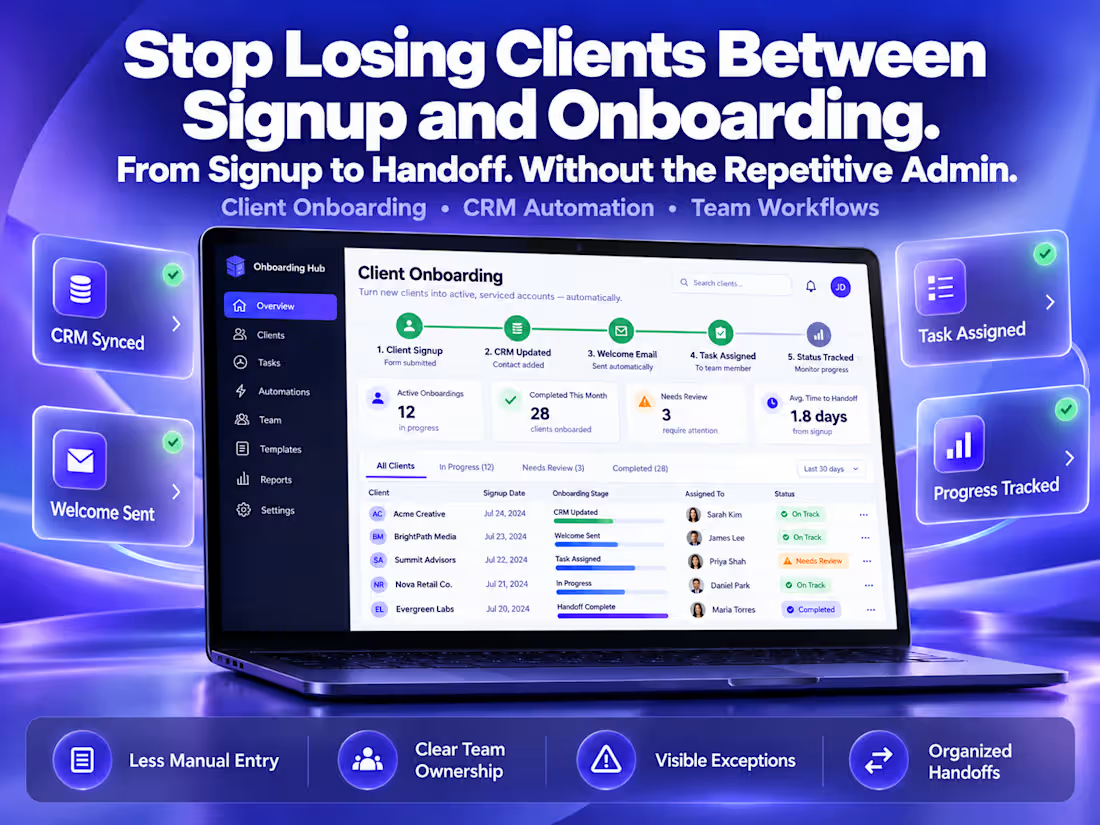
Step 1 — Customer intake
A new customer submits your approved onboarding form.
Step 2 — CRM update
Their information is checked and added to or updated in your CRM, with appropriate duplicate-handling rules.
Step 3 — Welcome communication
An approved welcome email is sent when the required conditions are met.
Step 4 — Team assignment
The responsible team member receives an onboarding task and notification.
Step 5 — Tracking and exception handling
The team can identify the client's onboarding status and review flagged problems that need attention.
This is an illustrative workflow. The exact implementation depends on your applications, permissions and agreed scope.
What Your $750 Implementation Includes
Discovery and review of your current onboarding process
Assessment of suitable built-in and third-party automation options
One agreed onboarding workflow using up to three compatible applications
Client intake, CRM update, welcome communication and task-handoff configuration as applicable
Basic duplicate-prevention and input-validation rules
Error notification and documented recovery process
Functional testing against agreed acceptance scenarios
Workflow diagram, setup documentation and handover walkthrough
Two rounds of minor revisions
30 days of post-delivery correction for defects attributable to the agreed implementation
Typical delivery: 5–10 business days after access, requirements and scope are confirmed.
How We Determine Whether Automation Is Worth It
Before recommending an implementation, I'll review:
How frequently your business onboards customers
Which manual tasks are repeated
Where delays, errors or missed handoffs occur
Which applications you're already paying for
Whether your existing software can handle the process
What ongoing software and maintenance costs may apply
The objective is to recommend an appropriate solution—not unnecessary automation.
How You'll Know It Works
Before delivery, we'll agree on test cases covering successful onboarding, duplicate records, missing information, team assignment and failure visibility.
I'll demonstrate the agreed workflow using authorized test records, document the results and explain how your team can manage exceptions.
Your Data, Access & Ownership
The implementation will use client-authorized accounts and the minimum appropriate permissions.
Where practical, testing will use synthetic or non-sensitive records. You retain control of your business accounts and connected services. Access provided for implementation will be reviewed and removed or transferred appropriately at handover.
Credentials should be connected through supported, secure authorization methods rather than shared as passwords.
Transparent Pricing
Starting implementation: $750 — one-time project
Third-party software subscriptions, usage charges, advanced API integrations, additional workflows and ongoing maintenance are not included.
Any required recurring costs will be discussed before implementation.
Optional ongoing support is available through a separately agreed maintenance package.
Is This the Right Investment for Your Business?
If your onboarding process already works reliably and takes only a few minutes each month, a $750 custom implementation may not be worthwhile.
But if growing workload, disconnected tools, inconsistent handoffs or repeated mistakes are disrupting your operations, it may be time for a more structured system.
Let's review your process before you invest.
Send me the applications you currently use and explain what happens when a new customer signs up. I'll help you identify whether you need a custom workflow, a simpler configuration
FAQs
Starting at$750
Duration8 days
Tags
HubSpot

Make

N8N

Zapier

Zoho CRM

AI Automation
Business Workflow Automation
CRM Automation
Service provided by
Hayeni Samuel Los Angeles, USA
- 7
- Followers
Client Onboarding Automation for Agencies & StartupsHayeni Samuel
Starting at$750
Duration8 days
Tags
HubSpot
Make
N8N
Zapier
Zoho CRM
AI Automation
Business Workflow Automation
CRM Automation
From New Client Signup to Organized Team Handoff Without the Repetitive Admin
When a new client joins your business, what happens next?
Does someone manually copy their details into a CRM, send a welcome message, assign an onboarding task and remind the responsible team member?
If your team is losing time to repeated administration, dealing with missed handoffs, or struggling with inconsistent onboarding, your current process may need improvement.
I help growing agencies, consultancies and B2B startups turn disconnected onboarding steps into one organized, tested workflow.
And if your existing software can solve the problem more simply, I'll recommend that approach first.
What Your Onboarding System Can Look Like
Step 1 — Customer intake
A new customer submits your approved onboarding form.
Step 2 — CRM update
Their information is checked and added to or updated in your CRM, with appropriate duplicate-handling rules.
Step 3 — Welcome communication
An approved welcome email is sent when the required conditions are met.
Step 4 — Team assignment
The responsible team member receives an onboarding task and notification.
Step 5 — Tracking and exception handling
The team can identify the client's onboarding status and review flagged problems that need attention.
This is an illustrative workflow. The exact implementation depends on your applications, permissions and agreed scope.
What Your $750 Implementation Includes
Discovery and review of your current onboarding process
Assessment of suitable built-in and third-party automation options
One agreed onboarding workflow using up to three compatible applications
Client intake, CRM update, welcome communication and task-handoff configuration as applicable
Basic duplicate-prevention and input-validation rules
Error notification and documented recovery process
Functional testing against agreed acceptance scenarios
Workflow diagram, setup documentation and handover walkthrough
Two rounds of minor revisions
30 days of post-delivery correction for defects attributable to the agreed implementation
Typical delivery: 5–10 business days after access, requirements and scope are confirmed.
How We Determine Whether Automation Is Worth It
Before recommending an implementation, I'll review:
How frequently your business onboards customers
Which manual tasks are repeated
Where delays, errors or missed handoffs occur
Which applications you're already paying for
Whether your existing software can handle the process
What ongoing software and maintenance costs may apply
The objective is to recommend an appropriate solution—not unnecessary automation.
How You'll Know It Works
Before delivery, we'll agree on test cases covering successful onboarding, duplicate records, missing information, team assignment and failure visibility.
I'll demonstrate the agreed workflow using authorized test records, document the results and explain how your team can manage exceptions.
Your Data, Access & Ownership
The implementation will use client-authorized accounts and the minimum appropriate permissions.
Where practical, testing will use synthetic or non-sensitive records. You retain control of your business accounts and connected services. Access provided for implementation will be reviewed and removed or transferred appropriately at handover.
Credentials should be connected through supported, secure authorization methods rather than shared as passwords.
Transparent Pricing
Starting implementation: $750 — one-time project
Third-party software subscriptions, usage charges, advanced API integrations, additional workflows and ongoing maintenance are not included.
Any required recurring costs will be discussed before implementation.
Optional ongoing support is available through a separately agreed maintenance package.
Is This the Right Investment for Your Business?
If your onboarding process already works reliably and takes only a few minutes each month, a $750 custom implementation may not be worthwhile.
But if growing workload, disconnected tools, inconsistent handoffs or repeated mistakes are disrupting your operations, it may be time for a more structured system.
Let's review your process before you invest.
Send me the applications you currently use and explain what happens when a new customer signs up. I'll help you identify whether you need a custom workflow, a simpler configuration
FAQs
$750