
Mobile DesignNyekachi Wihioka
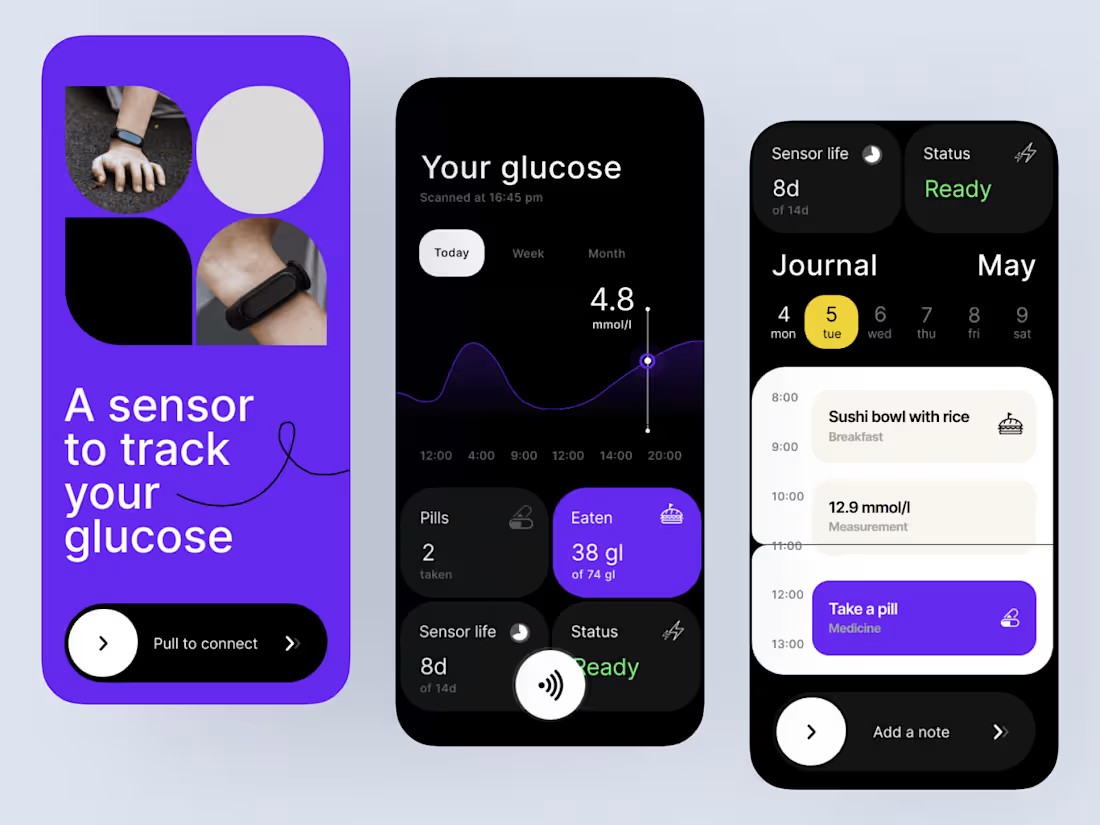
I design intuitive, high-performing mobile app interfaces using Figma, tailored to your product’s goals and your users’ needs.
Every detail is considered: the user journey, visual hierarchy, accessibility, and brand consistency. I combine thoughtful UX with clean, modern UI to craft mobile experiences that don’t just look great but also drive engagement and retention.
Whether you’re building an MVP or redesigning an existing app, I’ll help you turn your idea into a polished, production-ready mobile experience that feels seamless across iOS and Android.
What's included
User Experience (UX) Design
I start by defining the flow and structure of your mobile app, creating intuitive, user-friendly navigation that ensures every interaction feels natural. From onboarding to core actions, the focus is on simplicity, usability, and delight.
User Interface (UI) Design
I design visually compelling, brand-aligned interfaces using Figma, ensuring every element feels cohesive and purposeful. Typography, color, spacing, and layout are all crafted to enhance clarity and engagement.
Prototyping & Interactions
I bring your app to life with interactive Figma prototypes that simulate real user experiences. You’ll be able to see how screens transition, buttons react, and flows connect before any code is written.
Design System & Components
To ensure scalability and consistency, I create reusable Figma components, styles, and design tokens. This helps streamline future updates and keeps your product visually and functionally aligned.
Developer Handoff
I prepare your Figma files for seamless developer handoff, with organized layers, properly named components, and detailed design specs. This ensures an efficient, error-free implementation.
Post-Design Support
Once design delivery is complete, I remain available to assist with revisions, design updates, and guidance during development to make sure your app looks and feels perfect when launched.
FAQs
Nyekachi's other services

Contact for pricing
Tags
Adobe After Effects

Figma

Mobile Designer
UI Designer
UX Designer
Service provided by
Nyekachi Wihioka United Kingdom
- 12
- Followers
Mobile DesignNyekachi Wihioka
I design intuitive, high-performing mobile app interfaces using Figma, tailored to your product’s goals and your users’ needs.
Every detail is considered: the user journey, visual hierarchy, accessibility, and brand consistency. I combine thoughtful UX with clean, modern UI to craft mobile experiences that don’t just look great but also drive engagement and retention.
Whether you’re building an MVP or redesigning an existing app, I’ll help you turn your idea into a polished, production-ready mobile experience that feels seamless across iOS and Android.
What's included
User Experience (UX) Design
I start by defining the flow and structure of your mobile app, creating intuitive, user-friendly navigation that ensures every interaction feels natural. From onboarding to core actions, the focus is on simplicity, usability, and delight.
User Interface (UI) Design
I design visually compelling, brand-aligned interfaces using Figma, ensuring every element feels cohesive and purposeful. Typography, color, spacing, and layout are all crafted to enhance clarity and engagement.
Prototyping & Interactions
I bring your app to life with interactive Figma prototypes that simulate real user experiences. You’ll be able to see how screens transition, buttons react, and flows connect before any code is written.
Design System & Components
To ensure scalability and consistency, I create reusable Figma components, styles, and design tokens. This helps streamline future updates and keeps your product visually and functionally aligned.
Developer Handoff
I prepare your Figma files for seamless developer handoff, with organized layers, properly named components, and detailed design specs. This ensures an efficient, error-free implementation.
Post-Design Support
Once design delivery is complete, I remain available to assist with revisions, design updates, and guidance during development to make sure your app looks and feels perfect when launched.
FAQs
Nyekachi's other services
Contact for pricing