
Product Design - UI/UX, Mobile designEaxi Agu
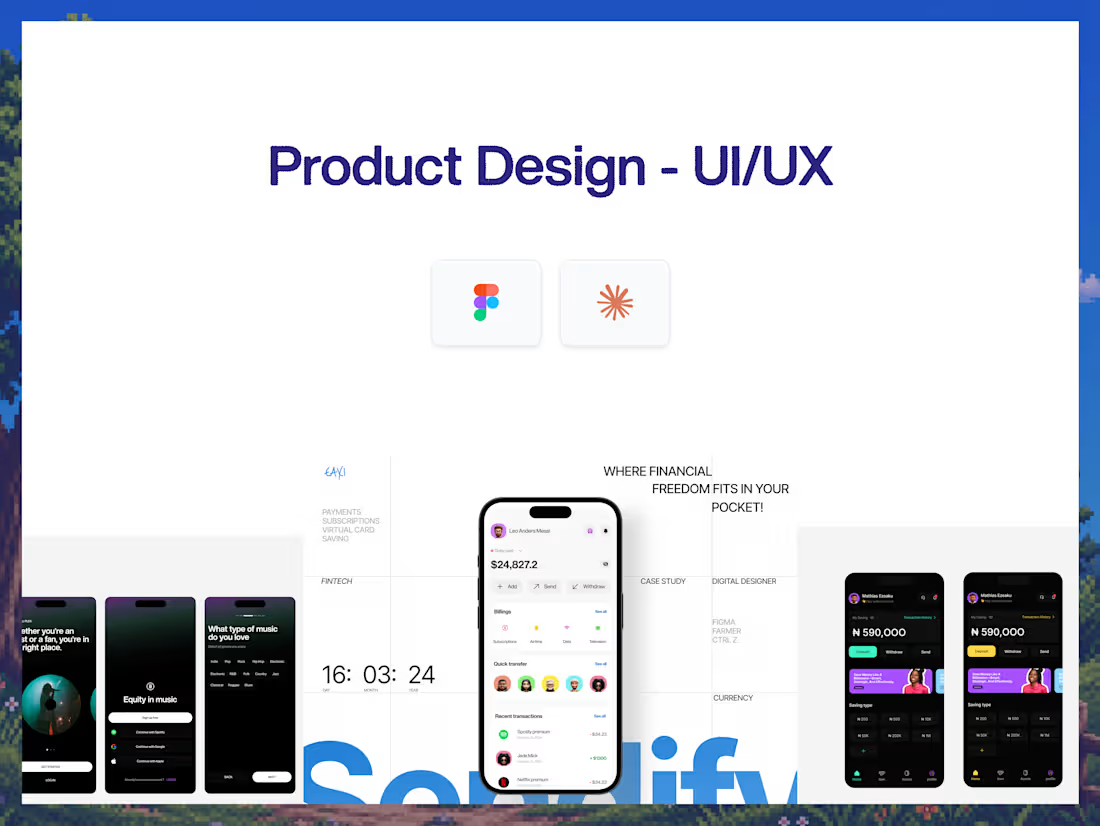
Most mobile products don't fail because the interface looks bad. They fail because the experience wasn't designed around how people actually use the product.
Too many features compete for attention. Important actions are buried. User flows feel disconnected. Empty states are ignored. And developers are left trying to interpret a collection of screens instead of building from a complete product system.
This engagement brings the product experience together.
I design the UX, user flows, interface, and complete mobile experience in Figma — from the first screen through the key states and interactions your product needs.
The result is a polished, developer-ready mobile product design built around how the product should actually work.
Why this engagement model exists
Good product design is more than making individual screens look good.
A mobile product is a system of decisions.
What does the user see first? What happens when they tap? What happens when there is no data? What happens when something goes wrong? How does a new user understand the product? How does an experienced user move faster?
I design those decisions before they become development problems.
The UX, flows, components, states, and visual system are designed together so the final product feels consistent and intentional from onboarding to everyday use.
Who this is for
Startups building an MVP or preparing for launch. Founders turning an idea into a real mobile product. Existing apps that need a UX/UI redesign. SaaS companies expanding into mobile. Teams that already have developers but need a product designer to own the user experience.
It's for teams that need more than a collection of attractive screens.
Not for: simple marketing websites, graphic design projects, or highly complex enterprise applications requiring extensive product research and multiple specialized design teams. Larger product engagements can be scoped separately.
What you walk away with
A product discovery session covering your users, product goals, key problems, features, and business objectives.
A clear information architecture showing how the product is organized and how users move through it.
User flows for the core journeys, including onboarding, authentication, primary actions, and other important product experiences.
Low-fidelity wireframes to establish structure and UX before visual design.
High-fidelity mobile UI designs with polished layouts, typography, color, imagery, icons, and interaction patterns.
A reusable design system with components, variants, spacing, typography, colors, buttons, forms, cards, navigation, and other core UI elements.
Complete interaction and state design covering loading, empty, error, success, disabled, active, and other relevant states.
Clickable Figma prototypes for important user journeys so the experience can be reviewed and tested before development.
Developer-ready Figma files with Auto Layout, reusable components, variants, consistent naming, and organized screens.
Design specifications and handoff notes where additional implementation context is required.
How it ships
Days 1–2: Discovery & UX — Product goals, target users, feature review, information architecture, user flows, and initial wireframes.
Days 3–5: UI direction & design system — Visual direction, typography, colors, navigation, core components, and key screen designs.
Days 6–9: Full product design — High-fidelity mobile screens, user states, interactions, and clickable Figma prototypes for the core user journeys.
Days 10–12: Refinement & developer handoff — Final UX/UI refinements, component cleanup, prototype testing, Figma organization, specifications, and developer handoff.
Typical turnaround: 12- 14 business days.
FAQs
Eaxi's other services
Starting at$2,199
Duration14 days
Tags
Figma

Notion

UI Designer
UX Designer
UX Researcher
Service provided by
Eaxi Agu proNigeria
- $25k+
- Earned
- 9
- Paid projects
- 5.00
- Rating
- 32
- Followers
Product Design - UI/UX, Mobile designEaxi Agu
Starting at$2,199
Duration14 days
Tags
Figma
Notion
UI Designer
UX Designer
UX Researcher
Most mobile products don't fail because the interface looks bad. They fail because the experience wasn't designed around how people actually use the product.
Too many features compete for attention. Important actions are buried. User flows feel disconnected. Empty states are ignored. And developers are left trying to interpret a collection of screens instead of building from a complete product system.
This engagement brings the product experience together.
I design the UX, user flows, interface, and complete mobile experience in Figma — from the first screen through the key states and interactions your product needs.
The result is a polished, developer-ready mobile product design built around how the product should actually work.
Why this engagement model exists
Good product design is more than making individual screens look good.
A mobile product is a system of decisions.
What does the user see first? What happens when they tap? What happens when there is no data? What happens when something goes wrong? How does a new user understand the product? How does an experienced user move faster?
I design those decisions before they become development problems.
The UX, flows, components, states, and visual system are designed together so the final product feels consistent and intentional from onboarding to everyday use.
Who this is for
Startups building an MVP or preparing for launch. Founders turning an idea into a real mobile product. Existing apps that need a UX/UI redesign. SaaS companies expanding into mobile. Teams that already have developers but need a product designer to own the user experience.
It's for teams that need more than a collection of attractive screens.
Not for: simple marketing websites, graphic design projects, or highly complex enterprise applications requiring extensive product research and multiple specialized design teams. Larger product engagements can be scoped separately.
What you walk away with
A product discovery session covering your users, product goals, key problems, features, and business objectives.
A clear information architecture showing how the product is organized and how users move through it.
User flows for the core journeys, including onboarding, authentication, primary actions, and other important product experiences.
Low-fidelity wireframes to establish structure and UX before visual design.
High-fidelity mobile UI designs with polished layouts, typography, color, imagery, icons, and interaction patterns.
A reusable design system with components, variants, spacing, typography, colors, buttons, forms, cards, navigation, and other core UI elements.
Complete interaction and state design covering loading, empty, error, success, disabled, active, and other relevant states.
Clickable Figma prototypes for important user journeys so the experience can be reviewed and tested before development.
Developer-ready Figma files with Auto Layout, reusable components, variants, consistent naming, and organized screens.
Design specifications and handoff notes where additional implementation context is required.
How it ships
Days 1–2: Discovery & UX — Product goals, target users, feature review, information architecture, user flows, and initial wireframes.
Days 3–5: UI direction & design system — Visual direction, typography, colors, navigation, core components, and key screen designs.
Days 6–9: Full product design — High-fidelity mobile screens, user states, interactions, and clickable Figma prototypes for the core user journeys.
Days 10–12: Refinement & developer handoff — Final UX/UI refinements, component cleanup, prototype testing, Figma organization, specifications, and developer handoff.
Typical turnaround: 12- 14 business days.
FAQs
Eaxi's other services
$2,199