
System Design (Desktop / Mobile App)Zhi Nan Poh
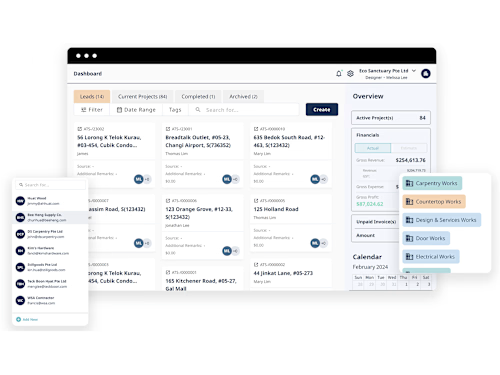
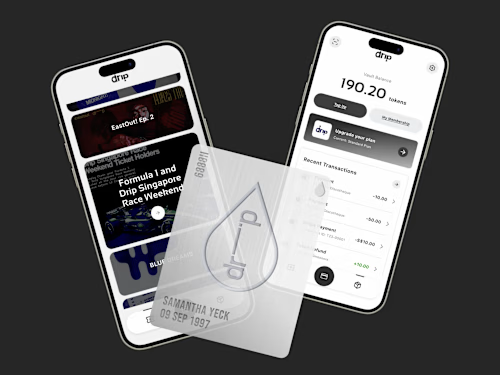
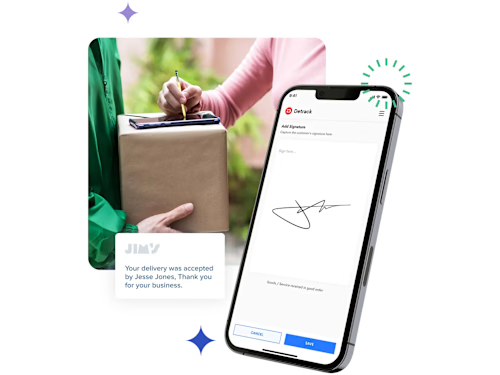
As a UI/UX SaaS Designer, I craft intuitive and efficient interfaces that elevate user experiences for software products. I focus on balancing functionality with aesthetics to ensure seamless workflows and engagement.
What sets me apart is my commitment to understanding user needs deeply and translating them into practical, elegant solutions that drive user satisfaction and product success.
What's included
High-Fidelity UI Design File
Description: Complete, polished screens for all pages and components in the SaaS product.
Format: Figma file
Quantity: All screens defined in the project scope, typically covering main workflows, settings, and additional features.
Revisions: Includes up to 2 rounds of revisions to finalise design elements.
Details: Each file includes naming conventions, style guides, and any specific visual assets (e.g., icons, images).
Interactive Prototype
Description: A clickable prototype that simulates key user flows and interactions within the SaaS product.
Format: Hosted online through Figma
Quantity: Full prototype covering all core features as outlined in user journeys.
Revisions: 1 round of revisions based on final user testing or client feedback.
Details: This prototype enables stakeholders to visualise the end-user experience and is ideal for preliminary testing and presentations.
Design System / Style Guide
Description: Comprehensive documentation of design elements, including color schemes, typography, spacing, and UI components, for use during development.
Format: Figma
Quantity: One complete guide covering all visual and interaction standards for consistency.
Revisions: Includes 1 revision to address any client feedback.
Details: This document ensures developers have a clear reference, reducing potential discrepancies in the final product and supporting consistency in future updates.
User Journey and Interaction Flow Diagrams
Description: Visual representations of the user flows and interactions, showing how users move through the application to accomplish tasks.
Format: PDF or digital link to flowchart (Miro, Figjam).
Quantity: One set of diagrams for each core user journey outlined in the project scope.
Revisions: 1 round of feedback-based adjustments.
Details: These help the client and developers understand and implement the intended user experience more accurately.
FAQs
Example work
Zhi Nan's other services

Contact for pricing
Tags
FigJam

Figma
Notion

Product Designer
UX Designer
Web Designer
Service provided by
Zhi Nan Poh Singapore
- 2
- Followers
System Design (Desktop / Mobile App)Zhi Nan Poh
Contact for pricing
Tags
FigJam
Figma
Notion
Product Designer
UX Designer
Web Designer
As a UI/UX SaaS Designer, I craft intuitive and efficient interfaces that elevate user experiences for software products. I focus on balancing functionality with aesthetics to ensure seamless workflows and engagement.
What sets me apart is my commitment to understanding user needs deeply and translating them into practical, elegant solutions that drive user satisfaction and product success.
What's included
High-Fidelity UI Design File
Description: Complete, polished screens for all pages and components in the SaaS product.
Format: Figma file
Quantity: All screens defined in the project scope, typically covering main workflows, settings, and additional features.
Revisions: Includes up to 2 rounds of revisions to finalise design elements.
Details: Each file includes naming conventions, style guides, and any specific visual assets (e.g., icons, images).
Interactive Prototype
Description: A clickable prototype that simulates key user flows and interactions within the SaaS product.
Format: Hosted online through Figma
Quantity: Full prototype covering all core features as outlined in user journeys.
Revisions: 1 round of revisions based on final user testing or client feedback.
Details: This prototype enables stakeholders to visualise the end-user experience and is ideal for preliminary testing and presentations.
Design System / Style Guide
Description: Comprehensive documentation of design elements, including color schemes, typography, spacing, and UI components, for use during development.
Format: Figma
Quantity: One complete guide covering all visual and interaction standards for consistency.
Revisions: Includes 1 revision to address any client feedback.
Details: This document ensures developers have a clear reference, reducing potential discrepancies in the final product and supporting consistency in future updates.
User Journey and Interaction Flow Diagrams
Description: Visual representations of the user flows and interactions, showing how users move through the application to accomplish tasks.
Format: PDF or digital link to flowchart (Miro, Figjam).
Quantity: One set of diagrams for each core user journey outlined in the project scope.
Revisions: 1 round of feedback-based adjustments.
Details: These help the client and developers understand and implement the intended user experience more accurately.
FAQs
Example work
Zhi Nan's other services
Contact for pricing