
Automated Image Compression & Upload to Bubble with BuildshipSebastian Avelar
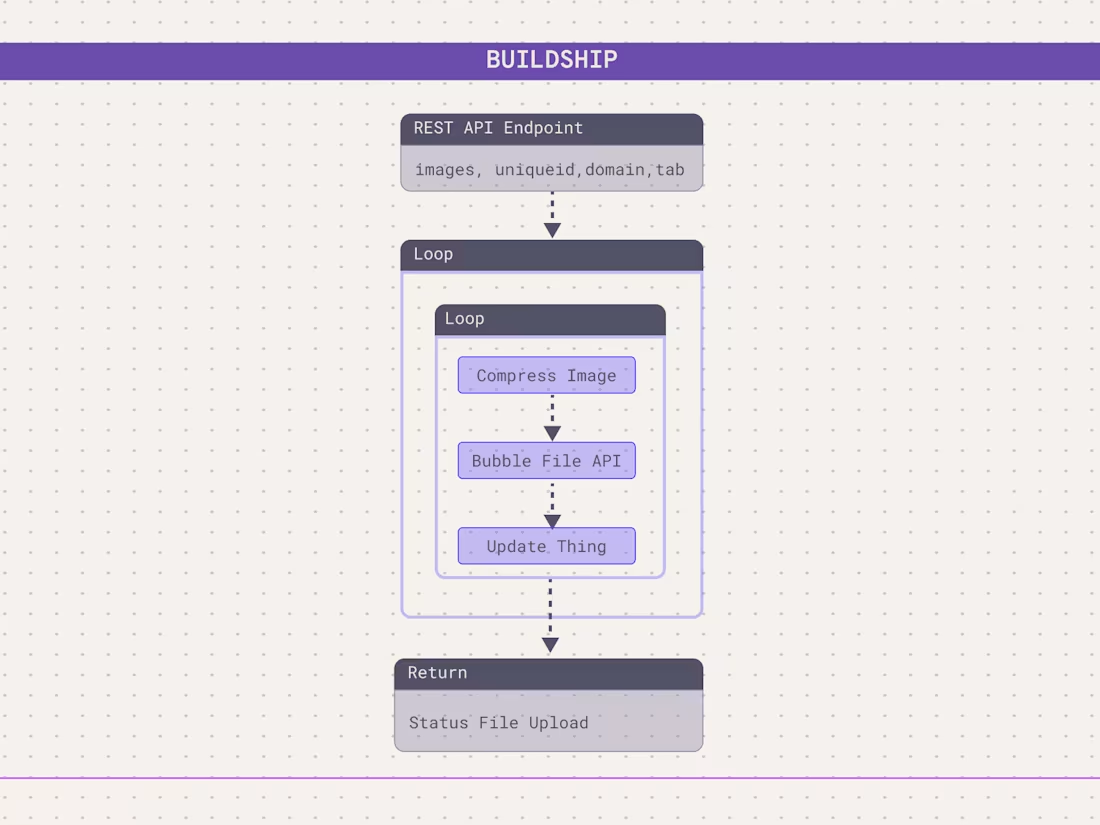
This Buildship workflow automates image processing and uploads optimized images directly to your Bubble database. It takes a list of images, a unique ID, a table name, and a field name—then compresses and converts them to WebP for better performance. The images are uploaded to Bubble’s File API and saved in the selected table.
From Bubble side, we trigger Buildship workflow through an API Call. It can be set up as a backend workflow and used to bulk edit on a datatype.
With this workflow, you can ensure your Bubble app loads images faster while keeping storage efficient. The setup is easy, and you’ll get full documentation plus a support call if needed.
What's included
Buildship Workflow with Documentation
A ready-to-use Buildship workflow that processes images before uploading them to Bubble.
Comes with instructions and notes for easy setup and customization.
Image Processing & Optimization
Compresses and converts images to WebP format for better performance.
It uses ffmpeg
Seamless Bubble Integration
Uploads images directly to Bubble’s File API, which can be attached to a thing.
Allows users to define which table, unique ID, and field name to update with the processed images.
One-on-One Setup Support Call
A free 1 hr support call to guide you through the setup, answer questions, and assist with further customization if needed
FAQs
Starting at$200
Duration1 week
Tags
Bubble

BuildShip

FFmpeg

Backend Engineer
Low-Code/No-Code Developer
Service provided by
Sebastian Avelar proParis, France
- $10k+
- Earned
- 14
- Paid projects
- 4.98
- Rating
- 145
- Followers
Automated Image Compression & Upload to Bubble with BuildshipSebastian Avelar
Starting at$200
Duration1 week
Tags
Bubble
BuildShip
FFmpeg
Backend Engineer
Low-Code/No-Code Developer
This Buildship workflow automates image processing and uploads optimized images directly to your Bubble database. It takes a list of images, a unique ID, a table name, and a field name—then compresses and converts them to WebP for better performance. The images are uploaded to Bubble’s File API and saved in the selected table.
From Bubble side, we trigger Buildship workflow through an API Call. It can be set up as a backend workflow and used to bulk edit on a datatype.
With this workflow, you can ensure your Bubble app loads images faster while keeping storage efficient. The setup is easy, and you’ll get full documentation plus a support call if needed.
What's included
Buildship Workflow with Documentation
A ready-to-use Buildship workflow that processes images before uploading them to Bubble.
Comes with instructions and notes for easy setup and customization.
Image Processing & Optimization
Compresses and converts images to WebP format for better performance.
It uses ffmpeg
Seamless Bubble Integration
Uploads images directly to Bubble’s File API, which can be attached to a thing.
Allows users to define which table, unique ID, and field name to update with the processed images.
One-on-One Setup Support Call
A free 1 hr support call to guide you through the setup, answer questions, and assist with further customization if needed
FAQs
$200