
Create a Captivating UI Design for Your Mobile or WebsiteOmoh Emoshogwe Franklyn
User Interface Design: The primary focus the project is to design the visual elements and layout of the user interface, including screens, menus, buttons, forms, and other interactive components.
User Experience (UX): While UI design primarily focuses on the visual aspects, it is essential to consider the overall user experience. This may involve conducting user research, creating user personas, and mapping out user journeys to ensure the design meets the needs and expectations of the target audience.
Responsive Design: designing the interface to be responsive, adapting seamlessly across different devices and screen sizes, such as desktops, tablets, and mobile device
What's included
Easy to use Design
I will create A good User friendly UI Design for your targeted audience and also make it inclusive for others.
UI Assets
Individual design assets such as icons, illustrations, and graphics that are used in the user interface. These assets are typically provided in various file formats (e.g., PNG, SVG) and sizes for easy integration into the development process.
Interactive Prototypes
Functional prototypes that allow users to interact with the interface and experience its usability. Interactive prototypes provide a hands-on demonstration of the UI design's functionality, user flow, and navigation, allowing for user testing and feedback.
Mockups
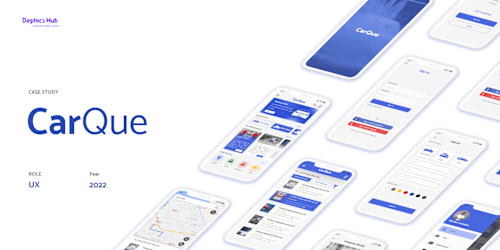
Detailed visual representations of the user interface design that depict the final look and feel of the product. Mockups showcase the colors, typography, imagery, and visual style, providing a realistic preview of the UI design.
Example work
Omoh Emoshogwe's other services

Contact for pricing
Tags
Adobe Photoshop

Adobe XD

Figma

Sketch

Product Designer
UI Designer
UX Designer
Service provided by
Omoh Emoshogwe Franklyn Nigeria
Create a Captivating UI Design for Your Mobile or WebsiteOmoh Emoshogwe Franklyn
Contact for pricing
Tags
Adobe Photoshop
Adobe XD
Figma
Sketch
Product Designer
UI Designer
UX Designer
User Interface Design: The primary focus the project is to design the visual elements and layout of the user interface, including screens, menus, buttons, forms, and other interactive components.
User Experience (UX): While UI design primarily focuses on the visual aspects, it is essential to consider the overall user experience. This may involve conducting user research, creating user personas, and mapping out user journeys to ensure the design meets the needs and expectations of the target audience.
Responsive Design: designing the interface to be responsive, adapting seamlessly across different devices and screen sizes, such as desktops, tablets, and mobile device
What's included
Easy to use Design
I will create A good User friendly UI Design for your targeted audience and also make it inclusive for others.
UI Assets
Individual design assets such as icons, illustrations, and graphics that are used in the user interface. These assets are typically provided in various file formats (e.g., PNG, SVG) and sizes for easy integration into the development process.
Interactive Prototypes
Functional prototypes that allow users to interact with the interface and experience its usability. Interactive prototypes provide a hands-on demonstration of the UI design's functionality, user flow, and navigation, allowing for user testing and feedback.
Mockups
Detailed visual representations of the user interface design that depict the final look and feel of the product. Mockups showcase the colors, typography, imagery, and visual style, providing a realistic preview of the UI design.
Example work
Omoh Emoshogwe's other services
Contact for pricing