
Lottie Player Pro for FramerBrian Karungani
What it does
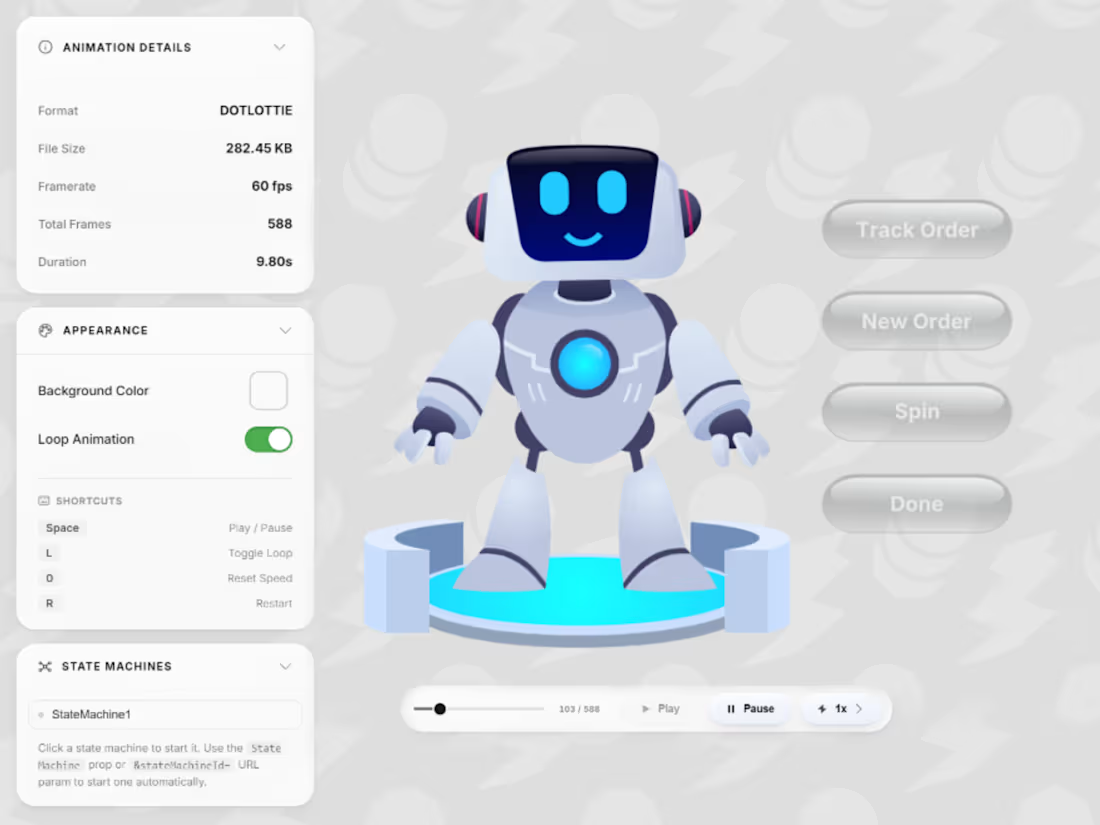
Lottie Player Pro plays both .lottie and .json animations with a full set of diagnostic tools built in. Use the controls to test and tune your animation directly on the Framer canvas, then hide the UI with one click when you're ready to publish. Everything you configured stays active.
Features
Plays .lottie (dotLottie) and .json (Lottie JSON) formats
State machine detection, start/stop controls, and trigger buttons
Segment playback with per-segment loop modes, editable directly on canvas
After Effects marker auto-import for .json files
Live scrubber with real-time frame counter
Adjustable speed, direction, and loop settings
Collapsible panels for a cleaner workspace
Glassmorphic UI that tints to match your background colour
Helpful error messages with CORS guidance
URL parameter support for all settings
How to use
Drop the component onto your Framer canvas and resize it to fit
Paste your animation URL into the Animation URL field in the property panel
Configure playback settings, segments, or state machine ID as needed
Test everything using the on-canvas controls
Toggle Show Controls off when you are ready to publish
Requirements
Your animation file must be hosted at a publicly accessible, CORS-enabled URL. LottieFiles, Cloudflare R2, and most CDNs work out of the box. State machine support requires .lottie format.
Example work
Brian 's other services

Starting at$29
Duration1 day
Tags
Framer Designer
Interaction Designer
Lottie Animator
State Machine
Vector Animation
Service provided by
Brian Karungani Nairobi, Kenya
- 5.00
- Rating
- 31
- Followers
Lottie Player Pro for FramerBrian Karungani
Starting at$29
Duration1 day
Tags
Framer Designer
Interaction Designer
Lottie Animator
State Machine
Vector Animation
What it does
Lottie Player Pro plays both .lottie and .json animations with a full set of diagnostic tools built in. Use the controls to test and tune your animation directly on the Framer canvas, then hide the UI with one click when you're ready to publish. Everything you configured stays active.
Features
Plays .lottie (dotLottie) and .json (Lottie JSON) formats
State machine detection, start/stop controls, and trigger buttons
Segment playback with per-segment loop modes, editable directly on canvas
After Effects marker auto-import for .json files
Live scrubber with real-time frame counter
Adjustable speed, direction, and loop settings
Collapsible panels for a cleaner workspace
Glassmorphic UI that tints to match your background colour
Helpful error messages with CORS guidance
URL parameter support for all settings
How to use
Drop the component onto your Framer canvas and resize it to fit
Paste your animation URL into the Animation URL field in the property panel
Configure playback settings, segments, or state machine ID as needed
Test everything using the on-canvas controls
Toggle Show Controls off when you are ready to publish
Requirements
Your animation file must be hosted at a publicly accessible, CORS-enabled URL. LottieFiles, Cloudflare R2, and most CDNs work out of the box. State machine support requires .lottie format.
Example work
Brian 's other services
$29