
Digital Restaurant Menu with QR Code - Simple and InteractiveTarek Sadek
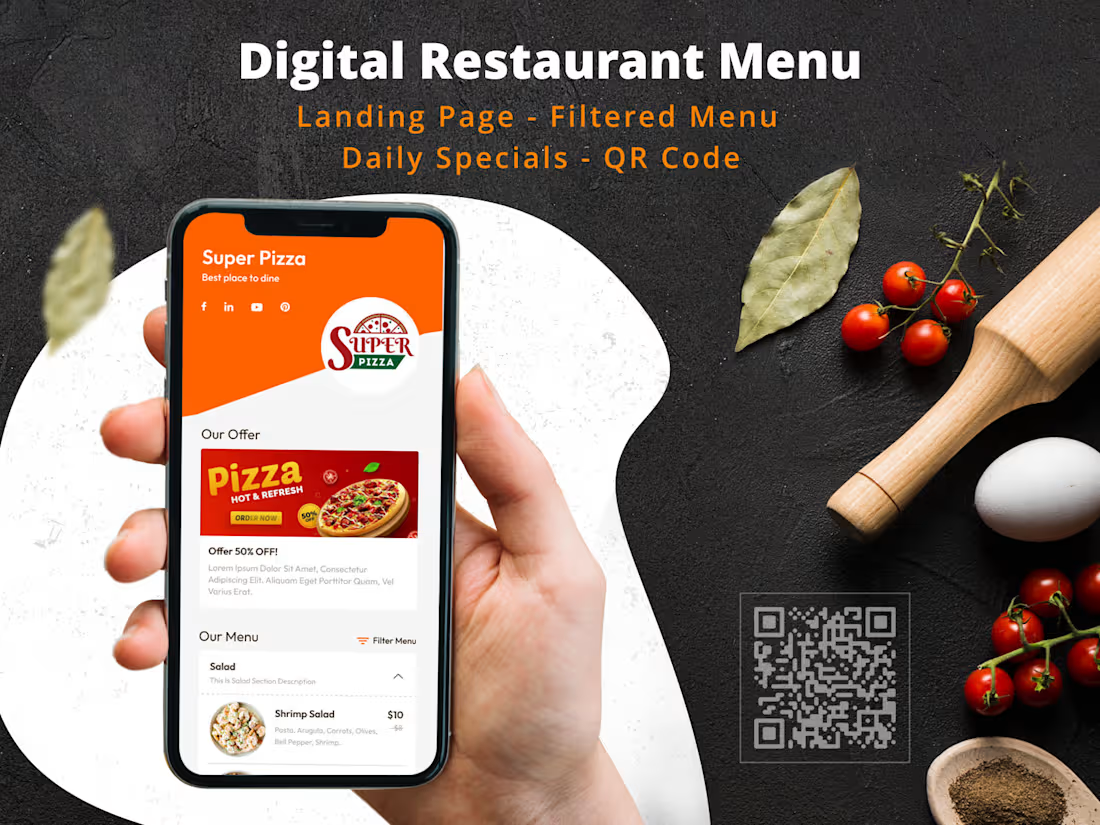
I offer a complete QR digital restaurant menu solution that transforms your menu into an interactive, easy-to-manage digital experience. With this service, you can effortlessly update your menu, showcase special offers, and provide customers with a seamless way to view and share your menu via QR codes. Enhance your restaurant's appeal with a modern, eco-friendly solution that simplifies menu management and improves customer engagement.
What's included
Customized Restaurant Page
A fully customized restaurant page featuring your logo, banner image, restaurant name, and slogan.
Interactive Digital Menu
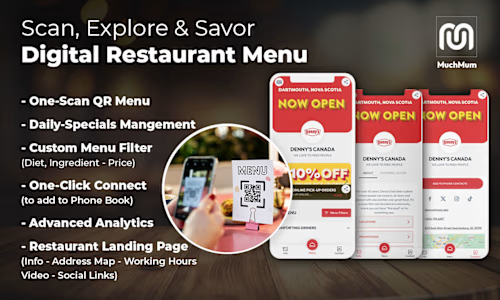
A digital menu divided into sections with related items, filterable by price, dietary restrictions, serving size, temperature, and spiciness.
Menu Management
Ability to add, edit, delete, and sort menu sections and items, with options to include title, description, ingredients, images, and filterable attributes.
Restaurant Information Section
A dedicated section for restaurant description, custom links, a promotional video, and working hours.
Contact Information
Comprehensive contact details including phone numbers, social links, email address, Google Map location, and an “Add to Phone Contacts” button that adds the restaurant's contacts to clients' phones.
QR Code Generation
QR codes for easy sharing of the restaurant page, downloadable in SVG and PNG formats.
Social Media Sharing Options
Integrated social media sharing options to promote your restaurant page.
Admin Accounts
One or multiple admin accounts with access to manage the restaurant page.
Daily Specials and Offers Carousel
A feature to add and display daily specials and offers in a carousel format, with options to select the display period and repeat on certain days.
Dedicated Firebase server
Configuration and deployment of your restaurant menu on a dedicated Firebase server for reliable hosting and management.
FAQs
Example work
Starting at$400
Duration1 week
Tags
Firebase

Material UI

Next.js

React

Redux

Frontend Engineer
Fullstack Engineer
Software Engineer
Service provided by
Tarek Sadek Alexandria, Egypt
Digital Restaurant Menu with QR Code - Simple and InteractiveTarek Sadek
Starting at$400
Duration1 week
Tags
Firebase
Material UI
Next.js
React
Redux
Frontend Engineer
Fullstack Engineer
Software Engineer
I offer a complete QR digital restaurant menu solution that transforms your menu into an interactive, easy-to-manage digital experience. With this service, you can effortlessly update your menu, showcase special offers, and provide customers with a seamless way to view and share your menu via QR codes. Enhance your restaurant's appeal with a modern, eco-friendly solution that simplifies menu management and improves customer engagement.
What's included
Customized Restaurant Page
A fully customized restaurant page featuring your logo, banner image, restaurant name, and slogan.
Interactive Digital Menu
A digital menu divided into sections with related items, filterable by price, dietary restrictions, serving size, temperature, and spiciness.
Menu Management
Ability to add, edit, delete, and sort menu sections and items, with options to include title, description, ingredients, images, and filterable attributes.
Restaurant Information Section
A dedicated section for restaurant description, custom links, a promotional video, and working hours.
Contact Information
Comprehensive contact details including phone numbers, social links, email address, Google Map location, and an “Add to Phone Contacts” button that adds the restaurant's contacts to clients' phones.
QR Code Generation
QR codes for easy sharing of the restaurant page, downloadable in SVG and PNG formats.
Social Media Sharing Options
Integrated social media sharing options to promote your restaurant page.
Admin Accounts
One or multiple admin accounts with access to manage the restaurant page.
Daily Specials and Offers Carousel
A feature to add and display daily specials and offers in a carousel format, with options to select the display period and repeat on certain days.
Dedicated Firebase server
Configuration and deployment of your restaurant menu on a dedicated Firebase server for reliable hosting and management.
FAQs
Example work
$400