
UI/UX Design | Figma Design System | Web Mobile | Ex-Apple AdobeJorge Tello Aliaga

My name is Jorge and I'm a Top Rated designer that will provide you with quality UI/UX/Visual work with minimal supervision.
I've worked for Adobe, Oracle, and Cisco. I have 10+ years of experience in UI/UX and I’m up to date with the latest trends and tools (Figma, Adobe Creative Cloud, Canva, Design Systems, Accessibility, Responsive, Agile, etc).
I'm experienced in all areas of Design from Wireframing to Visuals to Prototyping to Marketing Graphics.
I meet deadlines, I understand instructions easily, and I don't need supervision. Just assign me the work that needs to be done and I'll make sure to complete it to your satisfaction.
I'm currently looking for new projects, feel free to schedule me for a quick meeting to find out how I can help you!
What's included
Research and Discovery
• User Journey Map: Visual representation of the user’s experience.
• Competitive Analysis: Analysis of competitors' UI designs.
Wireframes and Prototypes
• Low-Fidelity Wireframes: Basic layout and structure of the UI, usually in black and white.
• High-Fidelity Wireframes: Detailed designs with more refined elements.
• Interactive Prototypes: Clickable versions of the high-fidelity wireframes to demonstrate user interactions.
Visual Design
• UI Mockups: Detailed, static images of the final user interface.
• Design System: Comprehensive guide including color palettes, typography, • UI components, icons, and branding guidelines.
• Responsive Design Mockups: UI designs for different screen sizes (mobile, tablet, desktop).
Interactive Elements
• Animations and Transitions: Specifications for how elements move and interact.
• Micro-interactions: Small, detailed interactions for enhancing user experience (e.g., button hover states, form validations).
Assets and Exported Files
• UI Assets: All necessary images, icons, and other graphical elements in required formats (e.g., PNG, SVG).
• Style Guide: Documentation of all visual elements and their usage.
• Design Files: Source files (e.g., Figma, Sketch, Adobe XD) including all screens and components.
Documentation
• Design Specifications: Detailed instructions for developers on implementing the design.
• Interaction Guidelines: Instructions on how interactive elements should behave.
Final Delivery
• Final UI Design: Polished and approved design ready for development.
• Handoff to Developers: Organized and annotated design files for developers, often through tools like Zeplin, InVision, or Figma's own handoff features.
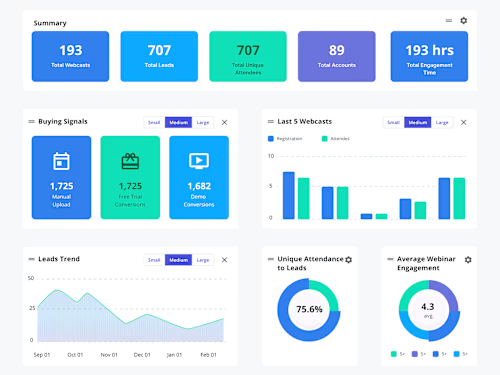
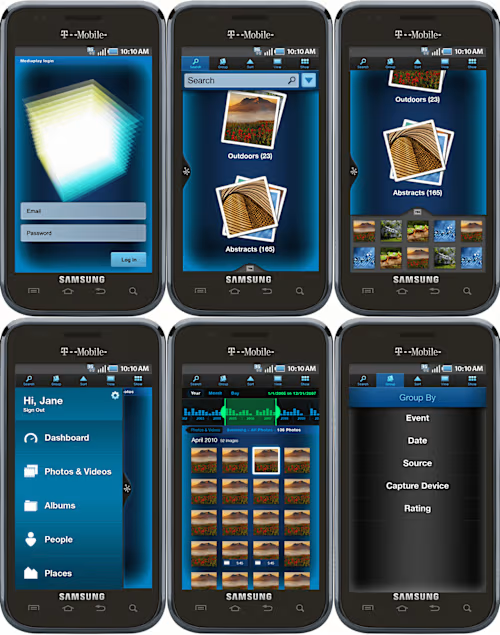
Example work

Jorge's other services

Starting at$75 /hr
Tags
Adobe Creative Cloud

Adobe XD

Figma

Sketch

Webflow

UI Designer
UX Designer
Visual Designer
Service provided by
Jorge Tello Aliaga Santa Clara, USA
- 5.00
- Rating
UI/UX Design | Figma Design System | Web Mobile | Ex-Apple AdobeJorge Tello Aliaga
Starting at$75 /hr
Tags
Adobe Creative Cloud
Adobe XD
Figma
Sketch
Webflow
UI Designer
UX Designer
Visual Designer
My name is Jorge and I'm a Top Rated designer that will provide you with quality UI/UX/Visual work with minimal supervision.
I've worked for Adobe, Oracle, and Cisco. I have 10+ years of experience in UI/UX and I’m up to date with the latest trends and tools (Figma, Adobe Creative Cloud, Canva, Design Systems, Accessibility, Responsive, Agile, etc).
I'm experienced in all areas of Design from Wireframing to Visuals to Prototyping to Marketing Graphics.
I meet deadlines, I understand instructions easily, and I don't need supervision. Just assign me the work that needs to be done and I'll make sure to complete it to your satisfaction.
I'm currently looking for new projects, feel free to schedule me for a quick meeting to find out how I can help you!
What's included
Research and Discovery
• User Journey Map: Visual representation of the user’s experience.
• Competitive Analysis: Analysis of competitors' UI designs.
Wireframes and Prototypes
• Low-Fidelity Wireframes: Basic layout and structure of the UI, usually in black and white.
• High-Fidelity Wireframes: Detailed designs with more refined elements.
• Interactive Prototypes: Clickable versions of the high-fidelity wireframes to demonstrate user interactions.
Visual Design
• UI Mockups: Detailed, static images of the final user interface.
• Design System: Comprehensive guide including color palettes, typography, • UI components, icons, and branding guidelines.
• Responsive Design Mockups: UI designs for different screen sizes (mobile, tablet, desktop).
Interactive Elements
• Animations and Transitions: Specifications for how elements move and interact.
• Micro-interactions: Small, detailed interactions for enhancing user experience (e.g., button hover states, form validations).
Assets and Exported Files
• UI Assets: All necessary images, icons, and other graphical elements in required formats (e.g., PNG, SVG).
• Style Guide: Documentation of all visual elements and their usage.
• Design Files: Source files (e.g., Figma, Sketch, Adobe XD) including all screens and components.
Documentation
• Design Specifications: Detailed instructions for developers on implementing the design.
• Interaction Guidelines: Instructions on how interactive elements should behave.
Final Delivery
• Final UI Design: Polished and approved design ready for development.
• Handoff to Developers: Organized and annotated design files for developers, often through tools like Zeplin, InVision, or Figma's own handoff features.
Example work
Jorge's other services
$75 /hr