
Omnichannel AI Support: 1- Brain, Every PlatformPATHAKHRK INC
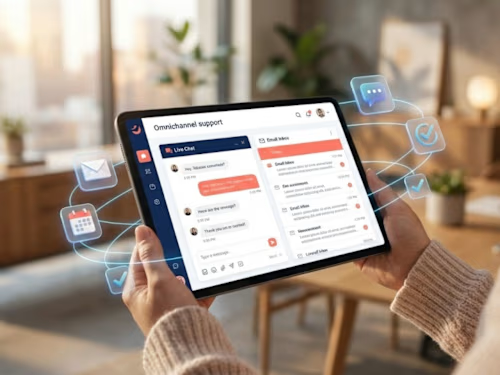
I'll build you a complete omnichannel support platform where one intelligent AI handles customer conversations seamlessly across web chat, email, WhatsApp, and SMS—maintaining perfect memory and context as customers switch between channels without them ever needing to repeat themselves or start over. The system combines RAG-powered knowledge retrieval with natural conversation AI, smooth human handoff when needed, and comprehensive analytics showing how each channel performs. This is for businesses tired of fragmented customer experiences who want unified, intelligent support that meets customers wherever they prefer to communicate while your team manages everything from one central platform.
What's included
Unified Omnichannel AI Architecture
Complete platform where one intelligent AI brain operates seamlessly across web chat, email, WhatsApp, and SMS. I'll build the architecture so customers can start a conversation on your website, continue it via email the next day, and follow up on WhatsApp—and the AI remembers everything. No fragmented experiences, no "who are you?" confusion, no starting over. The system maintains one continuous conversation history regardless of which channel the customer uses, with complete context flowing between platforms naturally.
Web Chat Widget with Smart Features
Beautiful, responsive chat widget that embeds on your website with modern UI design. The widget includes typing indicators showing the AI is working, read receipts confirming message delivery, quick reply buttons for common actions, file attachment support for documents and images, conversation history so users see past messages, and seamless handoff to human agents when needed. Fully customizable to match your brand—your colors, your logo, your style. Works perfectly on desktop, tablet, and mobile without any weird formatting issues.
Intelligent Email Integration & Management
Full email support where the AI monitors your support inbox, reads and understands incoming emails, generates contextually appropriate responses, maintains proper email threading, and handles attachments intelligently. The system recognizes when emails are part of ongoing conversations versus new inquiries, applies the same intelligent routing and qualification logic as other channels, and keeps everything synced. Your customers get thoughtful email responses that reference previous interactions across any channel, not generic auto-replies.
WhatsApp Business Integration
Native WhatsApp support through Twilio or WhatsApp Business API letting customers reach you on the platform they use most. The AI handles WhatsApp conversations with the same intelligence as other channels, supports rich media (images, documents, location sharing), respects WhatsApp's unique conversation patterns and etiquette, and maintains the informal, friendly tone WhatsApp users expect. International customers especially love this—WhatsApp is often their preferred communication method.
SMS Support for Broad Accessibility
Text message support for customers who prefer simple SMS. The AI keeps responses concise for the SMS format, handles the character limitations gracefully, supports two-way conversations naturally, and maintains context across multiple text exchanges. Perfect for time-sensitive notifications, appointment reminders, order updates, and customers in areas with limited internet but reliable cell service.
Conversation Memory Across Channels
Memory system using vector databases that tracks every interaction regardless of channel. When a customer emails after previously chatting on the website, the AI knows their history, references past conversations appropriately, maintains context about their issues and preferences, and provides personalized responses. The technology that makes "channel switching" seamless—customers feel understood, not like they're talking to different systems.
Intelligent Channel Routing & Preferences
Smart logic that learns which channels customers prefer and adapts accordingly. If someone always responds via WhatsApp but ignores emails, the system prioritizes WhatsApp for future communications. The AI can prompt users to switch channels when appropriate (complex issues might work better via email, urgent matters via chat), respects opt-out preferences per channel, and tracks engagement metrics to optimize channel strategy.
Advanced RAG Knowledge Base Integration
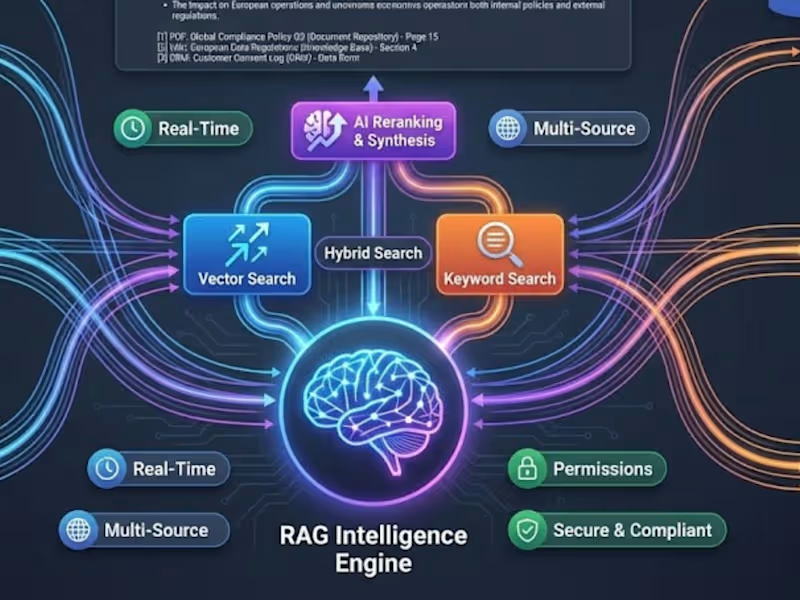
The AI doesn't just answer from memory—it pulls accurate information from your knowledge base using RAG technology. Upload your documentation, FAQs, policies, product specs, and troubleshooting guides, and the system retrieves relevant information for every response. Answers are grounded in your actual business information, cited with sources, and updated automatically when you add new content. No hallucinations, no outdated information, no guessing.
Human Agent Handoff & Collaboration
Escalation when conversations need human expertise. The AI recognizes when it's out of its depth, smoothly transfers to available human agents with full context, allows humans to join conversations while AI assists, and lets agents take over or tag back to AI as needed. Includes agent dashboard showing active conversations, queue management, and conversation history. Humans and AI collaborate rather than compete.
Automated Ticket Creation & Management
Integration with your ticketing system (Zendesk, Freshdesk, Jira Service Desk, or custom) where conversations automatically create tickets, update ticket status based on conversation progress, sync resolution notes and customer responses, and close tickets when issues resolve. Your support team gets organized ticket management without manual data entry. Everything flows automatically between conversation platform and ticketing system.
Multi-Language Support
AI communicates fluently in multiple languages based on customer preference. Automatically detects the language customers use, responds in that same language naturally, maintains conversation memory across language switches, and can even translate between languages if needed. Perfect for global businesses or multilingual markets. Your support becomes accessible to everyone regardless of their preferred language.
Smart Response Templates & Automation
Pre-built response templates for common scenarios—order status updates, return policies, appointment confirmations, shipping information. The AI personalizes these templates with customer-specific details, knows when to use templates versus generating custom responses, and learns which templates work best through usage analytics. Saves time while maintaining quality and consistency.
Conversation Analytics & Insights Dashboard
Dashboard showing how your omnichannel support performs. Track total conversations by channel, response times and resolution rates, customer satisfaction scores, common topics and trending issues, AI automation rates versus human handoff, and channel preferences and engagement patterns. See which channels customers prefer, what questions are most common, where the AI struggles, and where your knowledge base has gaps. Data that drives continuous improvement.
Business Hours & Availability Management
Flexible scheduling where you define when human agents are available, what happens outside business hours (AI handles everything or sets expectations for response), and channel-specific availability rules. The system communicates realistic expectations to customers, never promises what you can't deliver, and handles after-hours inquiries intelligently—either resolving them autonomously or capturing information for follow-up.
Customer Feedback & Satisfaction Tracking
Built-in feedback collection where customers rate their experience after conversations, provide comments about service quality, and indicate whether issues were resolved. The system tracks satisfaction by channel, identifies problem patterns requiring attention, recognizes excellent interactions for agent recognition, and provides insights for improving AI responses. You know exactly how well your omnichannel support is actually performing.
Conversation Compliance & Data Protection
Proper security and compliance features for handling customer data. All conversations encrypted in transit and at rest, data retention policies you control, GDPR and privacy regulation compliance, audit logs tracking all interactions, and secure data export capabilities. Customer information stays protected while remaining accessible to authorized team members.
API Access & Custom Integrations
Clean RESTful API providing programmatic access to the platform. Integrate with your CRM, send notifications from other systems, trigger conversations from your app, extract data for reporting, or build custom workflows. Comprehensive API documentation and code examples. The omnichannel platform becomes infrastructure powering your entire customer engagement ecosystem.
60-Day Omnichannel Optimization Program
2 months of intensive optimization after launch. I'll monitor performance across all channels, tune AI responses for better quality, optimize routing logic between channels, add new response templates based on patterns, improve knowledge base coverage, train your team on platform management, and establish best practices for maintaining excellence. We'll work together to ensure your omnichannel support delivers exceptional customer experiences consistently.
FAQs
Starting at$12,000
Duration5 weeks
Tags
FastAPI

LangChain

OpenAI

PostgreSQL

Twilio

AI Automation
Backend Engineer
Customer Success Manager
Service provided by
PATHAKHRK INC Kangra, India
- 2
- Followers
Omnichannel AI Support: 1- Brain, Every PlatformPATHAKHRK INC
Starting at$12,000
Duration5 weeks
Tags
FastAPI
LangChain
OpenAI
PostgreSQL
Twilio
AI Automation
Backend Engineer
Customer Success Manager
I'll build you a complete omnichannel support platform where one intelligent AI handles customer conversations seamlessly across web chat, email, WhatsApp, and SMS—maintaining perfect memory and context as customers switch between channels without them ever needing to repeat themselves or start over. The system combines RAG-powered knowledge retrieval with natural conversation AI, smooth human handoff when needed, and comprehensive analytics showing how each channel performs. This is for businesses tired of fragmented customer experiences who want unified, intelligent support that meets customers wherever they prefer to communicate while your team manages everything from one central platform.
What's included
Unified Omnichannel AI Architecture
Complete platform where one intelligent AI brain operates seamlessly across web chat, email, WhatsApp, and SMS. I'll build the architecture so customers can start a conversation on your website, continue it via email the next day, and follow up on WhatsApp—and the AI remembers everything. No fragmented experiences, no "who are you?" confusion, no starting over. The system maintains one continuous conversation history regardless of which channel the customer uses, with complete context flowing between platforms naturally.
Web Chat Widget with Smart Features
Beautiful, responsive chat widget that embeds on your website with modern UI design. The widget includes typing indicators showing the AI is working, read receipts confirming message delivery, quick reply buttons for common actions, file attachment support for documents and images, conversation history so users see past messages, and seamless handoff to human agents when needed. Fully customizable to match your brand—your colors, your logo, your style. Works perfectly on desktop, tablet, and mobile without any weird formatting issues.
Intelligent Email Integration & Management
Full email support where the AI monitors your support inbox, reads and understands incoming emails, generates contextually appropriate responses, maintains proper email threading, and handles attachments intelligently. The system recognizes when emails are part of ongoing conversations versus new inquiries, applies the same intelligent routing and qualification logic as other channels, and keeps everything synced. Your customers get thoughtful email responses that reference previous interactions across any channel, not generic auto-replies.
WhatsApp Business Integration
Native WhatsApp support through Twilio or WhatsApp Business API letting customers reach you on the platform they use most. The AI handles WhatsApp conversations with the same intelligence as other channels, supports rich media (images, documents, location sharing), respects WhatsApp's unique conversation patterns and etiquette, and maintains the informal, friendly tone WhatsApp users expect. International customers especially love this—WhatsApp is often their preferred communication method.
SMS Support for Broad Accessibility
Text message support for customers who prefer simple SMS. The AI keeps responses concise for the SMS format, handles the character limitations gracefully, supports two-way conversations naturally, and maintains context across multiple text exchanges. Perfect for time-sensitive notifications, appointment reminders, order updates, and customers in areas with limited internet but reliable cell service.
Conversation Memory Across Channels
Memory system using vector databases that tracks every interaction regardless of channel. When a customer emails after previously chatting on the website, the AI knows their history, references past conversations appropriately, maintains context about their issues and preferences, and provides personalized responses. The technology that makes "channel switching" seamless—customers feel understood, not like they're talking to different systems.
Intelligent Channel Routing & Preferences
Smart logic that learns which channels customers prefer and adapts accordingly. If someone always responds via WhatsApp but ignores emails, the system prioritizes WhatsApp for future communications. The AI can prompt users to switch channels when appropriate (complex issues might work better via email, urgent matters via chat), respects opt-out preferences per channel, and tracks engagement metrics to optimize channel strategy.
Advanced RAG Knowledge Base Integration
The AI doesn't just answer from memory—it pulls accurate information from your knowledge base using RAG technology. Upload your documentation, FAQs, policies, product specs, and troubleshooting guides, and the system retrieves relevant information for every response. Answers are grounded in your actual business information, cited with sources, and updated automatically when you add new content. No hallucinations, no outdated information, no guessing.
Human Agent Handoff & Collaboration
Escalation when conversations need human expertise. The AI recognizes when it's out of its depth, smoothly transfers to available human agents with full context, allows humans to join conversations while AI assists, and lets agents take over or tag back to AI as needed. Includes agent dashboard showing active conversations, queue management, and conversation history. Humans and AI collaborate rather than compete.
Automated Ticket Creation & Management
Integration with your ticketing system (Zendesk, Freshdesk, Jira Service Desk, or custom) where conversations automatically create tickets, update ticket status based on conversation progress, sync resolution notes and customer responses, and close tickets when issues resolve. Your support team gets organized ticket management without manual data entry. Everything flows automatically between conversation platform and ticketing system.
Multi-Language Support
AI communicates fluently in multiple languages based on customer preference. Automatically detects the language customers use, responds in that same language naturally, maintains conversation memory across language switches, and can even translate between languages if needed. Perfect for global businesses or multilingual markets. Your support becomes accessible to everyone regardless of their preferred language.
Smart Response Templates & Automation
Pre-built response templates for common scenarios—order status updates, return policies, appointment confirmations, shipping information. The AI personalizes these templates with customer-specific details, knows when to use templates versus generating custom responses, and learns which templates work best through usage analytics. Saves time while maintaining quality and consistency.
Conversation Analytics & Insights Dashboard
Dashboard showing how your omnichannel support performs. Track total conversations by channel, response times and resolution rates, customer satisfaction scores, common topics and trending issues, AI automation rates versus human handoff, and channel preferences and engagement patterns. See which channels customers prefer, what questions are most common, where the AI struggles, and where your knowledge base has gaps. Data that drives continuous improvement.
Business Hours & Availability Management
Flexible scheduling where you define when human agents are available, what happens outside business hours (AI handles everything or sets expectations for response), and channel-specific availability rules. The system communicates realistic expectations to customers, never promises what you can't deliver, and handles after-hours inquiries intelligently—either resolving them autonomously or capturing information for follow-up.
Customer Feedback & Satisfaction Tracking
Built-in feedback collection where customers rate their experience after conversations, provide comments about service quality, and indicate whether issues were resolved. The system tracks satisfaction by channel, identifies problem patterns requiring attention, recognizes excellent interactions for agent recognition, and provides insights for improving AI responses. You know exactly how well your omnichannel support is actually performing.
Conversation Compliance & Data Protection
Proper security and compliance features for handling customer data. All conversations encrypted in transit and at rest, data retention policies you control, GDPR and privacy regulation compliance, audit logs tracking all interactions, and secure data export capabilities. Customer information stays protected while remaining accessible to authorized team members.
API Access & Custom Integrations
Clean RESTful API providing programmatic access to the platform. Integrate with your CRM, send notifications from other systems, trigger conversations from your app, extract data for reporting, or build custom workflows. Comprehensive API documentation and code examples. The omnichannel platform becomes infrastructure powering your entire customer engagement ecosystem.
60-Day Omnichannel Optimization Program
2 months of intensive optimization after launch. I'll monitor performance across all channels, tune AI responses for better quality, optimize routing logic between channels, add new response templates based on patterns, improve knowledge base coverage, train your team on platform management, and establish best practices for maintaining excellence. We'll work together to ensure your omnichannel support delivers exceptional customer experiences consistently.
FAQs
$12,000