Freelancers using Elegant ThemesFreelancers using Elegant Themes
Divi Expert | Web Design & Development |WordPress | Divi
5.0
Rating
18
Followers
Divi Expert | Web Design & Development |WordPress | Divi
Creative Web & Graphic Designer | Video Editing

WordPress · Webflow · Shopify · GHL | Web Developer
17
Followers
WordPress · Webflow · Shopify · GHL | Web Developer
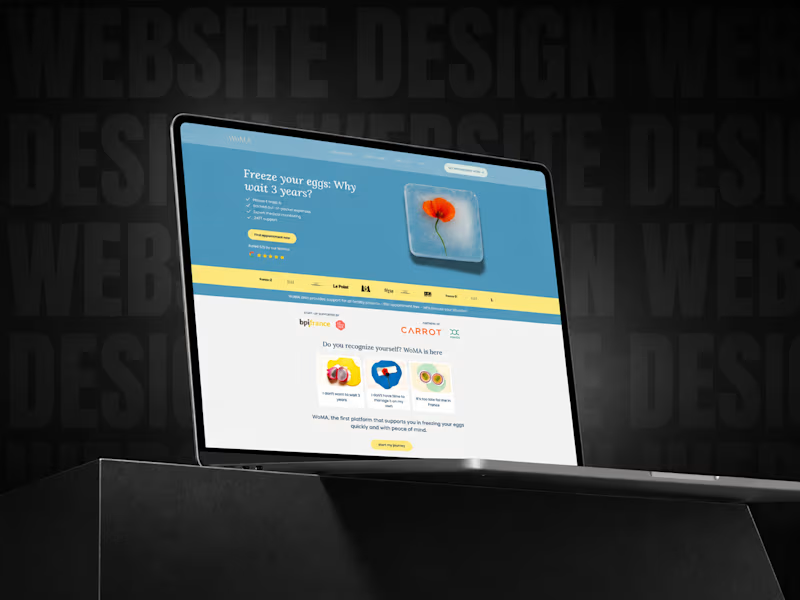
Cover image for Case Study: Turning a Client’s
Case Study: Turning a Client’s Webflow Website Into a Cleaner, More Responsive & User-Friendly Experience Sometimes a project does not start with a full rebuild. Sometimes it starts with one simple question from a client: “Can you review my current website and tell me how it can be improved? (https://www.woma.health/)” That is precisely how this project began. The client reached out to me because she already had a website, but it was not looking or performing the way she wanted. She shared the existing website link with me, and after reviewing it carefully, I noticed that the site was built in Webflow. Since Webflow is one of the platforms I work with confidently, I explained that we did not need to start everything from zero. Instead, we could improve the current structure, optimize the layout, make the design more polished, and create a better experience for visitors. After that, the client asked me how I would improve it. So, I reviewed the website in more detail and shared my thoughts about the layout, section structure, responsiveness, and overall user journey. During that discussion, she mentioned that she had already created a Figma design for the updated version of the website. She shared the Figma file with me, and I went through the full design carefully. Some sections were already well thought out by the client, while a few areas needed improvement. I suggested updates where needed, and she also refined some parts based on the information she wanted to present to her visitors. Once the website access was shared, I checked the Webflow structure properly. The client had started working on some sections herself, especially the blog area, but there were a few technical and layout-related issues that needed to be addressed. After we finalized the project scope and budget, I started the development work. The goal was not to make the website overly animated or visually complicated. The client wanted the website to feel clean, balanced, informative, and easy to navigate. Her visitors needed to understand the content clearly, so the focus was on readability, spacing, mobile responsiveness, and a smooth browsing experience. One of the most important parts of this project was making sure the design looked great across different devices. The desktop version had to feel polished, but the mobile version was equally important. I carefully adjusted the spacing, typography, layout behavior, and responsive structure so users could easily read and interact with the website from any screen size. Another key part of the project was the blog page. At one point, the client wanted to organize the blog content in a better way. She asked if we could add a filtering system so visitors could browse posts based on specific categories. I suggested a category-based filtering system, where users could click on a category and instantly see only the relevant posts. This made the blog page much easier to use and helped visitors find the content they were looking for faster. To make the idea clear, I first created a sample version inside the website and showed it to the client. She really liked the concept. After that, she created another Figma design for the blog page, and we refined it together with a few additional suggestions. The final blog page became simple, clean, and user-friendly — exactly what the website needed. This project was a true collaboration between the client’s creative direction and my Webflow development expertise. The client had a clear vision for how she wanted to communicate with her audience. My role was to bring that vision into Webflow properly, make the layout responsive, improve the technical structure, and ensure the website felt balanced and professional. The result was a much cleaner, more polished, and more user-friendly website. What I really enjoyed about this project was the collaboration. The client was involved in the creative process, open to suggestions, and focused on creating something meaningful for her visitors. Even after completing the main work, she continues to reach out whenever she needs help or updates. That kind of long-term client relationship is always valuable to me because it shows trust, communication, and satisfaction with the work. Project Highlights: ✅ Existing Webflow website review ✅ Figma design implementation ✅ Layout and section improvements ✅ Mobile responsiveness optimization ✅ Blog page restructuring ✅ Category-based blog filtering system ✅ Clean, balanced, and user-friendly design ✅ Ongoing client support and collaboration This project is a great example of how a website does not always need to be rebuilt from scratch. Sometimes, with the right strategy, clean execution, and thoughtful improvements, an existing website can be transformed into something much more professional, functional, and aligned with the client’s goals.
1
1
135
Shopify & GHL Expert | Stores That Sell on Autopilot
5.0
Rating
10
Followers
Shopify & GHL Expert | Stores That Sell on Autopilot
Ecommerce Specialist | Shopify, Wix, WordPress and Webflow.
New to Contra
Ecommerce Specialist | Shopify, Wix, WordPress and Webflow.
Cover image for A WordPress website shouldn't just
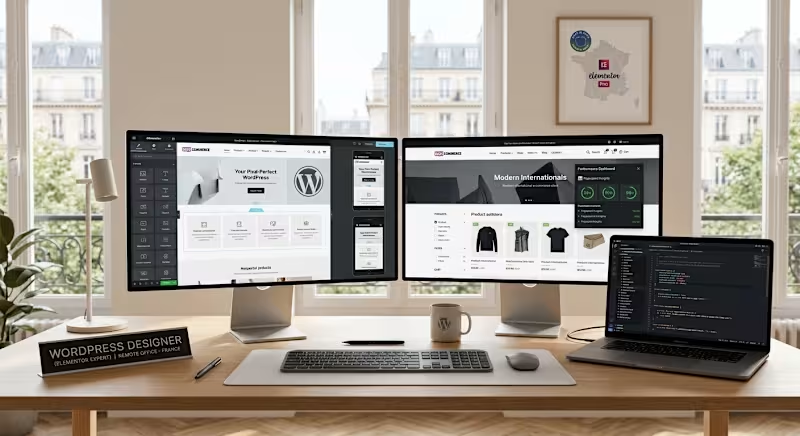
A WordPress website shouldn't just look good. It should work beautifully. I've seen websites that look impressive on desktop but become difficult to use on mobile. Others have beautiful designs but take too long to load. Some have a great homepage but a frustrating checkout. And some have all the right plugins but poor configuration creates more problems than solutions. That is where good WordPress development goes beyond design. When building or improving a WordPress website with Elementor, I look at the complete digital experience: 🎨 Design Accuracy Turning a Figma or pre-designed concept into a polished WordPress website requires more than dragging elements onto a page. Spacing, typography, structure, responsiveness, interactions, and visual consistency all matter. 📱 Responsive Experience A website needs to work properly across desktop, tablet, and mobile. Customers shouldn't have to zoom, scroll unnecessarily, or struggle with broken layouts to use your website. 🛒 WooCommerce For online stores, I focus on more than simply adding products. The product pages, navigation, cart, checkout, plugins, and overall buying journey should work together to make purchasing simple. ⚡ Performance A beautiful website that loads slowly can still lose visitors. I look for opportunities to improve page speed, responsiveness, image usage, plugins, scripts, and other factors affecting the user experience. 🔧 Troubleshooting & Optimization Websites change constantly. Plugins conflict. Layouts break. Features stop working. That's why ongoing troubleshooting and optimization are just as important as the original build. How I Can Help I help businesses turn WordPress concepts and existing websites into professional, responsive, functional, and conversion-focused digital experiences. That can include: ✔ WordPress & Elementor website development ✔ WooCommerce store setup and customization ✔ Figma-to-WordPress implementation ✔ Responsive design optimization ✔ Plugin and integration configuration ✔ Website troubleshooting ✔ Speed and performance improvements ✔ Basic technical SEO improvements ✔ Existing website redesign and optimization The goal isn't simply to build another website. It's to create a website that is easier to use, easier to manage, performs better, and supports the business behind it. If you're looking to improve a WordPress website, launch a WooCommerce store, or turn an existing design into a polished digital experience, let's connect and explore how we can work together. #WordPress #Elementor #WooCommerce #WordPressDeveloper #WebDesign #WebDevelopment #Ecommerce #WebsiteOptimization #CRO #OpenToWork
0
40