Projects in ResistenciaProjects in Resistencia
Cover image for I joined the Google Stitch
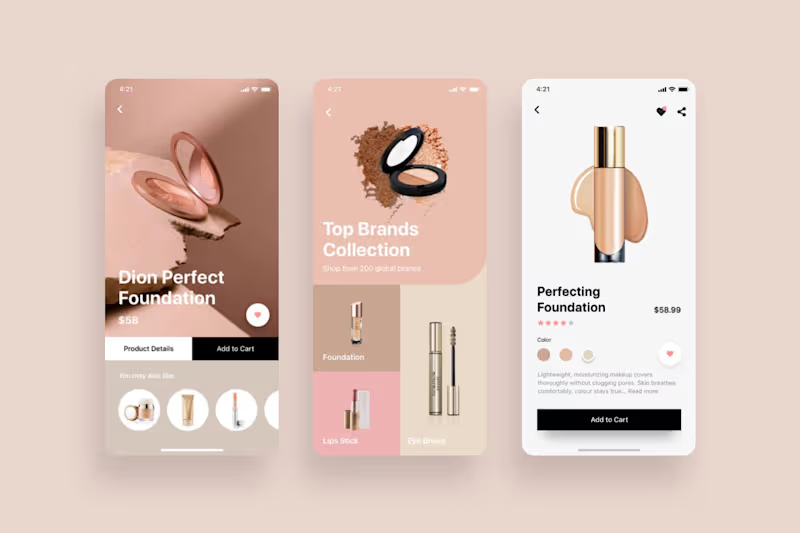
I joined the Google Stitch x Contra Challenge by creating LÚMIA Beauty, a landing page for a fictional premium makeup and fragrance brand, built around the challenge theme: creating interfaces that feel alive. The idea was to build an immersive, glossy, highly visual beauty experience where the interface didn’t feel like a static e-commerce page, but like a brand universe full of light, motion, and texture. For the project, I created a complete visual identity with a pink, shiny, glowy color palette. I also worked with a collection of AI-generated product and model images, including perfumes, lip gloss, blush, editorial visuals, and the LÚMIA Beauty logo. The landing page includes: - A hero section with a liquid, glossy, interactive background that reacts to mouse movement. - Product sections for perfumes, blush, and lip gloss. - A “Shop by Aura” experience to discover products through different visual moods. - Cards with hover states, glow, shimmer, and subtle motion. - An editorial section with models and a beauty campaign aesthetic. - A ritual builder to combine products into a beauty routine. - Reviews, FAQ, final CTA, and responsive footer. - Final deploy published on Netlify. I used Google Stitch as a central part of the workflow. First, I prepared a DESIGN.md (http://DESIGN.md) file to define the brand’s visual direction: colors, style, tone, components, motion, layout, and glossy/liquid aesthetic. Then I uploaded the product images, model images, and logo so Stitch could generate a landing page that felt consistent with the LÚMIA Beauty identity. From there, I used Stitch to create the first version of the page, iterate on specific sections, adjust the composition, improve the hero, add visual effects, and include interactions such as motion, hover states, shimmer, liquid backgrounds, and cursor-reactive behavior. After that, I exported the project using the copy-code-to-clipboard option. From there, I worked on the generated file to adjust specific parts of the page, especially structure details, responsive behavior, and small visual refinements. Once I had the final version, I inserted the finished index.html file back into the Stitch project board to keep the final result documented within the same workflow. I also prepared two videos for the submission: 1) A video showing my workflow inside Stitch. 2) A demo video showing the final LÚMIA Beauty experience. What I liked most about Stitch was how quickly it helped me move from a brand idea to a visually solid interface. The DESIGN.md (http://DESIGN.md) workflow helped a lot with consistency, and the in-context edits made the process feel closer to designing directly on the product. As feedback, I would love to see Stitch keep improving fine control over responsive details, specific animations, and component consistency, but the overall experience was very fluid and useful for prototyping a high-impact landing page in a short amount of time. Live project: https://LÚMIABeauty.netlify.app/ (https://glistening-lokum-d1e533.netlify.app/) Stitch project: https://stitch.withgoogle.com/projects/4725329965472555948 @stitchbygoogle #GoogleStitch #Contra #UIDesign #UXDesign #AIDesign #WebDesign #ProductDesign #BeautyBrand #LandingPage #BuildInPublic
9
11
639
Cover image for I recently built Job Board
I recently built Job Board Hub, a MERN stack application that helps users discover remote job opportunities across different areas like technology, design, marketing, and more. The idea is simple: job descriptions are often too long, repetitive, or hard to scan quickly. So I integrated an AI-powered job summary feature that allows users to generate a quick summary of each position and understand faster whether the role fits their profile. But beyond the UI, this project was focused on demonstrating important backend decisions that are often overlooked. The AI integration was built through an AI Gateway, making the system flexible enough to change models over time or even combine different providers in the future. I also implemented rate limiting to prevent abuse, protect token usage, and control costs. Another key detail is the use of streaming responses, which improves the user experience by showing the AI summary progressively instead of waiting for the entire response to finish. Some backend highlights: - MERN stack application - AI Gateway architecture - AI-powered job summaries - Streaming responses for better UX - Rate limiting to protect API usage - Clean backend structure for scalability - Remote jobs organized by category: This project helped me explore how AI can be integrated into real product experiences while keeping backend performance, scalability, and cost control in mind. Job Board Hub is not just a job listing app — it’s a small example of how AI can make everyday platforms faster, clearer, and more useful.
2
4
324
Cover image for Ticketify is a full stack
Ticketify is a full stack web application for buying, selling, and managing digital tickets for events 🎟️ The main idea behind the project is to offer a simpler, safer, and more intuitive experience for both people who want to buy tickets and organizers who need to manage their events, sales, and ticket validation. Unlike many ticket-selling platforms that often feel unclear or difficult to use, Ticketify aims to centralize the entire flow into a more organized experience: discovering events, buying tickets, receiving digital entries, and validating them through QR codes. The application has two main types of users: 🛒 Buyer user Buyers can explore published events, search by name, category, date, or price, view the details of each event, and purchase tickets through Mercado Pago integration. Once the purchase is completed, they can access their digital tickets, view the status of each ticket, and check their purchase history with detailed information. Implemented features for buyers: • Sign up and log in • Google login through OAuth 2.0 • Email verification • Password recovery • Event exploration and search • Filters by category, date, price, and name • Ticket purchase with Mercado Pago • Digital tickets with QR codes • Ticket status: valid or used • Purchase history • Purchase detail • PDF receipt download • User profile management 🎟️ Organizer / seller user Organizers can create and manage events, define ticket types, manage sales, and validate tickets on the day of the event. They also have a dashboard where they can view important metrics such as tickets sold, revenue generated, and the status of their events. Implemented features for organizers: • Event creation and editing • Event image/banner upload and update • Ticket type management • Event publishing and closing • Dashboard with key KPIs • Sold tickets overview • Total revenue overview • Management of their own events • Ticket validation through a QR scanner using the camera • Manual validation by code • User profile management 🔐 Security and authentication Ticketify also includes features focused on account security and protecting the purchase flow: • JWT authentication • OAuth 2.0 with Google • Email account verification • Password recovery • Alerts for logins from a different IP address • Protected routes based on user role • Differentiation between buyer and organizer 📧 Automated emails The application sends automated emails at important moments in the user flow: • Account verification • Password recovery • Purchase confirmation • New login alerts ⚙️ Technologies used The project was built with the MERN stack: • MongoDB • Express.js • React • Node.js It also integrates: • JWT for authentication • OAuth 2.0 with Google • Mercado Pago for payments • Resend for email delivery • Cloudinary for image management • QR scanner for ticket validation Ticketify was designed as a complete solution for events, where design, security, and user experience work together to make buying, selling, and validating tickets faster, more reliable, and more functional.
5
5
407