


PSD to HTML Landing Page Approved on ThemeForest
I turned a Photoshop design into Birza, a polished landing page that matches the original artwork closely. Smooth animations bring each section to life and make the page enjoyable to explore. It works well on phones, tablets, and computers. ThemeForest reviewed and approved the finished template, which shows it meets a high standard for quality and clean code.
0
168

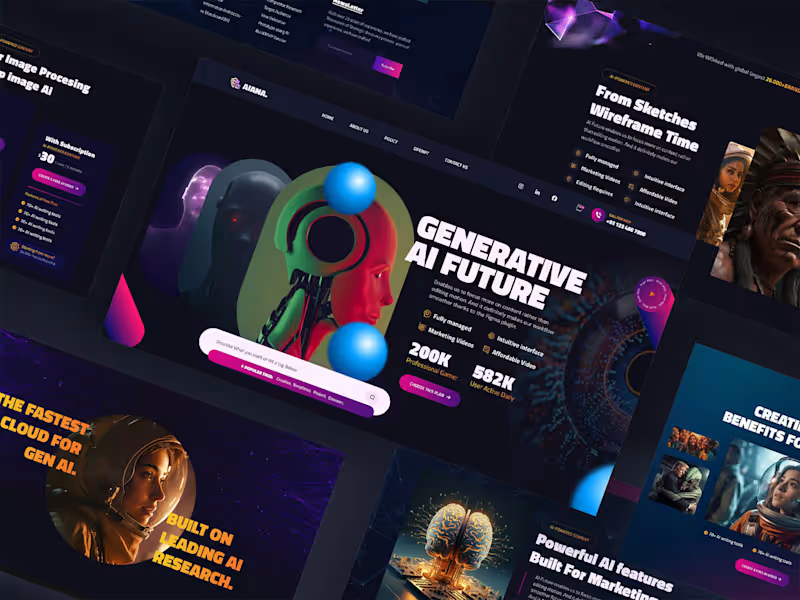
Aiana is a landing page for an AI powered content and creative platform. I was given a static PSD design and built it out completely from scratch, turning it into a fully coded, responsive website using HTML, CSS, JavaScript, Bootstrap and GSAP for the animations. The finished template was submitted to ThemeForest and passed their approval process.
What I did:
I converted every section of the design pixel by pixel: the hero slider, the AI powered features and pricing sections, a portfolio style projects showcase, an image gallery, a video section, testimonials, an FAQ accordion, and the footer with a newsletter signup. Since the original file was just a flat design, I had to work out the actual layout logic and responsive behavior myself, making sure everything held together cleanly across screen sizes instead of just matching the design at one fixed width.
I used GSAP to bring the page to life: smooth scroll triggered animations as sections come into view, a working hero slider, and subtle motion on the feature cards and gallery, so the final result feels dynamic instead of static like the original PSD.
Because this was built for ThemeForest, the code also had to meet their review standards for structure, cross browser compatibility, and code quality, not just visual accuracy.
Tools used: HTML, CSS, JavaScript, GSAP
0
290
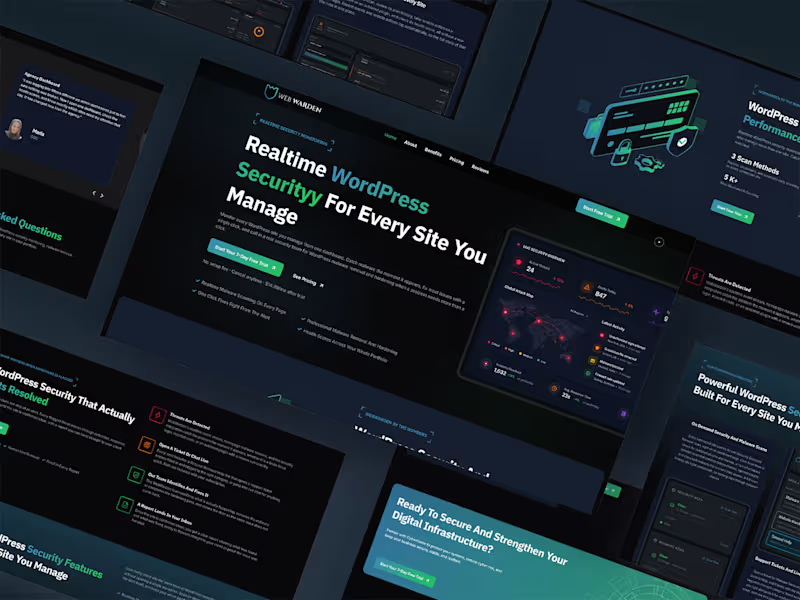
WebWarden is a WordPress security monitoring platform, and this covers the marketing landing page for it. I handled the whole thing: the branding, the design, and the build in WordPress with Elementor.
What I did:
I created the brand identity first, a dark themed look with a green accent color and a shield logo, meant to feel technical and trustworthy rather than generic. From there I designed and built the full landing page around a clear message: real time WordPress security monitoring for every site you manage, with a live dashboard preview right in the hero so visitors immediately see what the product actually looks like in use.
I built out a stats section highlighting scan methods, uptime, and sites monitored, followed by a "how it actually gets resolved" section explaining the alert to fix workflow step by step. Below that, I built a features section covering on demand scans, malware detection, and instant alerts through Slack and email, along with a before and after comparison section contrasting scattered manual site checks against a single unified dashboard.
I also built the pricing section, a testimonials area, an FAQ accordion answering common questions about how the security monitoring works, and a final call to action section, all tied together with consistent branding, spacing, and component styling across the page. I used GSAP throughout for scroll animations, so sections and stats animate in as you scroll instead of just appearing statically.
Tools used: WordPress, Elementor, GSAP, custom CSS
0
209

Armor360 needed a full website redesign, something that actually looked like a serious security company, not another generic template with a shield icon and a stock photo of a hacker in a hoodie. I handled the whole redesign myself, from the initial design to the finished, working website, plus separate landing pages for their individual products.
What I did:
I designed the site with a bento style layout and a dark theme: deep charcoal backgrounds, violet to cyan neon gradients, and glowing glass style panels. Once the client approved the design, I built it out fully in WordPress with Elementor, and added two more landing pages for their products, idgard and GateKeeper, keeping the same look and feel throughout.
I also added scroll animations using GSAP that fade sections in as you scroll. Instead of manually tagging every element, I set it up to target Elementor's own layout classes automatically, so new sections animate correctly on their own without extra setup work later.
Tools used: WordPress, Elementor, GSAP, custom CSS and JavaScript
2
0
417