Freelancers using Visual Studio Code in KarachiFreelancers using Visual Studio Code in Karachi
AI native apps
2x
Hired
5.0
Rating
17
Followers
AI native apps
Web Infrastructure Engineer & UI/UX Architect
New to Contra
Web Infrastructure Engineer & UI/UX Architect

Full Stack Developer | PHP, MySQL & JavaScript
Cover image for 🚀 Excited to Share a
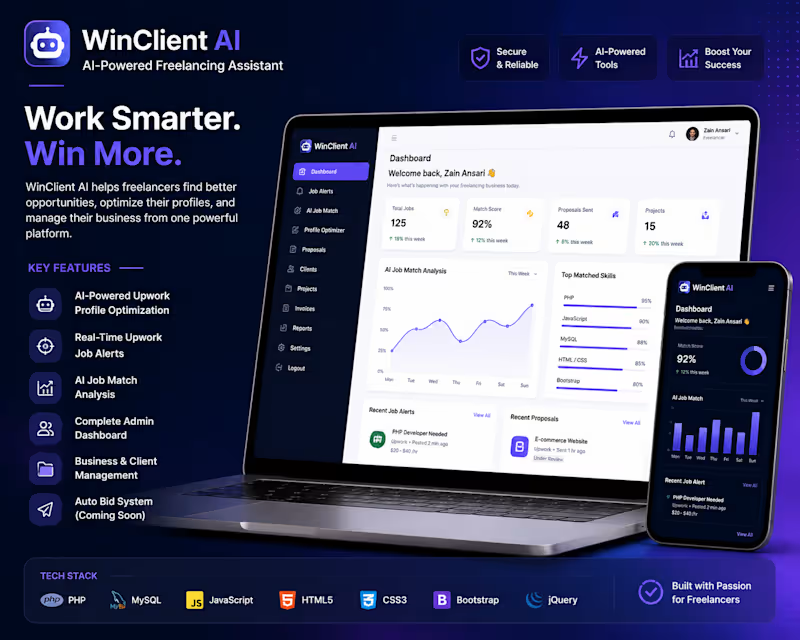
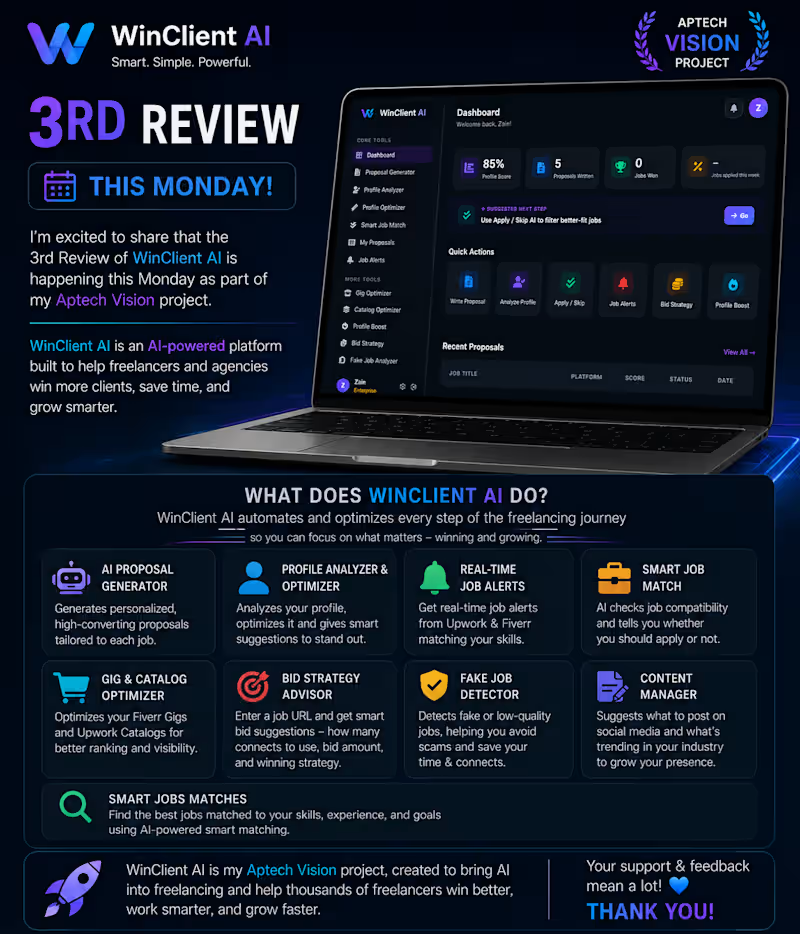
🚀 Excited to Share a New Milestone! This Monday, I'll be presenting the 3rd Review of WinClient AI, the project I'm building for the Aptech Vision Competition 2026. 🎯 WinClient AI is an AI-powered platform built to help freelancers and agencies work smarter, save time, and win more clients by automating the most important parts of their freelance workflow. 🔥 Core Features of WinClient AI ✅ AI Proposal Generator – Generate personalized, high-converting proposals in seconds. ✅ Profile Analyzer & Optimizer – Improve your Upwork and Fiverr profiles with AI-powered recommendations. ✅ Real-Time Upwork Job Alerts – Instantly receive relevant job opportunities based on your skills. ✅ Smart Job Match – AI analyzes your profile and recommends whether you should apply for a job or skip it. ✅ Gig & Catalog Optimizer – Optimize Fiverr Gigs and Upwork Catalogs for better visibility. ✅ AI Bid Strategy – Paste a job URL and get the recommended bid amount, connects to use, and winning strategy. ✅ Fake Job Detector – Identify low-quality or suspicious job posts before wasting your connects. ✅ AI Content Manager – Get content ideas, social media post suggestions, and discover the latest trends in your industry. Every review helps me improve this platform and brings me one step closer to creating a powerful AI solution for freelancers around the world. I'm continuously learning, building, testing, and refining WinClient AI based on real freelance workflows. Your feedback and support mean a lot. 💙 If you're a freelancer, agency owner, or AI enthusiast, I'd love to hear your thoughts in the comments!
1
122
Discord Community Expert | Server Setup
Product Design, Growth and Developer | E-Books and Software
5.0
Rating
11
Followers
Product Design, Growth and Developer | E-Books and Software
Cover image for SalesTrack: A Modern Sales Tracking
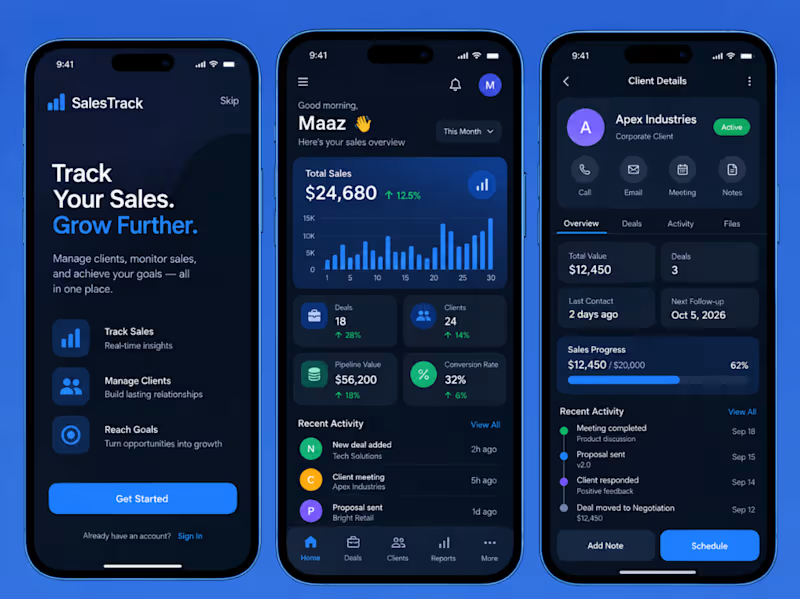
SalesTrack: A Modern Sales Tracking and Client Management App I designed SalesTrack to give sales professionals a clear view of their performance without turning the experience into a spreadsheet on a phone. Instead of overwhelming users with dense CRM tables, long reports, and scattered client records, I structured the product around the questions sales teams check every day: how much have I sold, how healthy is my pipeline, which deals are moving, and which clients need attention next? The visual identity combines a deep navy interface with electric blue accents, supported by green, purple, and amber indicators for performance states. The dark background keeps the interface focused, while blue is used consistently for primary actions, navigation, charts, progress bars, and active states. Cards are flat, spacious, and highly legible, creating a professional dashboard aesthetic without relying on illustrations or decorative imagery. The onboarding screen introduces the product with a simple promise: “Track Your Sales. Grow Further.” Instead of explaining every feature through lengthy copy, it highlights the three core functions of the platform: tracking sales, managing clients, and reaching revenue goals. A single Get Started action keeps the entry experience focused and mobile-first. The main dashboard opens with a personalized greeting and immediately surfaces the most important sales metrics. Total Sales sits at the top of the hierarchy alongside month-over-month growth and a compact performance chart. Supporting KPI cards show Deals, Clients, Pipeline Value, and Conversion Rate, allowing users to understand the state of their business within seconds. Sales performance is presented visually rather than through lengthy reports. The dashboard combines bar charts, percentage movements, status indicators, and compact cards to show trends at a glance. Metrics such as $24,680 in total sales, 18 active deals, 24 clients, a $56,200 pipeline, and a 32% conversion rate are organized in a consistent grid so users can compare performance without leaving the screen. The Recent Activity section turns the dashboard into an operational workspace rather than a static analytics page. New deals, client meetings, proposals, and other sales events are shown chronologically with clear timestamps. This gives users a quick understanding of what has happened recently and where follow-up may be required. The client detail experience is designed as a lightweight CRM. A client such as Apex Industries opens into a dedicated profile containing account status, communication shortcuts, deal information, activity, documents, and follow-up details. Quick actions for calling, emailing, scheduling meetings, and adding notes are positioned near the top so the screen supports action as much as information. Client performance is summarized through compact metrics including total account value, number of deals, last contact date, and next follow-up. A sales progress module visually compares the current value against the target, while the activity timeline records milestones such as meetings completed, proposals sent, client responses, and negotiation progress. Rather than forcing users through separate modules for every task, the interface keeps sales context connected. A representative can move from overall revenue performance to a specific account, review the relationship history, add a note, or schedule the next interaction without breaking the workflow. Across the product, a five-tab bottom navigation structure; Home, Deals, Clients, Reports, and More, keeps the information architecture predictable. Components, spacing, card dimensions, iconography, and typography remain consistent across screens, making the experience feel like one connected mobile product rather than several dashboards placed together. Frontend I built the client as a cross-platform mobile application using React Native and TypeScript. React Navigation manages the bottom-tab structure and stack navigation between dashboards, deal records, client profiles, reports, and activity screens. TanStack Query handles API data fetching, caching, background refreshing, and loading states, while Zustand manages lightweight client-side state such as active date ranges, dashboard filters, selected pipeline stages, and temporary UI preferences. The dashboard is built from reusable components including Metric Cards, Sales Charts, Pipeline Cards, Activity Rows, Client Cards, Progress Indicators, and Quick Action controls. A centralized design-token system manages spacing, typography, border radii, dark surfaces, and accent colors to maintain visual consistency across every screen. Chart components use lightweight mobile visualization libraries to display revenue trends, deal progression, conversion rates, and pipeline performance without overcrowding smaller screens. Responsive layouts ensure every dashboard element maintains proper mobile proportions rather than shrinking desktop-style panels into a phone interface. Backend The backend is a Node.js REST API built with NestJS and PostgreSQL through Prisma ORM. The primary data model covers Users, Clients, Contacts, Deals, Pipelines, Sales Activities, Notes, Meetings, Tasks, Sales Targets, and Reports. Each deal stores its value, pipeline stage, probability, assigned salesperson, expected close date, client relationship, status, and activity history. Client records contain contact details, account value, associated deals, last interaction, upcoming follow-ups, notes, and relationship status. Sales calculations are generated from transactional deal data rather than manually stored dashboard totals. This allows metrics such as total sales, pipeline value, conversion rate, closed deals, average deal size, and target achievement to update automatically as opportunities progress through the pipeline. Endpoints support dashboard analytics, client search, deal filtering, pipeline management, activity logging, follow-up scheduling, and reporting. For example, dashboard requests can be filtered by salesperson, period, team, or deal stage so the same architecture can support both individual representatives and sales managers. Authentication uses JWT access and refresh tokens with role-based permissions for sales representatives, managers, and administrators. PostgreSQL stores transactional CRM data, Redis can be used for frequently accessed dashboard aggregates, and WebSockets can optionally provide live updates when deals, activities, or team metrics change. The result is a mobile-first sales management experience that combines CRM functionality with meaningful sales analytics. SalesTrack gives users a fast, visually clear way to understand performance, manage clients, track opportunities, and decide what action needs to happen next — without the complexity normally associated with traditional CRM platforms.
1
214
Cover image for I designed this concept website
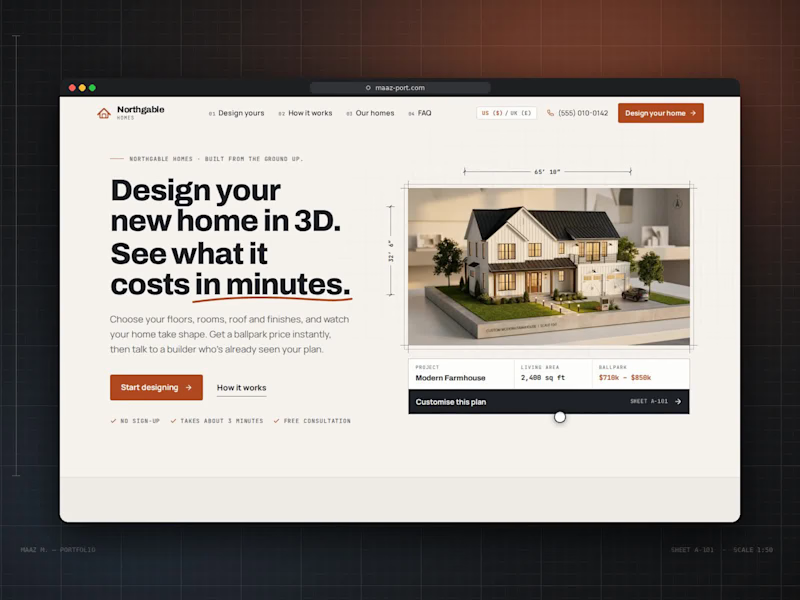
I designed this concept website for a custom home builder. The idea was to let people design their house themselves and see a real price before they ever speak to a salesperson. The challenge was to make something as complex as building a home feel simple, visual and even fun. Hero. The headline makes the promise in bold, tightly set type: "Design your new home in 3D. See what it costs in minutes.", with a hand-drawn rust underline beneath "in minutes." On the right, a model farmhouse sits inside an architect's frame with dimension lines (65′ 10″ × 32′ 6″) and a north arrow. Under it, a project card shows the design name, living area and ballpark price, with a dark "Customise this plan" bar. Three small checkmarks, "No sign-up," "Takes about 3 minutes" and "Free consultation," remove hesitation before the visitor starts. Visual language. I built the whole site around an architectural drawing set: Numbering: every section is labelled like a blueprint sheet (A-102, A-201, A-301), and monospace labels read like annotations on a plan. Grid: a faint drafting grid runs behind the page. Palette: warm paper cream, charcoal ink and one rust-orange accent for buttons and key prices. The navigation is numbered too (01 Design yours, 02 How it works, 03 Our homes, 04 FAQ), with a US/UK currency switch and a click-to-call phone number. The 3D designer. This is the heart of the site. On the left, a live 3D model of the house; on the right, a step-by-step panel: Start: choose from four starting designs (Contemporary, Modern Farmhouse, Traditional, Single-Storey) or start from scratch. Size: storeys, a living-area slider, a rectangle or L-shaped footprint, ceiling height and basement. Rooms: steppers for bedrooms and bathrooms, plus chips for a home office, laundry, pantry or media room. Roof: shape, pitch, material and colour swatches. Exterior: cladding type, colour and accent options like a stone base. Windows: window count, window style, rear doors and balconies. Outdoor: garage size, porch and patio, plus a roof terrace or fireplace. Finish: Essential, Premium or Luxury, ending on a summary. Every choice rebuilds the 3D house instantly, and a live estimate at the bottom of the panel updates with each decision. The viewer has its own controls: front, back, side and aerial cameras; a night mode with glowing windows; an inside cutaway of the floor plan; dimension overlays; and zoom. Supporting the decision. The rest of the page answers what a buyer asks next: "Three steps from first sketch to front door" uses large outlined numbers and simple line icons. "One team. One price. No surprises." lists the builder's guarantees. "Start from a favourite" shows four home designs as plan cards with specs and prices, each loading straight into the designer. The build schedule is a Gantt-style timeline across 11 months, from consultation to handover, separating "with you" steps from "we handle it." Client notes and FAQ: client notes pull out one large quote, and the FAQ gives five straight answers. The page closes on a dark section, "Your home, designed in minutes.", with a line drawing of a house and two clear actions: design your home or talk to the team.
0
34
Cover image for I designed this website for
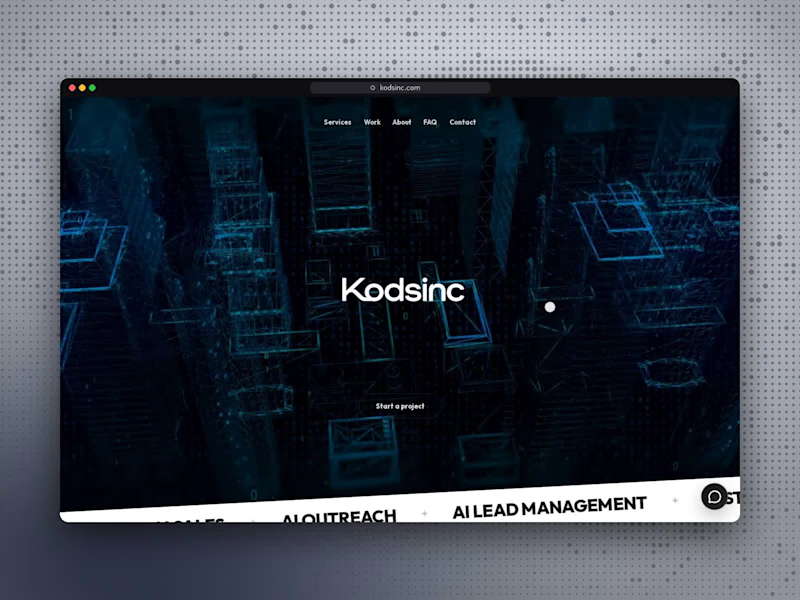
I designed this website for Kodsinc, a digital product and AI studio. The goal was to feel cinematic and ambitious from the first second, while explaining clearly what the studio builds and how it works with clients. The hero opens on a full-screen video of a glowing wireframe city with the Kodsinc wordmark at its centre. Beneath it, a tilted band scrolls through the studio's capabilities: AI voice agents, chat bots, automation, data and analytics, SaaS platforms and custom CRMs. As visitors scroll, the header condenses into a compact "Start a project" pill that expands into a numbered navigation menu. An AI assistant called Aria greets visitors, asks their name and offers suggested questions, so the site demonstrates the studio's own product from the start. For services, I designed a 3D card carousel. Seven vertical cards fan out side by side, and the selected one expands to reveal an illustration and the tools behind that service. The work section, "Work built to move," presents five products (Northstar, Flow CRM, AriaFin, WhatsApp SDR and Aria Assistant) as large stacked cards with device mockups. The page then builds trust. An interactive world map shows offices across five countries, and "Remote by location. Onsite in how we deliver" explains how the team stays close to clients. Security and compliance badges appear before the FAQ. The contact form sits beside the FAQ as a fill-in-the-blank sentence with a dropdown for the type of help needed. The page closes with the line "From Code to Intelligence," which sums up the studio in four words.
1
180
Lead Full Stack Developer | AI/ML Engineer | Data Scientist
New to Contra
Lead Full Stack Developer | AI/ML Engineer | Data Scientist
Full Stack Web Developer | .NET + HTML/CSS/JS | Clean & Fast
26
Followers
Full Stack Web Developer | .NET + HTML/CSS/JS | Clean & Fast
Full-Stack Developer | Building Seamless Mobile & Web Apps

New to Contra
Full-Stack Developer | Building Seamless Mobile & Web Apps