Projects using Telegram API in IndiaProjects using Telegram API in IndiaHow do you generate a thousand certificates, alert cards or social images from one Canva template without a designer touching each one? Lay the text over the base by URL. The certificate in the image was made exactly that way, demo data, no editor opened.
The pattern:
1. Export the template once with the dynamic fields empty. Name, course, date and ID are blank on the base.
2. Upload the base to an image engine. Cloudinary and ImageKit both build images from a URL: base image plus text layers with font, size, colour and position in the address itself. Bannerbear, APITemplate and Placid do the same from a saved template with named fields. At very high volume a self-hosted Sharp service does it for the cost of a small server.
3. Make.com fills the URL. A Sheet row, a form submission or a webhook supplies the fields; the scenario URL-encodes them and assembles the address.
4. Verify before you send. Fetch the image, check it is not empty and the text landed, then deliver by email, Telegram, WhatsApp or back into the record.
5. Keep the data as the only variable. The design never changes per record, so a template fix applies to every future image at once.
Five things that bite. Encoding: a comma or slash in a name breaks the URL unless the text is double-encoded. URL length: long layers need a named transformation instead of an inline one. Fonts: engines ship a fixed list, Cloudinary's text layers accept Caveat and Arial and Inter is not on it, so upload a custom font or pick a supported one before the client sees the mockup. Wrapping: set a max width on every text layer or a long name walks off the card. Cost at volume: URL rendering is cheap per image and billed on transformations and bandwidth, so check the plan before a 10,000-certificate cohort.
The production version of this pattern is the alert-card pipeline that has run 24/7 for a research analyst since 2025: every TradingView signal ships to Telegram as a branded image. The full case study, with the live URL you can edit and re-render, is on my profile.
Prem Patel, Nex Automations. Make.com Level 5 certified, official Make partner, Zapier Certified Expert. AI Email Automation System (Gmail → AI → Telegram / WhatsApp)
Overview:
I built an AI-powered email automation system that reads, understands, and acts on incoming emails automatically. It sends real-time updates via Telegram or WhatsApp, eliminating manual work and improving response speed.
Problem:
Managing emails manually takes 5–8 hours daily. Important emails get missed, responses are delayed, and repetitive tasks reduce productivity.
Solution:
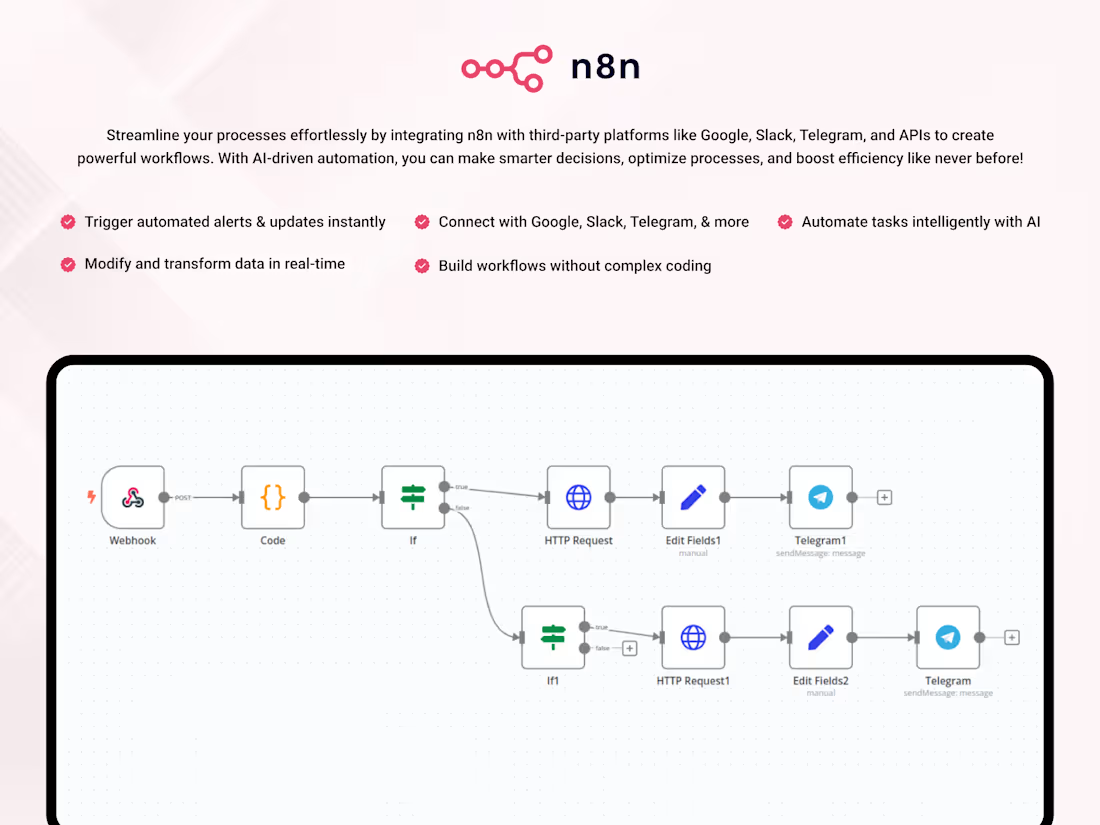
I developed a fully automated workflow using n8n that processes emails in real time and performs intelligent actions using AI.
Workflow:
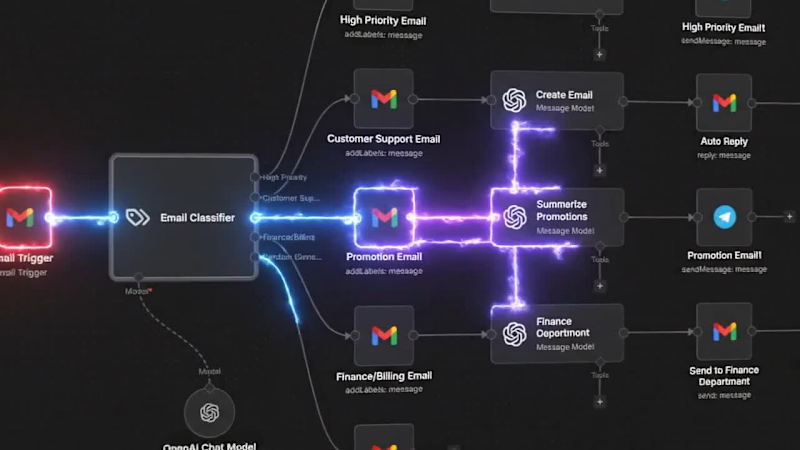
Gmail → AI Classifier → Smart Routing → Automated Actions → Telegram / WhatsApp Notifications
Features:
• AI classifies emails (High Priority, Support, Promotions, Finance, General)
• Automatic replies for customer support emails
• Summarization of promotional emails
• Finance emails forwarded to the right person
• Real-time alerts via Telegram or WhatsApp
• Fully automated system (no manual work)
Results:
• Saved 50–70 hours per week
• 40% faster response time
• 200+ emails handled automatically per day
Tech Stack:
• n8n (automation)
• OpenAI API (AI processing)
• Gmail API
• Telegram Bot API
• WhatsApp API (via Twilio / Meta)
Outcome:
This system transforms email management from manual work into a fully automated AI-driven process.
Call to Action:
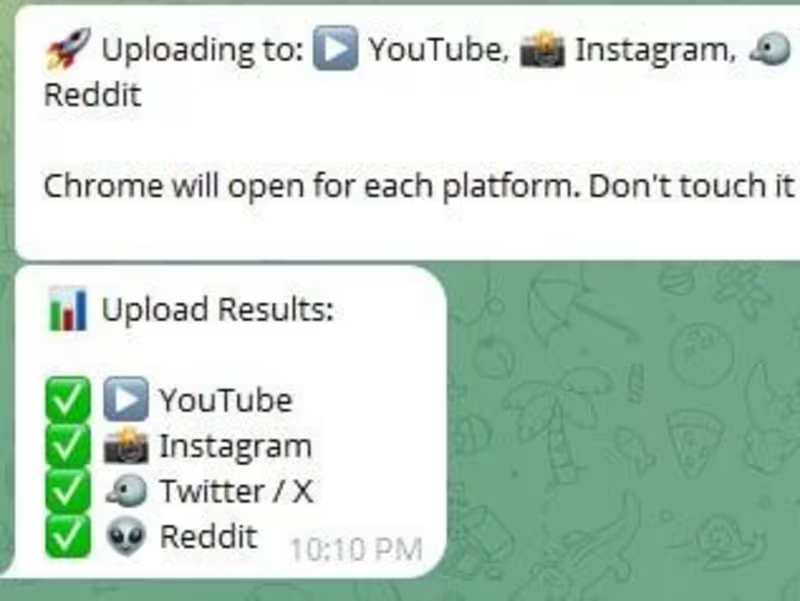
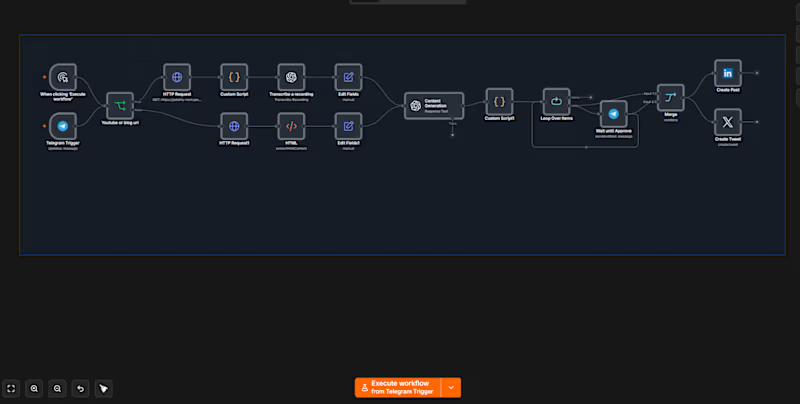
I can build a similar custom automation system for your business in 2–5 days, including Telegram or WhatsApp integration. Built a fully automated multi-platform content publishing system that transforms a single Telegram video into ready-to-publish content across multiple social media platforms.
The system automates the entire workflow — from receiving a video through Telegram to generating captions, processing content with AI, and automatically uploading posts to platforms like YouTube, Instagram, X, and Reddit.
One of the key features was creating a complete review and approval flow directly inside Telegram, allowing users to approve or manage content before publishing without needing separate dashboards or tools.
Key contributions:
• Built an end-to-end automated content pipeline using Python and workflow automation tools
• Integrated Whisper for speech-to-text transcription with OCR fallback support for extracting text from videos when needed
• Used local LLMs with Ollama and Llama 3 to generate captions and social media content automatically
• Automated browser-based uploads across multiple platforms using Playwright
• Developed Telegram-based controls for content review, approval, and publishing workflows
• Designed the system to run fully locally without relying on paid AI APIs
Tech stack:
• Python
• Playwright
• Whisper
• Ollama
• Llama 3
• Telegram Bot API
• OCR Processing
• Browser Automation
• AI Content Pipelines
This project strengthened my experience in AI-powered automation, browser scripting, local AI workflows, and scalable multi-platform content automation systems. What It Is
SevaFlow is a civic complaint management system that lets Indian citizens file government complaints through Telegram without downloading any app or creating an account. The complaint gets automatically understood, routed, and tracked using AI.
How It Works End to End
A citizen sends a plain text message to the Telegram bot describing their problem. That message gets sent to Google Gemini with a carefully designed prompt at temperature 0.1, meaning the AI outputs consistent, deterministic JSON every time. Gemini extracts the issue type, location, responsible department, priority level, and generates a summary, all returning a confidence score between 0 and 1.
The routing engine then takes over. It applies priority override rules first, so words like "fire" or "emergency" always trigger urgent regardless of what the AI said. It maps the AI suggestion to a configured department, assigns an SLA deadline based on department and priority, and stores everything in SQLite. The citizen immediately receives a Telegram confirmation with their reference ID like SF1234, department name, priority, and expected response time.
The Admin Side
Government officials log into a dashboard at the FastAPI server. They can filter and sort complaints, view the full status history of each one showing who changed what and when, update the status with notes like "team dispatched", and trigger a Telegram notification back to the citizen automatically.
What Makes It Technically Interesting
The AI pipeline has a two layer fallback. If Gemini fails, keyword matching kicks in to identify the department. If that also fails, it routes to General Services with medium priority and confidence marked as 0.0 so admins know it needs manual review. Nothing gets lost.
The department configuration is fully data driven. Adding a new government department requires zero code changes, just a new entry in config.py (http://config.py) with keywords, SLA hours, and contact email. The system picks it up on restart.
The database tracks two separate tables: complaints with all AI output stored alongside the raw text, and status history with a complete changelog including timestamps and the identity of who made each change.
Why It Won
Most hackathon civic tech projects build a web form. SevaFlow used Telegram as the interface because that is where citizens already are, made the AI classification reliable enough to actually route correctly, and built the full government side too, not just the submission side. End to end in one system, deployable on a single lightweight server.