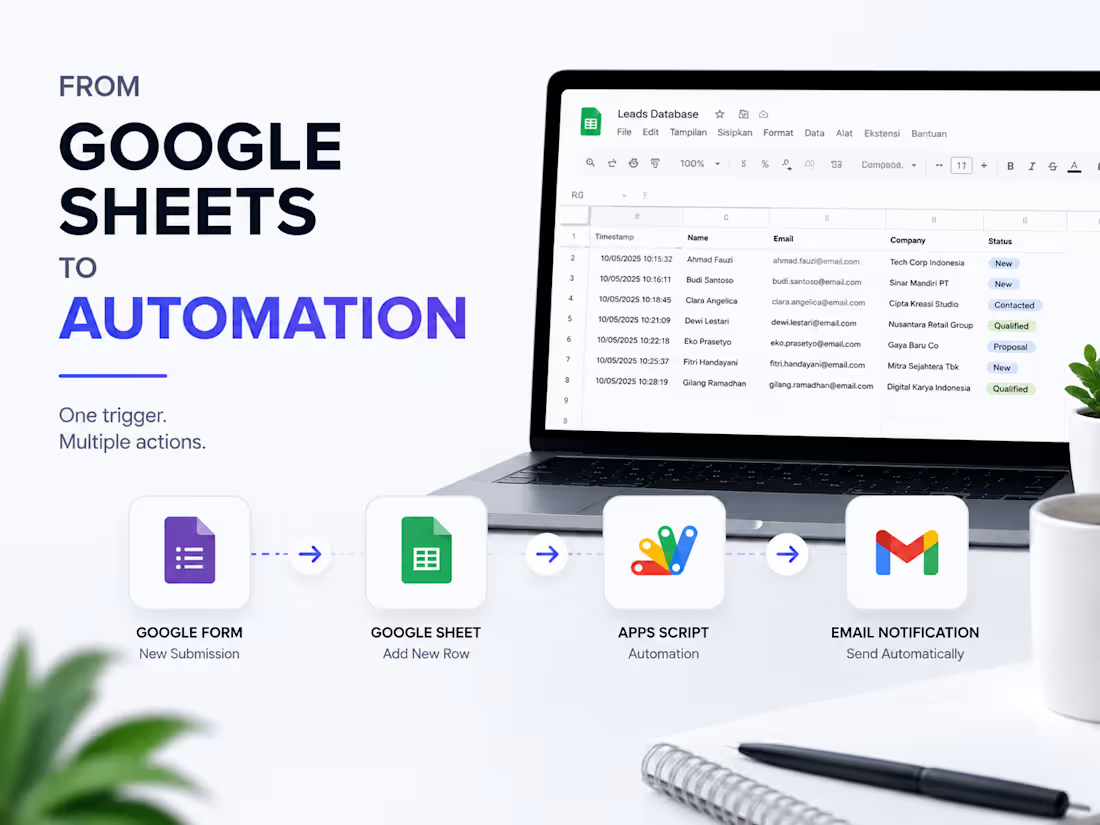
This tiny Apps Script can turn a Google Sheet into an automated notification system.
One of the simplest automations I use:
Google Form
↓
Google Sheet
↓
Apps Script
↓
Automatic email notification
Instead of checking the spreadsheet manually every time a new lead comes in, the workflow can trigger an email automatically.
The interesting part?
You don't need to build a complicated SaaS to automate a repetitive task.
Sometimes, a few lines of Apps Script are enough.
I use this approach as a foundation for larger Google Workspace automation systems.
What repetitive task would you automate first with Google Sheets?
0
146

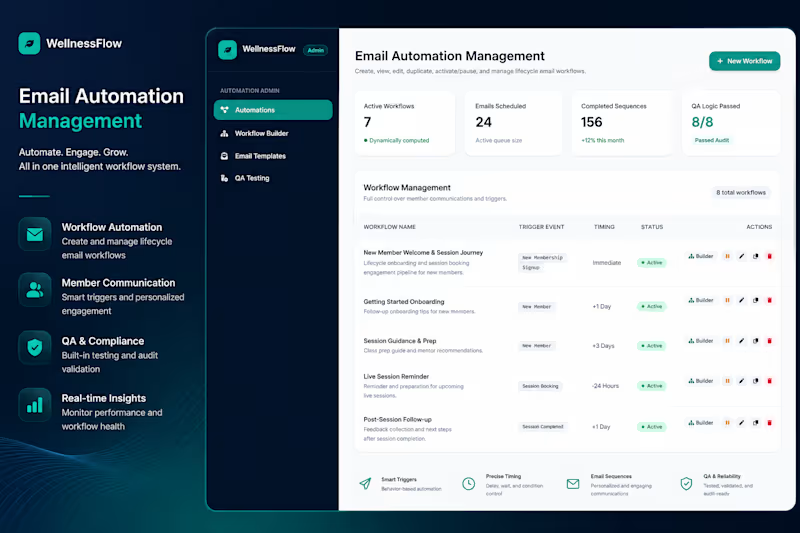

From Spreadsheet Chaos to Automated CRM System.
Most businesses don't need more tools. They need better workflows.
Many small businesses still manage customer data manually:
❌ Leads scattered across multiple spreadsheets
❌ Follow-ups forgotten
❌ No clear sales pipeline
❌ Customer history difficult to track
This is where automation can help.
I built a lightweight CRM system using Google Workspace + Google Apps Script that helps businesses:
✅ Capture and organize leads automatically
✅ Track customer progress through sales stages
✅ Create follow-up reminders
✅ Generate reports and insights
✅ Keep everything connected inside their existing workspace
The goal is simple:
Transform repetitive manual processes into a smarter business system.
No complicated software.
No unnecessary subscriptions.
Just a workflow designed around how your business actually works.
Building practical automation systems for businesses using Google Workspace.
What process in your business takes too much manual work?
0
158

🚀 From Google Sheets to a Professional CRM System
Many businesses start by managing customers with Google Sheets.
At first, it's simple.
As the business grows, however, spreadsheets become harder to maintain.
🔴 Customer information is scattered.
🔴 Sales opportunities are difficult to track.
🔴 Follow-ups are often forgotten.
🔴 Team members work with outdated data.
🔴 Reporting takes hours instead of seconds.
Google Sheets is an excellent foundation—but when combined with Google Apps Script and Google Workspace, it can evolve into a complete business application.
Instead of replacing your existing workflow, automation enhances it.
✨ Customer records are organized in one place.
📊 Interactive dashboards provide real-time business insights.
🎯 Sales pipelines clearly show every opportunity from lead to closed deal.
📧 Automated email notifications reduce manual follow-ups.
📄 Documents and reports can be generated automatically.
🔗 Everything stays connected inside the Google Workspace ecosystem.
The objective isn't simply to build another CRM.
It's to create a workflow that helps businesses save time, reduce repetitive work, and make better decisions with accurate data.
Every automated process means less time spent on administration—and more time focused on growing the business.
How are you currently managing your customer pipeline—spreadsheets, CRM software, or a combination of both?
1
289

📊 Business Dashboard: More Than Just Charts
A business dashboard should do more than display numbers.
It should become the operational hub where your team manages leads, tracks sales, monitors projects, and automates daily workflows.
Many businesses still rely on disconnected spreadsheets, emails, and manual updates.
As the business grows, so does the complexity.
A centralized dashboard built with Google Apps Script and Google Workspace helps bring everything together.
✨ What can it include?
👥 Customer Relationship Management (CRM)
📄 Proposal Generator
✍️ Contract Management
💳 Invoice Automation
📈 Sales Pipeline Tracking
📋 Task & Activity Monitoring
📊 Real-Time Business Analytics
☁️ Google Workspace Integration
Instead of switching between multiple tools, your team can manage the entire workflow from a single dashboard.
The result?
⚡ Faster operations
📉 Fewer manual errors
🤝 Better collaboration
📊 Complete visibility across your business
Business dashboards aren't just for reporting—they're designed to help teams make faster decisions and build scalable processes.
What is the first workflow you would automate in your business?
1
277

🔴 BEFORE
Spreadsheets + Emails + WhatsApp + Manual PDFs
🟢 AFTER
Google Apps Script + Automated Workflows + Real-Time Dashboard
The difference isn’t just better software.
It’s:
✔ Less manual work
✔ Fewer errors
✔ Faster approvals
✔ Connected business processes
✔ Better visibility across teams
Turn Google Sheets into a professional business system and automate the work that slows your business down.
#GoogleAppsScript #WorkflowAutomation #BusinessAutomation #GoogleWorkspace
0
199

Why Businesses Need Automation
Every growing business reaches a point where manual processes become a bottleneck.
Teams spend hours every week copying data between spreadsheets, sending follow-up emails, generating invoices, tracking approvals, and searching for documents.
These repetitive tasks don't create value—they consume time, increase the risk of errors, and slow down business growth.
That's where automation makes a difference.
With Google Apps Script and Google Workspace, businesses can automate routine operations such as:
✅ Lead & Client Management
✅ Approval Workflows
✅ Invoice & PDF Generation
✅ Email Notifications
✅ Dashboard Reporting
✅ Project Tracking
Instead of switching between multiple tools, everything works together in one streamlined system.
The result?
✔ Save hours every week
✔ Reduce manual errors
✔ Improve team productivity
✔ Scale operations more efficiently
Automation isn't about replacing people.
It's about allowing people to focus on work that truly matters.
What repetitive task would you automate first?
1
268

👋 Hello, Contra community!
I'm excited to start sharing my work here.
I specialize in building custom Google Apps Script and Google Workspace Automation solutions that help businesses eliminate repetitive tasks and streamline their daily operations.
Over the past few months, I've been designing and developing automation systems including:
✅ Business Automation Dashboards
✅ CRM & Client Management Systems
✅ Approval Workflow Automation
✅ Client Portals
✅ Invoice & PDF Automation
✅ Google Workspace Integrations
My goal is simple:
Help businesses save time, reduce manual work, and build scalable internal systems without expensive enterprise software.
I'll be sharing projects, automation ideas, UI concepts, and workflow solutions here.
Looking forward to connecting with founders, agencies, and businesses interested in automation.
🚀 Thanks for stopping by!
2
2
304

Manual approval processes often slow down business operations, causing delays, lost documents, and limited visibility across teams.
This project showcases a custom Approval Workflow System built with Google Apps Script and Google Workspace to digitize multi-level approval processes, automate notifications, generate documents, and provide real-time tracking through a modern dashboard.
The platform enables organizations to replace manual approvals via email, WhatsApp, and paper documents with a secure, scalable, and fully automated workflow system.
Key Features
• Multi-Level Approval Workflow
• Google Forms Integration
• Automated Email Notifications
• PDF Document Generation
• Google Drive File Management
• Approval Dashboard
• Audit Trail & Activity Logs
• Role-Based Access Control
• Real-Time Workflow Tracking
Technology Stack
Google Apps Script • Google Workspace • Google Sheets • Google Forms • Gmail API • Google Drive API • HTML • CSS • JavaScript
This project demonstrates how businesses can automate approval processes, improve transparency, reduce processing time, and eliminate repetitive administrative work.
What did you do?
• UI/UX Design
• Google Apps Script Development
• Workflow Automation
• Approval System Architecture
• Google Forms Integration
• PDF Automation
• Email Automation
• Google Drive Integration
• Dashboard Development
• Backend Development
0
139

Growing service businesses often struggle with disconnected tools, manual administrative work, and expensive SaaS subscriptions.
This project showcases a custom Business Automation Suite built on Google Workspace to centralize operations, automate repetitive workflows, and manage the entire client lifecycle from one secure platform.
The system demonstrates how businesses can manage CRM, proposals, contracts, invoices, documents, project tracking, and client portals using Google Apps Script and Google Workspace as a powerful, self-hosted business operating system.
Key Features
• Client CRM & Lead Management
• Contract & NDA Automation
• Invoice & Billing Management
• Client Portal
• Google Drive Workspace Management
• Google Sheets Database
• Workflow Automation
• Dashboard & Business Analytics
• Secure Role-Based Access
Technology Stack
Google Apps Script • Google Workspace • Google Sheets • JavaScript • HTML • CSS • Gmail API • Google Drive API
This project demonstrates how businesses can reduce software costs, automate internal operations, and create scalable systems without relying on multiple third-party platforms.
0
132

Every growing business reaches a point where spreadsheets and manual processes become a bottleneck.
I build custom automation platforms that connect Google Workspace, automate repetitive tasks, and provide real-time business insights through modern web applications.
This project is a concept of an AI-powered Business Automation Hub featuring workflow automation, dashboard analytics, reporting, notifications, and scalable internal systems designed for modern teams.
Whether you need CRM automation, approval workflows, document generation, dashboards, or AI integrations, every solution is tailored to your business processes.
0
121