The network for creativity
Join 1.25M professional creatives like you
Connect with clients, get discovered, and run your business 100% commission-free
Creatives on Contra have earned over $150M and we are just getting started
Back to feedPost

I'll be honest — a few years ago I would've rolled my eyes at another "best AI tools" roundup. But somewhere along the way, these things stopped being gimmicks and started actually saving people time. Not in a flashy, "AI will replace your job" way. More like... they quietly take over the annoying parts of work you never wanted to do in the first place.
So instead of listing fifty tools you'll never open twice, here's what's actually worth your attention right now, organized by the kind of problem each one solves.
The meeting notes you never wanted to take
If you've ever tried to actually listen in a meeting while also typing notes, you know it's basically impossible to do both well. Fireflies.ai and Read both solve this by transcribing everything and pulling out the action items on their own. Read goes a step further with something they call a "Speaker Coach" — it'll tell you, for instance, if you're talking too fast for people to actually follow. Slightly humbling the first time you see the report, but useful. There's a free tier if you just want to try it out before committing to anything.
Your calendar, but it actually thinks
Motion and Clockwise both got popular for the same reason: they stop treating your calendar as a passive list and start actively managing it. Motion takes your to-do list and slots it into your day automatically, rearranging things when something urgent comes up. Clockwise is more about protecting blocks of deep-focus time and syncing that across a team. Worth noting — these only really pay off if you commit to using them as your main calendar, not a side experiment you check once a week.
Research that doesn't eat your afternoon
This is where Perplexity has carved out a real niche. Instead of the usual scroll-through-ten-tabs routine, it pulls cited answers from dozens of sources in a few minutes. If your job involves any kind of research — competitive analysis, fact-checking, background reading before a project — this alone can save hours a week.
Writing help that's gone past spell-check
Writing tools used to mean grammar suggestions and not much else. Now they're doing tone adjustments, structural rewrites, even full first drafts from a rough brief. Handy if you're producing content regularly and just need something to get you past the blank page.
Automating the boring handoffs
Zapier's been around a while, but its AI layer (Copilot) has made it a lot easier to build automations just by describing what you want in plain English. If part of your day is manually moving information between apps — a new lead comes in, you copy it to a spreadsheet, you notify someone on Slack — this is the kind of thing that should just happen on its own.
Tools that don't ask you to leave your existing apps
Notion and Microsoft 365 Copilot take a different approach from most of the list above. Rather than being another tab you have to remember to open, they're built into tools you're already using — Copilot lives inside Word, Excel, and Outlook. That lower barrier to entry is probably why adoption for these has been faster than most standalone AI apps.
So, which one should you actually pick?
Here's where most people go wrong: they try to bolt on five new tools at once and end up using none of them properly. A better approach is picking the one thing that's actually costing you the most time — meetings, scheduling, research, repetitive busywork — and starting there. Give it two or three weeks. If it's not saving you real, measurable time by then, it's probably not the right fit, no matter how good the reviews looked.
The tools on this list will probably look different by the end of the year — this space moves fast. But the core idea holds up: the best AI tool is the one you stop noticing because it's just working in the background, not the one with the flashiest feature list.

The network for creativity
Join 1.25M professional creatives like you
Connect with clients, get discovered, and run your business 100% commission-free
Creatives on Contra have earned over $150M and we are just getting started






Related posts

Introducing Finora
A modern fintech app designed to make personal finance simpler, smarter, and easier to understand.
Built with a consistent Inter-based design system and a soft, modern visual language.
#UIUX #ProductDesign #Fintech #MobileApp #Figma


All experience in one app well designed.

Primland puts a whole mountain resort on one interactive 3D map. You start high above the Blue Ridge Mountains with clouds drifting through the valley, then pick a pin and fly down to the lodge, the pool, or the mountaintop restaurant. The terrain, the trees, and the smooth camera moves make you want to book a trip.
Big shout-out to Robert Borghesi for building this. The scale and the attention to detail are impressive.


Business owners: you get one AI automation free this month. Which one do you take?
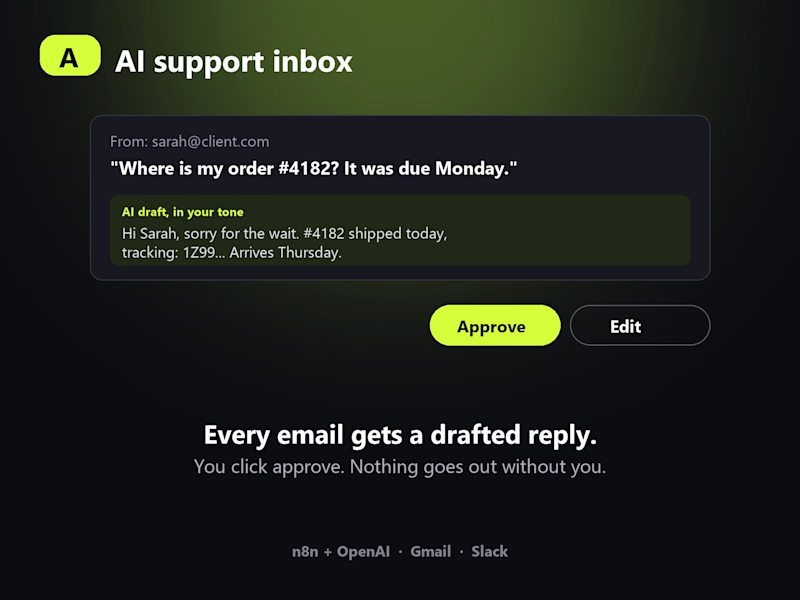
A. AI support inbox. Every customer email gets a drafted reply in your tone. You read it, click approve, done. Nothing goes out without you.
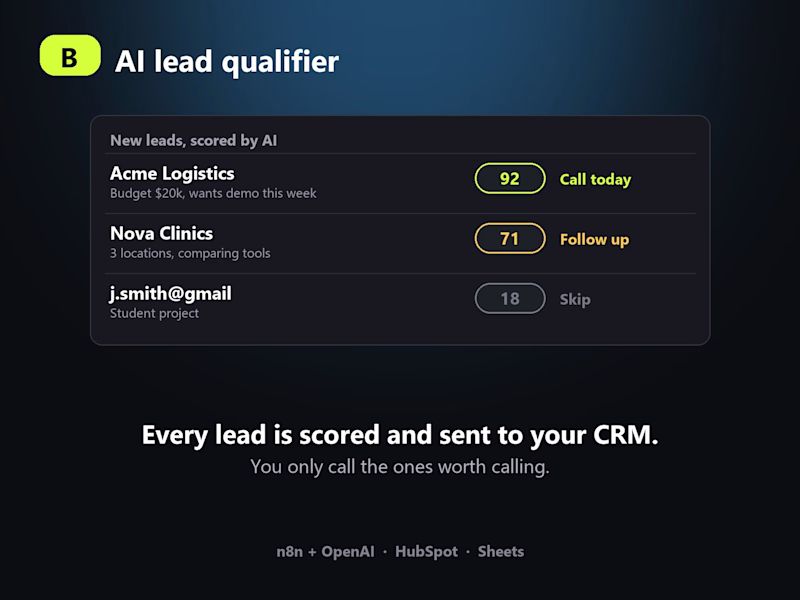
B. AI lead qualifier. Every new lead is scored, summarised and dropped into your CRM with the next step, so you only call the ones worth calling.
Both run on n8n + OpenAI, connect to the tools you already use (Gmail, HubSpot, Slack, Sheets) and take me about a day to set up.
Vote below. Then comment with what is eating most of your week right now. The 3 most painful answers get it built for free and I will post the before and after here.

0 voted
1%
0 voted
1%
0 votes
Closed

The one day setup estimate holds only if your existing Gmail and HubSpot data is already clean. Most businesses spend longer fixing inconsistent tags or messy history before the AI can actually qualify leads accurately.