The network for creativity
Join 1.25M professional creatives like you
Connect with clients, get discovered, and run your business 100% commission-free
Creatives on Contra have earned over $150M and we are just getting started
Back to feedPost

Super App Home Screen Redesign (Yassir-inspired)
Problem
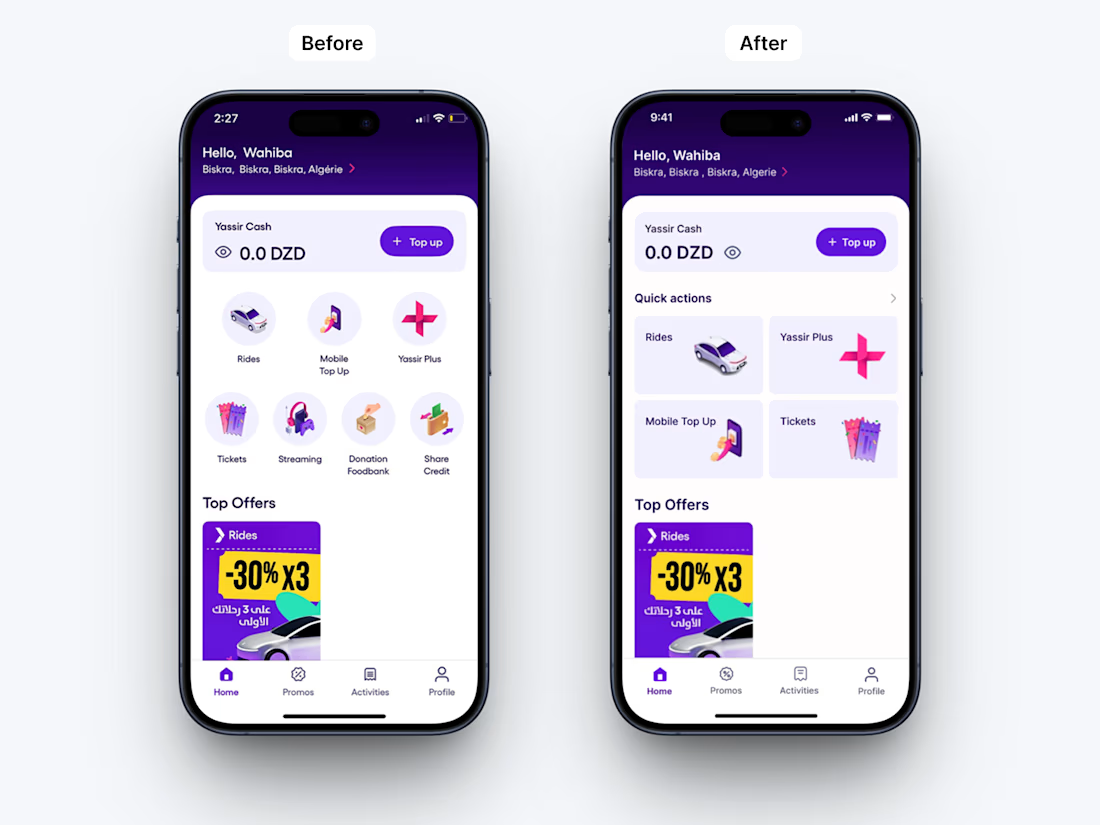
The original “Services” section relied on circular icons, which limited clarity and slowed down user decision-making. All services were given equal visual weight, even though some—such as the donation feedback service—are rarely used. This created unnecessary cognitive load and reduced the efficiency of the home experience.
Solution
I redesigned the structure by replacing circular icons with card-based Quick Actions, allowing better hierarchy and faster access to key user flows. This shift emphasizes the most frequently used actions directly on the home screen, improving scanability and interaction speed.
The home layout was also reorganized to prioritize high-frequency services, while secondary actions were visually deprioritized to maintain focus and reduce clutter.
Additionally, I refined the balance visibility interaction by repositioning the eye icon after the amount, ensuring users perceive the balance first before choosing to hide or reveal it. This small adjustment improves natural reading flow and interaction logic.
Outcome
A more focused and structured home experience with improved visual hierarchy, reduced cognitive load, and faster access to essential actions.
The network for creativity
Join 1.25M professional creatives like you
Connect with clients, get discovered, and run your business 100% commission-free
Creatives on Contra have earned over $150M and we are just getting started







Related posts


Shopping UX hits different when motion meets sound.
Built a fully animated shopping experience prototype with satisfying sound effects for every interaction. Sound ON 🔉

bro this feels so smooth, that sound effect on search is such a nice touch

Beautiful Grid effect that follows your cursor
Interactive footer built in Framer


Two ways to redesign the same living room. Which editor would you use?
A · Material Studio
B · Spatial Workshop
Rotate the room, swap the sofa, try a finish and save your design. I built both in Flutter, and I’m sharing both versions and the 3D assets for free:
Roomform

7 voted
64%
4 voted
36%
11 votes
Closed

Material Studio. The light interface lets the room be the hero, while the dark one makes the controls compete with it. Really generous of you to share the 3D assets too. Thank you.