The network for creativity
Join 1.25M professional creatives like you
Connect with clients, get discovered, and run your business 100% commission-free
Creatives on Contra have earned over $150M and we are just getting started
Back to feedPost

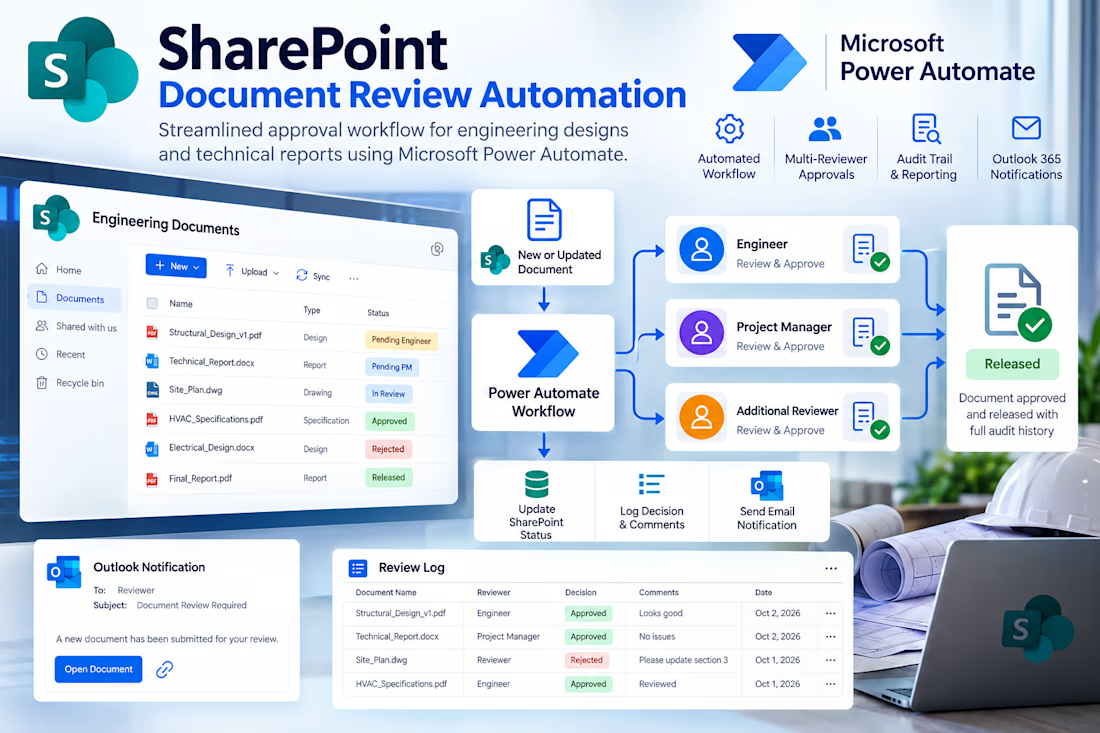
Developed a complete SharePoint Online document review workflow using Microsoft Power Automate for engineering designs and technical reports.
The automation triggers when documents are uploaded or updated, captures metadata, assigns multiple reviewers, tracks approvals and rejections, updates document statuses, and records reviewer decisions and comments in a dedicated Review Log.
Integrated Outlook 365 notifications provide reviewers with direct document links, while SharePoint version history remains intact throughout the review process.
The solution provides a clear, maintainable and auditable approval workflow within Microsoft 365.
AI AutomationAutomation EngineeringBusiness Workflow AutomationMicrosoft Office 365Microsoft OutlookMicrosoft SharePoint



I'd make the approval rule explicit when several reviewers respond, especially if one rejects after others approve. Does the workflow require every assigned reviewer to approve, or can a designated owner resolve a mixed decision?

Capturing metadata into a Review Log while keeping SharePoint version history intact gives you a solid audit trail. Sending direct Outlook links to reviewers cuts the back and forth.
The network for creativity
Join 1.25M professional creatives like you
Connect with clients, get discovered, and run your business 100% commission-free
Creatives on Contra have earned over $150M and we are just getting started
Related posts

Most inbound bottlenecks aren't caused by low lead volume—they happen during triage.
When inquiries roll into a Google Sheet or CRM, operations teams often waste 10–15 minutes per submission reading through messy paragraphs, deciphering budget mismatch, and manually deciding who gets an immediate call vs. a standard rate sheet.
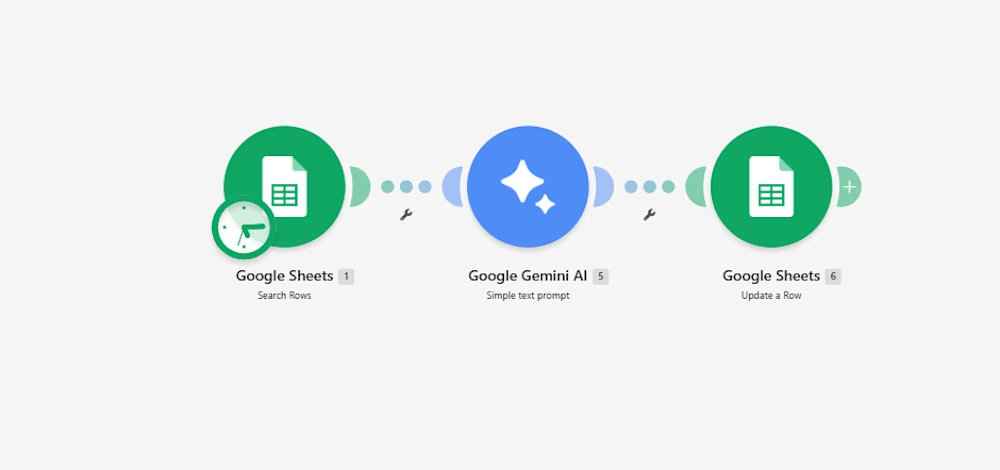
Instead of adding a bulky CRM add-on, I documented a lightweight 3-step automation pipeline built inside Make:
Intake & Extraction: An active listener triggers immediately upon a new submission, extracting core variables: client scope, target deliverables, timeline, and stated budget.
Context-Aware Evaluation (Gemini 2.5 Flash): The payload passes through an AI evaluation node with strict guardrails:
Evaluates budget against minimum agency criteria.
Assigns a triage score: Hot (immediate priority), Warm (nurture), or Cold (disqualified/template reply).
Generates a strict 15-word operational summary—no long paragraphs.
Determines an automated next step (e.g., routing to an account lead or flagging for asynchronous follow-up).
Data Return & Clean Pipeline: Appends the structured classification directly back to the master operational tracker, keeping the sheet filterable and clean.
The outcome: The sales and operations team can filter the entire board by priority status in two clicks, cutting first-touch response time to minutes without manually reading every single submission.
I’ve documented the full scenario map, execution logic, and data schemas below.
Curious how other agency operators and automation leads here handle their lead enrichment layer—are you doing AI scoring at the form level, or later in the CRM pipeline?:

For the budget gate, I'd keep an unstated budget separate from one explicitly below your minimum. Does the Make route ask for clarification when the amount or currency is missing, so a potentially suitable lead doesn't fall into Cold by default?

Blog Listening Web Application With Admin Dashboard.
webdesignappdesignadmindesignBackend DevelopmentFrontend DevelopmentFull Stack DevelopmentExpressJSNext.jsTailwind CSS


🚀 ST Automation Cloud - Enterprise AI Automation SaaS
What it does:
ST Automation Cloud is a next-generation platform that connects your daily business tools (Gmail, Google Sheets, Slack, Discord, Webhooks) into one unified workspace. Powered by Gemini AI, it allows users to build visual, multi-step automation workflows without writing a single line of code. It handles everything from data syncing to executing complex, autonomous AI pipelines.
How it is profitable (Business Value):
Massive Time & Cost Savings: By automating repetitive tasks (like lead generation, email sorting, and data entry), it saves hundreds of man-hours, directly reducing operational costs.
Zero Human Error: Automated workflows ensure 100% accuracy in data transfer between different apps, eliminating costly manual mistakes.
Infinite Scalability: Businesses can scale their operations 10x without needing to hire more staff. The autonomous AI agents work 24/7 in the background.
High-Throughput ROI: With enterprise-grade security and a premium user interface, it provides a quick return on investment by streamlining critical pipelines.
In short: It transforms manual, time-consuming operations into a fast, reliable, and fully automated digital workforce.


I'd distinguish a completed action from a completed workflow in the run history. If Gmail sends successfully but the next Slack step fails, can a user resume from Slack without sending the email again?