The network for creativity
Join 1.25M professional creatives like you
Connect with clients, get discovered, and run your business 100% commission-free
Creatives on Contra have earned over $150M and we are just getting started
Back to feedPost

I organized a cluttered Google Drive workspace by creating a clear folder structure, renaming files using consistent naming rules, and applying color‑coded categories. I reviewed each document, removed duplicates, and updated missing details to make the workspace easy to navigate. This sample demonstrates my workflow for digital organization, file management, and improving operational efficiency.


The network for creativity
Join 1.25M professional creatives like you
Connect with clients, get discovered, and run your business 100% commission-free
Creatives on Contra have earned over $150M and we are just getting started






Related posts

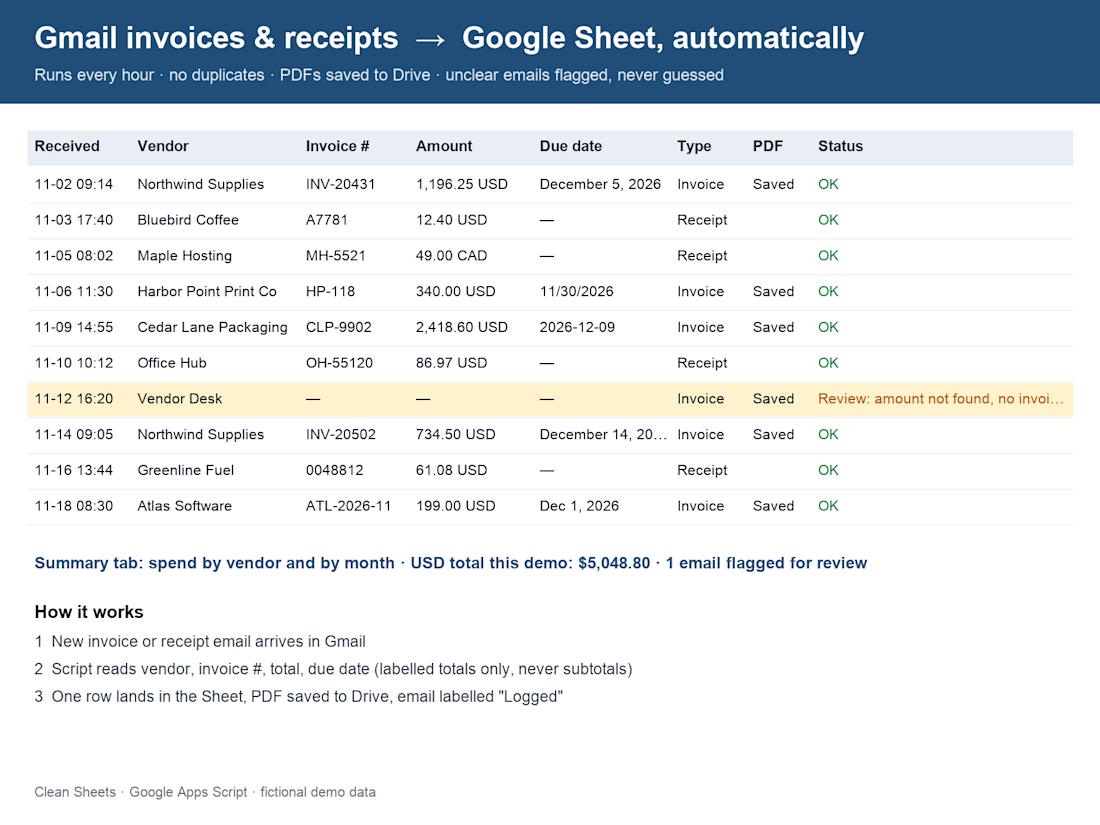
Invoice emails into a Google Sheet, automatically, every hour.
If you copy-paste invoices and receipts from Gmail into a spreadsheet, this one's for you. I built a small Google Apps Script that runs inside your own Google account. Each hour it finds new invoice and receipt emails and adds one row per email: date, vendor, invoice number, total, currency, due date and a link back to the email. PDFs get saved to a Drive folder.
Three rules I built it around:
1. Never guess. If the total isn't clearly labelled, the row is flagged "Needs review".
2. Never log the same email twice.
3. Read-only. It never changes or deletes your mail (it only adds one label).
The screenshot shows the output on 10 fictional sample emails. Spend by vendor and by month is on a Summary tab. Built with AI assistance and checked by hand.

Workspace member management UI Design
Managing team access should be straightforward. This workspace management interface helps admins invite team members, assign roles, and manage access permissions from a single screen.
Key Highlights:
↳ Centralized member list with roles and account status
↳ Invite team members through email
↳ Role selection for managing member permissions
↳ Shareable invitation links for quick access
↳ Member status tracking and access management
Looking for a SaaS dashboard or team management UI for your product?
📩 Email: connect@extrive.design


A document control register for a building project: folder tree, saved searches and document sets, and every file with its document number, title, state (work in progress, shared, published), revision and date.

The document-numbering pattern — HBR-GEN-0001_Project-brief.md, HBR-MEP-3001_Services-zones.svg — is what makes this register feel real, and the lock icons on restricted files are a thoughtful detail. A folder tree plus saved searches is exactly the right frame for a building project.
