The network for creativity
Join 1.25M professional creatives like you
Connect with clients, get discovered, and run your business 100% commission-free
Creatives on Contra have earned over $150M and we are just getting started
Back to feedPost

Four AI 3D tools and where I'd actually use them
Hey! I put together a short reel on these four platforms and figured I'd share a few things that didn't fit on screen. The question I kept coming back to: what happens after you hit Generate? How much cleanup is waiting for you? And can you actually download the mesh on the plan you're using?
Prices are in USD, taken from each tool's official pricing page in late November 2026.
01 / Meshy
Price: Free with 100 credits a month. Pro is $20/month for 1,000 credits.
Meshy is where I'd start if I had a sketch and wanted something I could bring into Blender that afternoon. You can generate the mesh, texture it, and set a target polygon count in the same workspace. The Remesh panel was the part that sold me on the workflow: pick a fixed or adaptive target, quads or triangles, and it costs no credits.
The catch is downloading. Free exports are limited to 10 untextured Meshy 6 Lite models a month, and on the free plan Remesh only offers the 10K target. And if your prop has thin straps or small attachments, check they survived the remesh before calling it done.
meshy.ai/pricing
02 / Tripo AI
Price: Free with 200 credits a month. Pro is $20/month (monthly billing) for 3,000 credits.
I'd reach for Tripo if I needed a bunch of game props and already knew my polygon budget. Smart Mesh lets you choose triangles or quads, and Local Edit lets you redo one part of the mesh. That's handy when the rest of the prop is fine and one handle came out weird.
Smart Mesh P2 costs 100 credits per generation, and the free plan includes only 2 Smart Mesh P2 trials. Free exports are limited to H2.5 models. For characters, I'd still open the mesh in Blender and inspect the shoulders and elbows before rigging.
tripo3d.ai/pricing
03 / Rodin AI
Price: Some models have free previews. Creator is $30/month, or $288 billed annually.
Rodin caught my eye because you can label the direction of each reference. If I were making a backpack for a close-up, I'd want to show it the straps and pockets from the back. Rodin takes up to five views (full multi-image input is a Creator feature, the free plan is limited), and you can preview a result before confirming the credit spend.
There's a bit of homework: keep the views consistent, same object and same proportions. If parts duplicate or surfaces twist, remove the least reliable view and generate again. I'd do that prep for an asset the camera will get close to.
hyper3d.ai/pricing
04 / 3D AI Studio
Price: Free credits to try it. Basic is $19/month for 1,000 credits, and Studio is $29/month for 3,500 (shown as a discount from $39). There's also a $34 one-time pack with 2,000 credits that don't expire.
This is the one I'd open when a reference is giving me trouble. Meshy, Tripo, Rodin and other engines live in one workspace, so you can run the same brief through different ones and compare two attempts before spending time cleaning up either one.
Check the cost on the model picker each time. In its text-to-3D tool, Rodin 2.5 is listed at 30 credits and Tripo P2 Game Ready at 70 with texture. A few retries can change what looked like a cheap experiment.
3daistudio.com/Pricing
Which one are you using, and how much cleanup did you end up doing? Tell me in the comments 👇
By the way, I build interactive sites and Three.js experiences. My own portfolio is a 3D night city you can drive through: light-table.netlify.app

Asking what happens after Generate is the right test for any AI tool, since the real cost is the cleanup, not the credits. The free-plan export limits you flagged are what would decide it for most people.
The network for creativity
Join 1.25M professional creatives like you
Connect with clients, get discovered, and run your business 100% commission-free
Creatives on Contra have earned over $150M and we are just getting started



Related posts

Want to show up more often in AI answers? Build dedicated pages around the exact angles buyers search for:
- Industries you serve
- Customer problems you solve
- Markets you work with
Targeted pages win AI search.








Fronterra: a Framer site for an AI-powered 3D learning platform for kids.
One homepage, two clear paths, for families and schools.
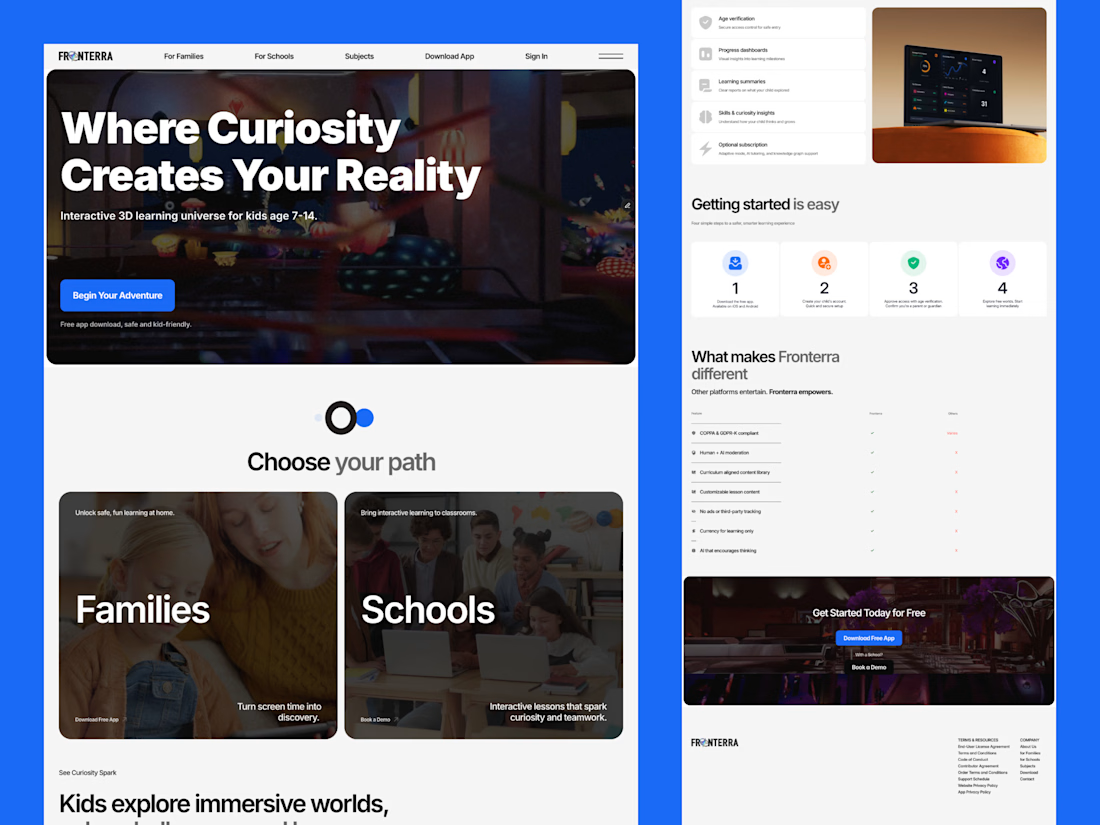

Splitting one homepage into two clear paths for families and schools is such a clean way to handle two audiences without building separate sites.