The network for creativity
Join 1.25M professional creatives like you
Connect with clients, get discovered, and run your business 100% commission-free
Creatives on Contra have earned over $150M and we are just getting started
Back to feedPost

Edit bay turns the Video.js player into a small edit suite. The picture is the program monitor, and the controls are a timeline and transport: frame-accurate timecode, J, K and L shuttle, frame stepping, chapters as colored clips, and subtitles on their own lane. While the video plays, the panel hides and leaves a 3px progress line. Clean feed, in settings, removes that line too. The layout holds at every player width, with AirPlay and Cast in settings on small players, and every control works from the keyboard with a visible focus ring. Press the question mark key to see all the keyboard shortcuts.

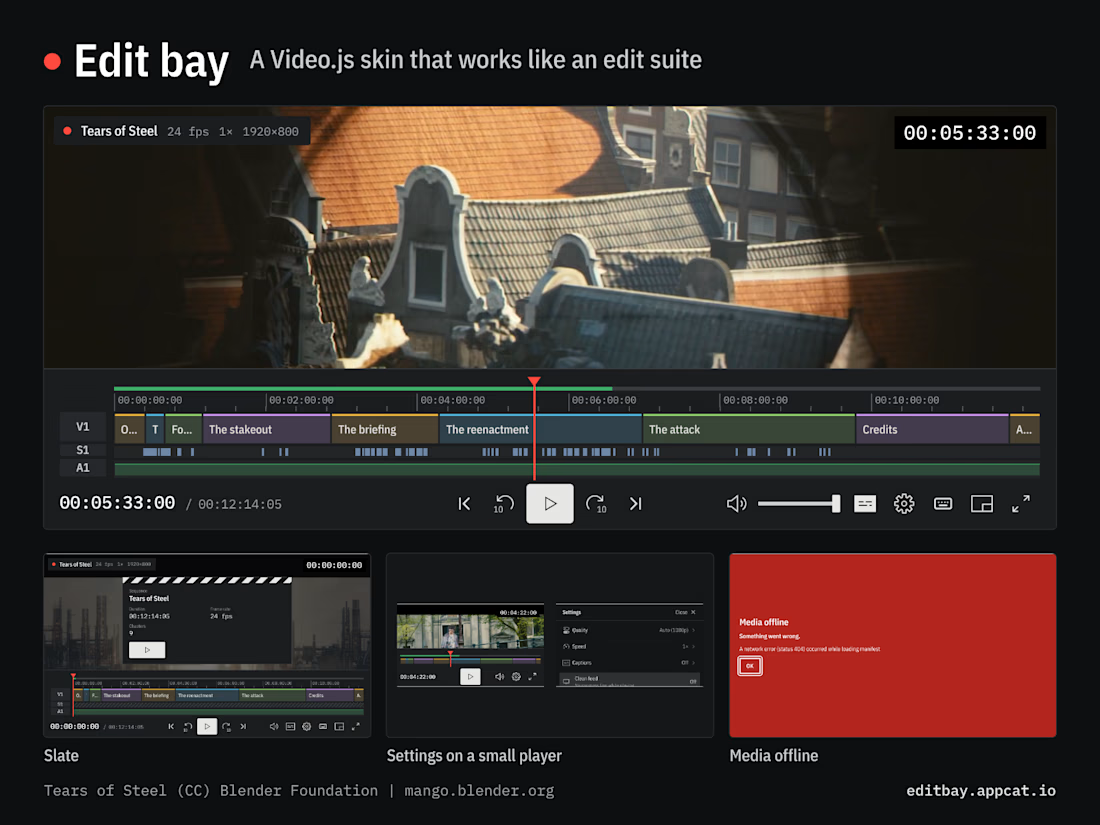

J, K and L shuttle plus frame-accurate timecode, feels like a real edit suite. Clean feed option is a nice touch.
Thanks. Getting the timecode honest took the most work. Browsers don’t report a video’s frame rate, so it’s a setting on the skin, and each frame step lands in the middle of the frame so the readout never rounds to the wrong one.

Appreciate it. The S1 lane is the part I’d want in my own NLE. It draws each subtitle as a block from the track that’s showing, so you can see where the dialogue sits before you scrub to it.

The subtitle lane is a smart addition for dialogue review. Does it handle overlapping cues as separate blocks?
Good question. It didn’t, so I added it. Each cue is now its own block, and when one starts before the previous one ends, it drops to an S2 lane, the way overlapping clips stack on V2. Tears of Steel’s subtitles never overlap, so this film shows one lane, but a track with crosstalk or sound captions gets two.

Getting the timecode honest, frame-accurate in a browser that doesn't report a video's frame rate, is the kind of invisible work that makes the whole edit-suite idea believable. The subtitle lane drawing each subtitle as a block, with overlapping cues in separate rows, is a...
Thanks, Mohsen. Overlapping cues now get their own row: a cue that starts before the previous one ends drops to S2, the way overlapping clips stack on V2. That came from a question in this thread. Tears of Steel’s subtitles never overlap, so on this film you’ll see one lane. Off to check out your submission right now.
The network for creativity
Join 1.25M professional creatives like you
Connect with clients, get discovered, and run your business 100% commission-free
Creatives on Contra have earned over $150M and we are just getting started



Related posts


Here’s a little piece from my current project. As I watch the Swiss design concept become a part of my creative DNA, I find myself constantly gravitating towards this direction in web design.
What’s really interesting is that Volume 3 studio and I are experimenting here, mixing things that seem completely unmixable at first glance.
Since Volume 3 is a CGI and VFX studio, it was crucial to incorporate a 3D dimension into their brand communication. On top of that, a Terminal UI is exactly what keeps that technical vibe going.
So, the final mix is International (Swiss) style, a Terminal UI, and a 3D feel brought to life by neumorphism. Crazy, right???
It looks simple and clean, but behind the scenes, there’s a massive amount of work on the details. We focused on all those little things that push the UX/UI into the premium segment — the things you don't necessarily see right away, but you definitely feel when you're on the page.
The work is still ongoing, so I can't dive into reflecting on the whole process just yet, but I'm gonna keep revealing small parts here.


Swiss grids on the web never get old when they're this clean. What are you and Volume 3 mixing it with?

Hey there!
Farbspur is my entry for the Video.js Skins Design Challenge: a custom skin for the Video.js v10 player that gets out of the way of what you’re watching.
The player has no colour of its own. Its seek bar is built from the video: it finds the strongest picture changes and turns them into blocks of colour, so every film gets its own player and you can jump straight to a scene.
→ Glass appears only where your hand is: a single drop moving on spring physics
→ Skips count up as you press: +5s, +10s, +15s
→ Quality, speed, casting and theatre mode share one visual language
→ Full keyboard control, and reduced motion for anyone who asks for it
The film and sound in the video were generated for this project.
Live demo: https://farbspur.pages.dev
Code (open source): https://github.com/moonz35345/farbspur


A player with no colour of its own, letting the film lead. Great idea.

Headquaters landing page web design 3D animation website icons


that metallic material is fire