The network for creativity
Join 1.25M professional creatives like you
Connect with clients, get discovered, and run your business 100% commission-free
Creatives on Contra have earned over $150M and we are just getting started
Back to feedPost

Title:AI-Powered Personal Tutor — 24/7 Learning Assistant
Short Description:
A full-stack AI learning assistant that acts as a personal tutor. Instantly answers questions, generates practice quizzes, and provides step-by-step solutions — built with Python, FastAPI, and Next.js.
Full Description:
An intelligent teaching agent that gives students personalized learning support anytime — no waiting for a teacher.
What it does:
Instant explanations on any topic
AI-generated practice quizzes
Step-by-step problem solving
Clean interactive chat interface
Available 24/7 — never offline
Tech Stack:
Python — AI logic and content generation
FastAPI — fast and reliable backend API
Next.js — clean, responsive chat frontend
Claude API — powering the intelligence
Skills:
Python, FastAPI, Next.js, Claude API, Artificial Intelligence, EdTech, Full Stack, Chatbot
Portfolio:
https://my-portfolio-vb6p.vercel.app/


The network for creativity
Join 1.25M professional creatives like you
Connect with clients, get discovered, and run your business 100% commission-free
Creatives on Contra have earned over $150M and we are just getting started



Related posts

i built a semi-3D interactive website with @Base44 for a Creative Production Studio, called STORM STUDIO,. that drafts 3D Digital unique experience for Brands.
STROM STUDIO specializes indesign, motion, 3D and Technology, working together to turn ambitious ideas into immersive digital experiences.
At STORM STUDIO, We create 3D visual storytelling and interactive web experiences that help brands stand out.
STORM STUDIO - https://stormstudio.base44.app
also, check it out on mobile, to get the full mobile experience
my walkthrough process will be below in my comment section

my walkthrough process
PS; if you opened the STORM STUDIO website on a Mobile phone, Shaking the phone rattles the rubik cubes like a shaken jar.
and,
on PC/DESKTOP, moving the cursor rattles the rubik cubes, also slowly scroll through the home page to have a full experience of the scroll animate effects, etc.
try it out 😊

Kajabi Website Design for Online Coaches & Courses
Designed a Kajabi website concept for online coaches and course creators who need a clear, professional way to present their programs and learning offers.
The website focuses on presenting course information, highlighting program benefits, and guiding visitors toward enrollment or the next step. The layout combines clear content structure, engaging sections, responsive design, and strategically placed calls to action to create a smooth experience across desktop and mobile.
The goal is to help coaches communicate the value of their programs and give prospective students a clear path from discovering the offer to taking action.
#Kajabi #KajabiWebsiteDesign #WebsiteDesign #OnlineCourse #CourseCreator #OnlineCoaching #CoachingWebsite #CourseWebsite #LandingPageDesign #SalesPageDesign #WebDevelopment #Elearning

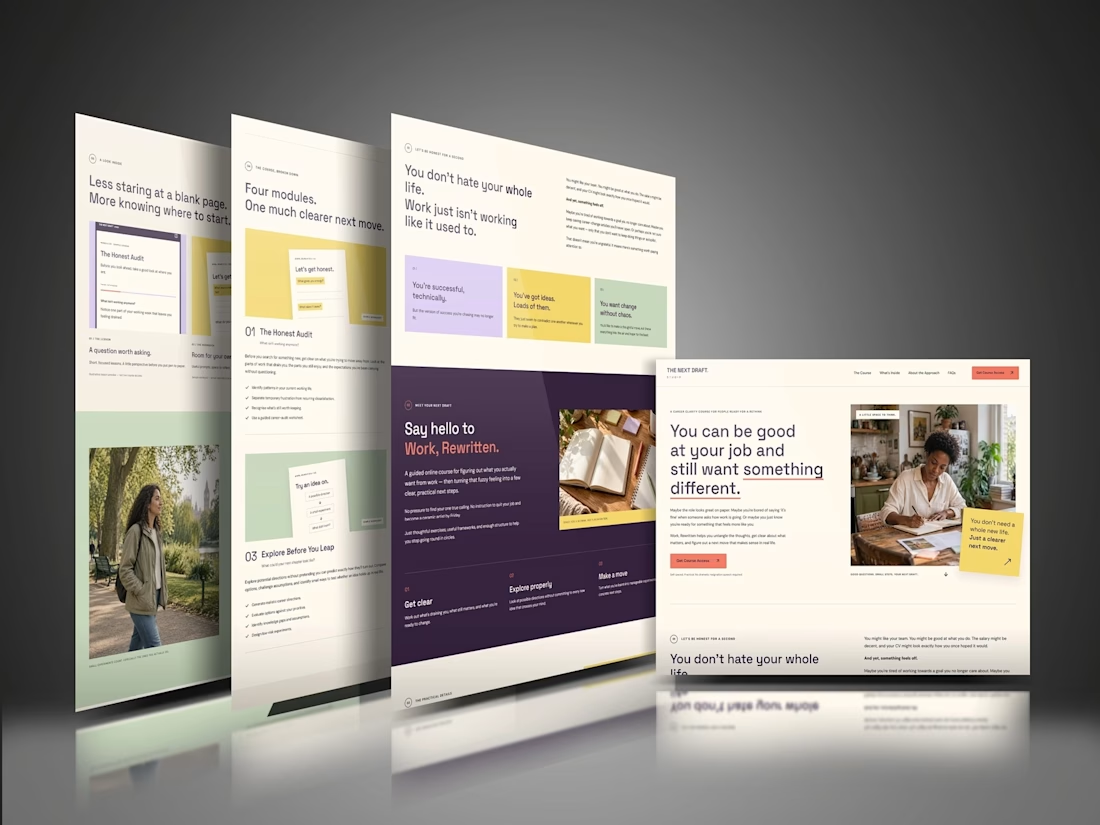

The “Four modules. One much clearer next move.” line makes the course feel manageable before someone gets into the details. That’s a useful choice for coaches whose offers can otherwise feel overwhelming. For this concept, would the main CTA go straight to enrollment, or let visitors preview a lesson first?

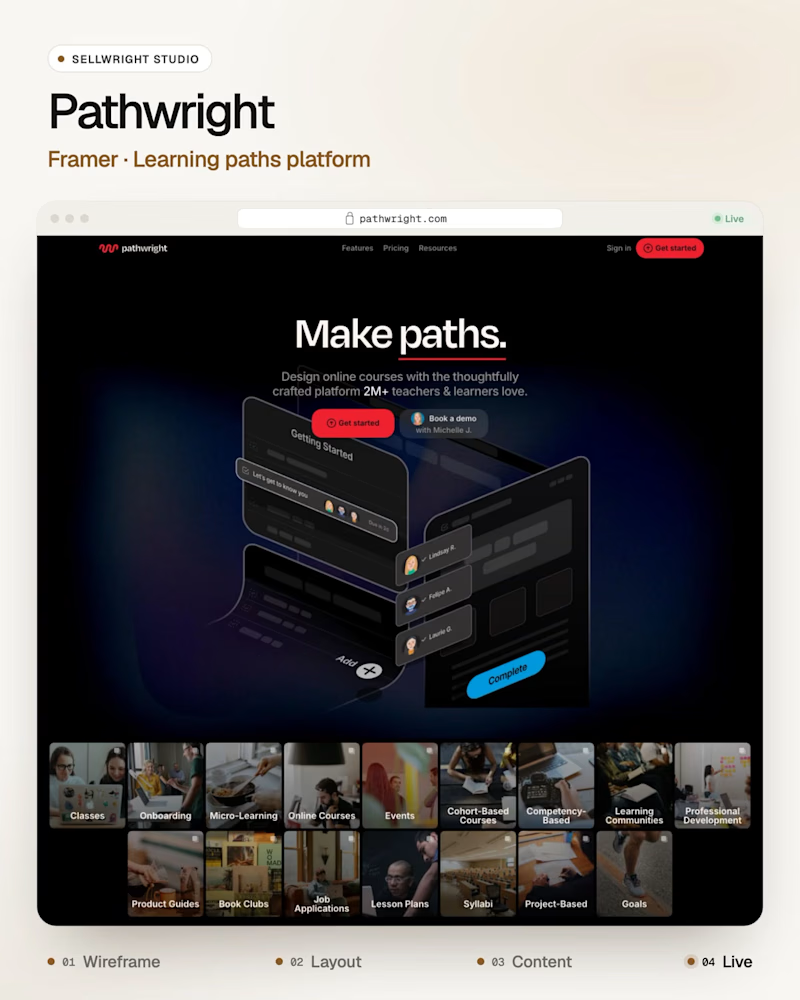
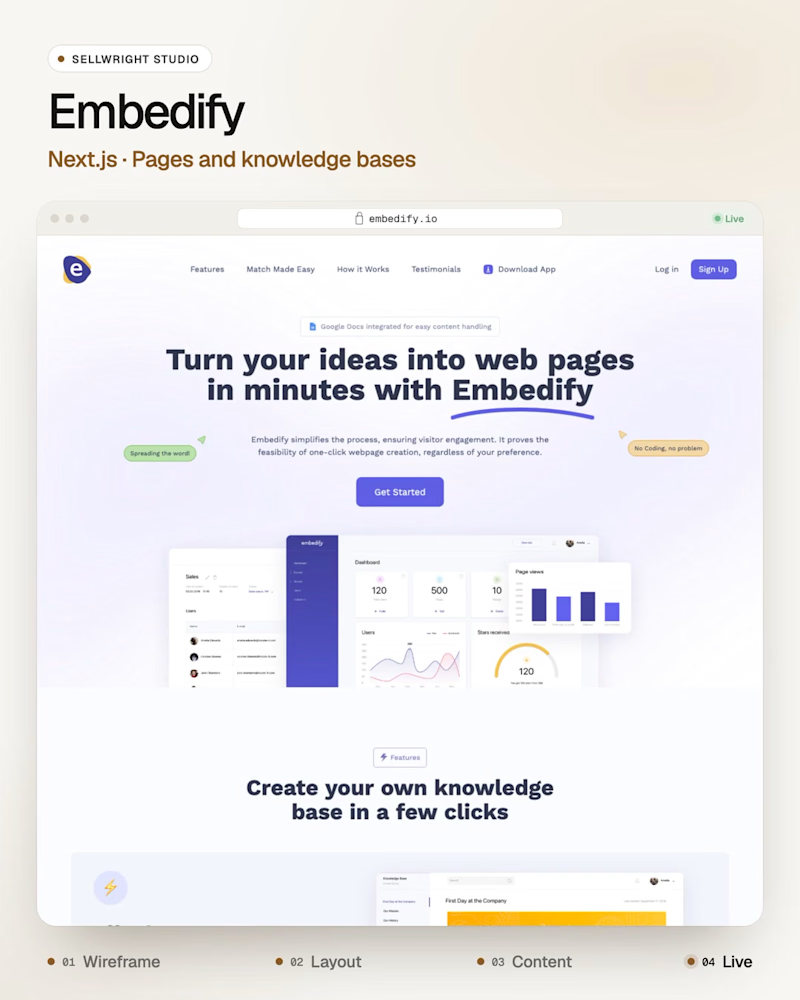
Dark or light: which SaaS homepage makes you scroll?
A: Pathwright (Framer), guided learning paths for teachers and teams.
B: Embedify (Next.js), a tool that turns ideas into web pages and knowledge bases.
Both heroes have one job: show the product before the first scroll.
Which one gets you there first, and why?
Live: pathwright.com · embedify.io
More builds: instagram.com/sellwrightstudio · youtube.com/@sellwrightstudio
3 voted
50%
3 voted
50%
6 votes
Closed

I’d go with B! A clean, visual layout can make a product feel more engaging while keeping the message clear.