The network for creativity
Join 1.25M professional creatives like you
Connect with clients, get discovered, and run your business 100% commission-free
Creatives on Contra have earned over $150M and we are just getting started
Back to feedPost

An AI workshop should end with a task your team can test.
Here is one exercise I would use for a small business team:
Input: a quotation request that names the product but leaves out the quantity.
AI prepares: the details it can identify, a list of missing information and a draft response asking for the quantity.
People check: whether it invented a price, assumed a quantity or promised a delivery date. Those details must come from an approved source or a person.
Then change the input: add an unclear product name, a conflicting instruction or a question the business guide cannot answer. Does the workflow stop and ask, or quietly guess?
The useful takeaway is a repeatable task, a checklist for checking the output and a clear handover to a person. Teaching that process is a different service from building and connecting a production system.
For a team session, bring one repetitive task, anonymised sample inputs and an example of an acceptable result. Keep customer details and confidential documents out of an unapproved AI tool.
I have put together a short team brief and workshop guide here:
https://futurespanai.com/guides/choosing-an-ai-workshop
Lau Kuan Ee · FutureSpan AI · Independent AI & digital consultant in Singapore
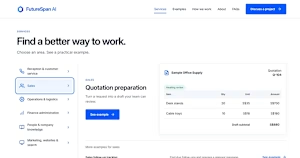
futurespanai.com
Choosing an AI Workshop for Your Singapore Team | FutureSpan AI
Choose workshop goals, practical exercises and outputs for your team. Understand the four-hour group scope, preparation and how learning differs from implementation.
The network for creativity
Join 1.25M professional creatives like you
Connect with clients, get discovered, and run your business 100% commission-free
Creatives on Contra have earned over $150M and we are just getting started
Related posts

What does practical, agentic AI look like in a real business workflow?
Our new TechFoundry IMS case study walks through seven demos—from purchase-order intake and catalog conflict resolution to vendor orders, shipments, client shipping, and invoice reconciliation.
It shows how AI agents, document processing, and software integrations work together, with human review where judgment matters. I’ve also included the technology stack behind the platform.
Explore the case study:
https://contra.com/p/oWU3ssF3-tech-foundry-ims-ai-procurement-and-fulfillment-in-seven-demos
Building an agentic AI solution? Book a free initial consultation with me on Contra. We’d love to work with you.
#PracticalAI #AgenticAI #Automation #SoftwareDevelopment

Purchase-order intake and catalog conflict resolution feel like the right place to start with agents, since the pain is concrete. How do you handle the cases where the agent is unsure and a human has to step in?

When a client replies "Looks good, but can you change the logo?", does your workflow count it as approved?
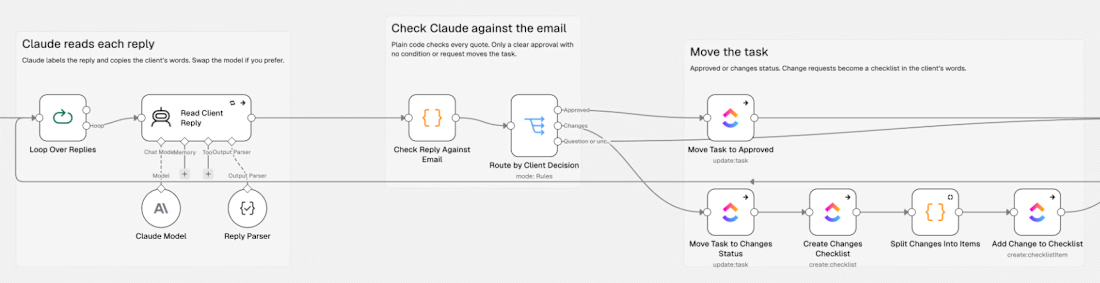
If you use AI to read client replies, the clear yes and the clear no are easy. The reply that causes trouble is the mixed one: "Looks good, but can you change the logo?" A lot of classifiers call that approved. The task moves to done and the logo change gets lost.
Two checks fix most of this, and you can add them to any workflow:
Ask the model for the exact sentence it based its decision on, not only a label, and ask it to say whether the approval has any conditions.
In a Code node, confirm that sentence really appears in the email. Accept an approval only when the quote is found and there are no conditions. Everything else goes to a person.
A minimal version of the quote check (Code node, Run Once for Each Item). Change emailText and quote to your own field names:
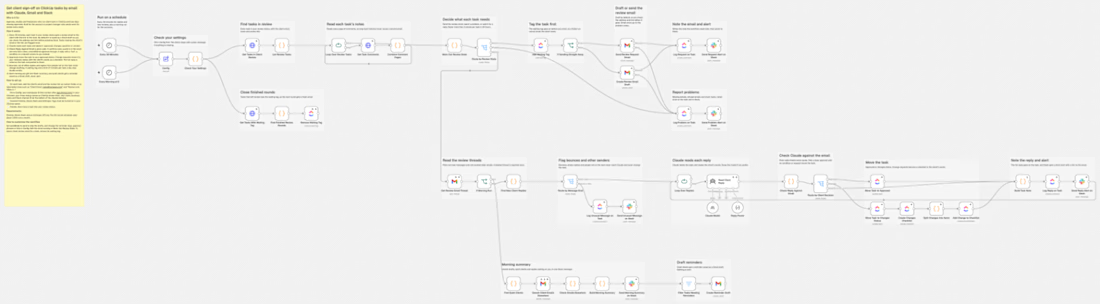
My full version does this for ClickUp: it emails the client when a task reaches review, reads the reply, moves the task to approved or revisions, and turns requested changes into a checklist. You can find it in the n8n template library under my name.
Would your workflow count "Looks good, but can you change the logo?" as approved, send it to a person, or have you never tested it? And what is the most confusing reply a client has sent you to a review request? Leave the names out and post it here.

Thinking about making a course on how I actually work with AI agents.
Not prompts.
The rules, skills and checks that make the agent build things the way my repo wants.
Would that be useful to anyone?

Yes please. The rules and checks part is what nobody teaches. Prompt tips are everywhere, repo setup isn't.