The network for creativity
Join 1.25M professional creatives like you
Connect with clients, get discovered, and run your business 100% commission-free
Creatives on Contra have earned over $150M and we are just getting started
Back to feedPost
Designers, I have the ultimate question. How do you design tables?
The "proper way" would be to have cells combined into rows so you can easily add and remove columns...
But how do you do then the hover in prototype so the whole row hovers?


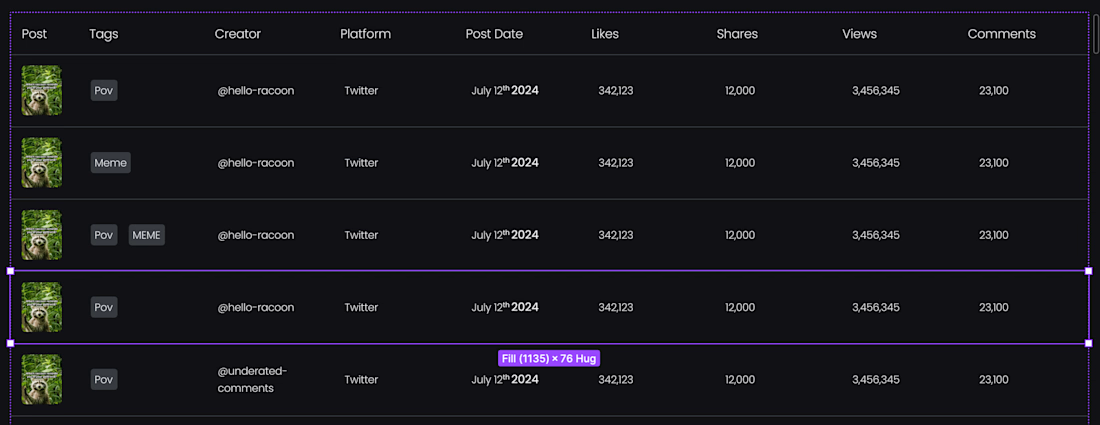

@Petra Smolcic Great question! If you're referring to prototyping interactions like hover effects, especially in Figma, the key is to create variants within a component for the row. You'd have one variant for the default (idle) state and another for the hover state with the row highlighted....


@Anita Autorino @Petra Smolcic This is my approach as well. I create a cell component with multiple variants (text, icons, hover states, etc) and swap them out as needed in the prototype.
Feel free to reach out and I can help you on call. Here's my calendar → https://cal.com/minutedesign/15min (Ignore the 15min intro thing).

cal.com
15 Min Meeting | Alex Nicolai | Cal.com
15 Min Meeting

@Anita Autorino Ohhhhhh, that's smart! So the cells are individual components of versions and the row is a component with states. 🤯 Thank you so much! 😁
@Anita Autorino I did it, I did it!! 🥳🥳🥳
The network for creativity
Join 1.25M professional creatives like you
Connect with clients, get discovered, and run your business 100% commission-free
Creatives on Contra have earned over $150M and we are just getting started
















Trending


Notion
Notion isn’t just where you work, it’s starting to work for you. What agents are you building?
portfolioreview
The best portfolios tell a story, not just show a grid. Share yours for feedback.
brandguidelines
Brand guidelines are becoming living systems, not static documents. What are you building for your clients?
aivideo
AI video tools are moving at warp speed. Which ones are you experimenting with?
freelancerlife
Freelancer life is wins, pivots, and everything in between. What’s yours right now?