The network for creativity
Join 1.25M professional creatives like you
Connect with clients, get discovered, and run your business 100% commission-free
Creatives on Contra have earned over $150M and we are just getting started
Back to feedPost

Chamber by Bilma — Turning Legal Enquiries Into a Structured Client Journey
I approached this challenge by asking a slightly different question:
What would happen if a legal practitioner's entire first client interaction was designed as a system, rather than a collection of forms, messages, and calendar events?
That became the foundation for Chamber by Bilma.
🔗 Explore the product:
chambers.bilma.me
The problem I focused on
For many legal practitioners, the problem isn't simply getting enquiries.
It's what happens after someone says, "I need a lawyer."
A typical journey can involve:
Enquiry → WhatsApp/email → asking questions → collecting information → checking conflicts → discussing availability → scheduling → reminders → consultation → follow-up.
Every step creates opportunities for things to get lost, delayed, or duplicated.
So rather than building another simple appointment-booking interface, I designed Chamber around the idea of a digital front door for legal practitioners.
My core product idea
I wanted three things to work together:
1. Discovery
Clients should be able to find a legal practitioner based on their actual legal need.
2. Structured intake
Once they find the right practitioner, Chamber should collect the information needed to understand the enquiry before the consultation.
3. Operational automation
Once a consultation is booked, the system should handle availability, calendar synchronization, reminders, and virtual meeting creation instead of making the practitioner manually coordinate everything.
That led to this journey:
Discover → Trust → Select a service → Intake → Book → Consult → Review
I designed Chamber around the practitioner, not the booking
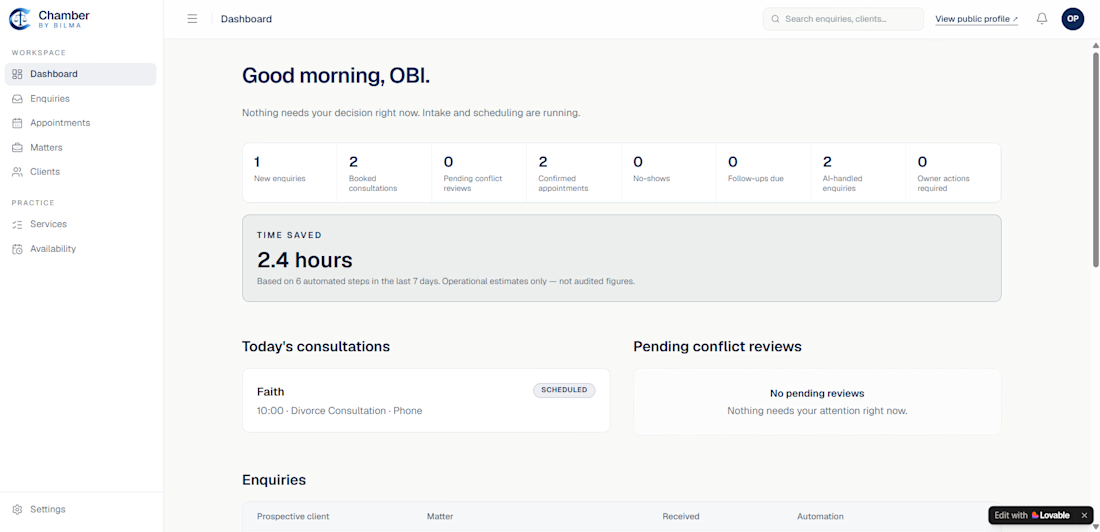
One of my biggest architectural decisions was treating each legal practitioner as an independent tenant.
A practitioner can configure:
Professional profile
Practice areas
Services
Pricing
Consultation duration
Virtual/physical availability
Google Calendar
Professional links
Case studies
Reviews
Their public profile becomes their professional entry point:
chambers.bilma.me/esq/@username
This means the client isn't really "booking Chamber."
They're booking a specific legal professional and a specific service.
That distinction influenced a lot of the UX.
A global client identity
Another problem I wanted to solve was identity.
A client shouldn't need a different account every time they work with a different lawyer.
So Chamber uses a global customer identity with independent practitioner relationships.
For example:
Obi → Practitioner A
Family Law
Obi → Practitioner B
Corporate Law
Obi → Practitioner C
Property Law
The customer's identity remains the same, while each practitioner's private workspace remains isolated.
This became an important architectural principle:
One Chamber identity. Many professional relationships. Completely isolated legal workspaces.
Smart Intake
I deliberately avoided making the intake experience feel like a traditional long legal form.
The idea is progressive disclosure:
One useful question at a time.
The questions adapt based on the selected legal service and the client's answers.
For example, a family-law enquiry may require very different information from a startup legal consultation.
The system can collect things such as:
What type of legal help is needed?
Who needs legal help?
Relevant parties
Description of the matter
Urgency/deadlines
Contact information
The goal is to collect enough information to make the consultation productive without overwhelming the client.
Calendar automation
I also wanted the practitioner's calendar to become part of the workflow rather than another disconnected tool.
Practitioners can connect their Google Calendar.
Chamber can then use calendar availability to help prevent double-booking and create consultation events.
For virtual consultations, the booking can also create the appropriate Google meeting experience.
So the workflow becomes:
Client selects service → selects available time → booking confirmed → calendar event created → virtual meeting attached → reminders sent.
The practitioner doesn't have to manually recreate the appointment in another system.
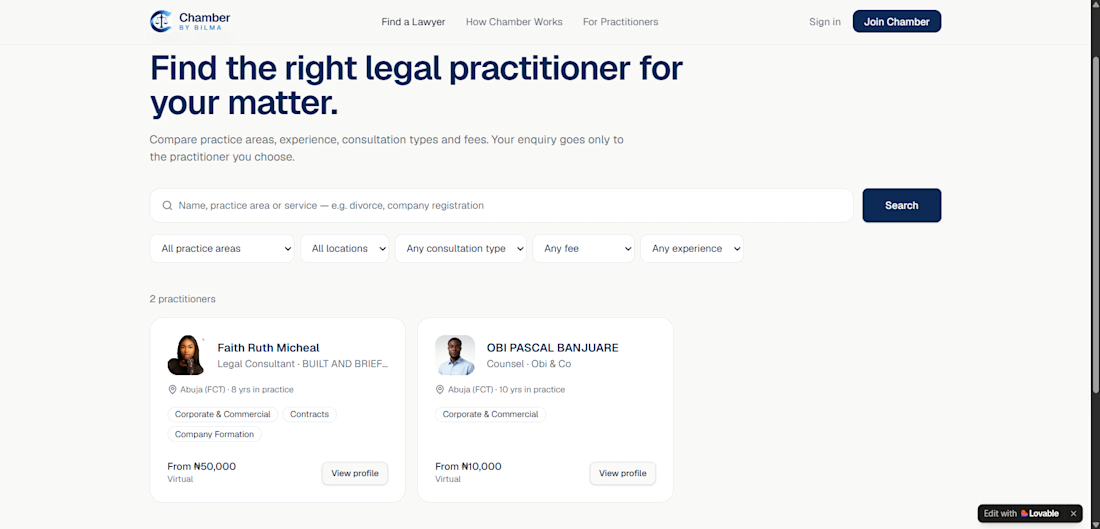
Discovery became a product layer
During the process, I realized that Chamber shouldn't only solve the problem of managing existing enquiries.
It could also become a discovery platform for legal practitioners.
That's why I introduced:
Find a Lawyer
Clients can discover practitioners based on things such as:
Practice area
Legal service
Location
Consultation format
Pricing
Experience
Availability
Each practitioner has a richer professional profile containing their services, experience, case studies, and client reviews.
I intentionally avoided a simplistic "Best Lawyers" leaderboard.
Instead, reputation is represented through factual signals such as:
Verified professional information
Years of practice
Completed consultations
Verified reviews
Published case studies
Profile completeness
The objective is to help clients make an informed choice rather than pretending that one opaque score can determine who is the "best" lawyer.
Case studies and reviews
I also wanted practitioners to be able to demonstrate experience without exposing private client information.
So private matters and public case studies are deliberately separated.
The intended workflow is:
Matter → Create case study → Sanitize → Practitioner review → Publish
A case study should never automatically become public simply because a matter exists.
Likewise, reviews are tied to qualifying completed consultations rather than allowing arbitrary public testimonials.
This creates a more trustworthy reputation layer while respecting the sensitivity of legal work.
Privacy was part of the architecture
Because Chamber deals with potentially sensitive legal information, privacy couldn't simply be a page in the footer.
It had to influence the architecture.
Private practitioner data is tenant-scoped.
A practitioner should never be able to access another practitioner's:
clients
matters
notes
conflict information
appointments
internal analytics
Likewise, clients only see information they're authorized to see.
The platform uses Supabase authentication and row-level security to enforce these boundaries at the data layer rather than relying solely on frontend restrictions.
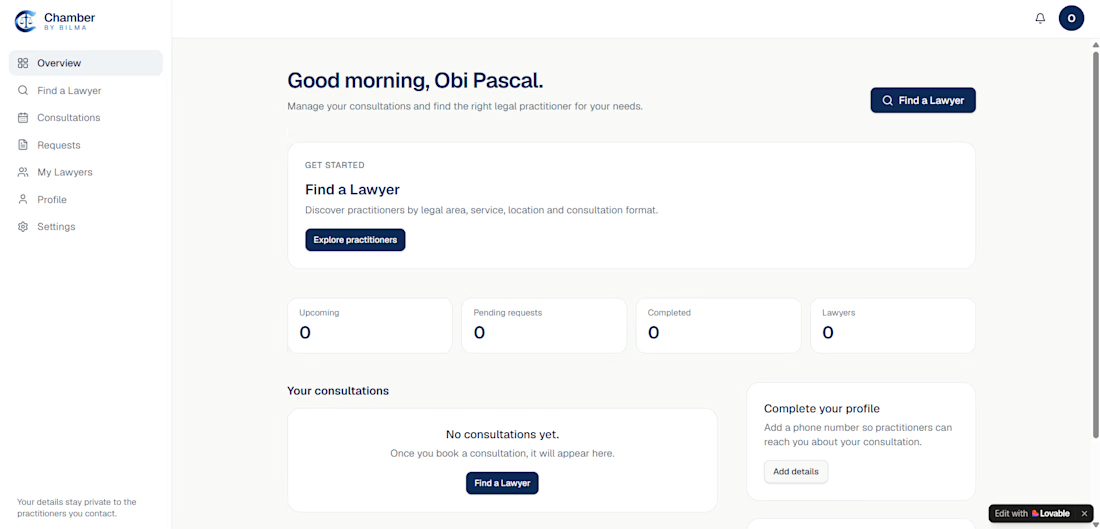
The client experience
I also redesigned the client side around a simple question:
"What does this client need to know right now?"
Instead of an empty dashboard, the client gets a home base for:
Upcoming consultations
Pending requests
Recent consultations
Their lawyers
Notifications
Profile completion
Finding another lawyer
The experience intentionally remains much simpler than the practitioner dashboard.
A client isn't managing a legal practice.
They're managing their relationship with legal professionals.
What I wanted Chamber to feel like
The visual direction was deliberately restrained.
I didn't want the typical:
⚖️ scales
🔨 gavels
✨ gold gradients
📸 generic law-firm stock photography
Instead, I went for a modern legal-tech aesthetic:
Deep blue + sky blue + warm neutrals + clean typography + generous whitespace.
The goal was to make Chamber feel like professional infrastructure, rather than a traditional law-firm website.
What I learned from building it
The biggest lesson for me was that the interesting part of this problem isn't the calendar.
It's the system surrounding the calendar.
A booking is only useful when the right person is booking the right service, the practitioner has enough context, conflicts can be reviewed, availability is accurate, the appointment is properly created, and both sides know what happens next.
That shifted my thinking from:
"Build a booking platform."
to:
"Design the infrastructure that turns a legal enquiry into a structured professional engagement."
That's what Chamber by Bilma is trying to become.
Explore the build
Built with Lovable + Supabase, with Google Calendar integration and a multi-tenant architecture designed around legal practitioners and their clients.
No video submission — I wanted the product and the thinking behind the product to speak for themselves.


The network for creativity
Join 1.25M professional creatives like you
Connect with clients, get discovered, and run your business 100% commission-free
Creatives on Contra have earned over $150M and we are just getting started



Related posts




I built a modern, AI-powered Grooming Studio Booking & Management Platform using Base44, designed to simplify appointment scheduling for customers and daily operations for business owners.
The goal was to create a seamless experience where customers can explore grooming services, meet the specialists, check opening hours, and book appointments in just a few simple steps.
Key Features:
Easy Appointment Booking: Customers can select a service, choose their preferred specialist, pick an available date and time, review their booking, and submit it.
Services & Team Showcase: A clean interface displaying available grooming services, specialists, and business information.
AI-Powered WhatsApp Assistance: Integrated WhatsApp chat with an AI assistant to help customers with questions and inquiries.
Owner Dashboard: A dedicated management interface to oversee appointments, bookings, and front desk operations.
Ask an Assistant: An AI-powered support option to help customers get answers quickly.
This project demonstrates how Base44 can be used to build a practical business solution that combines customer convenience, appointment management, and AI-powered assistance in one platform.
Built with Base44 to make grooming studio operations smarter, faster, and easier to manage.
#base44challenge @Base44


