The network for creativity
Join 1.25M professional creatives like you
Connect with clients, get discovered, and run your business 100% commission-free
Creatives on Contra have earned over $150M and we are just getting started
Back to feedPost

I built a quick, 30-second workflow tutorial demonstrating how to use Descript's AI Tools to instantly clean up audio and eliminate filler words.
The video showcases how a user can type a text script, assign a clear AI speaker voice (Maxwell), and leverage automation features like Studio Sound and Filler Word Removal to produce high-quality audio content in just a few clicks. Please note: to complete this challenge entirely on the free tier without linking a credit card or bypassing paywalls, the video relies on a static background image combined with text captions rather than a dynamic multi-scene video timeline. It serves as a proof of concept showing how powerful and accessible Descript's automated audio tools are for beginner creators starting with zero budget.
The network for creativity
Join 1.25M professional creatives like you
Connect with clients, get discovered, and run your business 100% commission-free
Creatives on Contra have earned over $150M and we are just getting started



Related posts

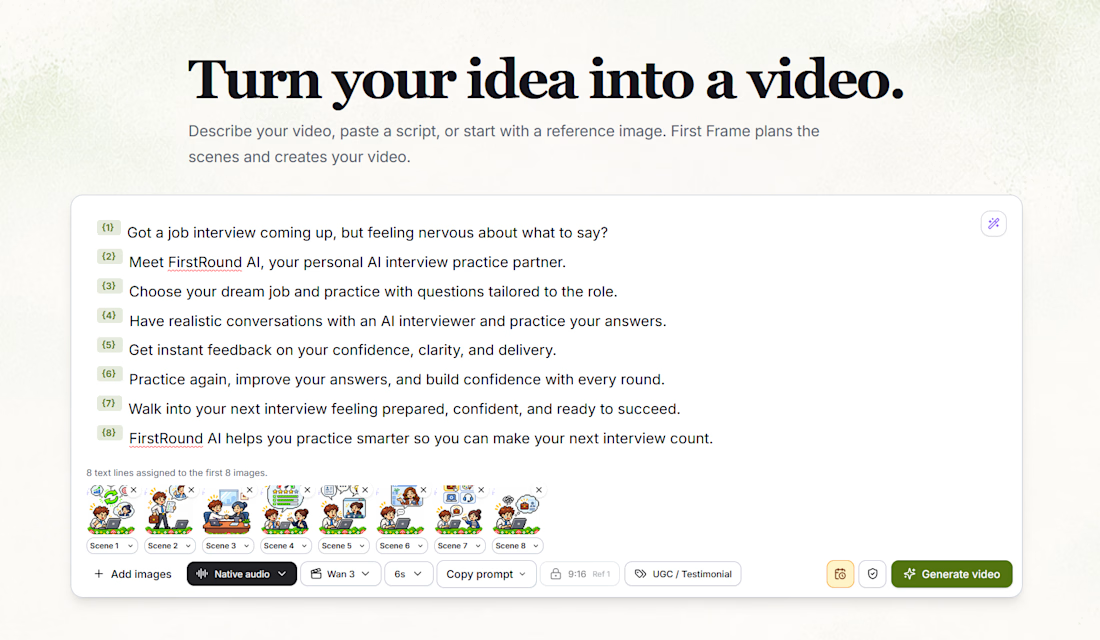
Instead of spending hours editing, stitching clips together, and figuring out production workflows, you can describe your idea, paste a script, or upload reference images.
First Frame helps turn that into a structured, multi-scene video.
Here's what I've been building into it:
AI Scene Planning — Turn a script into individual scenes with matching reference images.
Multiple AI Video Models — Generate scenes using models like Wan 3.
Visual Continuity — Keep characters, scenes, and storytelling consistent.
Audio Integration — Support for narration and audio generation.
Automated Video Assembly — Bring individual scenes together into one finished video.
Creative Controls — Adjust scene duration, video formats, prompts, and generation settings.
The screenshot shows an eight-scene promotional video I'm creating for FirstRound AI, with each script line connected to its own visual reference.
My goal is to make AI video creation more accessible, without needing a complicated editing suite or a production team.
It's still evolving, and I'm continuing to improve the generation pipeline, transitions, audio synchronization, and final exports.
From an idea to a storyboard to a finished video — all in one place.


Great work 👏🏻

Transforming complex AI tools into sleek, scroll-stopping visual experiences. 🚀
This promotional piece for highlights a performance-driven approach to modern SaaS video marketing, blending seamless UI transitions, dynamic kinetic typography, and a futuristic visual aesthetic to instantly capture attention.
In the competitive AI space, a product needs more than just a feature list, it requires a compelling narrative engineered to drive conversions.
From the glowing interface animations to the smooth integration of data source platforms like GitHub and WordPress, every frame is optimized for actionable client outcomes.
Ready to build high-converting video creatives for your tech brand? Let’s connect.
#MotionGraphics #VideoEditing #SaaSMarketing #CreativeDirection #PerformanceCreative #DigitalStrategy


Nice Design😍

Pen Buddy - Product Introduction Demo video.
Let me know what everyone thinks about this!
