The network for creativity
Join 1.25M professional creatives like you
Connect with clients, get discovered, and run your business 100% commission-free
Creatives on Contra have earned over $150M and we are just getting started
Back to feedPost

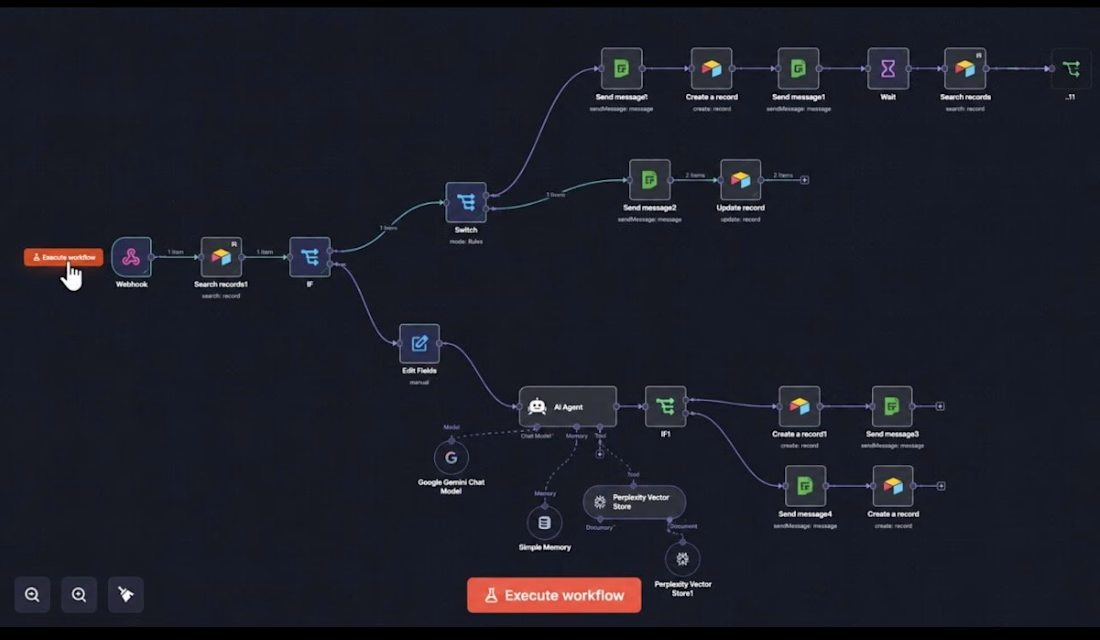
Here is a quick look at the workflow behind my Al-powered
WhatsApp hotel assistant.
When a customer sends a message, n8n receives it via a webhook and checks Airtable to determine whether the customer already exists. Based on the result, the workflow either continues the conversation or creates a new customer record.
The Al agent (powered by Gemini) responds using the hotel's knowledge base. If it can't answer a question, it intelligently offers to connect the customer with a human staff member.
If the customer accepts, the workflow notifies the team through Green API (WhatsApp), logs everything in Airtable, and waits for staff confirmation. If no one confirms within 5 minutes, the customer automatically receives a form to ensure no request is missed.
Tools used: n8n • Airtable • Green API • Google Gemini
This is just a high-level overview. I will be sharing a full voiceover walkthrough of the entire workflow in my next post, explaining every node and the logic behind it. Stay tuned!
#n8n #automation

The network for creativity
Join 1.25M professional creatives like you
Connect with clients, get discovered, and run your business 100% commission-free
Creatives on Contra have earned over $150M and we are just getting started
Related posts

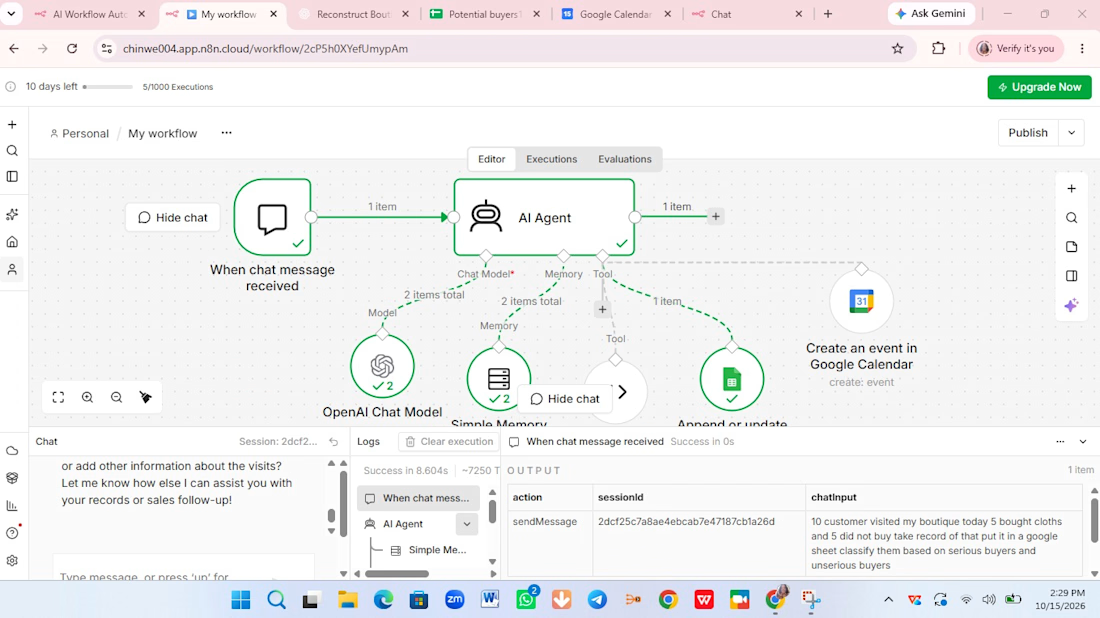
This is a customer support chatbot that help users to sell their products online.
User will chat with on your website.
It collect leads on your behalf gather detail in a google sheet.
It will even create meeting add to your Google calendar. It is useful for you as an individual, an entrepreneur, as somebody delivery services or product.
I use my niece boutique as a reference.
Tools:
Ai Agent, Ai chat model, memory, code tools, Google sheet and Google calendar.
Ai Agent: as Ai agent you it a task, it will use several tools at it's disposal to respond and act based on the system prompt.
Ai chat model: respond to all the chats.
Memory: you give your agent memory so that it can remember everything read understand and interpret it.
Code tool: It return the days of the week.It gather information about people that are chatting even see them as potential buyers or not.
Google sheet: It record every sales.
Google calendar: You use Google calendar to book an appointment with your customers

FirstReply — reply first, win the booking
Description
Event venues lose bookings because they reply a day late. By then the client has booked somewhere else. FirstReply answers every inquiry with a priced proposal and a held date in seconds.
The automation
1. An inquiry arrives from the venue page, or staff paste in an email.
2. AI extracts event type, date, guests, budget and requests, each with a confidence level and the exact words it came from.
3. Missing date or guest count? It writes a clarifying reply instead.
4. It matches the smallest free space that fits (or the two nearest free dates when it's booked), prices the right package and holds the date for 5 days.
5. The client gets their own proposal page and books with one tap. The hold becomes a confirmed booking.
6. Unsure details, over-budget totals or Review mode send it to a review queue first. Humans step in only when needed.
7. Views, acceptances and expiring holds update the pipeline and alert the team live. Every step is logged to the second.
The design A full design system first (tokens, type scale, components), built as a clickable prototype, then rebuilt in Base44 from prompts. Client pages are mobile-first; the venue side is desktop-first.
Try it Client side: firstreply.base44.app · Venue side: firstreply.base44.app/dashboard


Everyone is shipping AI agents right now. Almost no one is testing them — and that is the whole problem.
A demo agent and a production agent are different animals. The demo works because you walked it down the happy path. Production breaks on the paths you never imagined.
A real example from my own work: a support assistant correctly handed a conversation to a human when someone wrote "I want to talk to a person" in Spanish — but not in English, because one phrase was missing from a rule. Every automated test passed. It only surfaced when I ran real conversations through it.
That is the gap the "agents will replace everything" wave keeps skipping. The hard part was never making an agent act. It is making it:
• say "I don't know" instead of guessing,
• hand control back to a human at the right moment,
• and prove, with tests, that it still behaves when the input gets strange.
Autonomy is cheap. Trustworthy autonomy is the real engineering.
Before you let an AI agent near real users or real data — what is the first thing you check?



The Spanish vs English handoff bug is such a good example. Every test passes until a real user shows up.